Introduction
Hello! In our previous lesson, we focused on securing data access for human users by implementing row-level and column-level security with dynamic views. This is a critical piece of data governance. However, in a production data engineering environment, most data pipelines and processes are automated and don't have a human user directly running them. This raises a key question: how do we grant secure, programmatic access to these automated systems?
This lesson addresses that exact question. Our learning outcome is to configure and use service principals for automated programmatic access. Service principals are non-human identities, essentially "robot accounts," that you can use to run jobs, access APIs, and connect from external tools like CI/CD platforms.
We'll cover:
- What service principals are and why they are a security best practice.
- How to create a service principal and grant it permissions within your Databricks workspace.
- How to configure programmatic tools, like the Databricks CLI, to authenticate as a service principal.
By the end of this lesson, you'll be able to set up a secure, automated workflow, which is a fundamental skill for any professional data engineer working with Databricks.
1. What is a Service Principal?
A service principal is an identity within Databricks that isn't tied to a specific user. Think of it as an account for your applications, scripts, and automation tools.
The core principle is to always use a service principal for production automation instead of your user account. Why?
- Decoupling: If a developer who owns a production job leaves the company and their user account is deactivated, the job will fail. Service principals are independent and ensure continuity.
- Security: Service principals can be granted a narrow, specific set of permissions required for their task (the principle of least privilege). This is much more secure than using a developer's personal account, which may have broad permissions.
- Auditing: Actions performed by a service principal are clearly logged as such, making it easy to track what your automated processes are doing.
This diagram illustrates how a service principal acts as an intermediary for an application to securely access Databricks resources.
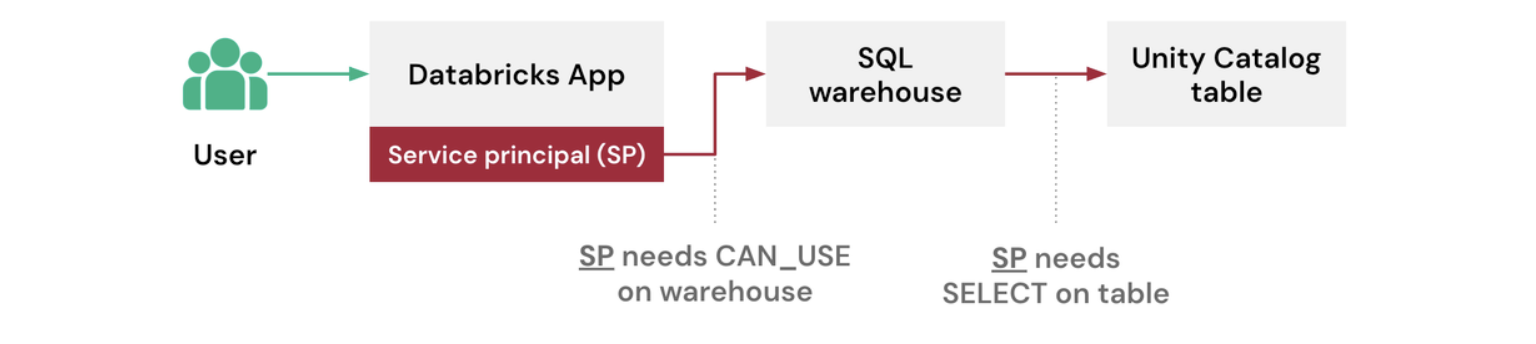
To get a clear overview, let's watch a short video segment that defines service principals and shows where they fit within Databricks user management.
33 User Management in Databricks | How to add Users, Service Principal & Groups in Unity Catalog
The video 'User Management in Databricks' provides a concise explanation of the different types of identities in Databricks.
Watch the segment from 02:43 to 03:07 to understand the distinction between users, service principals, and groups.
2. Creating and Using a Service Principal for a Job
Now for the hands-on part. You'll create a service principal, add it to your workspace, and assign it to run a job. This process requires Account Admin privileges.
The following video provides a step-by-step guide. We'll focus on creating a Databricks-managed service principal, which is the simplest and most common type.
33 User Management in Databricks | How to add Users, Service Principal & Groups in Unity Catalog
Let's return to the 'User Management in Databricks' video. This time, we'll follow the full process of creating a service principal and putting it to use.
Please watch and follow along with these segments in your own Databricks environment: Create a Service Principal (11:13 - 12:14): Follow the steps to create a new Databricks-managed service principal in the Account Console. Note the rationale for using it to run jobs. Add the Service Principal to a Workspace (13:20 - 14:45): Once the principal is created at the account level, you must assign it to your workspace and grant it necessary entitlements, such as 'Workspace access' and 'Databricks SQL access'. Assign to a Job (14:45 - 15:35): Finally, see how to select this service principal as the 'Run as' identity for a Databricks Workflow. This is the ultimate goal: a job that runs under the identity of the service principal, not a user.
After following these steps, you will have a service principal ready for automation within your workspace.
3. Configuring Programmatic Access (M2M Authentication)
Creating a service principal and assigning it to a job in the UI is a great start. But the real power comes from using it to authenticate from external tools like the Databricks CLI, SDKs (Python, Go), or custom scripts. This is called Machine-to-Machine (M2M) authentication, and it typically uses the OAuth 2.0 protocol.
To authenticate as a service principal, you need two key pieces of information:
- Client ID: This is the
Application IDof the service principal. - Client Secret: This is a secret key that you generate for the service principal.
Let's configure your local Databricks CLI to authenticate as the service principal you just created.
Step 1: Generate an OAuth Secret
First, you need to generate a secret for your service principal.
- Navigate back to the Account Console.
- Go to User management and click the Service principals tab.
- Click the name of the service principal you created.
- Go to the Credentials & secrets tab.
- Click Generate secret.
- Important: Copy the generated secret and store it securely (e.g., in a password manager). You will not be able to see it again. Also, copy the Client ID from this page.
Step 2: Configure the Databricks CLI
Now, we will create a new configuration profile in your local .databrickscfg file for this service principal. This allows the CLI to use the service principal's credentials.
The following video demonstrates this process clearly. It is followed by the official documentation which provides the exact configuration format for you to use.
49 Databricks CLI | Install and Authenticate Databricks CLI | U2M and M2M Authentication
The video 'Databricks CLI | Install and Authenticate' provides an excellent walkthrough of setting up M2M authentication.
Watch the segment from 09:13 to 14:22. This section covers: Navigating to the service principal to generate a secret (which you've just done). Editing the .databrickscfg file to add a new profile for the service principal. Using the --profile flag with databricks commands to perform actions as the service principal.
To complete the CLI configuration, you'll need to add a new profile to your .databrickscfg file. You can find this file in your home directory (~/.databrickscfg).
Authorize service principal access to Databricks with OAuth
The official documentation, 'Authorize service principal access to Databricks with OAuth,' provides the exact configuration templates for various tools. We'll use the template for .databrickscfg.
Read the section titled 'Step 2: Use OAuth authorization'. Scroll down to the subsection for the .databrickscfg file. You will use the template for 'workspace-level operations'.
Add the following block to your ~/.databrickscfg file, replacing the placeholders with your information. Choose a unique name for your profile, like sp-prod.
[sp-prod]
host          = <your-workspace-url>
client_id     = <your-service-principal-client-id>
client_secret = <your-service-principal-secret>
Step 3: Test the Configuration
Now, test your new configuration by running a CLI command with your new profile. For example, to list the catalogs the service principal can see:
databricks catalogs list --profile sp-prod
If this command succeeds, you have successfully configured programmatic access for your service principal!
4. Advanced: Managing Principals with Code
As a data engineer building robust systems, you'll want to manage infrastructure and identities as code (IaC). Creating service principals manually in the UI is fine for learning, but in production, you should use tools like Terraform. Your experience with developer platforms and automation makes this a natural next step.
This approach allows you to version control your service principals, their permissions, and secrets, providing a repeatable and auditable setup.
Provision a service principal by using Terraform
This documentation page, 'Provision a service principal by using Terraform,' provides a complete example of how to define a service principal in a .tf file and provision it using the Terraform CLI.
Review the section 'Create the Databricks service principal and Databricks access token'. Pay close attention to the main.tf file structure. Notice how it defines a databricks_service_principal resource. This is a best practice for managing identities in a production environment.
Similarly, now that you have an authenticated principal, you can interact with the Databricks REST API directly, which is what the CLI and SDKs do under the hood.

Conclusion
In this lesson, you've mastered the configuration and use of service principals for secure, automated access to Databricks. This moves beyond user-centric security and into the realm of production-grade data engineering.
Key Takeaways:
- Service principals are non-human identities designed for automation, providing better security and stability than user accounts.
- They are created at the account level and then granted permissions and entitlements within a workspace.
- Machine-to-Machine (M2M) authentication uses a service principal's Client ID and Client Secret to gain programmatic access.
- You can configure tools like the Databricks CLI and SDKs to authenticate as a service principal by setting up a configuration profile.
- For production environments, managing service principals using Infrastructure as Code (IaC) tools like Terraform is a critical best practice.
Preview of the Next Lesson:
Now that you have a secure identity for your automated tasks, the next logical step is to build the tasks themselves. In our next lesson, we will begin exploring Databricks Workflows, where you will learn to create and configure multi-task jobs. The service principal you configured today will be the identity that runs those jobs.