Introduction
In our last lesson, you successfully created your first Delta table and performed basic queries. You learned that a Delta table isn't just a collection of Parquet files; it also includes a crucial _delta_log directory. This lesson dives deep into that directory to uncover the "magic" behind Delta Lake's reliability.
Today's learning outcome is to inspect the Delta transaction log to understand how ACID properties are maintained. For a data engineer, understanding this mechanism is like looking under the hood of an engine. You're used to the challenges of managing data consistency in file-based systems; the Delta transaction log is the elegant solution that makes data lakes reliable enough for data warehousing workloads.
By the end of this lesson, you'll understand how every change to your table is meticulously recorded, guaranteeing that your data remains consistent and trustworthy, even with many concurrent operations.
The Transaction Log: A Single Source of Truth
At its core, the Delta transaction log (or DeltaLog) is an ordered, immutable record of every transaction that has ever occurred on a Delta table. When you query a Delta table, Spark doesn't just scan the data files. First, it consults the transaction log to determine exactly which files constitute the correct version of the table. This makes the log the definitive single source of truth.
Let's begin with a short video from Databricks that introduces the concept and structure of the transaction log.
Tech Talk | Diving into Delta Lake Part 1: Unpacking the Transaction Log
This video, 'Diving into Delta Lake Part 1: Unpacking the Transaction Log', explains what the transaction log is, its role as a file protocol, and its basic structure within the _delta_log directory.
Watch the segment from 01:35 to 03:49. Focus on how the _delta_log directory sits alongside the data files and contains a series of numbered JSON files that represent the table's history.
This concept of a write-ahead log is a fundamental pattern in database systems, but Delta Lake uniquely applies it to files in cloud storage, which is what enables ACID transactions on a data lake.
The Anatomy of a Commit File
As you just saw, every transaction is recorded as a commit in a new JSON file within the _delta_log directory (e.g., 000000.json, 000001.json, etc.). Each of these files contains distinct pieces of information that, when combined, define the state of the table after that transaction.
Let's dissect the contents of these JSON files. We'll use a detailed blog post that walks through the creation of a table and examines the first commit file.
Delta Lake 101 Part 2: Transaction Log
This article, 'Delta Lake 101 Part 2: Transaction Log', provides a clear, code-driven breakdown of the transaction log's contents. We'll focus on the initial commit from creating a table.
Read the first part of the article, starting from the CREATE TABLE command down to the explanation of the metaData section (just before the INSERT example). As you read, pay close attention to the three main parts of the first JSON file: commitInfo: Contains metadata about the operation itself, like the timestamp, the operation type (CREATE TABLE), and the user who performed it. protocol: Specifies the reader and writer versions required to interact with this table, ensuring compatibility. metaData: Describes the table's properties, including its unique ID, schema, and partitioning.
These initial entries set the foundation. The real power becomes evident when we start modifying the data.
How DML Operations are Recorded
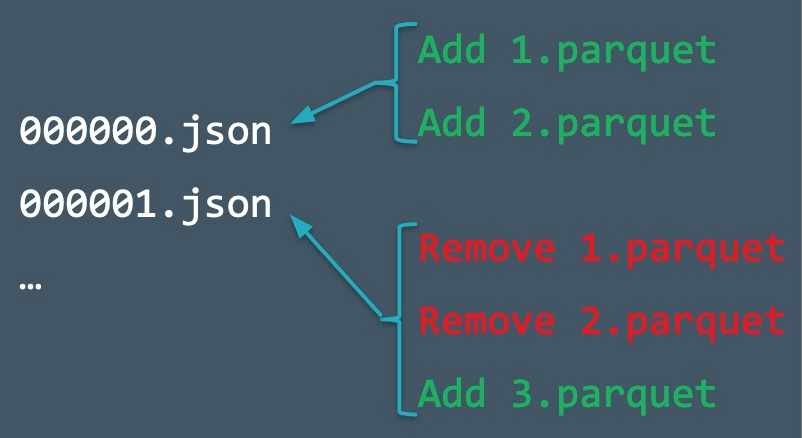
Here is the most critical concept for understanding ACID properties in Delta Lake: data files (Parquets) are immutable. An UPDATE or DELETE operation does not change an existing file. Instead, it works by adding new files and atomically marking the old files as no longer valid in the transaction log.
This process consists of two primary actions recorded in the commit logs:
add: Adds a new data file to the table.remove: Logically removes an existing data file.
The following video provides an excellent animated visualization of this process for UPDATE, DELETE, and INSERT operations.
In this section of 'Deep-Dive into Delta Lake', the presenter clearly demonstrates how DML operations translate into file-level changes and corresponding log entries.
Watch the segment from 12:19 to 15:05. Observe carefully: UPDATE: Notice how an UPDATE reads an existing Parquet file, writes a new Parquet file with the changed data, and the transaction log records a remove for the old file and an add for the new one. DELETE: Similarly, DELETE writes a new file containing only the surviving rows and then marks the old file for removal. INSERT: This is the simplest case, which just adds a new file.
This "copy-on-write" mechanism is how Delta Lake achieves atomicity and isolation. A transaction is only complete when the new JSON log file is successfully written. Any reader of the table will see either the state before the commit or the state after the commit, but never a partially written state.
This image clearly illustrates the result of two transactions: the first one adds two files, and the second one replaces them with a third.
To see the raw JSON for these actions, let's return to the blog post.
Delta Lake 101 Part 2: Transaction Log
The 'Delta Lake 101' article also provides the raw JSON outputs for INSERT, UPDATE, and DELETE operations, letting you see the add and remove actions for yourself.
Quickly scan through the sections for INSERT, UPDATE, and DELETE. You don't need to read every line, but locate the add and remove blocks in the JSON snippets for the UPDATE and DELETE operations. This will reinforce what you saw in the video.
Hands-On: Inspecting the Log Yourself
Now, let's apply this knowledge to the table you created in the previous lesson.
1. Locate Your Table's Path
First, you need to find where the files for your table are stored. Run the following command in a notebook, replacing your_table_name with the name of the table you created.
-- Use DESCRIBE DETAIL to find the physical location of your table's files
DESCRIBE DETAIL your_table_name;
Copy the path from the location column in the output.
2. List the Transaction Log Files
Using the path from the previous step, list the files in the _delta_log directory using the %fs magic command.
-- Replace <your_table_path> with the location you copied
%fs ls <your_table_path>/_delta_log/
You should see at least one JSON file (00000000...json), which corresponds to the initial creation of the table. If you inserted data, you'll see more.
3. Read a Commit File
You can read the contents of a JSON log file directly using Spark. This allows you to inspect the raw actions.
# Replace <your_table_path> with the location of your table
log_path = "<your_table_path>/_delta_log/00000000000000000000.json"
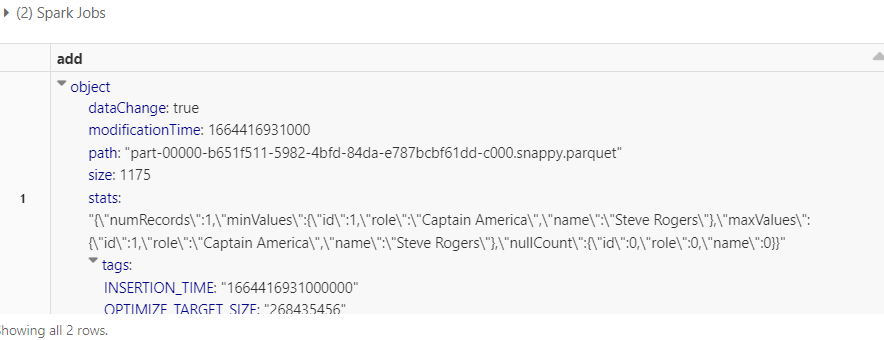
spark.read.json(log_path).show(truncate=False)
Examine the output. You'll see the commitInfo, protocol, and metaData sections we discussed. If this commit added data, you will also see add actions with statistics about the files written.
4. Use DESCRIBE HISTORY
Manually reading JSON files is great for deep inspection, but Databricks provides a much friendlier command: DESCRIBE HISTORY. This command parses the log files for you and presents the commit history in a clean, tabular format.
DESCRIBE HISTORY your_table_name;
This command is your primary tool for auditing changes to a Delta table. It shows the version, timestamp, user, operation type (CREATE TABLE, WRITE, MERGE, etc.), and metrics for each transaction.
Scaling Metadata with Checkpoints
As a table undergoes thousands of transactions, reading all the individual JSON files to compute the current state would become slow. To solve this, Delta Lake periodically creates checkpoint files.
A checkpoint is a snapshot of the table's state up to a specific commit, stored in an efficient Parquet format. By default, a checkpoint is created every 10 commits. When reading a table, Spark can jump to the latest checkpoint and then apply only the few JSON commits made since, dramatically improving read performance.
Tech Talk | Diving into Delta Lake Part 1: Unpacking the Transaction Log
Let's return to the 'Diving into Delta Lake' video for a final concept: checkpoint files. This explains how Delta Lake efficiently scales metadata management.
Watch from 13:02 to 17:05. This segment visually explains why checkpoints are needed and how Spark uses them to avoid reading the entire log history.
If you look at the _delta_log directory of a table with more than 10 commits, you will see these ...checkpoint.parquet files.
Conclusion
In this lesson, you've gone under the hood of Delta Lake to understand its core engine: the transaction log. This is a foundational concept that enables nearly all of Delta's advanced features.
Key Takeaways:
- The
_delta_logdirectory is the single source of truth for a Delta table. - Every transaction is recorded as an atomic commit in a sequentially numbered JSON file.
- Data files are immutable.
UPDATEandDELETEoperations are handled by writing new files and usingaddandremoveactions in the log to define the current state. This is the mechanism behind ACID transactions. - You can inspect the log manually by reading the JSON files or use the convenient
DESCRIBE HISTORYcommand for a summarized view. - Checkpoint files are Parquet-based snapshots that ensure metadata processing remains fast even for tables with millions of transactions.
Preview of the Next Lesson:
The transaction log doesn't just record the current state; it records every state the table has ever been in. Because each commit represents a distinct version, we can query the table as it existed at any point in time. In the next lesson, we will explore this powerful capability by learning how to query previous table versions using Delta Lake time travel.