Introduction
In our last lesson, you learned how to query historical "snapshots" of your data using Delta Lake time travel. We saw that every operation creates a new table version, which is stored in the transaction log. Today, we'll dive into the specific Data Manipulation Language (DML) operations that create these versions: UPDATE, DELETE, and MERGE.
This lesson directly addresses the learning outcome: Perform MERGE, UPDATE, and DELETE operations on Delta tables. As a data engineer, these commands are your primary tools for building pipelines that modify and enrich data. While the commands themselves will look familiar from your SQL experience, we'll focus on how Delta Lake executes them transactionally on top of cloud object storage—a key concept for the Databricks certification.
UPDATE and DELETE: Modifying Data in Place
At a high level, UPDATE and DELETE in Delta Lake behave just as you'd expect: UPDATE modifies rows that match a predicate, and DELETE removes them. The crucial difference lies in how this happens. Since data files in object storage are immutable, Delta Lake cannot perform in-place updates. Instead, it performs a "copy-on-write" operation.
Let's explore this process.
Tech Talk | Diving into Delta Lake Part 3: How do DELETE, UPDATE, and MERGE work
The video 'Diving into Delta Lake Part 3' from Databricks provides an excellent explanation of the mechanics behind DML operations. We'll start with the sections on UPDATE and DELETE.
Watch the following two segments: UPDATE (4:23 - 7:58): Pay close attention to the two-scan process. Delta first identifies the files containing data to be updated, then rewrites those files with the changes. DELETE (16:56 - 20:28): Notice how the process is similar to UPDATE. The speaker also discusses the VACUUM command, which physically removes the old, 'tombstoned' files. This connects back to our previous lesson on time travel retention.
As the video explained, when you run an UPDATE:
- Delta Lake scans the table to find all data files containing rows that match your
WHEREclause. - It reads these files into memory, applies the updates, and writes the results to new data files.
- Finally, it commits to the transaction log, marking the old files as "tombstoned" (removed) and adding the new files.

Hands-On: UPDATE and DELETE Syntax
The syntax for these operations is straightforward in both SQL and Python. For a quick reference, review the code examples in the official documentation.
Tutorial: Create and manage Delta Lake tables
The official Databricks tutorial provides concise syntax examples for UPDATE and DELETE in both SQL and Python.
Scan the sections 'Update a table' and 'Delete from a table'. You don't need to read in-depth, just familiarize yourself with the syntax for both Python and SQL.
Now, let's put it into practice. In your Databricks notebook, create a simple table and perform these operations.
1. Create Sample Data
# Create a DataFrame
data = [
    (1, "Elara", "Engineer", 80000),
    (2, "Finn", "Analyst", 65000),
    (3, "Liam", "Engineer", 82000),
    (4, "Zoe", "Intern", 30000)
]
columns = ["id", "name", "role", "salary"]
df = spark.createDataFrame(data, columns)


# Write to a Delta table
df.write.format("delta").mode("overwrite").saveAsTable("employees")
2. Perform an UPDATE
Let's give the interns a raise.
SQL:
UPDATE employees
SET salary = 35000
WHERE role = 'Intern';

SELECT * FROM employees;
Python:
from delta.tables import DeltaTable
from pyspark.sql.functions import col


# Target the Delta table
delta_table = DeltaTable.forName(spark, "employees")


# Perform the update
delta_table.update(
    condition = col("role") == "Intern",
    set = { "salary": "35000" }
)


# Show the result
delta_table.toDF().show()
3. Perform a DELETE
Let's say the intern role is being removed.
SQL:
DELETE FROM employees WHERE role = 'Intern';

SELECT * FROM employees;
Python:
# Target the Delta table again
delta_table = DeltaTable.forName(spark, "employees")


# Perform the delete
delta_table.delete(condition = "role = 'Intern'")


# Show the result
delta_table.toDF().show()
After each operation, you can run DESCRIBE HISTORY employees; to see the new versions being created.
MERGE: The Ultimate DML Command
The MERGE command is one of Delta Lake's most powerful features. It allows you to combine INSERT, UPDATE, and DELETE operations into a single, atomic transaction. This is invaluable for common data engineering tasks like "upserting" data from a source system into a target table—updating existing records and inserting new ones.
MERGE works by comparing a source table (containing the changes) with a target table based on a key. You then define actions based on whether a row matches or not.
The main clauses are:
WHEN MATCHED: The source key exists in the target. You can thenUPDATEorDELETEthe target row.WHEN NOT MATCHED: The source key does not exist in the target. You can thenINSERTthe new row.WHEN NOT MATCHED BY SOURCE: A row exists in the target but not in the source. This is useful for tasks like soft-deleting records that have been removed from the source system.
Hands-On MERGE Walkthrough
The following video provides a clear, practical demonstration of building a MERGE statement from scratch using SQL.
15 Delta Tables MERGE and UPSERTS | SCD1 in Delta | Soft Delete with Incremental data using Merge
The video 'MERGE and UPSERTS' from the Ease With Data channel walks through a full MERGE scenario.
Watch the entire video (around 13 minutes). Follow along as the presenter: Explains the concept of MERGE as an upsert. Creates a target table (EMP) and a source table with changes (EMP_updates). Builds a MERGE query with WHEN MATCHED THEN UPDATE and WHEN NOT MATCHED THEN INSERT. Adds a WHEN NOT MATCHED BY SOURCE THEN DELETE clause. Modifies the logic to perform a 'soft delete' by updating a status column instead of physically deleting.
MERGE Internals
Under the hood, MERGE is more complex than a simple UPDATE. It involves joining the source and target tables to determine the correct action for each row.
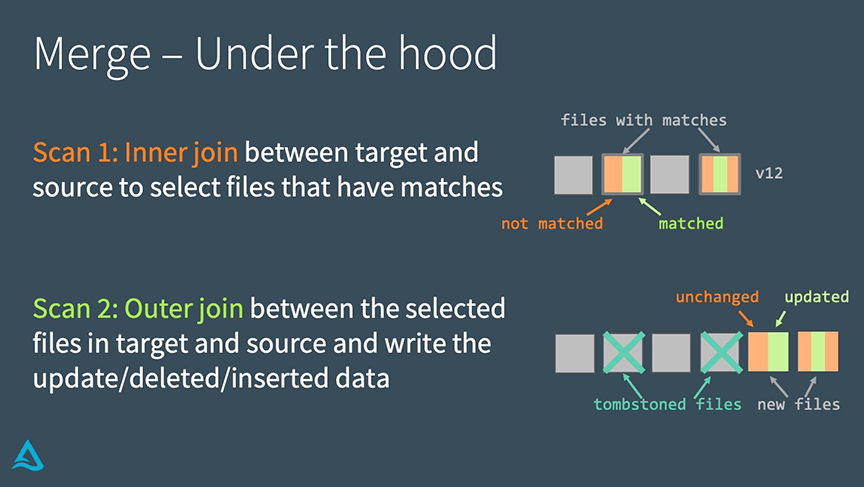
The key takeaway is that MERGE is a join-heavy operation. Optimizing MERGE performance, which we'll touch on later, often involves optimizing these joins.
Hands-On: MERGE Syntax
Now, let's apply the MERGE logic from the video to our employees table. First, create a "source" DataFrame representing incoming changes.
1. Create Source Data
Notice that Finn gets a promotion and salary bump, Elara's salary is adjusted, and a new employee, Ken, is added.
# Create a DataFrame with updates and new data
updates_data = [
    (2, "Finn", "Senior Analyst", 75000), # Update
    (1, "Elara", "Engineer", 85000),      # Update
    (5, "Ken", "Data Scientist", 95000)   # Insert
]
updates_df = spark.createDataFrame(updates_data, columns)


# Create a temporary view to use in SQL
updates_df.createOrReplaceTempView("employee_updates")
2. Perform the MERGE
SQL:
MERGE INTO employees AS target
USING employee_updates AS source
ON target.id = source.id
WHEN MATCHED THEN
  UPDATE SET
    target.role = source.role,
    target.salary = source.salary
WHEN NOT MATCHED THEN
  INSERT (id, name, role, salary)
  VALUES (source.id, source.name, source.role, source.salary);

SELECT * FROM employees ORDER BY id;
Python:
The Python syntax is more verbose but follows the same logic.
delta_table = DeltaTable.forName(spark, "employees")

delta_table.alias("target").merge(
    source = updates_df.alias("source"),
    condition = "target.id = source.id"
  ) \
  .whenMatchedUpdate(
    set = {
      "role": "source.role",
      "salary": "source.salary"
    }
  ) \
  .whenNotMatchedInsert(
    values = {
      "id": "source.id",
      "name": "source.name",
      "role": "source.role",
      "salary": "source.salary"
    }
  ) \
  .execute()

delta_table.toDF().show()
For more detailed syntax and advanced clauses, you can refer to the official documentation.
Upsert into a Delta Lake table using merge - Azure Databricks
The documentation page 'Upsert into a Delta Lake table using merge' provides a comprehensive reference for all MERGE clauses and their semantics.
Quickly review the provided examples for SQL and Python. Pay special attention to the 'Merge operation semantics' section, which describes the rules for each clause.
Conclusion
In this lesson, you've mastered the essential DML operations for modifying data in Delta Lake. You now understand not only the syntax but also the underlying copy-on-write mechanism that ensures these operations are atomic and create auditable table versions.
Key Takeaways:
UPDATEandDELETEwork by rewriting affected data files and creating a new table version.MERGEis a powerful, atomic operation that combinesINSERT,UPDATE, andDELETElogic, making it ideal for upsert and CDC (Change Data Capture) patterns.MERGElogic is defined byWHEN MATCHED,WHEN NOT MATCHED, andWHEN NOT MATCHED BY SOURCEclauses.- These operations can be executed using both standard SQL and programmatic Python APIs.
Preview of the Next Lesson:
Now that you know how to modify data, the next step is to manage and optimize your tables. In our next lesson, we will begin Module 3 by exploring "Advanced Delta Lake Features." You will learn how to configure Delta table properties, including setting log and data retention periods, which directly impacts the time travel and VACUUM capabilities we've touched upon.