Hello! In our last lesson, we defined what a foreign key is and discussed its crucial role in creating relationships between tables and ensuring data integrity. We established that a foreign key in one table points to a primary key in another, forming the "glue" of a relational database.
Today, we'll put that theory into practice. This lesson is all about developing the practical skill of identifying foreign keys in a given set of related tables. Mastering this will enable you to look at a database schema and instantly understand how the different pieces of information are connected, a core competency for your upcoming project and exam.
1. The Core Principle: How to Spot a Foreign Key
In the previous lesson, we saw how separating data into tables like CUSTOMERS and ORDERS helps reduce redundancy. The link was made by placing the CustomerID from the CUSTOMERS table into the ORDERS table. This illustrates the fundamental rule for identifying foreign keys:
A foreign key is typically an attribute that exists as a primary key in another table.
The table where the attribute is a primary key is the "parent" table (e.g., CUSTOMERS). The table where the same attribute appears as a foreign key is the "child" table (e.g., ORDERS). This creates a link, allowing you to find all orders placed by a specific customer.
Let's look at a clear visual of this principle.
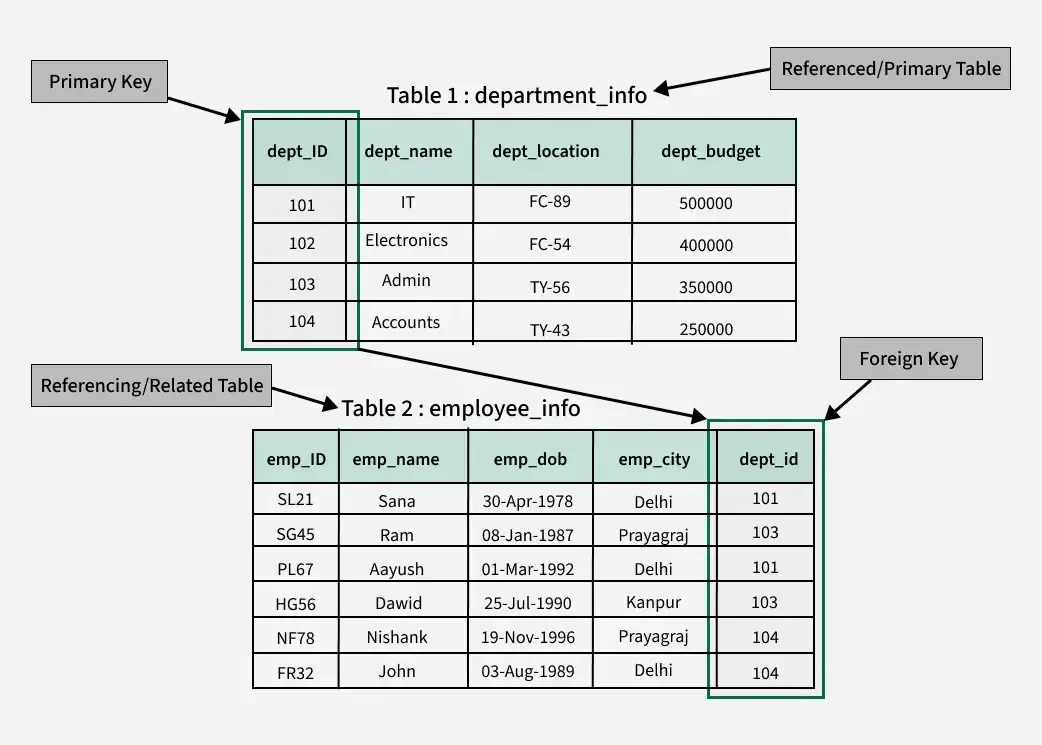
To reinforce this, let's read a short article that clearly explains the difference and interaction between primary and foreign keys using a simple bookshop example.
This article from CockroachDB Labs uses a practical example to distinguish between primary and foreign keys and explain how they work together.
Please read the sections titled "Our example database" and "What is the difference between primary keys and foreign keys?". As you read, focus on this key distinction: Primary Key (order_no in the orders table): Its job is to uniquely identify each row within that single table. Foreign Key (user_id in the orders table): Its job is to link a row in the orders table to a specific row in the users table.
2. Guided Practice: A Video Walkthrough
Now that we've reviewed the core principle, let's work through an example together. The following video presents a small database design and walks through the process of identifying the foreign keys based on the relationships between the tables.
Relational Database Modeling: Primary and Foreign Keys
This video by Dustin Ormond provides a clear, narrated exercise for identifying foreign keys.
Watch the segment from "try this on your own". First, observe the entity setup he presents. Pause the video at this point and try to identify the primary and foreign keys for the Department, Employee, Course, and Certificate tables yourself. Think about which table is the "parent" and which is the "child" in each relationship. Once you have your answers, resume the video to watch the solution and explanation.
The key rule demonstrated in the video is that the primary key of the entity on the "one" side of a relationship becomes a foreign key in the entity on the "many" side. For example, because one department can have many employees, DepartmentID (the PK of Department) is placed in the Employee table as an FK.
3. Independent Practice: Analyzing a Sales Database
You're now ready to apply this skill to a more comprehensive scenario. The image below shows four tables from a sales database: Customers, Orders, OrderDetails, and Products. Your task is to identify all the primary and foreign keys.

Take a moment to analyze the tables and answer the following questions.
Your Task:
- Identify the Primary Key for each of the four tables. Remember, a primary key must uniquely identify each record in its table.
- Identify all the Foreign Keys in this database. For each foreign key you find, state which table it is in and which primary key (in another table) it refers to.
Take your time and write down your answers before revealing the solution below.
Click here to see the solution and explanation.
1. Primary Keys:
- Customers table: The primary key is
CustomerID. It's a unique identifier for each customer. - Products table: The primary key is
ProductID. It uniquely identifies each product. - Orders table: The primary key is
OrderID. It uniquely identifies each sales order. - OrderDetails table: This is a bit trickier.
OrderIDby itself isn't unique (order 10251 appears twice), andProductIDisn't unique either. The primary key here is a composite key made of (OrderID,ProductID). The combination of these two uniquely identifies each line item within an order.
2. Foreign Keys:
- In the
Orderstable:CustomerIDis a foreign key. It links to theCustomerIDprimary key in theCustomerstable. This tells us which customer placed the order.
- In the
OrderDetailstable:OrderIDis a foreign key. It links to theOrderIDprimary key in theOrderstable. This tells us which order a specific product line item belongs to.ProductIDis a foreign key. It links to theProductIDprimary key in theProductstable. This tells us which product is being ordered in that line item.
Notice that in the OrderDetails table, OrderID and ProductID serve as both parts of the composite primary key and as individual foreign keys. This is a very common pattern in tables that link two other tables together, which we will explore further when we discuss composite entities.
Conclusion
In this lesson, we transitioned from defining foreign keys to actively identifying them. This skill is less about memorization and more about recognizing patterns and logical connections within the data.
Key Takeaways:
- To find a foreign key, look for an attribute in one table that also serves as a primary key in another table.
- This structure creates a parent-child link, where the "child" table contains the foreign key and the "parent" table contains the primary key it references.
- Identifying these key relationships is the first step in understanding the structure and rules of any relational database.
In our next lesson, we will formalize our understanding of the links that foreign keys create. We'll move on to defining different types of relationships—such as one-to-one, one-to-many, and many-to-many—and learn how to determine the precise nature of the connection between two tables.