Hello! Welcome to the third lesson in our Python fundamentals module.
In our last session, you learned how to use for loops to automate tasks and process collections of data. This is a crucial skill, but Python offers an even more elegant and efficient way to handle a common task: creating a new list based on an existing one.
Today's lesson focuses on a powerful feature called list comprehensions. Our goal is to learn how to use list comprehensions to create new lists from existing collections. Think of it as upgrading your for loop into a compact, single line of code that is often faster and easier to read once you understand the syntax. This is a favorite tool among data analysts for its power and conciseness.
From for Loop to List Comprehension
Let's start by revisiting a task from our previous lesson: creating a new list. Imagine you have a list of numbers and you want to create a new list containing the square of each number.
Using a for loop, you would write this:
numbers = [1, 2, 3, 4, 5]
squares = []  # 1. Initialize an empty list

for number in numbers:  # 2. Loop through the original list
    squares.append(number * number)  # 3. Append the new value

print(squares)


# Output: [1, 4, 9, 16, 25]
A list comprehension achieves the exact same result in a single line:
numbers = [1, 2, 3, 4, 5]
squares = [number * number for number in numbers] # All three steps in one!

print(squares)


# Output: [1, 4, 9, 16, 25]
This structure is incredibly useful. The following video gives a great introduction to how this conversion from a for loop to a list comprehension works.
Python for Data Analysis: List Comprehensions
This video from DataDaft shows how a traditional for loop can be refactored into a more efficient list comprehension.
Watch from the beginning until 03:05. The video clearly demonstrates how the logic of creating and appending to a list is condensed into one line.
As you saw, the basic syntax follows a clear pattern. This image breaks it down visually.

Adding Conditional Logic
The real power of list comprehensions becomes apparent when you start adding conditional logic. You can use them to both filter data and transform data differently based on a condition.
Filtering with an if Statement
Let's say you want to create a list of squares, but only for the even numbers in your original list. In a list comprehension, you can add an if clause at the end to act as a filter.
The syntax is: [expression for item in iterable if condition]
numbers = [1, 2, 3, 4, 5, 6, 7, 8]
even_squares = [num * num for num in numbers if num % 2 == 0]

print(even_squares)


# Output: [4, 16, 36, 64]
The next video provides an excellent visual walkthrough of how Python processes this logic: it loops, then filters, and only then applies the transformation.
Python List Comprehension (Visually Explained) | The Cleanest Way to Code | #Python Course 33
This video from Data with Baraa visually explains the three-part structure of a list comprehension: transformation, looping, and filtering. The practical example on cleaning URL data is a great showcase of its use in data analysis.
First, watch from 00:34 to 03:36 to understand the logical flow. Then, watch the practical example from 03:48 to 07:31, which demonstrates how to clean a list of domain names—a common data preparation task.
Transforming with if-else
What if you want to apply a different action depending on the item? For example, categorize numbers as "small" or "large". For this, you use an if-else structure, but the syntax is different. The if-else block moves to the beginning of the comprehension.
The syntax is: [value_if_true if condition else value_if_false for item in iterable]
numbers = [25, 80, 12, 55, 98, 30]
categories = ['High' if num > 50 else 'Low' for num in numbers]

print(categories)


# Output: ['Low', 'High', 'Low', 'High', 'High', 'Low']
This is a critical distinction:
ifat the end is for filtering (skipping items).if-elseat the beginning is for transforming (changing every item).
This image shows both variations side-by-side.
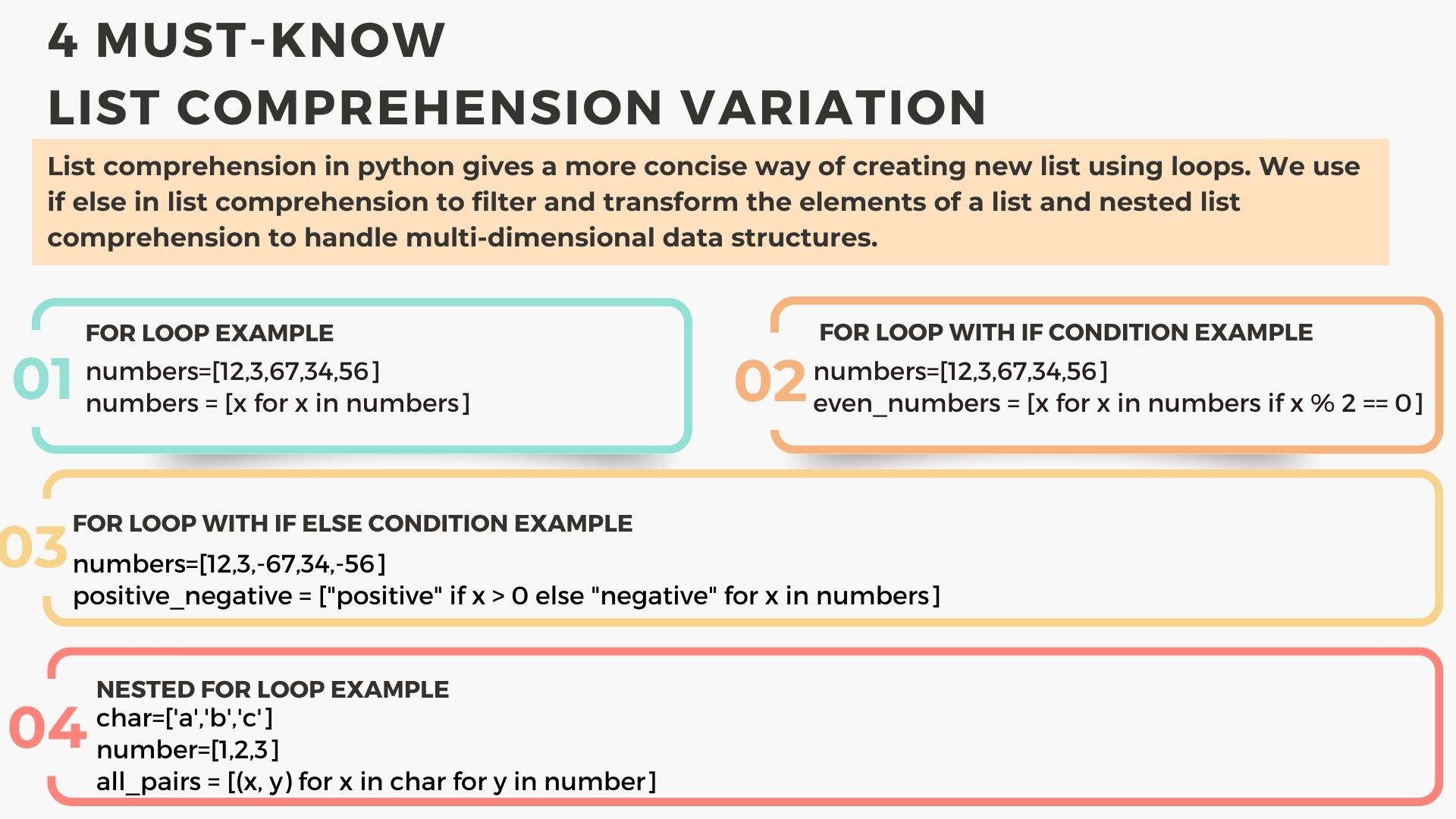
For a more detailed explanation of these two conditional structures, the following article is very clear.
Introduction to List Comprehensions in Python
This article from Earth Data Science provides clear code examples and explanations for using conditionals in list comprehensions.
Please read the section titled 'Conditionals'. Focus on the two subsections, 'If Condition Only' and 'If Else Conditionals', to solidify your understanding of the different syntax for each.
A Note on Readability
You can even nest loops inside a list comprehension, but be careful. While it's possible to write very complex one-liners, your goal should always be clear and maintainable code. If a list comprehension becomes too long or hard to read, a standard for loop is often a better choice.
This final video clip demonstrates a nested comprehension and gives some excellent advice on when to avoid them.
Python for Data Analysis: List Comprehensions
Let's return to the DataDaft video to see how nested loops work in a list comprehension and, more importantly, to hear some valuable advice on keeping your code readable.
Watch from 04:40 to 09:48. This section covers using multiple for loops and nested comprehensions, but crucially advises against making them overly complex.
Put it into Practice
Time to apply what you've learned. Here are a few exercises based on common data analysis scenarios.
Exercise 1: Data Transformation
You have a list of temperatures in Celsius. Create a new list with the temperatures converted to Fahrenheit.
The formula is: .
temps_celsius = [22.5, 31.0, 18.2, 25.1, 15.7]


# Your code here
# temps_fahrenheit = ...


# Solution
temps_fahrenheit = [(temp * 9/5) + 32 for temp in temps_celsius]
print(temps_fahrenheit)
Exercise 2: Filtering and Transformation
You have a list of product prices. Create a new list containing the prices of items that cost more than $50, with a 10% "luxury tax" added.
prices_usd = [120, 45, 88, 32, 150, 51]


# Your code here
# taxed_luxury_prices = ...


# Solution
taxed_luxury_prices = [price * 1.10 for price in prices_usd if price > 50]
print(taxed_luxury_prices)
Exercise 3: Conditional Transformation (if-else)
You have a list of employee work hours for a week. Create a list that labels each entry as 'Overtime' if the hours are over 40, and 'Standard' otherwise.
work_hours = [38, 45, 40, 48, 35]


# Your code here
# hour_labels = ...


# Solution
hour_labels = ['Overtime' if hours > 40 else 'Standard' for hours in work_hours]
print(hour_labels)
Conclusion
Excellent work! You've just added a powerful and "Pythonic" tool to your data analysis toolkit. Mastering list comprehensions will make your code more concise, efficient, and readable.
Key Takeaways:
- List comprehensions are a compact way to create a new list by processing an existing iterable.
- The basic syntax is
[expression for item in iterable]. - To filter items, add an
ifstatement at the end:[... for ... if condition]. - To transform items differently based on a condition, use an
if-elseblock at the beginning:[value_if_true if condition else value_if_false for ...]. - While powerful, always prioritize code readability. A simple
forloop is better than a complex, unreadable comprehension.
Preview of the Next Lesson:
So far, we've written code that runs from top to bottom. But what if you need to perform the same set of steps multiple times in your analysis? In our next lesson, we'll cover how to define and call functions to organize reusable code. This will allow you to package logic—like the data cleaning steps or calculations you've been learning—into blocks that you can use again and again.