Hello! Welcome back to your second lesson in the "Basics of Data Analysis" course.
In our last session, we focused on storing data using Python's fundamental collection types: lists and dictionaries. This gave us the "containers" to hold our data. Today, we'll learn how to work with the data inside those containers.
This lesson is all about automation. Your background in mechatronics involves creating systems that perform repetitive tasks, and that's exactly what we'll do with code. The goal for today is to learn how to write for loops to process data collections. This will allow you to perform an action on every single item in a list or dictionary, a task that's central to almost every data analysis project.
Part 1: What are For Loops and Why Use Them?
Imagine you have a list of a thousand sensor readings. If you needed to check each one to see if it's above a certain threshold, doing it manually would be impossible. A for loop automates this by repeating a block of code for each item in your collection.
To understand how this works visually, the following video provides an excellent explanation of the core concept and syntax.
Python For Loops (Visually Explained) | #Python Course 17
This video from Data with Baraa visually breaks down how a for loop is structured and how Python executes it step-by-step.
Watch from the beginning to 09:21. The first six minutes cover the fundamental logic. The next three minutes show a practical example and introduce a common naming convention that makes code more readable.
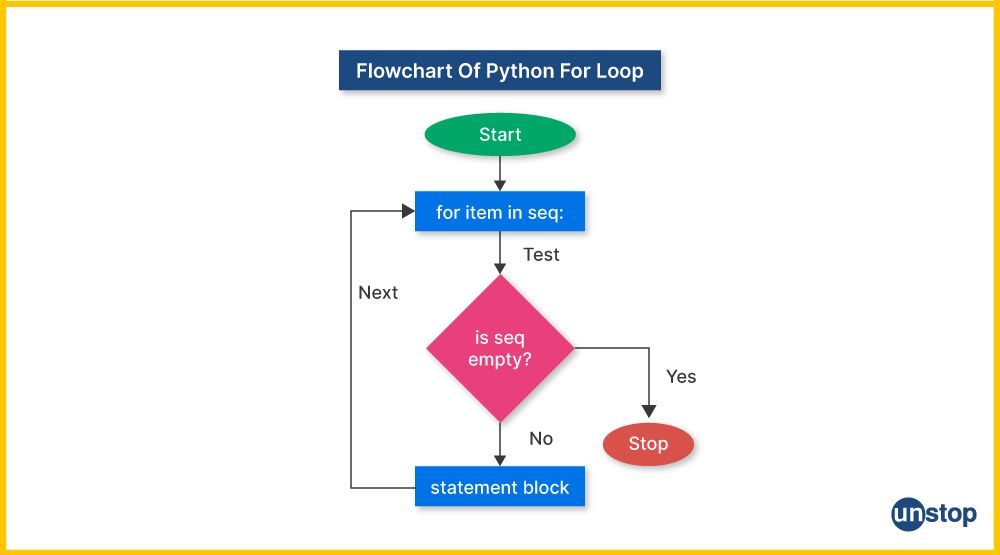
As you saw, the basic structure is for <variable> in <sequence>:, followed by an indented block of code to be repeated. The loop takes each item from the sequence, assigns it to the variable, and runs your code block.
This flow can also be represented as a flowchart:
Part 2: Iterating Over Different Kinds of Collections
The power of for loops comes from their versatility. You can use them to iterate over many different types of data collections.
Iterating Over Lists, Strings, and Ranges
You've already seen how to loop through a list. The same logic applies to other sequences like strings (where you iterate character by character) and ranges of numbers. The range() function is particularly useful when you need to repeat an action a specific number of times.
The next segment of the video you just watched explains this perfectly.
Python For Loops (Visually Explained) | #Python Course 17
Let's continue with the 'Python For Loops (Visually Explained)' video to see how to use loops with strings and, most importantly, the range() function.
Watch from 09:21 to 15:38. Pay close attention to the range() function and its arguments: start, stop, and step. Understanding range() is essential for many data tasks.
Key points on range():
range(5)generates numbers from 0 up to (but not including) 5:0, 1, 2, 3, 4.range(1, 6)generates numbers from 1 up to 6:1, 2, 3, 4, 5.range(1, 10, 2)generates numbers from 1 up to 10, with a step of 2:1, 3, 5, 7, 9.
Iterating Over Dictionaries
Looping over dictionaries is a bit different, since they are made of key-value pairs. You have three main ways to do this:
- Loop over the keys.
- Loop over the values.
- Loop over both the keys and values at the same time.
The following video from Alex The Analyst clearly demonstrates how to do this.
For Loops in Python | Python for Beginners
This video provides a focused look at how to iterate through dictionaries, which you learned about in the last lesson.
Watch from 03:26 to 06:20. Focus on the use of .values() to get only the values and .items() to get both the key and the value in each iteration.
To summarize for dictionaries:
for key in my_dict:iterates through the keys.for value in my_dict.values():iterates through the values.for key, value in my_dict.items():iterates through the key-value pairs, which is often the most useful approach.
Part 3: Practical Applications for Data Analysis
Now, let's tie this all back to your goal of learning data analysis. Loops are not just a programming concept; they are the workhorses of data preparation and analysis.
Common Data Tasks Using Loops
Watch this segment to see a high-level overview of how for loops are used in real-world data projects.
Python For Loops (Visually Explained) | #Python Course 17
This part of the video from Data with Baraa connects the concept of loops directly to data analysis tasks like data cleaning and aggregation.
Watch from 15:38 to 18:03. This will give you context for why learning loops is so important for data-related work.
Hands-On Example: Data Cleaning
Let's look at a concrete example. The next part of the video walks through a common task: cleaning a list of messy file names. This is a perfect demonstration of automation.
Python For Loops (Visually Explained) | #Python Course 17
This detailed example shows how to use a for loop and string methods to clean up data—a task you'll perform very often.
Watch from 19:49 to 22:35. Notice how multiple cleaning steps (removing spaces, changing case) are applied to each file name inside the loop.
Hands-On Example: Aggregating Data
Let's revisit the sensor_log from our last lesson. This is a list of dictionaries—a very common data structure. Suppose we want to calculate the average reading. A for loop is the perfect tool for this.
We can initialize a total variable to zero, then loop through the list. In each iteration, we access the 'reading' value from the dictionary and add it to our total.
# Our data: a list of dictionaries
sensor_log = [
    {
        'sensor_id': 'TEMP-01',
        'reading': 22.5,
        'unit': 'Celsius'
    },
    {
        'sensor_id': 'HUM-04',
        'reading': 45.2,
        'unit': '%'
    },
    {
        'sensor_id': 'TEMP-01',
        'reading': 22.6,
        'unit': 'Celsius'
    }
]


# We are only interested in temperature readings for this calculation
total_temp_reading = 0
num_temp_readings = 0


# Loop through each record in the log
for record in sensor_log:


    # Check if the record is a temperature reading
    if record['unit'] == 'Celsius':


        # Add the reading to our total
        total_temp_reading += record['reading'] # This is a shortcut for total_temp_reading = total_temp_reading + record['reading']


        # Increment our count of temperature readings
        num_temp_readings += 1


# Calculate the average
average_temp = total_temp_reading / num_temp_readings

print(f"The average temperature is: {average_temp:.2f} Celsius")
This example combines everything we've learned so far: lists, dictionaries, accessing values, and using a for loop to perform a calculation (aggregation).
Put it into Practice
Now it's your turn to write some code. Here are a few exercises to solidify your understanding. Try to solve them on your own first. The solutions are provided for you to check your work.
Exercise 1: Basic for Loop
Write a for loop that prints the numbers from 1 to 10.
Hint: Use the range() function.
# Your code here


# Solution
for i in range(1, 11):
  print('Current value:', i)
Exercise 2: Looping Over a List
You are given a list of country names. For each country, print out its name and the number of letters it contains.
# Your code here
countries = ['Thailand', 'Vietnam', 'Malaysia', 'UAE']


# Solution
for country in countries:
  print(f"{country} contains {len(country)} letters!")
Exercise 3: Looping Over a Dictionary
You have a dictionary of exam results. Find the highest and lowest scores.
Hint: Initialize max_score to a very low number and min_score to a very high number, then loop through the dictionary's values and update them.
# Your code here
exam_results = {
  'Dominic Vargas': 67, 'Marion Riley': 89,
  'Candice White': 45, 'Doreen Goodwin': 82,
  'Janet Hunter': 98, 'Jaime Page': 32
}


# Solution
max_score = 0
min_score = 100

for score in exam_results.values():
  if score > max_score:
    max_score = score
  if score < min_score:
    min_score = score

print(f"The highest score was: {max_score}")
print(f"The lowest score was: {min_score}")
(Exercises adapted from "10 Python Loop Exercises with Solutions" on LearnPython.com).
Conclusion
Great work today! You've learned one of the most important concepts in programming for automating tasks. This skill moves you from just storing data to actively processing it.
Key Takeaways:
forloops are used to iterate over a sequence (like a list, string, or dictionary) and execute a block of code for each item.- The basic syntax is
for item in sequence:. Don't forget the colon and the indentation! - The
range()function is a powerful way to generate sequences of numbers to control your loops. - You can iterate over dictionary keys, values (with
.values()), or key-value pairs (with.items()). - Loops are fundamental for data analysis tasks like cleaning, transforming, and aggregating data.
Preview of the Next Lesson:
Now that you're comfortable with writing for loops to create and modify collections, you're ready for a powerful shortcut. In the next lesson, we will cover list comprehensions. This is a concise, "Pythonic" way to create new lists from existing ones, effectively packing a for loop into a single, readable line of code.