Hello! Welcome to your first lesson in the "Basics of Data Analysis" course.
Given your background in mechatronics and experience with Excel, you're already familiar with the importance of structured data. This course is designed to help you leverage Python to perform data analysis tasks more powerfully and efficiently.
Today, we'll start with the absolute fundamentals. Our goal is to learn how to use lists and dictionaries to store and access structured data in Python. These are the primary building blocks you'll use to hold and organize data before you analyze it, much like columns and structured tables in Excel. By the end of this lesson, you'll be comfortable creating and manipulating these data collections, setting a solid foundation for the rest of the course.
What are Data Structures?
Before we dive into the specifics of lists and dictionaries, let's briefly define what we mean by a "data structure." In programming, a data structure is simply a way of organizing and storing data so that it can be accessed and worked with efficiently.
For a quick, high-level overview of this concept, please read the first two short sections of the following article from Dataquest.
Python Data Structures: Lists, Dictionaries, Sets, Tuples - Dataquest
This article provides a clear introduction to data structures in Python.
Please read the sections titled 'What Is a Data Structure?' and 'Data Structures in Python'. Focus on understanding the core idea of a data structure and the difference between mutable (changeable) and immutable (unchangeable) types.
As you read, you saw that Python's most common mutable data structures are lists and dictionaries. Let's explore each one.
Part 1: Lists - Ordered Collections
A Python list is an ordered collection of items. You can think of it as a single column of data in an Excel spreadsheet. Because lists are ordered, you can access any item by its position.
Creating and Reading Lists
Let's start by learning how to create a list and access its elements. The video below provides a great, practical introduction. The presenter, Nicholas Renotte, uses a helpful "CRUD" (Create, Read, Update, Delete) framework, which should feel familiar given your engineering background.
Python for Data Science - Variables, Lists and Dictionaries
This segment of the video 'Python for Data Science' will show you the basics of creating lists and reading data from them using indexing.
Watch from 27:32 to 34:00. Pay close attention to how a list is defined using square brackets [] and how individual items are accessed using their numerical index (position). Notice the concept of zero-indexing, where the first item is at index 0.
Key takeaways from the video:
- Lists are created with
[]. For example:my_list = [10, 20, 30]. - They can hold different data types (integers, strings, etc.) in the same list.
- You access items using their index:
my_list[0]returns10.
Updating and Deleting from Lists
Now that you can create and read lists, let's explore how to modify them. This is where the power of Python for data manipulation begins to show. The next part of the video covers updating and deleting list items in detail.
Python for Data Science - Variables, Lists and Dictionaries
Let's continue with the same video to learn how to manipulate lists.
Watch the section from 56:31 to 01:07:23. The presenter walks through the full CRUD cycle for lists. Focus on the methods used to add items (.append(), .insert()), modify an item by its index, and remove an item (del).
To summarize the key list manipulation techniques:
- Update an existing item:
names[4] = 'Nicholas Renotte' - Add an item to the end:
names.append('Elon Musk') - Insert an item at a specific position:
names.insert(0, 'Richard Branson') - Delete an item by its index:
del names[-2]
Part 2: Dictionaries - Key-Value Pairs
Next, we'll look at dictionaries. A dictionary is a collection of key-value pairs. Think of it like a single record or row of data, where each "key" is like a column header (e.g., "Name", "Age") and the "value" is the data for that record (e.g., "Alice", 30).
For a quick text-based introduction, read the section on dictionaries from this Mode Analytics tutorial.
Python Basics: Lists, Dictionaries, & Booleans - Mode Analytics
This article gives a concise, data-analysis-focused explanation of dictionaries.
Read the section titled 'Dictionaries', starting from 'Dictionaries are also what they sound like...' and ending just before 'Changing values and combining objects'. This will explain the key-value pair concept.
Creating and Reading Dictionaries
Now let's see this in action. The video below will show you how to create dictionaries and access their values.
Python for Data Science - Variables, Lists and Dictionaries
This segment introduces dictionaries, showing how to define them and retrieve values using keys.
Watch from 47:46 to 52:30. Notice the use of curly braces {} and the key: value syntax. A key difference from lists is that you access values using the key, not a numerical index.
Updating and Deleting from Dictionaries
Just like lists, dictionaries are mutable. You can add new key-value pairs, change existing values, and remove pairs.
Python for Data Science - Variables, Lists and Dictionaries
Finally, let's complete the CRUD cycle for dictionaries to see how they can be modified.
Watch from 01:07:23 to 01:17:33. Focus on how to add a new key-value pair, how to update the value of an existing key, and how to delete a pair using del.
To summarize dictionary manipulation:
- Access a value:
astronaut['name'] - Update a value:
astronaut['allergies'] = 'mango' - Add a new key-value pair:
astronaut['spaceship'] = 'Galactic 1' - Delete a key-value pair:
del astronaut['spaceship']
Combining Structures: A Glimpse of Real-World Data
In data analysis, you'll often work with complex, structured data. A very common pattern is a list of dictionaries, where each dictionary represents a record (like a row in a table).
Let's imagine we're tracking sensor data. We could have a list where each element is a dictionary containing details about a single reading.
sensor_log = [
    {
        'sensor_id': 'TEMP-01',
        'reading': 22.5,
        'unit': 'Celsius',
        'timestamp': '2023-10-27T10:00:00Z'
    },
    {
        'sensor_id': 'HUM-04',
        'reading': 45.2,
        'unit': '%',
        'timestamp': '2023-10-27T10:00:05Z'
    },
    {
        'sensor_id': 'TEMP-01',
        'reading': 22.6,
        'unit': 'Celsius',
        'timestamp': '2023-10-27T10:01:00Z'
    }
]
To access the reading from the second entry in our log, you would combine list and dictionary access:
second_reading = sensor_log[1]['reading']print(second_reading)
This would output 45.2.
This ability to nest structures is what makes Python so flexible for handling data from various sources, like APIs or complex files.
Conclusion
In this lesson, we took the first essential step in learning Python for data analysis. You learned about the two most fundamental data structures for grouping data.
Here's a quick visual summary of the data structures we discussed.
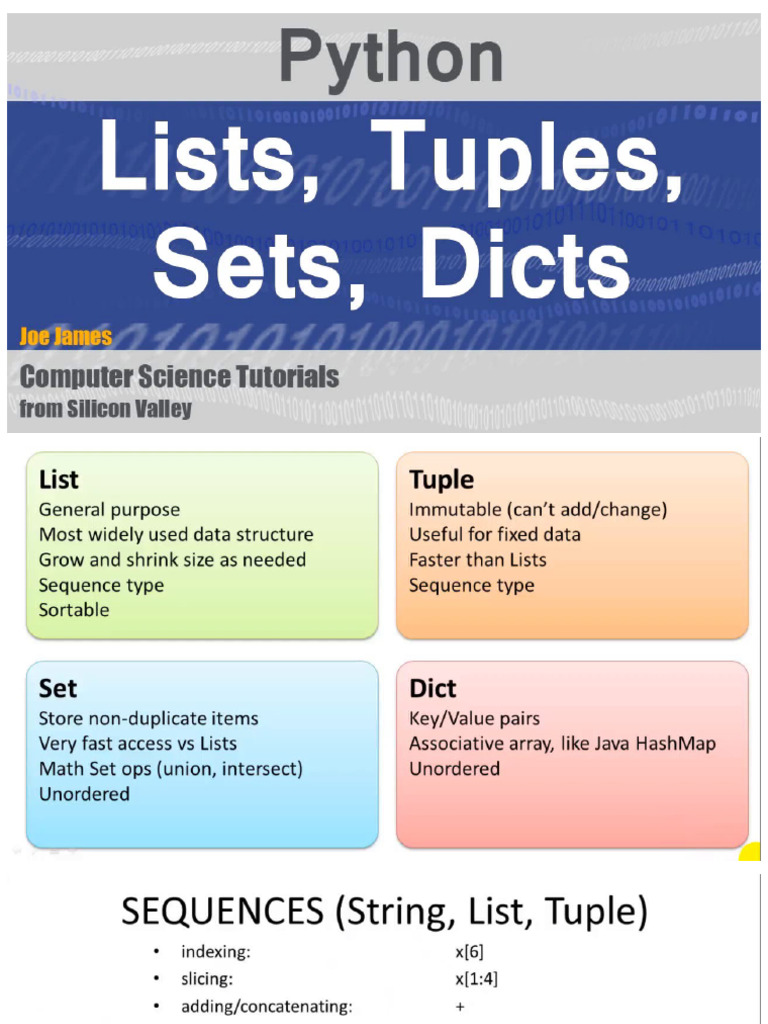
Key Takeaways:
- Lists are ordered collections, accessed by a numerical index (e.g.,
my_list[0]). They are ideal for sequences of items. - Dictionaries are collections of key-value pairs, accessed by a unique key (e.g.,
my_dict['name']). They are perfect for storing records with named attributes. - Both are mutable, meaning you can add, remove, and change their contents after creation.
- You can nest these structures (e.g., a list of dictionaries) to represent more complex data, similar to a table in a database or Excel.
Preview of the Next Lesson:
Now that you know how to store collections of data, the next logical step is to learn how to process them. In our next lesson, you will learn how to write for loops to iterate over lists and dictionaries, allowing you to perform an action on every item in your collection automatically. This is a cornerstone of automation in data analysis.