Hello! Welcome to the final lesson in our first module on Python fundamentals.
In our last session, we explored list comprehensions, a concise way to create lists. This technique helps make your code more efficient and "Pythonic." Today, we're going to take a big step toward writing professional, clean, and effective code by learning about functions.
As you perform more complex data analysis, you'll find yourself repeating the same steps: calculating a specific metric, cleaning data in a particular way, or formatting output. Copying and pasting this code is not only tedious but also prone to errors. Functions are the solution.
Our learning outcome for this lesson is to define and call functions to organize reusable code. By the end of this session, you'll be able to bundle your logic into named, reusable blocks that you can execute whenever you need them.
What is a Function?
You've already been using functions without even realizing it! print(), len(), and sum() are all built-in Python functions. You give them some input (an argument), and they perform a task.
A function is simply a named, reusable block of code that performs a specific job. The core principle behind using functions is DRY—Don't Repeat Yourself.
Defining and Calling Your First Function
Let's start by learning the syntax to create our own function.
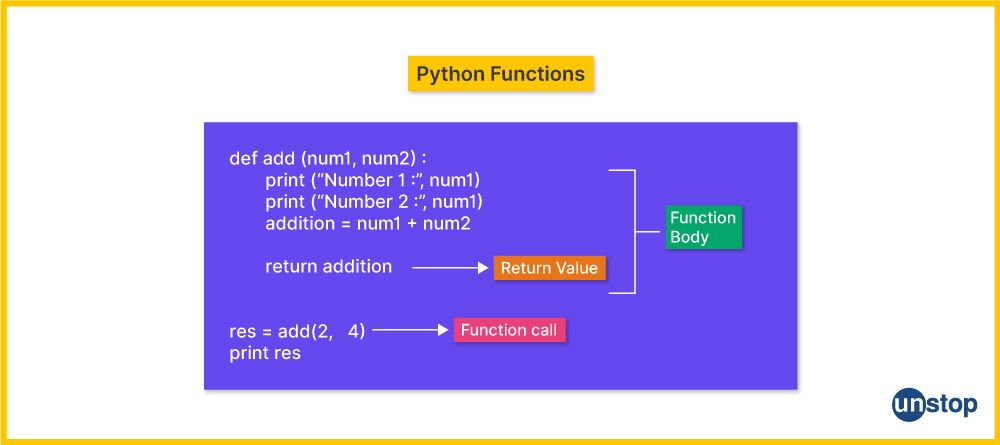
A function definition in Python has a few key parts:
- The
defkeyword, which signals the start of a function definition. - A function name that you choose (e.g.,
greet_user). - Parentheses
()after the name. - A colon
:at the end of the line. - An indented block of code (the function's body) that runs when the function is called.
This visual breaks down the structure nicely:
For example, here is a simple function that prints a greeting:
def greet_user():
    """Displays a simple greeting."""  # This is a docstring, an optional explanation
    print("Hello! Welcome to your data analysis journey.")
To run the code inside the function, you call it by writing its name followed by parentheses:
greet_user()


# Output: Hello! Welcome to your data analysis journey.
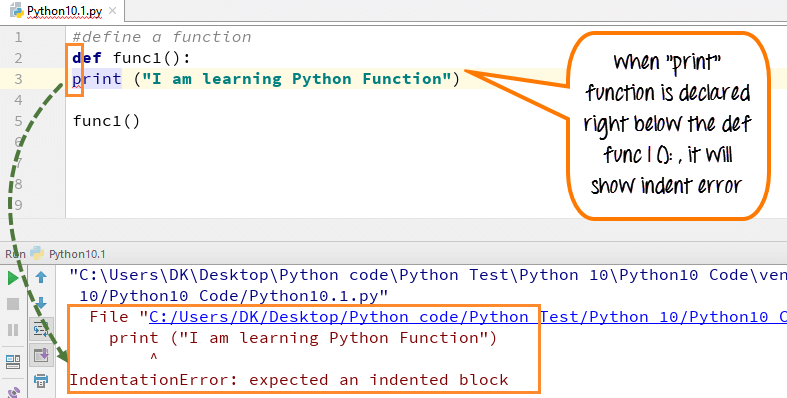
A quick note on indentation: Python uses indentation to define code blocks. If the code inside your function is not indented correctly, you will get an IndentationError.
The following video provides a great hands-on demonstration of defining and calling a basic function.
Functions in Python | Python for Beginners
This video from Alex The Analyst will walk you through the process of writing and calling your very first function.
Watch the first part of the video (00:00 - 01:45) to see how to use the def keyword and how to call the function to execute its code.
Passing Information to a Function (Parameters and Arguments)
A function becomes much more powerful when you can pass data into it. You can define a function to accept information by placing variable names, called parameters, inside the parentheses.
When you call the function, you provide values, called arguments, for those parameters.
def greet_by_name(name):  # 'name' is a parameter
    print(f"Hello, {name}!")

greet_by_name("Alex")  # "Alex" is an argument
greet_by_name("Maria") # "Maria" is an argument


# Output:
# Hello, Alex!
# Hello, Maria!
You can also define functions that accept multiple arguments. The video below continues this topic, showing how to create more dynamic functions.
Functions in Python | Python for Beginners
Let's return to the video from Alex The Analyst to see how to work with single and multiple arguments.
Watch from 01:45 to 04:32. This section demonstrates how to pass a single argument to a function and then expands to show how to use multiple arguments, separated by commas.
Getting Information Back from a Function
So far, our functions have only printed output. But what if you want the function to compute a value that you can use later in your program? For this, you use the return statement.
When a function returns a value, you can store it in a variable.
def calculate_area(length, width):
    """Calculates the area of a rectangle."""
    area = length * width
    return area


# Call the function and store the result
rect_area = calculate_area(10, 5)

print(f"The calculated area is: {rect_area}")


# Output: The calculated area is: 50


# You can now use this variable for other calculations
cost_per_sq_meter = 25
total_cost = rect_area * cost_per_sq_meter
print(f"Total cost: ${total_cost}")


# Output: Total cost: $1250
Understanding Scope: Local vs. Global Variables
It's crucial to understand that variables created inside a function (like area in the example above) are local. They only exist within that function and are destroyed once the function finishes running. This is known as the function's scope.
The return statement is the bridge that allows you to pass a value from the function's local scope back to your main program.
The following video offers an excellent visual explanation of this concept, covering why return is essential and how Python manages variables using namespaces.
Python Functions - Visually Explained
This video from 'Visually Explained' masterfully illustrates the concepts of local variables, scope, and why the return statement is so important.
Watch from 04:44 to 10:29. This is a key conceptual part of the lesson. Pay close attention to the animation showing how the 'local namespace' is created and destroyed, and how return gets a value out just in time.
Putting It All Together: A Practical Example
Let's apply these concepts to a common data analysis task: summarizing a list of numbers.
Exercise:
Write a function named summarize_data that takes a list of numbers as a parameter. The function should calculate and return two values: the total sum and the average of the numbers in the list.
Hint: Python functions can return multiple values by separating them with a comma.
# Your code here
def summarize_data(numbers):
    """Calculates the sum and average of a list of numbers."""
    total = sum(numbers)


    # To avoid division by zero, we'll check if the list is empty
    if len(numbers) > 0:
        average = total / len(numbers)
    else:
        average = 0
    return total, average


# Test your function
daily_sales = [185.5, 212.0, 175.0, 250.25, 199.75]
total_sales, avg_sales = summarize_data(daily_sales)

print(f"Total Sales: ${total_sales:.2f}")
print(f"Average Sales: ${avg_sales:.2f}")


# Expected Output:
# Total Sales: $1022.50
# Average Sales: $204.50
In this example, we encapsulated the logic for summarizing data. We can now reuse this function on any list of numbers without rewriting the code.
Conclusion
Congratulations on completing the first module! You now have a solid foundation in the basic building blocks of Python for data handling. Functions are a cornerstone of writing clean, efficient, and scalable code.
Key Takeaways:
- Functions allow you to package reusable code under a single name (the DRY principle).
- You define a function using the
defkeyword, followed by a name, parentheses, and a colon. - Parameters are variables in the function definition that act as placeholders for data.
- Arguments are the actual values you pass to the function when you call it.
- The
returnstatement sends a value back from the function to the main program. - Variables created inside a function are local and only exist within that function's scope.
Preview of the Next Module:
With the Python fundamentals covered, we are now ready to dive into the specialized libraries that make Python a powerhouse for data analysis. In our next module, we'll start with NumPy, the foundational package for numerical computing. You'll learn how to create and manipulate a new, highly efficient data structure called a NumPy array, which is the engine behind many of the data analysis tools you'll use.