Welcome to the first lesson in our module on memory and concurrency. In our previous discussions on Inter-Process Communication, we explored how processes can cooperate by intentionally breaking their isolation. This naturally leads to a fundamental question: how is that isolation established in the first place? How does an operating system manage to run dozens or even hundreds of processes concurrently on the same physical hardware without them interfering with one another?
The answer lies in one of the most elegant and foundational concepts in modern operating systems: virtual memory. In this lesson, we will explore what virtual memory is and examine its profound benefits, namely providing each process with a private, isolated address space and the illusion of having access to more memory than is physically available. For an engineering manager, understanding this concept is crucial as it underpins system stability, security, and performance in virtually all modern computing environments.
The Problems with Direct Memory Access
Before we can appreciate the solution, we must first understand the problems it solves. Imagine a world without virtual memory, where every program directly manipulates physical RAM. This "direct access" model, common in early, simpler computers, creates several critical issues in a modern multitasking environment.
To get a clear picture of these challenges, the following video offers an excellent conceptual introduction.
What is virtual memory? – Gary explains
This video from Android Authority concisely explains the limitations of a system where programs directly access physical memory.
Please watch the segment from the beginning up to the introduction of virtual memory. As you watch, focus on the three main problems described: The risk of one program overwriting another's data. The need for programs to use relative addressing, complicating development. The problem of memory fragmentation, where memory is wasted in small, unusable gaps.
As the video explains, a system without memory virtualization is fragile and inefficient. A single buggy program could corrupt the data of other running applications or even bring down the entire operating system.
The Grand Illusion: Separating Logical from Physical
Virtual memory solves these problems by creating a powerful abstraction. The operating system, in cooperation with a hardware component called the Memory Management Unit (MMU), presents each process with a "lie." It tells each process that it has its own private, contiguous block of memory—the virtual address space—starting at address zero and extending up to a very large limit (e.g., bytes on a 64-bit system).
The process operates entirely within this virtual world. When it reads from or writes to an address, say 0x4000, it's using a virtual address. The MMU intercepts this request and translates it into a physical address that corresponds to an actual location in RAM.
To explore this core idea further, the following article provides a clear narrative written from the perspective of a backend engineer.
All You Need to Know About Virtual Memory, Page Tables ...
This article from Medium eloquently frames virtual memory as a deliberate and controlled "lie" told to programs to solve the inherent problems of direct physical memory management.
First, read the section What are the issues with working directly with memory? to review the problems of limited space, fragmentation, and security. Then, read the section titled The Big Idea: Lie to Programs. This part explains the core concept of giving each process an isolated, contiguous virtual space and introduces the idea of address translation.
This abstraction layer—this "lie"—is the key to all the benefits that virtual memory provides. Let's examine these benefits in detail.
Benefit 1: Process Isolation and Security
Because each process operates in its own private virtual address space, it is completely isolated from all other processes. An address 0x10A0B0 in your web browser process is entirely different from the same address 0x10A0B0 in your code editor process. The MMU, using separate translation tables for each process, maps these identical virtual addresses to completely different physical addresses in RAM.
This isolation has profound implications for system stability and security:
- Stability: A bug in one application cannot corrupt the memory of another application or the operating system kernel. The rogue process may crash, but the rest of the system remains stable.
- Security: Malicious software cannot easily inspect or tamper with the memory of other running processes, forming a fundamental security boundary.
The image below illustrates this perfectly. It shows two separate processes, Notepad.exe and MyApp.exe. Each has its own private virtual address space. Notice how different virtual addresses from each process are mapped by the OS to distinct, non-contiguous physical memory pages.

Benefit 2: A Larger-Than-Life Address Space
One of the most powerful features of virtual memory is its ability to make the available memory seem much larger than the physical RAM installed in the machine. A 64-bit process has a theoretical address space of 16 exabytes, far exceeding any RAM available today.
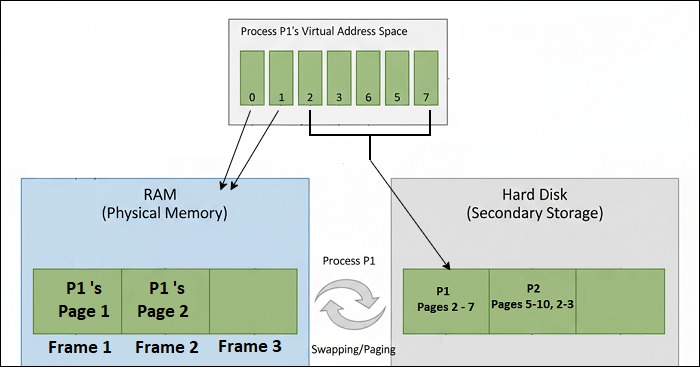
This is achieved through a mechanism called demand paging. The OS doesn't load an entire program into RAM when it starts. Instead, it loads only the essential parts. The virtual address space is divided into fixed-size blocks called pages, and physical RAM is divided into blocks of the same size called frames.
When the program tries to access a part of its virtual address space that isn't currently in a physical frame (i.e., not in RAM), the MMU triggers a page fault. This is not an error, but rather a signal to the OS. The OS then:
- Finds the required page on the hard disk (in a special area often called a "swap file" or "page file").
- Loads that page into an available frame in RAM.
- Updates its translation tables to map the virtual page to the newly loaded physical frame.
- Resumes the process as if nothing happened.
This lazy-loading approach means only the active "working set" of a program needs to be in RAM. Less frequently used parts can remain on the much larger, albeit slower, secondary storage.
The following video from MIT OpenCourseWare explains the concept of demand paging and page faults clearly.
16.2.2 Basics of Virtual Memory
This video explains how the OS uses page faults and demand paging to load program data from secondary storage into main memory only when it's actually needed.
Please watch the segment from the introduction of demand paging to the discussion of the program's working set. This explains how page faults are the mechanism that allows the system to use the hard disk as an extension of RAM.
The image below provides a great visual summary of this process, showing how a process's virtual address space is mapped to both physical RAM for active pages and the hard disk for inactive pages.
Benefit 3: Efficient and Simplified Memory Management
Finally, virtual memory dramatically simplifies memory management for both the OS and the application developer.
- Elimination of External Fragmentation: As we saw in the first video, allocating and deallocating variable-sized chunks of memory in physical RAM leads to fragmentation. Virtual memory solves this because the OS always works with fixed-size pages. It can map a contiguous virtual address space to physical frames that are scattered all over RAM, as shown in the first image. This eliminates the need to find large, contiguous free blocks.
- Simplified Programming: Programmers can write code assuming they have a large, linear memory space to work with. They don't need to worry about the physical layout of memory or whether there's enough contiguous RAM available.
- Efficient Sharing: A single physical copy of a shared library (like a common system DLL or
.sofile) can be mapped into the virtual address space of multiple processes. Each process thinks it has its own private copy, but they all share the same physical RAM, saving significant memory.
Conclusion
In this lesson, we have demystified the concept of virtual memory. It is not a physical component but a powerful abstraction created by the operating system and CPU hardware.
Here are the key takeaways:
- The Core Idea: Virtual memory gives each process the illusion of its own private, large, and contiguous memory space, decoupling it from the physical reality of RAM.
- Process Isolation: By providing each process with a separate virtual address space, the OS ensures that processes cannot interfere with each other, leading to a more stable and secure system.
- Larger Address Space: Through demand paging, the OS uses the hard disk as an extension of RAM, allowing programs to be much larger than the physical memory available.
- Efficiency: Virtual memory solves the problem of external fragmentation and allows for efficient sharing of common code libraries between processes.
Now that we understand the "what" and "why" of virtual memory, our next lesson will focus on the "how." We will take a closer look at paging and page tables to understand the mechanics of how the MMU translates virtual addresses into physical addresses, which is the engine that drives this entire system.