In our last lesson, we established the "what" and "why" of virtual memory—a powerful abstraction that provides each process with a private, large, and contiguous address space. This elegant "lie" is the foundation for process isolation, security, and efficient memory management. Now, it's time to pull back the curtain and explore the "how."
This lesson will demystify the mechanics behind virtual memory. You will learn how the operating system and the CPU's Memory Management Unit (MMU) work together to translate the virtual addresses used by a program into the physical addresses that correspond to actual locations in RAM. The core components of this mechanism are paging and page tables, and understanding them is fundamental to grasping how modern computers manage memory.
The Basic Mechanism: Paging and Address Translation
As we touched upon previously, the fundamental idea behind paging is to divide memory into fixed-size blocks. The virtual address space is chopped into pages, and the physical memory (RAM) is divided into same-sized blocks called page frames. The OS is then responsible for mapping virtual pages to physical frames.
A key insight is that a contiguous block of virtual pages does not need to map to a contiguous block of physical frames. This flexibility is what allows the OS to overcome the problem of physical memory fragmentation.
To see how this works, let's start with a simple example.
This chapter from the excellent "Operating Systems: Three Easy Pieces" book introduces the core idea of paging with a very clear, small-scale example. It demonstrates how a process's virtual address space can be scattered across physical memory.
Please read the section A Simple Example. Focus on how the 64-byte virtual address space is placed into the 128-byte physical memory and how the page table is introduced as the data structure that tracks these mappings.
The crucial next step is to understand how a virtual address itself is structured. The hardware doesn't treat it as a single monolithic number. Instead, it splits it into two parts:
- Virtual Page Number (VPN): The upper bits of the address, which identify the virtual page.
- Page Offset: The lower bits of the address, which specify the byte's location within that page.
The size of the page determines how many bits are used for the offset. For example, with 4 KiB pages ( bytes), the lower 12 bits of the virtual address form the page offset. The remaining upper bits form the VPN.
The translation process then becomes:
- The VPN is translated to a Physical Frame Number (PFN) using the page table.
- The offset remains unchanged. It is simply combined with the PFN to form the final physical address.
This short video provides an excellent visual walkthrough of this fundamental process.
Virtual Memory: 7 Address Translation Example Walkthrough
This video by David Black-Schaffer clearly demonstrates how a virtual address is split and translated.
Watch from the beginning to the end of the first example. Pay close attention to how the Virtual Page Number is used as an index into the page table, while the page offset is passed through directly to form the final physical address.
The Page Table and its Entries
As you've now seen, the page table is the central data structure for address translation. It's essentially a lookup table, indexed by the VPN, that provides the corresponding PFN. For each process, the OS maintains a separate page table.
Let's formalize the translation with the simple example from the OSTEP text.
This section builds on the previous example by walking through the translation of a specific virtual address.
Read the text starting from the address breakdown. This will show you mathematically how virtual address 21 is broken into its VPN and offset, and how the page table provides the PFN to construct the final physical address 117.
However, a Page Table Entry (PTE) contains much more than just the physical frame number. It also holds several crucial control bits that the MMU uses to enforce memory protection and manage pages.
Page Tables and MMU: How Virtual Memory Actually Works Behind the Scenes (Animation)
This animation from BitLemon provides a great overview of the different fields within a page table entry.
Watch the segment from the discussion of PTE fields. As you watch, make note of the purpose of each of these common bits: Protection Bits: Read-Only, User/Supervisor, No-Execute. These are fundamental for security and preventing bugs. Status Bits: Present (or Valid), Dirty, Accessed. These are used by the OS for demand paging and page replacement decisions.
These bits are what enable the OS to implement the features we discussed in the last lesson. For example:
- If a process tries to write to a page marked
Read-Only, the MMU triggers a protection fault. - If a process tries to access a page where the
Presentbit is0, the MMU triggers a page fault, signaling the OS to load the page from disk.
The Size Problem: Multi-Level Page Tables
So far, we've considered a simple, linear page table (an array). This works for tiny address spaces, but it fails spectacularly with modern 64-bit systems. A 64-bit address space is enormous (16 exabytes). A single page table to map this entire space, even with 4 KiB pages, would require trillions of entries and consume a petabyte-scale amount of memory itself. This is obviously impractical.
The solution is to add a level of indirection, creating a tree-like structure known as a multi-level page table. Instead of one giant table, we have a hierarchy of smaller tables.
- A top-level table's entries don't point to physical frames. Instead, they point to the physical address of a next-level page table.
- This continues for several levels until the final-level table, whose entries point to the actual physical frames.
This hierarchical approach saves an immense amount of space because page tables for unused regions of the virtual address space simply don't need to be allocated. Modern architectures like x86-64 use a four-level page table scheme.
Introduction to Paging | Writing an OS in Rust
This article from "Writing an OS in Rust" gives one of the clearest explanations of multi-level page tables available.
First, read the section on two-level page tables to understand the core concept of using indirection to save space. Then, continue to the next section, Paging on x86_64, which describes the four-level structure used in virtually all modern PCs and servers. Pay attention to how the 48-bit virtual address is broken down into multiple 9-bit indices and a 12-bit offset.
A Full Translation Walkthrough
Now we can put all the pieces together to see how a virtual address is translated in a modern x86-64 system. The CPU's CR3 register holds the physical address of the top-level page table (the Page Map Level 4 Table, or PML4). The hardware then "walks" the page table hierarchy.
The following diagram illustrates this entire process.
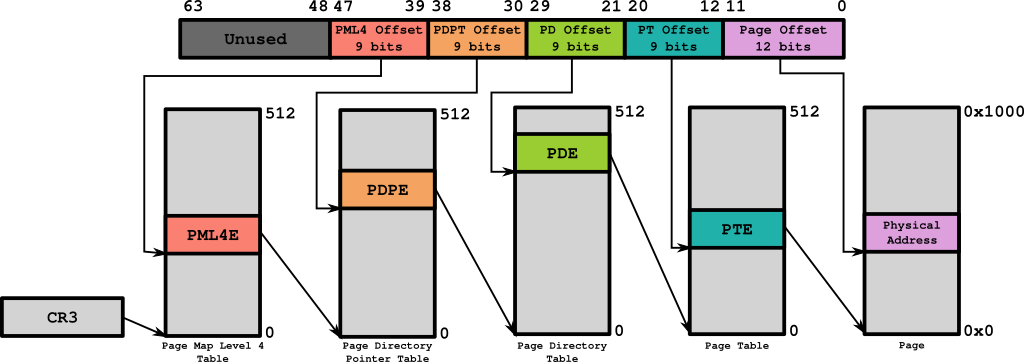
Let's walk through this step-by-step with a concrete example.
Introduction to Paging | Writing an OS in Rust
This final section from the "Writing an OS in Rust" article provides a detailed walkthrough of the diagram above.
Read the section Example Translation. This text describes precisely how the different 9-bit parts of the virtual address are used as indices at each level of the page table hierarchy to find the final physical frame number.
This entire process—splitting the address, indexing into tables, and checking protection bits—is performed automatically in hardware by the Memory Management Unit (MMU) on every single memory access. It's a remarkable piece of engineering that is completely transparent to the running application.
The obvious performance question is: doesn't this slow things down? Accessing one memory location now requires up to four additional memory reads just to walk the page tables. This would be prohibitively slow. The hardware solves this with a specialized cache called the Translation Lookaside Buffer (TLB), which stores recently used virtual-to-physical address translations. If a translation is in the TLB (a "TLB hit"), the lengthy page table walk can be skipped entirely.
Conclusion
In this lesson, we have dissected the core mechanism that powers virtual memory. We've moved from the high-level concept to the low-level hardware implementation details.
Here are the key takeaways:
- Address Splitting: A virtual address is composed of a Virtual Page Number (VPN) and a Page Offset. The offset is never translated.
- Page Tables: These are per-process data structures, managed by the OS, that map VPNs to Physical Frame Numbers (PFNs).
- Page Table Entries (PTEs): A PTE contains the PFN plus crucial control bits for protection (
read/write/execute) and memory management (present,dirty,accessed). - Multi-Level Structure: To handle vast 64-bit address spaces efficiently, modern systems use a hierarchy of page tables (e.g., 4 levels on x86-64).
- Translation Process: The MMU uses a special register (
CR3) to find the top-level page table and "walks" the hierarchy using parts of the virtual address as indices to find the final PFN.
We've seen that the present bit in a PTE indicates whether a page is actually in physical RAM. When a program tries to access a page that isn't present, the MMU triggers a page fault. In our next lesson, we will explore how the OS handles this. Since physical memory is limited, the OS must decide which page to evict to make room for the new one. This leads us directly to the topic of page replacement algorithms.