Hello! In our previous lesson, we established how to represent physical vectors like position, velocity, and force using NumPy arrays. This was a crucial first step in translating physics concepts into a language our simulation can understand.
Now that we can store these vectors, our next task is to extract meaningful scalar quantities from them. For instance, if our rocket has a velocity vector of [vx, vy], how do we determine its overall speed? Or, in which direction is it actually flying? This lesson will equip you with the tools to answer these questions by teaching you how to compute the magnitude and direction of any 2D vector. This skill is fundamental for analyzing the results of our future simulations, allowing us to track key metrics like speed, distance from the launchpad, and flight path angle.
Vector Magnitude: The "How Much?"
The magnitude of a vector is its length or size. It's a scalar value that answers the question, "how much?". For a velocity vector, the magnitude is the speed. For a position vector, the magnitude is the straight-line distance from the origin.
You might recall from your physics and math classes that this "length" can be found using the Pythagorean theorem. If a vector is defined by its components [x, y], these components form the two legs of a right-angled triangle, and the vector itself is the hypotenuse.
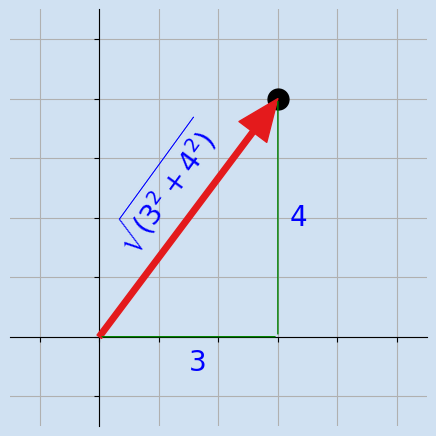
To formalize this, let's explore the mathematical definition and its importance in fields like physics and engineering.
Numpy find magnitude of vector - CodeGive
This article from CodeGive provides a clear definition of vector magnitude and its mathematical foundation.
Please read the first two sections. Start with "What is a Vector?" and continue through to the end of the section "Mathematical Foundation of Magnitude". This will formalize the concept shown in the image above.
The key formula is: For a vector , its magnitude is given by:
Calculating Magnitude in NumPy
While we could implement this formula step-by-step (np.sqrt(np.sum(v**2))), NumPy provides a dedicated, highly optimized function for this exact purpose, which is part of its linear algebra module, linalg.
The following reading will introduce you to this function. It is the standard and preferred method for this calculation in any Python-based scientific computing work.
Numpy find magnitude of vector - CodeGive
Continuing in the same article, we'll now see how to perform this calculation efficiently in code.
Read through "Method 1: Manual Calculation" to see how the formula translates directly to code. Then, focus on "Method 2: Using np.linalg.norm()", as this is the function you will be using in practice. Note how it simplifies the calculation to a single, readable line of code. You can find these sections just after the introduction to NumPy. The part to focus on is from Method 2's 3D example.
As the article explains, the np.linalg.norm() function is the most efficient and readable way to find a vector's magnitude. Let's see it in action. If a rocket has a velocity vector of [30.0, 40.0] m/s (30 m/s horizontally and 40 m/s vertically), we can find its total speed like this:
import numpy as np

velocity_vector = np.array([30.0, 40.0])


# Calculate the magnitude (speed) using np.linalg.norm()
speed = np.linalg.norm(velocity_vector)

print(f"The velocity vector is {velocity_vector} m/s.")
print(f"The rocket's speed is {speed:.2f} m/s.")


# Expected output: 50.00 m/s
In our simulations, we won't just have one velocity vector; we'll have an entire array of them, one for each point in time. np.linalg.norm() handles this brilliantly using the axis parameter. If we have a NumPy array where each row is a vector, we can calculate the magnitude of every vector in one go. This is a powerful feature you'll use constantly.
Vector Direction: The "Which Way?"
Now that we know the vector's magnitude, we need its direction. This is typically defined as the angle the vector makes with the positive x-axis, measured counter-clockwise. For a rocket's velocity vector, this angle tells us its flight path inclination.
From trigonometry, you know that for a right triangle with sides x and y, the angle θ can be found using the inverse tangent: . However, this approach has a critical flaw: y/x is the same as (-y)/(-x). This means the inverse tangent function can't distinguish between a vector pointing into the first quadrant (e.g., [3, 4]) and one pointing into the third (e.g., [-3, -4]). We would need to write extra logic to check the signs of x and y to find the correct angle.
The video below demonstrates this problem and the manual corrections required when using the basic inverse tangent function.
How to Find the Direction Angle of a Vector
This video from Mario's Math Tutoring clearly explains the concept of a direction angle and the pitfalls of using a simple arctan function.
Watch the first minute to understand the definition and the formula. Then, see how it requires correction for a vector in the second quadrant and the third quadrant. Notice the extra + 180 degrees needed in these cases.
The arctan2 Solution
This quadrant-checking logic is cumbersome and error-prone. Fortunately, this is a solved problem in programming. NumPy provides the function np.arctan2(y, x), which is designed specifically for this task.
Instead of taking a single ratio y/x, it takes y and x as two separate arguments. This allows it to consider their individual signs and always return the correct angle in the correct quadrant, over a full range from -π to +π radians (-180° to +180°).
The following Stack Overflow discussion perfectly illustrates this. The question shows the kind of complex if/else logic we want to avoid, and the answer provides the clean, professional solution.
How to calculate an angle between 2D vector and OX with numpy?
This is a classic programming question with a very elegant answer that you should know.
Skim the question to see the complicated calc_phi function the author wrote. Then, read the short, accepted answer, which shows the use of np.arctan2.
np.arctan2(v[1], v[0]) is the definitive way to find the direction of a 2D vector v. Let's use it on a vector pointing into the second quadrant, where a simple arctan would fail.
import numpy as np


# Vector pointing up and to the left
velocity_vector = np.array([-50.0, 50.0])


# Calculate direction using np.arctan2(y, x)
# The result is in radians
angle_rad = np.arctan2(velocity_vector[1], velocity_vector[0])


# Convert to degrees for easier interpretation
angle_deg = np.rad2deg(angle_rad)

print(f"Vector: {velocity_vector}")
print(f"Direction: {angle_rad:.2f} radians")
print(f"Direction: {angle_deg:.2f} degrees")


# Expected output: 135.00 degrees
Notice the arguments are (y, x), not (x, y). velocity_vector[1] is the y-component, and velocity_vector[0] is the x-component. The function correctly returns 135°, placing the vector in the second quadrant, without any if statements.
Conclusion
In this lesson, you've learned to extract two of the most important scalar properties from a vector representation. This moves us beyond simply storing data to actively analyzing it—a core activity in any simulation project.
Here are the essential takeaways:
- Vector Magnitude is the vector's length, calculated using the Pythagorean theorem. In our simulations, it will represent quantities like speed or distance.
- The preferred way to compute magnitude in NumPy is with
np.linalg.norm(vector). - Vector Direction is the angle the vector makes with the positive x-axis. It will tell us our rocket's trajectory angle.
- The robust method for finding direction is
np.arctan2(y_component, x_component), which correctly handles all quadrants and returns an angle in radians.
You now have a complete toolkit for describing 2D vectors: you can create them, perform arithmetic on them, and compute their magnitude and direction. In our next lesson, we will put this to use. We'll start generating data from simple physics scenarios and learn how to use Matplotlib, Python's primary plotting library, to visualize our results. We'll finally be able to plot a trajectory