Hello! Welcome back to your course on penetration testing.
In our last two lessons, we established a solid foundation. We started with the OSI and TCP/IP models to understand the theory of network communication, and then you learned how to use Wireshark to observe that theory in practice by analyzing packets and identifying communication patterns. You saw that every IP packet has a source and destination address.
Today, we're diving deep into Layer 3 to understand what those IP addresses really are. This lesson focuses on IP addressing, subnetting, and calculating network ranges using CIDR notation. For a penetration tester, this isn't just an academic exercise. Mastering subnetting is how you map a target environment, understand its segmentation, and define the scope of your attack surface. It's a fundamental skill for network reconnaissance.
1. The Anatomy of an IP Address
An IPv4 address, like 172.16.25.10, is simply a 32-bit number. To make it human-readable, we write it as four 8-bit numbers (octets) separated by dots. But an IP address alone doesn't tell us the whole story. It needs a companion: the subnet mask.
The subnet mask's job is to divide the IP address into two parts:
- Network Portion: Identifies the network the device is on. Think of this as the street name.
- Host Portion: Identifies the specific device on that network. This is like the house number.
All devices on the same network share the same network portion. This is how a router knows whether to send a packet to a local device or forward it to another network.
To understand how the mask works, we need to think in binary. The subnet mask is also a 32-bit number. The 1s in the mask correspond to the network portion of the IP, and the 0s correspond to the host portion.
The following video from NetworkChuck offers an excellent, energetic explanation of this core concept.
What is a Subnet Mask??? (you NEED to know it!!)
This video breaks down what a subnet mask is and why it's so important. It provides a great visual for understanding how the mask separates the network and host portions of an IP address.
Watch from the beginning to 08:10. Focus on: The fundamental role of the subnet mask. How a decimal subnet mask (like 255.255.255.0) translates to binary. The key idea: 'ones' in the mask represent the network, and 'zeros' represent the host.
2. CIDR Notation: The Pentester's Shorthand
Writing out 255.255.255.0 all the time is tedious. In the real world, and especially in pentesting tools and reports, you'll almost always see Classless Inter-Domain Routing (CIDR) notation.
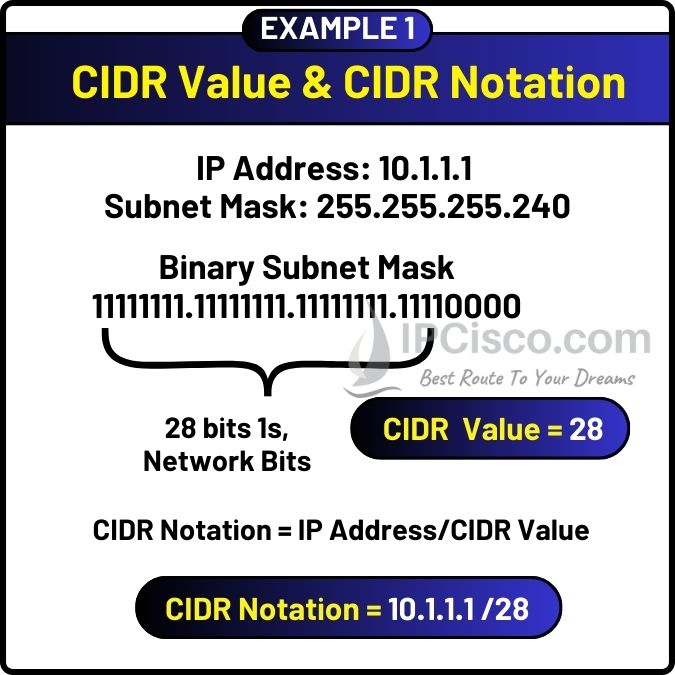
CIDR notation is just a shorthand for the subnet mask. It's a slash (/) followed by the number of 1s in the mask.
255.255.255.0in binary is11111111.11111111.11111111.00000000. It has 24 ones, so its CIDR notation is /24.255.255.0.0in binary is11111111.11111111.00000000.00000000. It has 16 ones, so its CIDR notation is /16.
So, when you see 192.168.1.10/24, you immediately know the first 24 bits are for the network and the last 8 bits are for the host.
Test your understanding!
What is the subnet mask in dotted-decimal notation for a network with a /26 CIDR prefix?
Show answer
A /26 prefix means there are 26 ones in the subnet mask:11111111.11111111.11111111.11000000
- The first three octets are all ones, which is
255.255.255. - The last octet is
11000000. In binary, this is . - So, the full mask is
255.255.255.192.
3. Why Subnet? Slicing the Pizza
So, why do we need to do this? Why not just use one giant network? Subnetting is the process of taking one large network and breaking it into smaller logical networks, called subnets.
This is crucial for:
- Security: You can create separate subnets for different departments (e.g., Finance, Development) or for different security levels (e.g., a corporate LAN vs. a public guest Wi-Fi). A firewall between these subnets controls traffic, limiting an attacker's ability to move freely if one subnet is compromised.
- Performance: It reduces broadcast traffic. Broadcasts are sent to every host on a network. By creating smaller subnets, you reduce the size of these broadcast domains, making the network more efficient.
- Organization: It makes the network more manageable and simplifies troubleshooting.
Professor Messer's "pizza analogy" is a classic way to visualize this.
Calculating IPv4 Subnets and Hosts - CompTIA Network+ N10-009 - 1.7
This short clip explains the 'why' behind subnetting. It introduces the idea of variable-length subnet masks to create networks that are just the right size for your needs.
Watch from 01:02 to 02:38. Pay attention to the pizza analogy and the concept of creating networks of different sizes from a larger block.
4. The Math Behind Subnetting
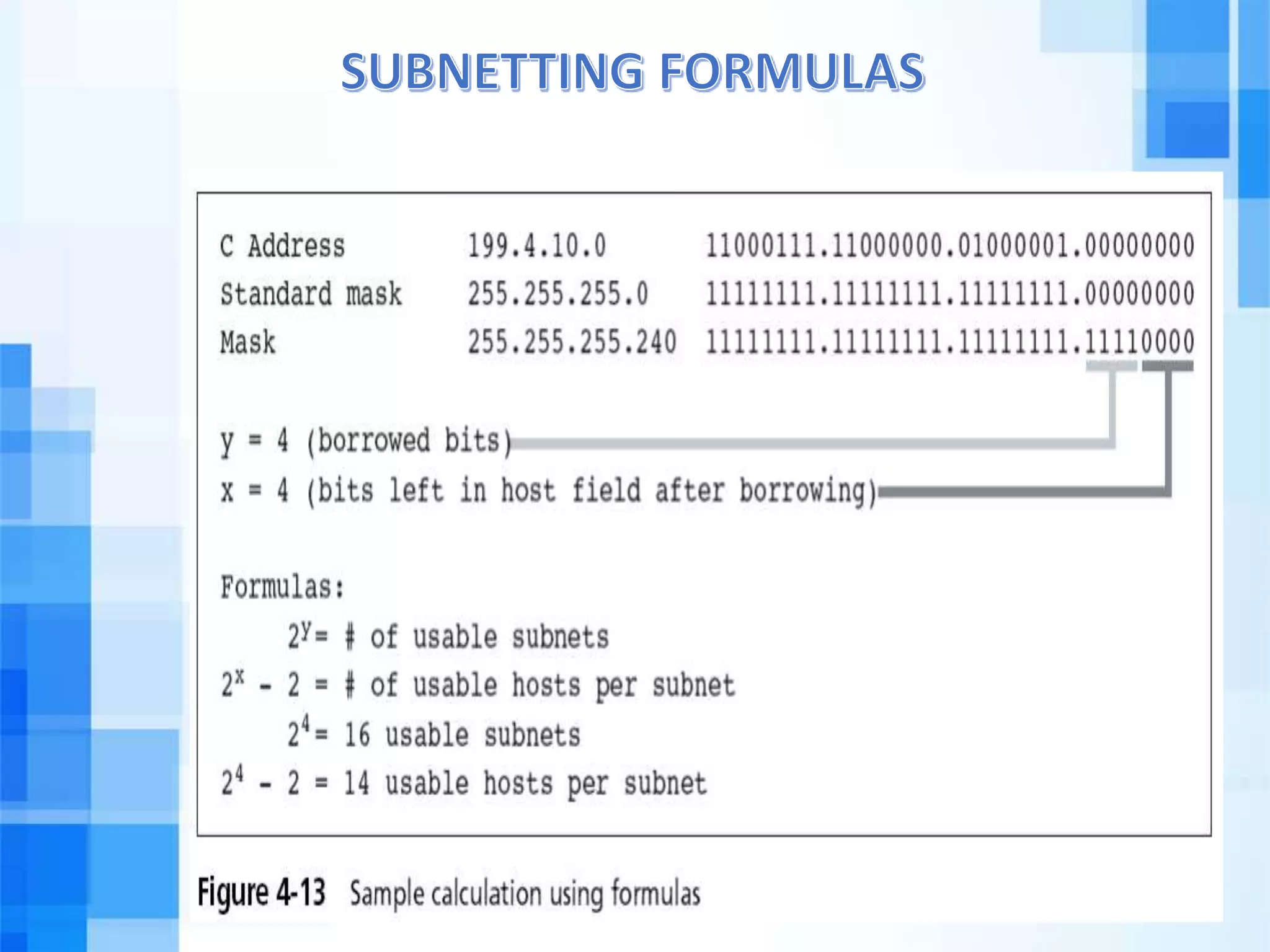
Subnetting is achieved by "borrowing" bits from the host portion of the address and reassigning them as subnet bits. This gives you more networks, but fewer hosts per network.
Here are the two essential formulas you need to know:
- Number of Subnets = , where
sis the number of bits you borrowed. - Number of Usable Hosts per Subnet = , where
his the number of bits left for hosts.
We subtract 2 from the host calculation because two addresses in every subnet are reserved:
- The Network ID: The first address (all host bits are 0). It identifies the subnet itself.
- The Broadcast Address: The last address (all host bits are 1). It's used to send messages to all hosts on that subnet.
Let's watch Professor Messer apply these formulas with his clear, step-by-step examples.
Calculating IPv4 Subnets and Hosts - CompTIA Network+ N10-009 - 1.7
This video demonstrates the practical calculation of subnets and hosts. Professor Messer uses a 'powers of two' chart, which is a very fast and effective method for doing subnet math.
Watch from 04:19 to 07:52. You'll see: The introduction of the powers of two chart and the formulas (4:19). A worked example for a /24 network (5:13). A second, more complex example for a /26 network (6:27). Follow his logic for identifying the default network bits, the borrowed subnet bits, and the remaining host bits.
5. A Real-World Scenario: Subnetting a Coffee Shop
Theory is great, but let's apply this to a scenario you might encounter as a pentester. Understanding how a network is architected is the first step to finding its weaknesses.
The following guide walks through a practical subnetting problem from start to finish.
This guide from the Abertay Hackers Society wiki presents a clear, practical problem: subnetting a small business network. It's a perfect end-to-end example of applying the concepts we've discussed.
Read the entire page. It will walk you through: The scenario: A request to create 3 subnets from a given network ID. The 'cheat sheet' table for quickly finding the right subnet mask. The final table showing the Network ID, Host ID Range, and Broadcast ID for each new subnet. This is the exact information you would need to map out a target network.
Test your understanding!
You are given the network 172.20.0.0/16. You need to create subnets that can support at least 1,000 hosts each.
- How many host bits (
h) do you need? - What is the new CIDR prefix for these subnets?
- How many usable hosts will be in each subnet?
Show answer
-
You need to find
hsuch that .- (too small)
- (just right)
So, you need 10 host bits.
-
An IPv4 address has 32 bits total. If 10 bits are for hosts, then
32 - 10 = 22bits are for the network. The new CIDR prefix is /22. -
As calculated in step 1, there will be 1022 usable hosts per subnet.
Conclusion
Great job working through a topic that can be tricky for many. Subnetting is a core networking skill that directly translates to your effectiveness as a penetration tester. When you're performing reconnaissance on a client's network, identifying the different subnets tells you about the network's architecture, where the boundaries are, and where routers and firewalls—key targets for a pentest—are likely located.
Here are the key takeaways from today's lesson:
- An IP address is split into a network portion and a host portion by a subnet mask.
- CIDR notation (e.g.,
/24) is a shorthand that tells you how many bits are in the network portion. - Subnetting is the process of borrowing bits from the host portion to create smaller networks, which improves security and performance.
- You can calculate the number of new subnets with and the number of usable hosts per subnet with .
- Every subnet has a reserved Network ID (the first address) and a Broadcast ID (the last address).
In our next lesson, we will move up to Layer 4 of the OSI model. We'll explore the critical differences between the two main transport protocols, TCP and UDP, and revisit the TCP three-way handshake in more detail. This is essential for understanding how services on a target system establish connections, which is the foundation for techniques like port scanning.