Hello! Welcome back to your course on penetration testing.
In our last lesson, we explored Layer 3 of the OSI model, diving into IP addressing, subnetting, and CIDR notation. You learned how to dissect an IP address and its subnet mask to understand the boundaries of a network. This is a crucial skill for mapping out a target environment.
Today, we're moving up the stack to Layer 4: the Transport Layer. This lesson will focus on differentiating between the two workhorse protocols of the internet, TCP and UDP, and taking a close look at the famous TCP three-way handshake.
For a penetration tester, understanding these protocols is not optional. Every connection you make to a target, whether it's browsing their website or scanning for open ports, is governed by these rules. Knowing how TCP establishes connections is the key to understanding how port scanners like Nmap work, including how they can perform "stealthy" scans to avoid detection.
1. The Two Couriers: TCP vs. UDP
Imagine you need to send a message. You have two options:
- Registered Mail (TCP): You carefully package the message, get a tracking number, send it, and wait for a delivery confirmation. If the package gets lost, the postal service tries again. The message is guaranteed to arrive, and all pages will be in the correct order. This process is reliable but has some overhead and is a bit slower.
- Postcard (UDP): You write a quick message on a postcard and drop it in the mailbox. It's fast, simple, and has very little overhead. However, there's no tracking, no delivery confirmation, and no guarantee it will arrive. If it gets lost, it's gone for good.
This analogy captures the essence of the Transmission Control Protocol (TCP) and the User Datagram Protocol (UDP). They both operate at Layer 4, but they serve very different purposes.
To get a foundational understanding, let's start with a clear, concise article that lays out the core characteristics of each protocol.
This article from Algomaster provides an excellent overview of TCP and UDP. It clearly defines their roles and key characteristics, setting the stage for a deeper dive.
Please read the following sections: The introduction (up to section 1). Section 1: The Role of the Transport Layer. Section 2: What Is TCP (Transmission Control Protocol)? Section 3: What Is UDP (User Datagram Protocol)? Section 4: Head-to-Head Comparison: TCP vs UDP (focus on the summary table). Pay attention to the keywords: connection-oriented vs. connectionless, and reliable vs. best-effort.
2. A Deeper Dive into the Differences
Now that you have the basic concepts, let's explore these differences with more technical precision. The following video from Practical Networking offers one of the best explanations available, breaking down the comparison into four key dimensions and debunking common myths.
TCP vs UDP - Explaining Facts and Debunking Myths - TCP Masterclass
This video provides a thorough and accurate comparison of TCP and UDP. It will clarify what terms like 'reliable' and 'flow control' actually mean in a practical sense.
Watch from 01:33 to 17:57. The video covers: Connection-oriented vs. Connectionless (01:33 - 03:40) Reliability (acknowledgements and ordering) (03:40 - 08:03) Flow Control (08:03 - 10:27) Overhead (header sizes) (10:27 - 13:36) Common Myths (e.g., 'UDP is faster', 'TCP is more secure') (13:36 - 17:57) This will give you a robust mental model of how these protocols operate.
To summarize the key distinctions:
| Feature | TCP (Transmission Control Protocol) | UDP (User Datagram Protocol) |
|---|---|---|
| Type | Connection-oriented | Connectionless |
| Reliability | Reliable. Uses acknowledgements (ACKs) and retransmits lost packets. | Unreliable ("Best-effort"). No acknowledgements or retransmissions. |
| Ordering | Ordered. Packets are guaranteed to be reassembled in the correct sequence. | Unordered. Packets may arrive out of order. |
| Speed | Slower, due to connection setup and reliability mechanisms. | Faster, due to minimal overhead and no handshakes. |
| Header Size | Larger (20-60 bytes) to support its features. | Smaller (8 bytes), very lightweight. |
| Flow Control | Yes. Prevents the sender from overwhelming the receiver. | No. Sends data as fast as possible. |
| Use Cases | Web (HTTP/S), Email (SMTP), File Transfer (FTP), Databases. | Video/Audio Streaming, Online Gaming, DNS, VoIP. |
Test your understanding!
For each of the following applications, would TCP or UDP be the more appropriate protocol? Explain why.
- A video conferencing application like Zoom.
- Downloading a software update for your operating system.
- Looking up the IP address for
google.comusing DNS.
Show answer
- UDP. For video conferencing, timeliness is more important than perfect reliability. It's better to have a tiny, momentary glitch (a dropped packet) than to have the entire video stream pause to wait for a retransmission.
- TCP. A software update must be 100% complete and correct. Even one corrupted or missing packet could render the entire update useless or even damage the system. TCP's reliability and ordered delivery are essential here.
- UDP. DNS requests need to be extremely fast. A single request and a single response are all that's needed. The low overhead and connectionless nature of UDP make it perfect for this quick transaction. If the request fails, the application can simply try again.
3. The TCP Three-Way Handshake
Because TCP is connection-oriented, it must formally establish a connection before any data is sent. This process is known as the three-way handshake. It's a simple, elegant sequence of three packets that ensures both the client and server are ready to communicate.
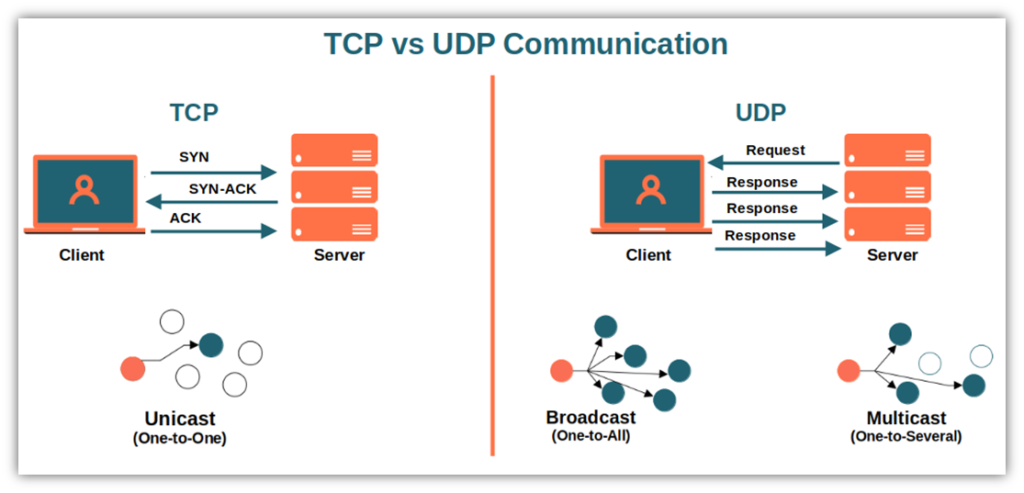
The three steps are:
- SYN: The client sends a TCP packet with the SYN (Synchronize) flag set. This packet essentially says, "I would like to start a connection with you. My initial sequence number is X."
- SYN-ACK: The server receives the SYN packet. If it's willing to accept the connection, it responds with a packet that has both the SYN and ACK (Acknowledge) flags set. This packet says, "I acknowledge your request to connect (ACK). I would also like to establish a connection. My initial sequence number is Y."
- ACK: The client receives the SYN-ACK packet and sends one final packet with the ACK flag set. This packet says, "I acknowledge your agreement to connect. The connection is now established."
Data transfer can begin only after this handshake is complete.
The following video from The Cyber Mentor, whom you may know from the pentesting community, provides a great explanation and, more importantly, shows you what this looks like in Wireshark.
Networking for Ethical Hackers - TCP, UDP, and the Three-Way Handshake (Re-Up)
This video will walk you through the three-way handshake and then demonstrate it using Wireshark. This provides a perfect practical link to what you learned about packet analysis in a previous lesson.
Watch from 01:24 to 05:06. Focus on: The explanation of the SYN, SYN-ACK, ACK process. The Wireshark demonstration. Try to follow along as he identifies the three handshake packets in the live capture. Notice the source and destination IPs and ports, and the flags set on each packet.
For a detailed text-based breakdown of this process, you can refer back to the article "Tcp Vs Udp | System Design" and read the subsection "1. Connection Establishment (Three-Way Handshake)" under the "How TCP Works" heading.
4. The Handshake in Penetration Testing
So, why is this handshake so important for you? Because by manipulating it, we can gather information about a target. This is the foundation of port scanning with Nmap.
-
TCP Connect Scan (
-sTin Nmap): This is the most basic scan. It attempts to complete the full three-way handshake with every port on the target. If the handshake succeeds, the port is open. If the server responds with a different packet (like a RST - Reset), the port is closed. This is reliable but very "loud" and easily logged by firewalls. -
SYN "Stealth" Scan (
-sSin Nmap): This is a more subtle technique. Your machine sends a SYN packet, as if to start a connection.- If the target responds with a SYN-ACK, you know the port is open. But instead of sending the final ACK, your machine sends a RST (Reset) packet, tearing down the connection before it's fully established.
- If the target responds with a RST, you know the port is closed.
Because the full connection is never made, this type of scan is less likely to be logged by basic security monitoring, hence the name "stealth scan." The video you just watched briefly mentions this idea.
Networking for Ethical Hackers - TCP, UDP, and the Three-Way Handshake (Re-Up)
Let's revisit a short clip from the last video where the presenter introduces the concept of a stealth scan.
Watch from 05:06 to 05:50. The presenter explains how you can send a SYN, receive a SYN-ACK, and then send a RST instead of an ACK. This is the core principle of a SYN scan, a topic we will explore in great detail in Module 2.
Conclusion
Excellent work today. We've moved up to the Transport Layer and unraveled the key differences between its two main protocols. Understanding this TCP/UDP trade-off between reliability and speed is fundamental to networking and system design.
Here are the key takeaways:
- TCP is connection-oriented and reliable. It's used when data integrity is critical (e.g., web browsing, file transfers).
- UDP is connectionless and fast. It's used when speed is more important than perfect reliability (e.g., streaming, gaming, DNS).
- The TCP three-way handshake (SYN, SYN-ACK, ACK) is the mandatory process for establishing a reliable TCP connection.
- Penetration testing tools like Nmap exploit the mechanics of the three-way handshake to discover open ports on a target system.
In our next lesson, we will pivot from networking theory to another essential pillar of penetration testing: the Linux command line. You've mentioned you have some basic familiarity, and we'll start building on that by learning to navigate the file system and manage files using core utilities. This is a foundational skill for interacting with compromised systems.