Introduction
In our last lesson, you created a detailed research plan for our fictional client, GreenLeaf Organics. This plan is your roadmap, outlining the business objective, your specific research questions, and the key competitors to investigate. With this solid foundation in place, it's time to move from planning to execution.
This lesson is all about rolling up your sleeves and gathering the data. You will learn how to systematically collect competitor intelligence based on your research plan and how to use powerful, free tools to identify broader market trends. By the end, you will have collected the raw information needed to build the final competitor analysis report for your client. This is a core activity in freelance data research, turning a plan into a valuable dataset.
Gathering Competitor Intelligence
Your research plan for GreenLeaf Organics breaks down the required information into clear categories. Let's tackle them one by one. For this part of the project, you'll be acting like a detective, visiting the websites and social media pages of the competitors you identified and recording your findings.
Your primary tool will be a Google Sheet. Create a new sheet and name it GreenLeaf Organics - Competitor Data. Create a separate tab for each competitor you identified in the previous lesson. In each tab, set up columns for the data points we need to collect, such as:
- Product Name (Vitamin C Serum)
- Price
- Size (e.g., 30ml)
- Key Ingredients/Features
- Stated Value Proposition
- Apparent Target Audience
- Social Media Channels (with links)
- Social Media Content Theme
- Key Praise from Reviews
- Key Complaints from Reviews
As you visit each competitor's website and social media profiles, fill in this spreadsheet. This manual, methodical data collection is a fundamental skill.
For finding insights into what customers are saying, the techniques from Adam Erhart's video we reviewed in the last lesson are very useful. Pay close attention to product pages on the competitor's site and search for their products on larger marketplaces like Amazon to find reviews.
Automating Data Collection with a Web Scraper
Manually collecting data is great for targeted information, but what if you need to gather data from a long list, like a directory with hundreds of entries spread across multiple pages? This is a common freelance task and a skill you specifically wanted to learn. Doing this by hand is slow and prone to error. The solution is web scraping.
In simple terms, web scraping is the process of automatically extracting data from websites. While advanced scraping can involve coding, there are many user-friendly, no-code tools that work as browser extensions. We'll explore one called Instant Data Scraper.
Ultimate Guide to Using an Instant Data Scraper - Indie Hackers
This guide from Indie Hackers provides an excellent overview of what Instant Data Scraper is and how it works. It's a perfect tool for beginners.
Read the following sections to get a solid understanding of the tool: Key Takeaways to get a quick summary. Understanding Instant Data Scrapers to learn what it does. Key Features to see its capabilities. How it Works to understand the underlying process.
The scraper's AI tries to automatically identify tabular data on a page. You can then refine the selection and export the data.

The real power of these tools comes from handling pagination—the process of moving from one page of results to the next (e.g., Page 1, Page 2, Page 3...).
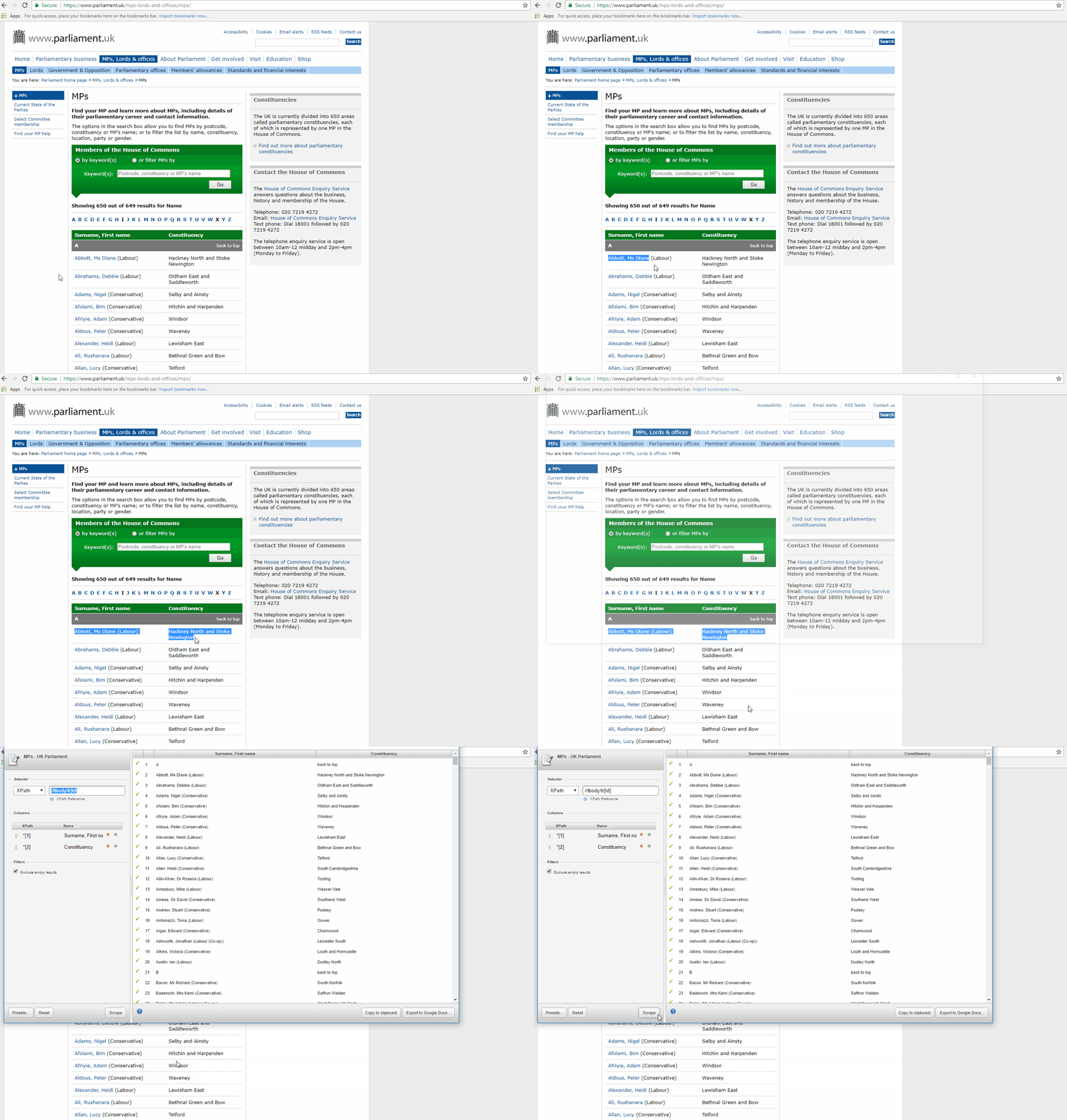
Let's learn exactly how to manage pagination.
Ultimate Guide to Using an Instant Data Scraper - Indie Hackers
Now let's focus on the practical steps of using the tool, especially for multi-page lists.
Please read the instructions on setting up the scraper, then jump to the crucial section on handling pagination. Finally, review the section on exporting the data.
While you won't need to scrape large volumes of data for the GreenLeaf Organics project, understanding this tool is vital for future freelance work, such as building lead lists or compiling product catalogs.
Identifying Broader Market Trends with Google Trends
Beyond analyzing individual competitors, market research involves understanding the "big picture." What are customers interested in? Are certain trends growing or declining? A fantastic free tool for this is Google Trends. It shows the relative popularity of a search term over time.
This can help you answer questions for your client like:
- Is interest in "organic skincare" growing?
- Is "vitamin C serum" more popular than "retinol serum"?
- Are there seasonal peaks in interest for skincare products?
The following video provides a great walkthrough of how to use Google Trends for market research.
How To Use Google Trends To Find Products, Keywords, Content Ideas & More
This video from Miles Beckler, "How To Use Google Trends," is a practical guide to using the tool for product, keyword, and content ideas.
Watch the following segments: Getting started: Learn how to enter a keyword, adjust the location and time filters, and interpret the main graph. Finding related ideas: See how to discover related topics (for niche ideas) and related queries (for content ideas). Comparing trends: This is the most powerful feature. Learn how to compare multiple terms to see their relative popularity and identify which trends are growing or shrinking.
To reinforce this, the article below from Medium provides a clear, step-by-step guide to using Google Trends for the exact kind of research we are doing.
How to Use Google Trends for Market Research? | Medium
This article provides another perspective on using Google Trends effectively.
Read through the first few sections to solidify your understanding: Start with the introduction. Review the steps to find popular topics. Learn how to determine seasonal patterns. Finally, see how you can research competitors directly by comparing their brand names.
Your Task: Execute Data Collection
It's time to execute your research plan.
Part 1: Competitor Data Collection
- Open the Google Sheet you created,
GreenLeaf Organics - Competitor Data. - For each of the three competitors you identified in the last lesson, visit their website and social media pages.
- Methodically fill in the data for each competitor in their respective tab in your spreadsheet. Be thorough and precise. This spreadsheet is now your primary dataset for the project.
Part 2: Market Trend Analysis
- Go to Google Trends.
- Set the region to your target market (e.g., United States).
- Compare the following search terms over the "Past 5 years":
organic skincareclean beautyvegan skincare
- Take a screenshot of the comparison graph.
- In your
Market Research PlanGoogle Doc from the last lesson, add a new heading:Market Trend Analysis. - Paste the screenshot into this new section and write 2-3 sentences below it describing what the graph shows (e.g., "Interest in 'clean beauty' has been steadily rising and surpassed 'organic skincare' in 2021.").
This combination of specific competitor data and high-level trend analysis will provide a rich, multi-layered view of the market for your client.
Conclusion
In this lesson, you transitioned from planning to action, gathering the essential data for your market analysis project. You practiced the methodical, detail-oriented work of collecting competitor intelligence and learned how to use powerful tools to scale your efforts and understand the broader market context.
Here are your key takeaways:
- Systematic Collection is Key: A well-structured spreadsheet is your best friend for organizing competitor data.
- Web Scrapers Boost Efficiency: Tools like Instant Data Scraper can save you hours when collecting data from lists, especially across multiple pages.
- Google Trends Reveals the Big Picture: Use it to understand customer interest, compare concepts, and spot rising or falling trends.
You now have a dataset full of valuable information. In our next and final lesson for this project, you will learn how to synthesize these findings. We will organize the data into a clear comparison matrix and write a final summary report that presents your key insights to the client.