Introduction
Welcome to the next stage of your journey as a freelance data researcher! In the previous modules, you've built a strong foundation of practical skills, culminating in a complete, professional market analysis report for a hypothetical client. That project wasn't just an exercise; it's now the first and most important piece of your professional portfolio.
In this lesson, we will shift from doing the work to getting the work. To attract clients, you need a professional presence online. We will focus on setting up your freelancer profile, which acts as your digital storefront. By the end of this lesson, you will have created the essential framework for your profile on two of the most popular freelance platforms: Upwork and Fiverr. This will set the stage for you to start marketing your skills and landing your first projects.
Part 1: Choosing Your Marketplace: Upwork vs. Fiverr
Before we start building, it's important to understand the two main models for freelance marketplaces. While many platforms exist, Upwork and Fiverr represent the two most common approaches.
- Upwork operates like a traditional job market. Clients post projects, and freelancers submit proposals (like job applications) to compete for the work. Your profile is your comprehensive resume, showcasing your skills, experience, and portfolio.
- Fiverr works more like a service catalog. As a freelancer, you create pre-packaged services called "Gigs" at set prices (e.g., "I will research 50 leads for $50"). Clients then browse and purchase these Gigs, much like shopping online.
Most successful freelancers use a combination of platforms, but understanding the difference is key to positioning yourself correctly. Let's start with a quick overview of how the Fiverr model works.
Fiverr Tutorial for Beginners | The Complete Fiverr Guide
The video "Fiverr Tutorial for Beginners" by Aasil Khan provides a clear explanation of the platform's core concept.
Please watch the section that explains how Fiverr works. Pay close attention to the idea of selling a "skill" or "service" and the workflow from a client purchasing a gig to you delivering the work.
Now that you have a sense of the two models, let's get started by building your profile, which is the foundation for success on any platform. We'll begin with Upwork, as its profile-centric approach is an excellent way to organize your skills and experience.
Part 2: Building Your Upwork Profile
Your Upwork profile is the first thing a potential client sees. A complete and professional profile not only builds trust but also makes you more visible in client searches. We'll walk through the key steps to create a strong foundation.
First, let's watch a practical demonstration of the account creation and profile setup process.
How To Create and Verify Upwork Account in 2025 (FREE Upwork Tutorial)
This video from OnlineHustleTV provides a helpful step-by-step walkthrough of creating an Upwork account and filling out the essential sections.
You can follow along with the video as you create your own account. Watch the initial account creation steps. Make sure to select "I'm a freelancer, looking for work." Next, observe the process of answering the initial questions about your goals and experience. Pay close attention to the detailed walkthrough of filling out your profile. This covers your professional role, work experience, skills, and bio. Finally, see how to set your rate and add your photo.
As you create your profile, use the following official guide from Upwork as a detailed checklist. It breaks down the nine most critical components of a successful profile.
How To Use Upwork as a Freelancer (Beginner's Guide)
This guide from Upwork's own resources is your blueprint for creating a compelling profile.
Please read the entire section "Setting up your profile: 9 key steps". As you read, start filling out each section in your own Upwork account.
Your Task: Create Your Upwork Profile
As you follow the resources above, here is specific guidance on how to apply what you've learned in this course to your new profile:
- Skills (Step 2): Add skills you've practiced, such as
Market Research,Data Entry,Web Research,Competitor Analysis,Google Sheets, andData Collection. - Title (Step 3): Be specific. Instead of "Freelancer," use a title like "Data & Market Research Assistant" or "Competitor Analysis Specialist."
- Work Experience (Step 4): This is crucial. You have experience! Add an entry for "Freelance Data Researcher." For the description, summarize the market analysis project you just completed. For example: "Conducted market analysis for a new organic skincare product. Researched 5 key competitors to identify pricing strategies, product features, and customer sentiment. Synthesized findings into a one-page report with actionable recommendations for market entry."
- Bio / Overview (Step 7): This is your chance to speak directly to the client. Start with how you help them. For example: "I help businesses make smarter decisions by providing clear, accurate, and actionable data. Whether you need to understand your competitors, build a lead list, or organize messy information, I deliver well-structured research that you can use immediately."
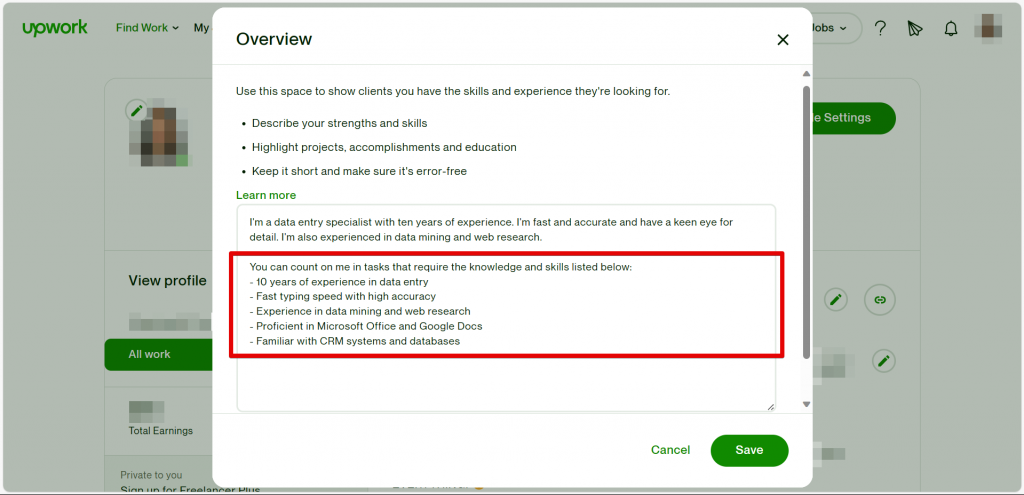
Remember, a complete profile is critical for getting noticed. As Upwork states, freelancers with complete, high-quality profiles are significantly more likely to be hired by clients.

Part 3: Setting Up Your Fiverr Profile & First Gig
Now, let's apply these same principles to Fiverr. The profile setup is simpler, but the key is creating a compelling "Gig"—your specific service offering. Since your goal is data research, we'll focus on creating a gig that aligns with that.
First, let's look at the process of creating a seller account on Fiverr.
Fiverr Tutorial for Beginners | The Complete Fiverr Guide
The "Fiverr Tutorial for Beginners" also has a great section on account creation.
Watch the segment on creating your account and becoming a seller. Notice the similarities to the Upwork profile: you'll add personal info, a photo, a description, and your skills.
With your account created, your main task on Fiverr is to build a Gig. The following guide provides excellent, beginner-friendly examples for a data entry-related service, which is a great starting point for any data researcher.
How to Do Data Entry on Fiverr (Complete Beginner Guide 2026)
This blog post from HowToMentor gives practical, copy-and-pasteable examples for creating your first gig.
Read through the guide, focusing on these sections: Step 1, which reinforces the profile setup. Step 2, for ideas on your Gig title, category, and tags. Step 3, which provides a template for your Gig description. Step 4, for advice on how to price your services as a new seller.
Your Task: Create Your First Fiverr Gig
Using the guidance from the resources, create your first Gig. Don't worry about making it perfect; you can always edit it later.
- Gig Title: Start with something clear and specific, like "I will do web research and data entry for your business" or "I will research your top 5 competitors."
- Category:
Data > Data Entryis a good place to start. - Description: Use the structure from the
howtomentor.blogarticle.- What I offer: List the skills from this course:
Web Research,Competitor Analysis,Data Collection,Data Entry in Google Sheets. - Why choose me?: Emphasize qualities like
100% Accuracy,Organized Spreadsheets, andClear Communication.
- What I offer: List the skills from this course:
- Pricing: Follow the beginner strategy. Start with a small, simple package (e.g., 1 hour of research for $10) to help you get your first orders and reviews.
Conclusion
Congratulations on taking this huge step toward launching your freelance career. You've laid the essential groundwork for your online business presence.
Here are the key takeaways from today's lesson:
- Your profile is your storefront. A complete, professional, and client-focused profile on platforms like Upwork and Fiverr is your primary tool for attracting business.
- Frame your experience. The projects you complete in this course are real work experience. Learn to describe them in a way that highlights the value you provided, just as we did with the market analysis project.
- Start simple and build. Your first profile and gig won't be perfect. The goal is to get started, gain experience, and refine your offerings over time based on what clients are looking for.
In our next lesson, we will dive deeper into the art of persuasion by focusing on how to write a compelling service description. We will refine the bio and gig descriptions you started today to make them even more effective at converting potential clients into paying customers.