Introduction
In the last lesson, you developed a strategic email template to re-engage past clients and convert one-off audits into recurring revenue. You now have a complete service "product": the initial audit, the retainer pitch, and a re-engagement strategy.
However, one of the biggest friction points in selling follow-on work is the client's uncertainty about how to implement your recommendations. This lesson provides you with a powerful tool to eliminate that friction. You will learn how to translate a key recommendation from your audit report into a developer-ready ticket.
This is a tactical value-add that serves two purposes:
- It demonstrates that you understand the software development lifecycle, positioning you as a practical partner, not just a critic.
- It makes it incredibly easy for a client to say "yes" to hiring you for the next phase, as you've already done the first piece of implementation work for them.
Your deliverable will be a reusable Dev-Ready Ticket Template, which you'll build directly in Figma.
1. What is a Developer-Ready Ticket?
Developers don't work from PDF reports. They work from structured tasks in project management tools like Jira, Asana, or Linear. These tasks are often called "tickets," "issues," or "user stories." A developer-ready ticket contains all the information an engineer needs to understand what to build and why, without having to ask for clarification.
Providing one of these as a free sample is a masterstroke. It saves the client's Product Manager time, eliminates ambiguity for developers, and showcases your value beyond the audit itself.
Here's what a well-structured ticket looks like in a real-world tool. Notice the clear title, description, and checklist of criteria.
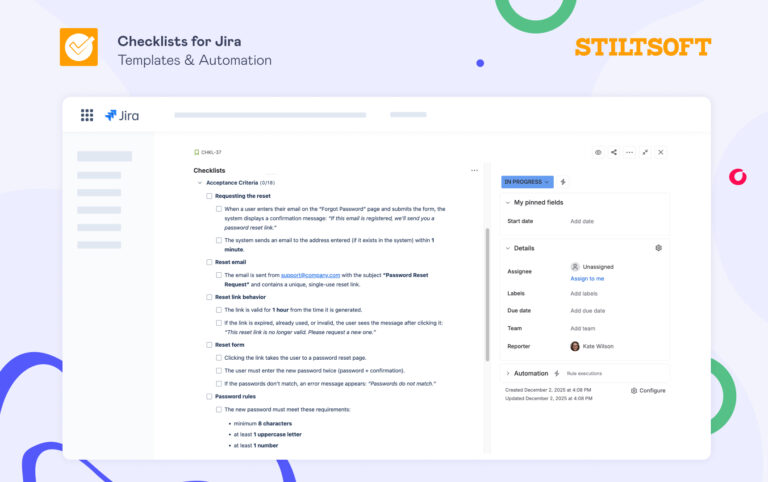
To create a ticket like this, you need to master two core concepts: the User Story and Acceptance Criteria.
2. The User Story: Framing the "Who, What, and Why"
A user story is a concise, plain-language explanation of a feature from the end-user's perspective. It's the core of the ticket, ensuring that everyone on the team—from engineers to marketers—understands the business value of the work.
The most common format is:
As a [type of user], I want to [perform an action], so that [I can achieve a goal].
This video provides a quick, no-fluff explanation of this format.
How to write good User Stories in Agile
The video 'How to write good User Stories in Agile' from The Agile Shop offers a clear and practical guide to the user story format and its components.
Watch from the beginning to 01:23. Focus on how the 'As a..., I want..., So that...' structure answers the questions of who the user is, what they need to do, and what value they get from it.
For example, if your audit found that a SaaS dashboard lacks a search function, your user story might be:
As a project manager with 50+ active projects, I want to search for a project by name, so that I can find it quickly without manually scanning a long list.
This immediately tells the developer why they are building the feature, which leads to better technical decisions.
3. Acceptance Criteria: The Definition of "Done"
This is the most critical part of the ticket and where you, as a UX professional, provide immense value. Acceptance Criteria (AC) are a set of testable conditions that must be met for the user story to be considered complete. They are the contract that ensures the final implementation matches your design and the user's needs.
The article below outlines three common formats, but for your purposes, you will primarily use the first two.
The 3 Templates That Make Writing Acceptance Criteria Actually Easy
The article 'The 3 Templates That Make Writing Acceptance Criteria Actually Easy' is an excellent, practical guide. It will show you how to structure your ACs and, more importantly, what mistakes to avoid.
Read the following sections: 'Format #1: The Simple Bullet List': This will be your default format for most UI/UX recommendations. It's fast, clear, and effective. 'Format #2: The Scenario-Based Format (Given-When-Then)': Understand this format for more complex logic, like error states or conditional UI. You won't use it as often, but knowing it is a sign of seniority. 'Common Mistakes to Avoid': This is the most important section. Pay close attention to 'Writing “How” Instead of “What”' and 'Being Too Vague'. Internalizing this will set you apart.
The key takeaway is that ACs must be testable and describe what the system should do, not how it should be coded.
- Bad (prescribes "how"): Use a React state hook to toggle the modal.
- Good (describes "what"): When the user clicks the 'Delete' button, a confirmation modal appears.
4. Translating a Recommendation into a Ticket
Let's walk through translating an audit finding into a full ticket. We'll use the search functionality issue identified in the Gymshark audit case study as our example.
UI UX Audit & Analysis Tutorial | GYMSHARK Case Study Included | 2022
In the 'UI UX Audit & Analysis Tutorial' video, the presenter identifies several issues with the search functionality. We will use these findings as the basis for our ticket.
Watch the section on the search widget from 19:43 to 23:27. Note the specific problems identified: lack of prominence, taking the user out of their journey, unclear buttons, and missing 'popular searches'.
Now, let's structure this into a developer-ready ticket using the components from the Arbisoft article "How to Write Developer-Ready Tickets".
Sample Developer-Ready Ticket
Ticket Title: Enhance Global Search to Improve Product Discovery and Adhere to E-commerce Best Practices
User Story: As a shopper, I want to easily find and use the search bar, see helpful suggestions, and not lose my context, so that I can discover products faster and have a more intuitive browsing experience.
Figma Design Link: [Link to your Figma prototype showing the 'after' state of the new search component]
Acceptance Criteria:
- UI & Interaction:
- The search icon in the main navigation is replaced by a full search input field with a visible border.
- When the user clicks into the search input field, an overlay dropdown appears.
- The main page content remains visible behind the overlay.
- Clicking the 'X' icon inside the search input clears the typed text but keeps the search overlay open.
- Pressing the 'Escape' key on the keyboard closes the search overlay.
- Clicking anywhere on the page outside of the search overlay also closes it.
- Search Suggestions (Empty State):
- When the search overlay opens with no text entered, it displays a "Popular Searches" section.
- This section contains at least 5 clickable, predefined search terms (e.g., "Leggings," "Shorts," "Hoodies").
- Search Suggestions (Active Typing):
- As the user types (e.g., "sh"), a list of matching product suggestions appears in the overlay in real-time.
- Each suggestion includes the product image, name, and price.
This ticket is now a concrete, actionable task. A developer can read this and know exactly what to build.
5. Your Task: Build the Dev-Ready Ticket Template in Figma
It's time to create your reusable asset. You will build this ticket structure as a component in your master UX Audit Template Figma file. This allows you to quickly fill it out and present it as part of your audit deliverables or as a follow-up.
Instructions (30 minutes):
- Open your
UX Audit Template.figfile. - Create a new page named
[ASSET] Deliverables. - Create a new Frame on this page and name it
Dev-Ready Ticket Template. - Using auto-layout, text styles, and components, build a template that includes the following sections:
- Ticket Title: (Use a bold, large font)
- User Story: (Use a text block pre-filled with the
As a..., I want..., so that...structure) - Acceptance Criteria: (Use a bulleted list or a checklist with checkboxes
☐that a developer can mentally tick off) - Figma Design Link: (A placeholder for the link)
- (Optional but recommended) Supporting Evidence: Create a small section where you can paste an annotated screenshot of the current problematic UI, providing visual context for the fix. You can reuse the annotation components you've already built.
This turns an abstract recommendation into a tangible blueprint for action, dramatically increasing your perceived value to the client.
Conclusion
You have now mastered a crucial skill that bridges the gap between UX strategy and engineering execution. By providing a developer-ready ticket, you're not just identifying a problem; you're handing the client the first step of the solution. This preempts the question "What do we do next?" and makes it incredibly easy for them to hire you for the full implementation.
Key Takeaways:
- A developer-ready ticket is a powerful sales tool for converting an audit into a redesign project.
- Structure your tickets with a clear User Story (
As a..., I want..., so that...) to communicate business value. - Write specific, testable Acceptance Criteria that describe what the outcome should be, not how to code it.
- Your Figma ticket template is now a reusable asset in your freelance toolkit.
Next Steps:
Your service offering is now fully defined, from the initial audit and ROI calculations to proposing retainers and providing actionable development tickets. Your "product" is complete. In our next module, we will shift focus entirely to the client acquisition engine. You'll begin by building a professional identity on LinkedIn designed to attract your ideal clients—SaaS founders and Product Managers—and make them come to you.