Hello! Welcome back to our study of Turing Machines.
In our last lesson, we focused on designing Turing Machines as language acceptors—machines that provide a "yes" or "no" answer for a given input string. We saw how the "marking and scanning" strategy allowed TMs to recognize complex languages like , which are beyond the reach of simpler automata.
Today, we explore the other fundamental capability of a Turing Machine: its role as a function computer, or a transducer. Instead of just accepting or rejecting, these TMs transform their input into a new output, which remains on the tape when the machine halts. This aligns with our intuitive notion of "computation"—taking an input, performing an operation, and producing a result.
Our learning outcome for this lesson is to design TMs to compute functions on their input, focusing on classic examples like arithmetic operations and string manipulation.
1. Turing Machines as Function Computers
A Turing Machine computes a function if, for any input string , the TM, when started in the configuration , halts in a configuration where is the only content on the tape. The computation looks like this:
where is a halting state. The content on the tape is the result of the computation.
For arithmetic functions, it's often easiest to work with a unary number system. In unary, a number is represented by a string of identical symbols. For example, using 1 as our symbol:
1represents the number 1111represents the number 3- The empty string, , represents 0
Let's dive into designing TMs for some fundamental functions.
2. Basic Unary Arithmetic: Increment and Decrement
The simplest functions are increment () and decrement (). The logic for these is very straightforward.
Incrementing a Unary Number
Strategy: To add 1 to a number represented in unary, we just need to add one more 1 to the string.
- Start at the beginning of the input string.
- Scan right across all the
1s. - When the first blank symbol (
⊔) is found, replace it with a1. - Halt.
Decrementing a Unary Number
Strategy: To subtract 1, we need to remove one 1 from the string.
- Start at the beginning of the input string.
- Scan right across all the
1s. - When the first blank symbol (
⊔) is found, move one step to the left. - Replace the rightmost
1with a blank symbol. - Halt.
The following video provides a clear walkthrough of how to translate these simple strategies into TM transition diagrams.
Design a Turing Machine for Incrementer || Decrementer || function f(x)=x+1 || f(x)=x+2 || f(x)=x-1
This video from Sudhakar Atchala demonstrates the design of Turing Machines for increment and decrement operations on unary numbers. It's a great starting point for seeing how a simple algorithm translates directly into TM states and transitions.
Watch the following two segments: Incrementer f(x) = x+1: From 00:46 to 03:57. Decrementer f(x) = x-1: From 05:57 to 07:29. Focus on how the movement of the tape head and the state changes directly implement the high-level strategies we just discussed.
3. String Manipulation: Copying a String
A more complex and essential function is string copying: , where # is a separator. For example, if the input is 010, the output should be 010#010.
This task requires the TM to "remember" symbols from the original string while writing them to a new location. This is a perfect application of the "marking" and "zigzag" strategy we used in the previous lesson.
Strategy:
- Setup: Scan to the end of the input string and write the separator
#. Rewind to the beginning. - Main Loop:
a. Find the first unmarked symbol in (e.g., the leftmost0or1).
b. "Mark" it to remember which symbol it is and to know it's being processed. A common technique is to use different symbols from the tape alphabet (e.g., change0toA,1toB).
c. Scan right, past the rest of and the separator#, to the end of the tape.
d. Write the symbol you are copying (0or1).
e. Rewind left, back to the marked symbol (AorB).
f. "Unmark" the symbol (changeAback to0,Bback to1) and move one step right to begin the next iteration of the loop. - Termination: The loop ends when, at the beginning of an iteration, the machine sees the
#separator instead of a0or1. This means all of has been copied. The machine can then clean up the tape if necessary and halt.
This process is more involved, so a detailed walkthrough is very helpful.
A Turing machine to make a copy of its input
This document from Yale University provides an exceptionally clear, step-by-step design and trace of a Turing Machine that copies its input. It methodically explains the purpose of each state and instruction.
Please read the following sections: Start at the section titled 'A Turing machine to make a copy of its input' (page 3). Read through this section carefully to understand the design process, including the use of states q3, q4, q5, and q6 to manage the marking and copying loop. Next, review the section 'Turing machine to make a copy of its input' (page 7). This provides a commented list of all the TM's instructions, which serves as a formal definition. Finally, look through 'A run of the copying Turing machine' (pages 8-12). You don't need to trace every single step, but follow along to see how the tape evolves and how the machine cycles through its states to copy the string 100.
This copy operation highlights the core capabilities of a TM: using its states as short-term memory, modifying the tape to keep track of progress, and moving freely back and forth across the work area.
4. Back to Arithmetic: Unary Addition
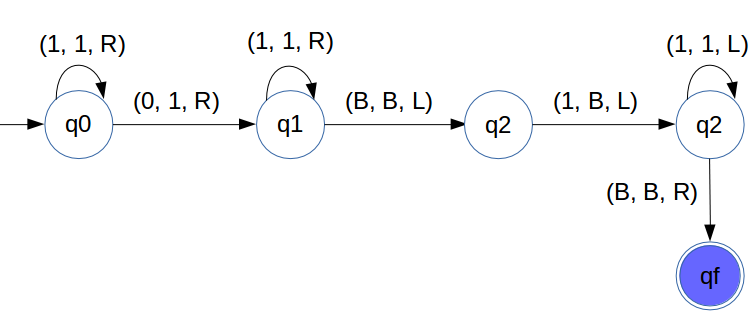
Now let's design a TM to compute the sum of two unary numbers, . The input will be formatted as 1...1#1...1, where there are ones, a separator, and ones. The output should be a single string of ones.
Example: Input 11#111 (for 2+3). Output should be 11111 (for 5).
Strategy: The key insight is that we can merge the two strings of ones.
- Scan right until the
#separator is found. - Change the
#into a1. The tape now holds a single string of ones. - To get the correct sum of , we need to remove one
1. Scan all the way to the right end of the newly formed string. - When the first blank is found, move one step left.
- Erase the last
1by replacing it with a blank. - Halt.
This visual demonstration will clarify the process.
Turing Machine for Addition of 2 numbers || Unary || integers || TOC || FLAT ||Theory of Computation
This video, also from Sudhakar Atchala, walks through the design of a TM for adding two unary numbers. Pay attention to how the input format is exploited to simplify the computation.
Watch the video from the beginning to 06:54. The video uses '0's instead of '1's for unary, but the logic is identical. Observe how the TM first joins the two numbers and then corrects the total count.
Here is a state diagram that implements a similar logic for unary addition.
Test your understanding!
Using the strategies we've discussed, outline a high-level algorithm (not the full TM design) for a Turing Machine that computes unary subtraction, . Assume , and the input is in the format 1...1#1...1. For example, input 11111#11 (5-2) should result in 111 (3).
Hint: Think about pairing and marking off symbols, similar to the language-recognition TMs.
Show answer
A good strategy would be to iteratively "cancel out" one 1 from the first number for every 1 in the second number.
-
Main Loop:
a. Scan right to find the first unmarked1in the second number (after the#). Mark it (e.g., change it to anX). If no1s are found after the#, go to the cleanup step.
b. Rewind left to find the last unmarked1in the first number (before the#). Mark it (e.g., change it to aY).
c. Repeat this loop. -
Cleanup: Once all the
1s in the second number have been marked asXs, the loop terminates. The machine then needs to:
a. Scan the tape from left to right.
b. Erase all marked symbols (Ys,#,Xs) by replacing them with blanks.
c. The remaining unmarked1s from the first number form the result. The TM can shift them to the beginning of the tape if a clean output format is desired.
d. Halt.
This method effectively subtracts by removing one unit from m for each unit in n.
Conclusion
In this lesson, we've seen that Turing Machines are not just verifiers but powerful calculators. By manipulating symbols on their tape, they can compute a wide range of functions, from simple arithmetic to complex string operations.
Key Takeaways:
- A TM computes a function by transforming its initial tape content () into a final tape content () upon halting.
- The choice of data representation (like unary vs. binary) can significantly impact the complexity of the TM design.
- Simple functions like unary increment/decrement require simple, linear passes over the tape.
- More complex functions like string copying require "memory" techniques like marking symbols and using the "zigzag" scanning pattern.
- Your experience with designing algorithms is directly applicable here. Breaking down a function into a sequence of simple, mechanical steps is the key to designing a TM.
- Just as in software engineering, complex TMs can be designed in a modular way. The document "Turing Machines - More Examples" (resource LINK) shows how a binary
ADDmachine can be built usingINCR(increment) andDECR(decrement) as subroutines.
Preview of the Next Lesson:
Designing the string copy TM with a single tape felt a bit cumbersome, didn't it? It required a lot of back-and-forth movement. What if we had more than one tape? In our next lesson, we will explore variations of the Turing Machine, such as multi-tape TMs, and prove that these more convenient models are computationally equivalent to the standard, single-tape TM we've been using.