Introduction
In the previous lesson, you established a professional, Git-based version control system for your n8n workflows. This "workflow-as-code" approach provides a critical safety net, giving you a full history of changes and the ability to recover from mistakes. You are now managing your workflows as true software assets.
With that foundation in place, we now shift from infrastructure to resilience. In production, systems will fail. APIs will go down, data will be malformed, and network issues will occur. A junior builder's workflow crashes; an engineer's workflow anticipates and handles failure gracefully. This lesson begins our focus on building these resilient systems.
The learning outcome is to implement robust try-catch blocks for error handling using the Error Trigger node.
Given your development background, you're familiar with try-catch blocks as a fundamental programming construct. In n8n, this concept is realized through two primary patterns, which we will distinguish clearly:
- Node-Level
try-catch: Implemented using a node's "Settings" tab and setting "Continue On Fail" to true, which exposes an error output pin. This allows you to handle an error for a specific node within the same workflow. - Workflow-Level
try-catch: Implemented by designating a separate, global "Error Workflow". This workflow, which starts with an Error Trigger node, acts as a centralizedcatchblock for any unhandled, workflow-halting error in any linked workflow.
This lesson focuses on implementing the second pattern. A centralized error handler is an architectural best practice for any serious automation system, providing a single point of control for logging, alerting, and analysis.
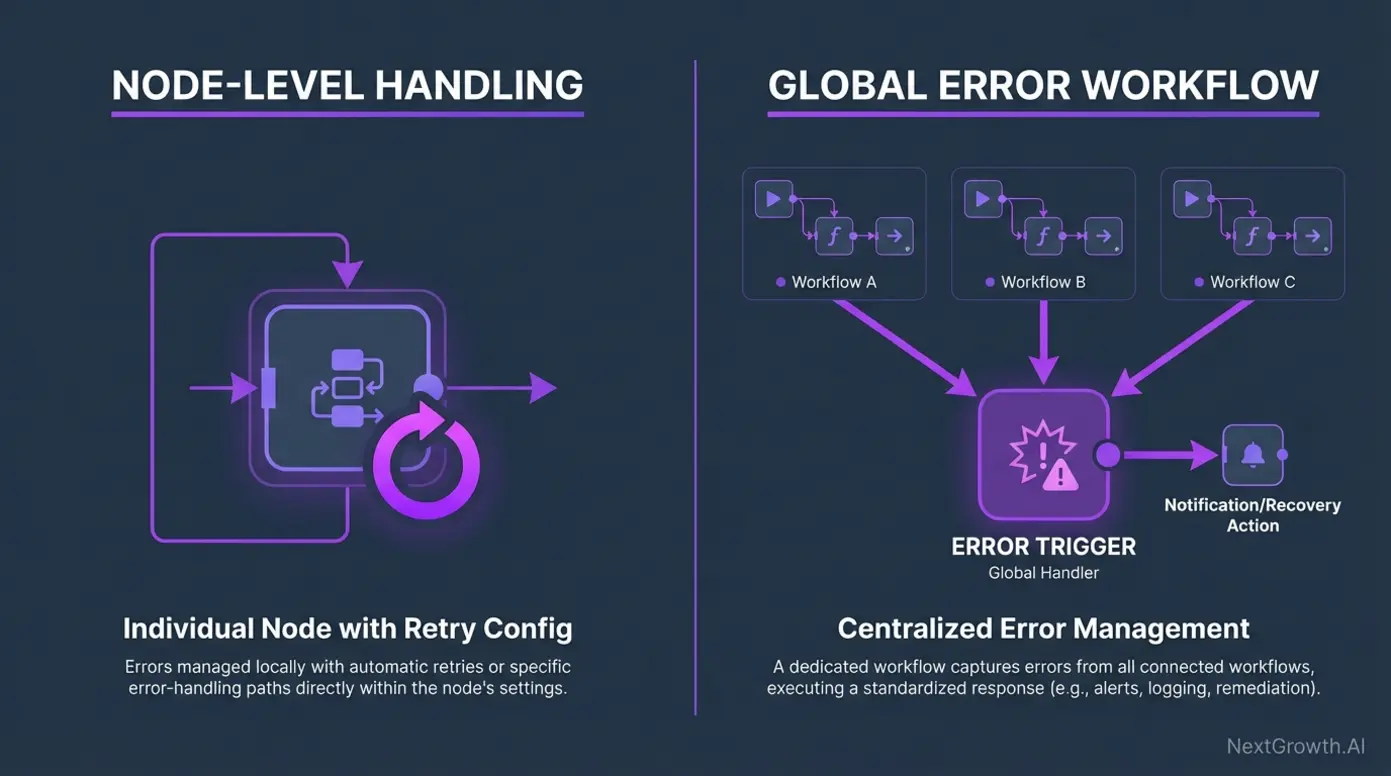
The Anatomy of n8n Error Handling
Before we build, let's precisely define the mechanisms. An unhandled error is one that causes a workflow execution to stop and turn red. By default, this is a dead end.
Our goal is to intercept this event. We achieve this by linking a main workflow to a dedicated error-handling workflow.
n8n Workflow Design Patterns: Error Handling & Production Setup
The article 'n8n Workflow Design Patterns' provides an excellent summary of the two main error handling approaches. It clarifies the distinction between continuing on error and using the specific error output.
Read the sections titled 'Continue on Error vs Continue (using error output)' and 'Error Trigger Nodes for Centralized Monitoring'. Focus on understanding why a centralized trigger is superior for system-wide monitoring.
As you read, note the key difference: Continue (using error output) handles errors locally, while the Error Trigger creates a global, system-wide backstop. For a systems architect, this global handler is non-negotiable.
Practical Task: Engineer a Centralized Error Handling System
Scenario: You are deploying a client's lead intake workflow. The workflow relies on an external API that could potentially fail. Instead of the workflow simply halting, the requirement is to log every failure to a persistent store (Google Sheets) and send an immediate, detailed notification for triage.
Part 1: Build and Link the Global Error Handler
First, watch this video to see the end-to-end process of creating and connecting an error workflow.
One n8n Workflow for Unlimited Error Handling (Step-by-Step)
Nate Herk's video provides a direct, practical walkthrough of creating a central error logging workflow. It covers the core mechanics we will be implementing.
Watch from 00:45 to 03:03. Pay close attention to these three steps: Creating a new workflow with the 'Error Trigger' node. Navigating to the main workflow's settings to link it to the error workflow. Intentionally causing an error and inspecting the rich data payload captured by the 'Error Trigger'.
Now, apply this process.
-
Create the Error Handler Workflow:
- Create a new workflow.
- Apply our naming convention:
[SYS] Global Error Handler. - Add an Error Trigger node as the first and only node for now. Save the workflow.
-
Link Your Main Workflow:
- Open your
WIP_ [Webhook] Lead Intake...workflow. - Go to Workflow settings (three dots in the top right).
- In the Error Workflow field, select your newly created
[SYS] Global Error Handlerworkflow. - Save the settings.
- Open your
-
Trigger and Verify the Catch:
- In your
WIP_ [Webhook] Lead Intake...workflow, intentionally introduce an error that will halt execution. A simple way is to find yourHTTP Requestnode that calls an external service and invalidate the API key or change the URL to something non-existent. - Execute the workflow. It should fail (the execution will be red).
- Now, go to the Executions list for your
[SYS] Global Error Handlerworkflow. You should see a new, successful execution. - Open this execution and inspect the data passed to the
Error Trigger. You'll find a rich JSON object containing the name of the failed workflow, the execution URL, the node that failed, and the specific error message. This is the raw material for our error handling logic.
- In your
Part 2: Implement Logging and Alerting
With the error successfully caught, we now process it.
One n8n Workflow for Unlimited Error Handling (Step-by-Step)
Continuing with the same video, we'll now implement the logging and notification logic.
Watch from 03:03 to 06:56. This demonstrates how to map the error data from the trigger node into both a Google Sheet and a Slack message. You can use email instead of Slack for the notification part.
-
Set up the Error Log:
- Create a new Google Sheet named
System Error Log. - Create a header row with the following columns:
Timestamp,WorkflowName,WorkflowUrl,ErroredNode,ErrorMessage.
- Create a new Google Sheet named
-
Build the Logging Logic:
- In your
[SYS] Global Error Handlerworkflow, add a Google Sheets node after theError Trigger. - Configure it to
Appenddata to yourSystem Error Logsheet. - Map the data from the
Error Triggernode to the corresponding columns.Timestamp: Use an expression{{ $now }}.WorkflowName:{{ $json.workflow.name }}WorkflowUrl:{{ $json.execution.url }}ErroredNode:{{ $json.error.node.name }}ErrorMessage:{{ $json.error.message }}
- In your
-
Build the Alerting Logic:
- Add an Email or Slack node after the Google Sheets node.
- Compose a clear, actionable alert message that includes the key information (workflow name, error message, and a direct link to the failed execution URL). This allows an on-call engineer to immediately investigate.
-
Test the Full Flow: Retrigger the error in your main workflow and verify that a new row is added to your Google Sheet and you receive an alert.
Part 3: Controlled Failures with Stop and Error
Not all failures are unexpected crashes. Sometimes, you need to deliberately halt a workflow because a business rule has been violated. For this, we use the Stop and Error node. It immediately stops the workflow and triggers the designated error workflow, but allows you to pass a custom, meaningful error message.
Why 97% of n8n Workflows Fail in Production (And How to Fix It)
The video from Bart Slodyczka demonstrates how to use the 'Stop and Error' node to create intentional, descriptive failure points in your workflow.
Watch from 11:16 to 14:30. Focus on how the 'Stop and Error' node is used on an error path to send a custom message to the error trigger workflow. This is a powerful technique for creating auditable, business-logic failures.
-
Implement a Validation Check:
- In your
WIP_ [Webhook] Lead Intake...workflow, add an IF node after the trigger. - Set up a condition to check for a critical piece of data (e.g.,
{{ $json.body.email }}is not empty). - On the
falsepath of the IF node (where the data is invalid), add a Stop and Error node.
- In your
-
Configure the Custom Error:
- In the
Stop and Errornode, define a custom Message. Make it explicit, for example:CRITICAL: Lead intake failed validation. Email field is missing.
- In the
-
Test the Controlled Failure:
- Trigger your main workflow with data that will fail the validation check (e.g., a webhook payload without an email address).
- The workflow should stop at the
Stop and Errornode. - Check your
System Error LogGoogle Sheet. You should see a new entry where theErrorMessageis your custom message, and theErroredNodeis theStop and Errornode itself. This immediately tells you not only that the workflow failed, but precisely why.
Deliverables
- A screenshot of your completed
[SYS] Global Error Handlerworkflow canvas. - A screenshot of your
System Error LogGoogle Sheet, showing at least two distinct error entries: one from an unexpected API failure and one from the controlledStop and Errornode. - A screenshot of the section of your
WIP_ [Webhook] Lead Intake...workflow showing theIFnode branching to theStop and Errornode.
Evaluation Criteria
- Architectural Soundness: Is the error handler correctly implemented as a separate, centralized workflow?
- Data Integrity: Does the Google Sheet log capture all required fields accurately for both unexpected and controlled failures?
- Controlled Failure Implementation: Is the
Stop and Errornode used correctly to enforce a business rule and pass a custom, informative message? - Production Readiness: Is the entire system robust enough to provide actionable insights when a failure occurs?
Conclusion
You have now engineered a fundamental component of any production-grade system: a centralized, resilient error handling mechanism. You've moved beyond letting workflows fail silently and can now catch, log, and report on any failure, whether it's an unexpected system crash or a deliberate business logic violation.
Key Takeaways:
- The Error Trigger node is the entry point for a global, workflow-level
catchblock. - Centralized error handling is a core architectural pattern for creating maintainable and observable automation systems.
- The Stop and Error node is a critical tool for enforcing business rules and creating controlled, auditable failure points in your logic.
- The distinction between a node failing (which can be handled locally) and a workflow erroring (which is caught by the error workflow) is crucial. The
Error Triggeronly fires for the latter.
In our next lesson, we will build directly on this foundation. Now that we can reliably catch errors, we will learn how to handle them more intelligently. You will design and implement retry mechanisms with exponential backoff for transient API or service failures, adding another layer of resilience to your systems.