Introduction
In our previous lesson, we concluded our exploration of the All India Quota (AIQ) by dissecting the high-fee structures of Deemed Universities, a critical risk to manage during choice filling. With that, our survey of the AIQ landscape is complete. We now pivot to the counseling process that holds the vast majority of MBBS seats for a Tamil Nadu native: the 85% Tamil Nadu State Quota.
This lesson marks the beginning of your deep dive into the state-specific procedures. We will focus on the very first step: detailing the online registration and application process on the Tamil Nadu Medical Selection portal. Think of this as the initial user registration and profile creation phase in a large-scale web application. The data entered here is the foundational source for all subsequent steps, from merit list generation to final seat allotment. Mastering this process is the non-negotiable entry ticket to participating in the state counseling.
The Gateway: The Tamil Nadu Medical Selection Portal
All admissions for the Tamil Nadu State Quota are managed by a single authority: the Selection Committee, which is part of the Directorate of Medical Education and Research (DME), Government of Tamil Nadu. The entire application process is conducted online through their official portal.
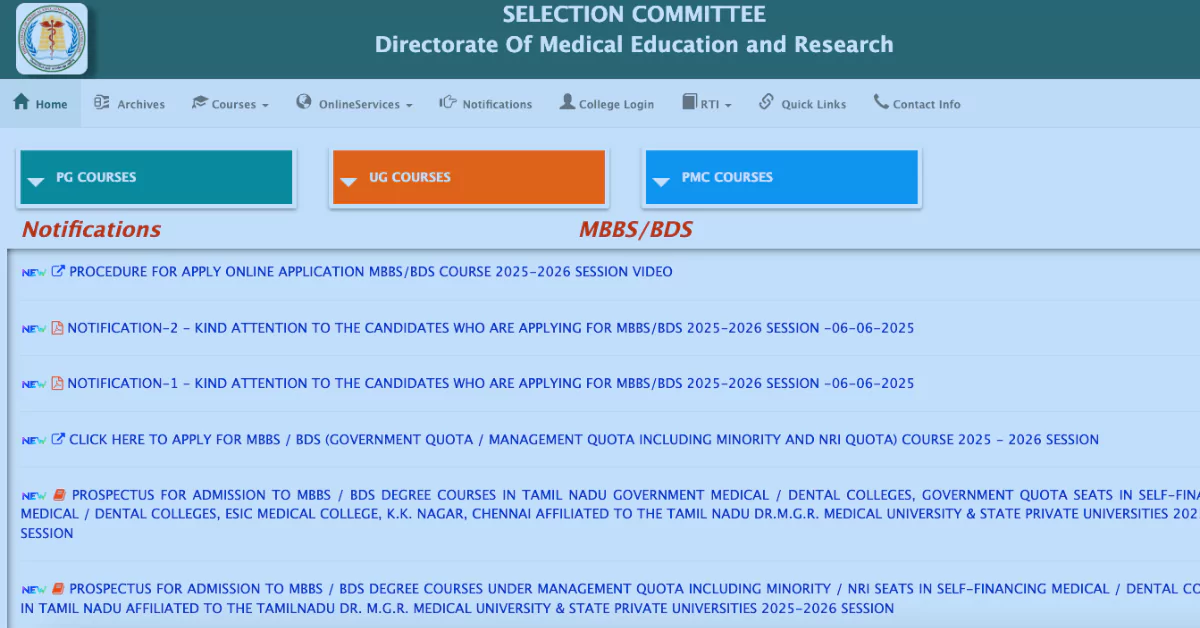
The official website is https://tnmedicalselection.org. It is crucial for your sister to use only this website for the application process to avoid misinformation and potential scams. This application window typically opens shortly after the NEET-UG results are declared.
Anatomy of the Application Process
Before diving into the details, it's helpful to understand the overall workflow. This initial online application is the first of several stages. Its primary purpose is to collect candidate data to generate the official State Merit List.
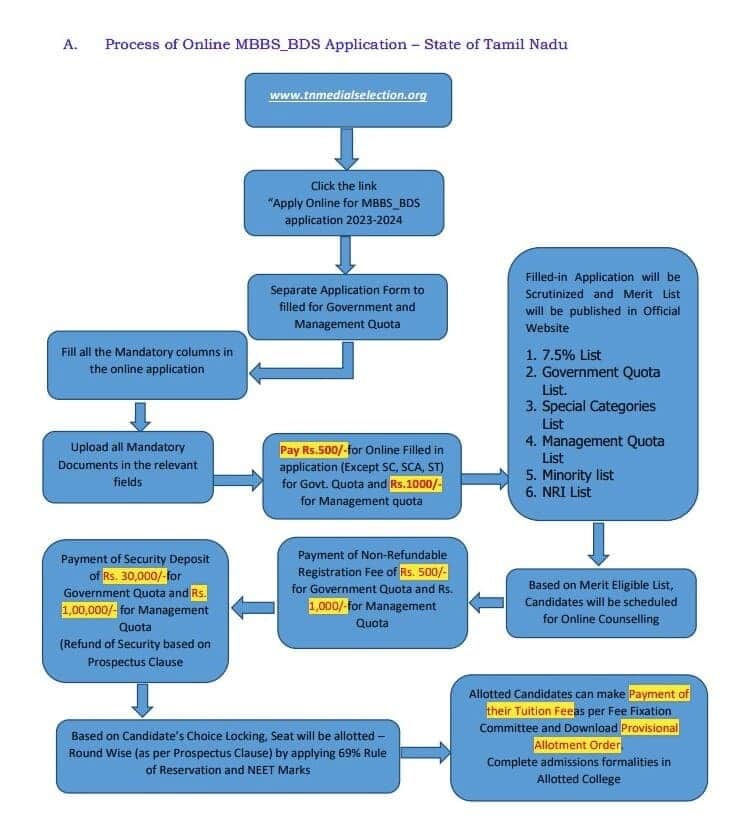
It's important to distinguish between two key terms you'll encounter:
- Application (or Initial Registration): This is the process we are covering now. It involves submitting all personal, academic, and document details to the Selection Committee to be considered for the State Merit List.
- Counselling Registration/Choice Filling: This happens after the merit list is published. Only candidates who appear on the merit list are eligible to register for the counseling rounds to fill and lock their college choices.
The V4Edu Solutions guide's FAQ section clarifies this distinction well.
Tamil Nadu NEET UG Counselling 2026 - V4Edu Solution
Please read the first three questions in the "Frequently Asked Questions" section of this guide.
Focus on these points: The first question, "How to apply?", confirms that the process starts after results are out on the official website. The second question, "Is applying online enough?", clearly states that this initial application only gets you into the merit list. The third question, "When should I register?", explains that a separate registration for counseling happens later.
A Step-by-Step Walkthrough of the Application
The application process is detailed and requires careful attention. The videos from Biology Simplified Tamil and Mizpah Career Academy provide excellent visual demonstrations of the entire procedure. We will use them as a guide as we walk through each step.
Step 1: New User Registration
This is the account creation phase. Your sister will create a unique Login ID and password that she will use throughout the counseling process.
TN Medical Selection 2025 Application Demo | Step by step
This video by Biology Simplified Tamil provides a clear, screen-by-screen demonstration of the initial registration.
Watch the section from the beginning of the demo. Pay close attention to: Navigating to the correct application link on the portal. The "New Registration" process. The initial details required: Qualifying Examination (HSC/CBSE), Year of Passing, Mobile Number, and Email ID. The rules for creating a secure password. The OTP verification process sent to the registered mobile number.
The key takeaways here are the absolute necessity of using a currently active mobile number and a valid email address. All future communications, including critical OTPs, will be sent to these contacts.
Step 2: Filling the Multi-Part Application Form
Once the account is created, the main application form appears, which is divided into several sections.
A. Personal & Communication Details
This section captures basic identity and contact information. Accuracy is key, especially for community details, as this impacts reservation eligibility (though not for the General Category).
Tamil Nadu Medical Counselling Registration Demo 2025 - Don't make these mistakes - Mizpah Academy
The Mizpah Career Academy video gives excellent commentary on filling out these sections.
Watch the segments covering Personal Information and Address/Special Reservation. Note the fields for: Father's and Mother's name (as per official records). Community Certificate details (issuing district, authority, certificate number, date). Present and Permanent Address. Special reservation categories (like PwD, Ex-Servicemen), which should be marked 'No' if not applicable.
B. School of Study Information
This section is used to verify nativity (that the candidate is from Tamil Nadu) and eligibility for specific quotas like the 7.5% Government School reservation.
C. Academic Details: The Critical "API Call"
This is arguably the most important data entry step in the entire application. The system uses the NEET Roll Number and Application Number to fetch the candidate's score directly from the National Testing Agency (NTA) database.
From your developer perspective, think of this as the primary API call: getNeetScore(rollNumber, applicationNumber). If the keys (the numbers) are incorrect, the call will fail, and the application will be based on invalid data, leading to rejection from the merit list.
Tamil Nadu Medical Counselling Registration Demo 2025 - Don't make these mistakes - Mizpah Academy
This video segment clearly explains the importance of the academic details section.
Watch the walkthrough of the Academic Details section. The presenter correctly emphasizes that the NEET Roll Number and Application Number must be entered without any errors. You will also see fields for entering 12th-grade marks for Physics, Chemistry, Biology, and English.
D. Quota Selection and Bank Details
This is a new, streamlined feature. Candidates can apply for the Government Quota, the Management Quota, or both within a single application form.
- Government Quota (GQ): Includes all seats in Government Medical Colleges and a percentage of seats in Self-Financing colleges. The application fee is ₹500.
- Management Quota (MQ): Includes Management and NRI seats in Self-Financing colleges. The application fee is ₹1000.
If your sister wishes to apply for both (as a backup strategy), she can select both options, and the total fee will be ₹1500. For her goal of securing a low-fee government seat, applying for the Government Quota is essential.
Tamil Nadu Medical Counselling Registration Demo 2025 - Don't make these mistakes - Mizpah Academy
This part of the video explains the unified application process and other additional details.
Focus on the segment from the selection option. It clearly shows the checkbox to also apply for Management Quota and how it changes the total fee. This section also covers entering bank account details, which is vital for the refund of the security deposit later in the process. Ensure the account number and IFSC code are entered with 100% accuracy.
Step 3: Document Upload
The next step is to upload scanned copies of all required documents. It is highly advisable to prepare all these files before starting the application.
The MBBSCouncil guide provides a concise checklist of the necessary documents.
Review the full list under the heading "Required Documents". This gives you a clear inventory of what your sister needs to gather and scan. Documents are typically required in PDF format, while photos and signatures are in JPG.
Key documents to prepare include:
- NEET UG Admit Card and Score Card
- Class 10th, 11th, and 12th (HSC) Mark Sheets
- Transfer Certificate (TC)
- Nativity Certificate
- Candidate's Community Certificate (if applicable, though not for reservation benefits in the General Category, it's often a required identity document)
- Parent's documents (Aadhaar/Ration card, Community Certificate)
- Scanned passport-size photograph, signature, and left thumb impression.
Step 4: Preview, Payment, and Final Submission
The final stage involves a full preview of the application. This is the last chance to correct any errors before submission. After confirming all details are correct, the candidate proceeds to the payment gateway to pay the non-refundable application fee online.
Once payment is successful, the application is submitted. It is essential to download and save a copy of the final, submitted application form for future reference.
Pre-Application Checklist
To make the process smooth for your sister, you can help her prepare a "pre-flight checklist":
- Gather Information: Collect all personal details, parents' details, school names and addresses (for 6th-12th), marks, and NEET/HSC roll/register numbers in one place.
- Scan Documents: Scan all required certificates into separate, clearly named PDF files (e.g.,
HSC_Mark_Sheet.pdf,Nativity_Certificate.pdf). Ensure each PDF is under the size limit (usually around 3MB). - Prepare Images: Have the passport-size photo, postcard-size photo, signature, and left thumb impression scanned and saved as JPG files, adhering to the specified size limits (e.g., 10-50 KB).
- Assistance: If they encounter any technical difficulties, they can visit a TNEA Facilitation Centre (TFC), which are located at all government medical colleges, for assistance with the online form.
Conclusion
You now have a detailed, step-by-step map of the Tamil Nadu MBBS online application process. This initial submission is the foundation upon which the entire state counseling structure is built. A correct and complete application is the first crucial victory in the journey towards securing a medical seat.
Here are the key takeaways from this lesson:
- The application must be submitted online via the official portal, https://tnmedicalselection.org.
- The process involves four main stages: New User Registration, Filling the Multi-Part Form, Document Upload, and Payment & Submission.
- Extreme care must be taken when entering NEET Roll Number and Application Number, as this is used to automatically fetch the candidate's score.
- Candidates must decide whether to apply for the Government Quota only or both Government and Management Quotas during this application, which determines the application fee.
- Preparing all required information and scanned documents in advance is the best strategy for a smooth and error-free submission.
With the application submitted, the next question is: what does the Selection Committee do with this data? Our next lesson will answer that by analyzing how the Tamil Nadu State Merit List is prepared and used to determine state ranks, which is the direct output of this application process and the input for the counseling rounds.