Introduction
Welcome to your next lesson. In our previous session, you mastered lists, which allow you to manage ordered sequences of data using numerical indices. This was a crucial step towards handling collections of information. However, accessing data by its position (like item[3]) isn't always the most intuitive or efficient way to organize complex information.
Imagine you're building a system like J.A.R.V.I.S. to monitor the Iron Man suit. You wouldn't want to remember that suit_stats[4] is the power level and suit_stats[7] is the flight stabilizer status. It would be far more effective to access these data points using descriptive names, like suit_stats['power_level'] or suit_stats['flight_stabilizer_status'].
This is precisely where Python's dictionaries come in. They are a data structure designed to store information not in an ordered sequence, but as a collection of key-value pairs. This lesson will equip you with the ability to use dictionaries, a cornerstone of nearly every significant Python application, including AI.
Your learning outcome for this 60-minute lesson is to use dictionaries to store and retrieve key-value pairs. By the end, you will understand how they differ from lists and be able to create, modify, and access data within them.
What is a Python Dictionary?
A dictionary is a collection that stores data in pairs, where each pair consists of a unique key and its corresponding value. Think of it like a real-world dictionary: the key is the word you look up, and the value is its definition.
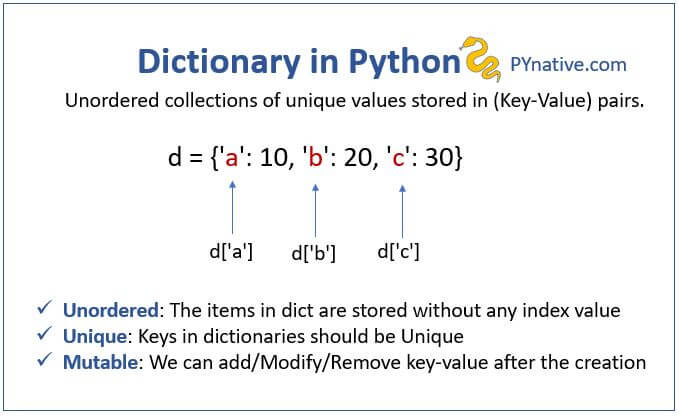
Here are the essential characteristics of a Python dictionary:
- Unordered (Historically): Unlike lists, dictionaries are not primarily about sequence. While modern Python versions (3.7+) remember the insertion order, you should not rely on this order for your logic. The main power of a dictionary is direct access via keys.
- Mutable: You can add, remove, and change key-value pairs after the dictionary has been created.
- Keys are Unique and Immutable: Every key in a dictionary must be unique. Keys must also be of an immutable type, such as a string, number, or tuple. You cannot use a list as a key.
- Values Can Be Anything: The values in a dictionary can be of any data type—numbers, strings, lists, or even other dictionaries.
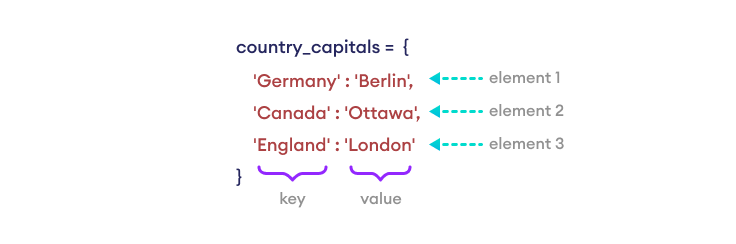
To delve deeper into the theory behind dictionaries, their properties, and how they are constructed, the following article is an excellent resource.
The article 'Dictionaries in Python' from Real Python provides a thorough introduction. We will focus on the foundational sections.
Read the sections 'Getting Started With Python Dictionaries' and 'Creating Dictionaries in Python'. Pay close attention to the characteristics of dictionaries and the restrictions on keys (hashable and unique).
Storing and Retrieving Key-Value Pairs
Now let's move from theory to practice. The fundamental operations for any dictionary are creating it, putting data into it, and getting data out of it.
The following video provides a clear, step-by-step demonstration of these core actions. We will watch it in segments to focus on each skill.
Python Tutorial for Beginners 5: Dictionaries - Working with Key-Value Pairs
This video, 'Python Tutorial for Beginners 5: Dictionaries' by Corey Schafer, is one of the best introductions available. We'll start with creating a dictionary and retrieving values from it.
Watch from the beginning to 04:07. Focus on: Creation: How to create a dictionary using curly braces {}. Retrieval with []: How to access a value using its key in square brackets (e.g., student['name']). Handling Errors: What a KeyError is and why it happens. Safe Retrieval with .get(): How the .get() method prevents errors for non-existent keys and allows you to provide a default value.
As you saw, there are two main ways to retrieve a value:
-
Direct Access with
[]:my_dict['key']- Pro: Simple and direct.
- Con: If the key does not exist, your program will crash with a
KeyError.
-
Safe Access with
.get():my_dict.get('key', 'default_value')- Pro: It's safe. If the key doesn't exist, it returns
None(or a default value you provide) instead of crashing. - Con: Slightly more to type. This is the preferred method when you are not certain a key will be present.
- Pro: It's safe. If the key doesn't exist, it returns
Adding and Updating Pairs
Adding a new key-value pair or updating an existing one uses the same simple syntax: direct assignment with square brackets.
- If the key does not exist, a new key-value pair is created.
- If the key already exists, its corresponding value is updated.
Let's continue with the same video to see this in action.
Python Tutorial for Beginners 5: Dictionaries - Working with Key-Value Pairs
Now let's watch how to add new data to our dictionary and update existing entries.
Watch from 04:07 to 05:54. Notice how the same syntax student['phone'] = '555-5555' is used to both add a new entry and later update an existing one like student['name'] = 'Jane'. Also, pay attention to the .update() method for modifying multiple pairs at once.
Deleting Pairs and Looping
To round out your foundational skills, it's useful to know how to remove entries and how to iterate through the contents of a dictionary.
- Deleting: You can use the
delkeyword (del my_dict['key']) to remove a specific pair, or the.pop()method to remove a pair and get its value back. - Looping: You can loop over a dictionary's keys, its values, or its key-value pairs together.
This final segment of the video covers these operations.
Python Tutorial for Beginners 5: Dictionaries - Working with Key-Value Pairs
Let's see how to remove items from a dictionary and how to loop through its contents, which is a very common task.
Watch from 05:54 to 09:00. Note the difference between del and .pop(). For looping, focus on the use of .keys(), .values(), and especially .items(), which is the most common way to loop through both keys and values simultaneously.
Your Turn: AI Core Systems Monitor
Now it's time to apply these concepts. You are building a simple monitoring system for an AI core. You will use a dictionary to store the status of various subsystems.
Instructions (15 minutes):
- Create an empty dictionary named
ai_core_status. - Add the following key-value pairs to the dictionary:
'primary_power':'Online''memory_usage':45.7(a float representing percentage)'active_processes':['Vision', 'NLP', 'Logistics'](a list)
- The power level has spiked. Update the value for the
'primary_power'key to'High'. - A new subsystem has come online. Add a new key
'data_bus'with the value'Nominal'. - Print the entire
ai_core_statusdictionary to see the current state. - You need to check the status of the cooling system. Use the
.get()method to retrieve the value for the key'cooling_system'. Since it doesn't exist, provide a default value of'Not Found'. Print this status. - Use a
forloop with the.items()method to print each subsystem and its status in a clean format, likeSubsystem: [KEY] -> Status: [VALUE].
Example Code Structure:
# 1. Create an empty dictionary
ai_core_status = {}


# 2. Add initial subsystems
ai_core_status['primary_power'] = 'Online'


# Add the other two here...


# 3. Update power status
# Your code here...


# 4. Add the data bus subsystem
# Your code here...


# 5. Print the full dictionary
print(f"Current Core Status: {ai_core_status}")


# 6. Check for the cooling system
# Your code here...
cooling_status = ai_core_status.get('cooling_system', 'Not Found')
print(f"Cooling System Status: {cooling_status}")


# 7. Loop and print each subsystem status
print("\n--- Subsystem Report ---")


# Your for loop here...
# for key, value in ... :
#    print(...)
Take your time to implement this. This exercise directly tests your ability to create, add, update, and retrieve data from a dictionary.
Conclusion
Fantastic work. You have now added Python's dictionaries to your arsenal. You've moved beyond simple ordered sequences and can now store data in a structured way that maps meaningful keys to values. This ability to create associative relationships is fundamental to building complex programs, from web backends to the sophisticated AI systems you aspire to create.
Key Takeaways:
- Dictionaries store data as key-value pairs inside curly braces
{}. - Keys must be unique and immutable.
- You can store, update, and retrieve values using square bracket notation:
my_dict['key']. - Using
my_dict.get('key', 'default')provides a safe way to retrieve values without causing aKeyError. - You can iterate over keys, values, or key-value pairs using a
forloop, most commonly with the.items()method.
Preview of the Next Lesson:
So far, all the data you've created in your lists and dictionaries exists only in your computer's memory. When your program finishes, that data disappears. How do you make your data permanent? In our next lesson, you will learn how to read from and write to text files. This will allow you to save your program's state, load configurations, and process large amounts of data that persist between program runs—a critical skill for any real-world application.