Introduction
Welcome to your next lesson in Python programming. In our last session, we mastered for and while loops, which gave your programs the ability to perform repetitive tasks. We saw that loops often iterate over sequences of items, like numbers generated by range(). But what if the data you need to process isn't just a simple sequence of numbers? What if it's a list of sensor readings, a series of mission objectives, or the coordinates of objects detected by a computer vision system?
To handle this, we need a way to store and manage ordered collections of data. This brings us to one of the most powerful and fundamental data structures in Python: the list.
Your goal of building an AI with a "superpower" brain, like Tony Stark's J.A.R.V.I.S., depends on managing vast amounts of information. Lists are the primary tool for this. They allow you to collect data, access it in order, and modify it as new information arrives.
By the end of this 60-minute lesson, you will be able to create and manipulate lists using indexing, slicing, and appending. This is a critical step that moves you from working with single data points to managing entire collections of them.
What is a Python List?
At its core, a Python list is a container that holds an ordered collection of items. Think of it as a dynamic array. Here are its key characteristics:
- Ordered: Items are stored in a specific sequence, and that order is maintained.
- Mutable: You can change the list after it's created—add, remove, or change items. This is a crucial feature.
- Heterogeneous: A single list can contain items of different data types (e.g., integers, strings, and even other lists).
Creating Lists
You can create a list in a few common ways. The most direct is using a list literal, which is simply a comma-separated series of values inside square brackets [].
# A list of prime numbers
primes = [2, 3, 5, 7, 11]


# A list of mission objectives (strings)
objectives = ["Establish orbit", "Deploy satellite", "Return to base"]


# A mixed-type list
mixed_data = ["sensor_A", 12.5, True]


# An empty list, to be filled later
sensor_readings = []
You can also use the list() constructor to create a list from another iterable object, such as a string or a range object from our last lesson.
To see these creation methods demonstrated, please watch the first part of the following video.
The video 'How to Use Lists in Python' from the Programming with Mosh channel provides a clear and concise demonstration of the different ways you can create a list.
Watch from 00:13 to 03:33. Pay attention to creating lists with square brackets, using multiplication * to repeat items, and using the list() function with a range or a string.
For a more detailed textual reference on the characteristics of lists, you can review the introductory section of the article "Python's list Data Type" from Real Python.
Python's list Data Type: A Deep Dive With Examples
This article provides an in-depth look at Python lists. The first section gives a great overview of their core properties.
Read the sections 'Getting Started With Python’s list Data Type' and 'Constructing Lists in Python'. Focus on the bulleted list of characteristics (Ordered, Zero-based, Mutable, etc.) and the examples of creating lists with literals and the list() constructor.
Accessing and Modifying List Items
Once you have a list, you'll need to work with its contents. Python provides powerful mechanisms for accessing and changing items based on their position.
Indexing: Accessing a Single Item
Each item in a list has an index, which is its position in the sequence. Python uses zero-based indexing, meaning the first item is at index 0, the second at index 1, and so on.

You can access an item by putting its index in square brackets after the list variable.
objectives = ["Establish orbit", "Deploy satellite", "Return to base"]

first_objective = objectives[0]  # Accesses "Establish orbit"
last_objective = objectives[2]   # Accesses "Return to base"


# Using negative indexing is often more convenient for accessing items near the end
last_objective_again = objectives[-1] # Accesses "Return to base"
second_to_last = objectives[-2]      # Accesses "Deploy satellite"
Because lists are mutable, you can also use indexing to change an item at a specific position.
objectives[2] = "Perform re-entry"
print(objectives)  # Output: ['Establish orbit', 'Deploy satellite', 'Perform re-entry']
The next segment of the video demonstrates both accessing and modifying elements using indexing.
Let's see a live demonstration of how to use positive and negative indices to access and modify list elements.
Watch from 03:44 to 04:44. Notice how a negative index like -1 easily accesses the last item, and how assignment letters[0] = 'A' changes the list in-place.
Slicing: Accessing a Sub-List
What if you need a part of a list, not just a single item? For this, you use slicing. The syntax is list[start:stop:step].
start: The index of the first item to include (inclusive, defaults to 0).stop: The index of the first item not to include (exclusive, defaults to the end).step: The amount to jump between items (defaults to 1).
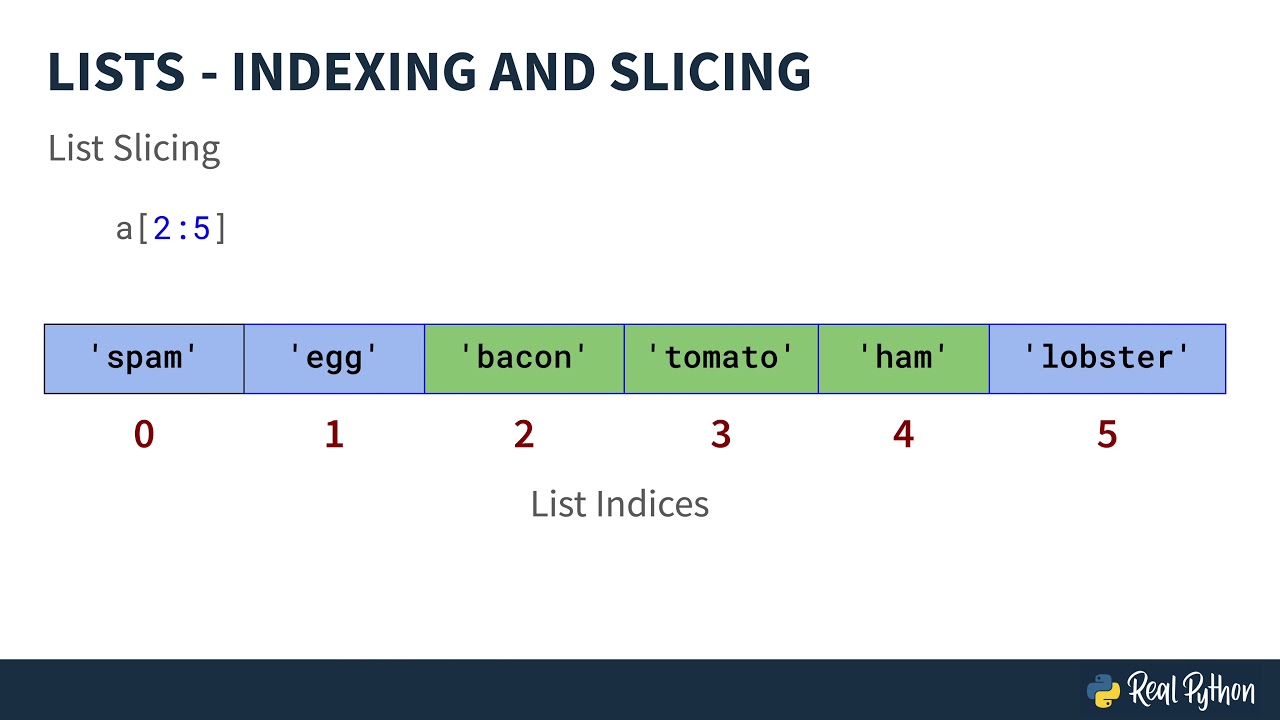
numbers = [0, 1, 2, 3, 4, 5, 6, 7, 8, 9]


# Get the first three numbers
first_three = numbers[0:3]  # or simply numbers[:3]


# Result: [0, 1, 2]


# Get numbers from index 5 to the end
from_five_on = numbers[5:]


# Result: [5, 6, 7, 8, 9]


# Get every other number
even_numbers = numbers[::2]


# Result: [0, 2, 4, 6, 8]


# Get a section from the middle
middle_part = numbers[3:7]


# Result: [3, 4, 5, 6]
This next video segment will walk you through these slicing operations.
This clip demonstrates how to use slicing to extract parts of a list, including using a step value.
Watch from 04:44 to 06:57. Focus on how leaving the start or end index blank works, and see the powerful examples of using step to get every other item or even reverse a list.
Growing and Shrinking Lists
Lists are dynamic, meaning their size can change. Python provides several methods to add and remove items.
list.append(item): Adds a single item to the end of the list. This is the most common way to add items.list.insert(index, item): Adds an item at a specificindex, shifting existing items to the right.list.pop(index): Removes the item at the givenindexand returns it. If no index is specified, it removes and returns the last item.list.remove(value): Searches for the first occurrence ofvalueand removes it.del list[index]: Thedelstatement removes an item at a specific index.
Let's watch a demonstration of these essential methods.
This segment covers the core methods for adding and removing items from a list, which are fundamental to dynamically managing your data.
Watch from 13:44 to 17:04. Note the difference between append (adds to end), insert (adds at index), pop (removes by index), and remove (removes by value).
A Critical Concept: References vs. Copies
This is one of the most important—and often misunderstood—concepts for new Python programmers. When you assign a list to a new variable, you are not creating a new list. You are creating another reference (or name) pointing to the same list in memory.
original_list = [1, 2, 3]
reference_list = original_list  # This does NOT create a copy

reference_list.append(4)

print(original_list)  # Output will be [1, 2, 3, 4]!
Changing reference_list also changed original_list because they both point to the same object. To create a true, independent copy, you must use slicing [:] or the .copy() method.
original_list = [1, 2, 3]
copied_list = original_list[:] # This creates a shallow copy

copied_list.append(4)

print(original_list) # Output: [1, 2, 3]
print(copied_list)   # Output: [1, 2, 3, 4]
Understanding this distinction is crucial for avoiding unexpected bugs. The following video from Khan Academy provides an excellent visual explanation of this concept.
This video clearly demonstrates the difference between assigning a reference and creating a copy of a list. This is a fundamental concept for managing data correctly.
Watch from 04:06 to 10:42. The instructor first explains the theory with diagrams and then proves it in the Python interpreter. Pay close attention to how changing the 'referenced' list b affects a, while changing the 'copied' list c does not.
Your Turn: Mission Control Pre-Launch Sequence
Now it's time to apply what you've learned. Imagine you're programming a simple mission control system. You will use a list to manage the sequence of pre-launch checks.
Instructions (10 minutes):
- Create a list named
pre_launch_checkscontaining the following initial steps:"System power on","Propellant loading","Engine ignition". - Print the initial list.
- A new check,
"Communications check", needs to be added before"Propellant loading". Use the.insert()method. - The
"Engine ignition"step is premature. Replace it with"Final orbit calculation". Use indexing to modify the element. - A final check,
"Liftoff", needs to be added to the very end of the sequence. Use the.append()method. - Print the final, updated list of checks.
- Now, create a backup. Use slicing to create a new list called
critical_checksthat contains only the first three checks from the finalpre_launch_checkslist. - To prove your backup is a true copy,
appendthe string"Backup confirmed"to yourcritical_checkslist. - Finally, print both the
pre_launch_checkslist and thecritical_checkslist to confirm that only the backup list was modified.
Example Code Structure:
# 1. Create the initial list
pre_launch_checks = ["System power on", "Propellant loading", "Engine ignition"]
print(f"Initial checks: {pre_launch_checks}")


# 3. Insert the communications check
# Your code here...


# 4. Modify the last element
# Your code here...


# 5. Append the liftoff check
# Your code here...


# 6. Print the final list
print(f"Final checks: {pre_launch_checks}")


# 7. Create the backup
# Your code here...


# 8. Modify the backup
# Your code here...


# 9. Print both lists to verify
print(f"Final main sequence: {pre_launch_checks}")
print(f"Critical backup sequence: {critical_checks}")
Take your time to work through this. It combines all the key skills from this lesson into a practical scenario.
Conclusion
Excellent work today. You have learned how to use Python's lists, one of the most versatile tools in your programming toolkit. You can now store, access, and manipulate ordered collections of data, a skill that is absolutely essential for any non-trivial program, especially in the field of AI where data is king.
Key Takeaways:
- Lists are ordered, mutable collections of items, created with
[]. - Indexing (
list[i]) allows you to access or modify a single item by its position. - Slicing (
list[start:stop]) creates a new sub-list from an existing one. - Methods like
.append(),.insert(), and.pop()allow you to dynamically change the size and content of a list. - Assignment (
=) creates a reference, not a copy. To create an independent copy of a list, you must use slicing (new_list = old_list[:]).
Preview of the Next Lesson:
Lists are fantastic for ordered sequences, but what if you need to store data not by its position, but by a unique identifier? For example, storing a person's information using keys like "name", "age", and "occupation". In our next lesson, we will explore dictionaries, a data structure that allows you to store and retrieve data using key-value pairs. This will open up even more powerful ways to structure the information in your programs.