Introduction
In our last lesson, you learned how to use conditional statements (if, elif, else) to make your programs execute code selectively. This gave your code the ability to make decisions. Your goal of building a "superpower" brain for complex problem-solving requires not only making decisions but also performing tasks repeatedly and efficiently, often on vast amounts of data. This is where loops come into play.
Brief Recap:
In the previous lesson, you wrote a function check_reactor_status that made a single decision based on temperature and pressure. But what if you needed to check the status of 1,000 different sensors every second? Writing 1,000 if statements would be impossible. You need a way to automate repetition.
This Lesson's Goal:
Today, we will learn how to make your programs perform repetitive tasks. By the end of this 60-minute lesson, you will be able to write for and while loops to iterate over sequences. This will enable you to process collections of data and automate tasks, which is a cornerstone of any significant program, especially in AI where you process large datasets.
The for Loop: Iterating Over a Sequence
The first and most common type of loop in Python is the for loop. Its purpose is to iterate over a sequence of items—like a list of numbers, the characters in a string, or a defined range—and execute a block of code for each item. You use a for loop when you know in advance the collection of items you need to process.
Let's start with a visual model of how a for loop operates.
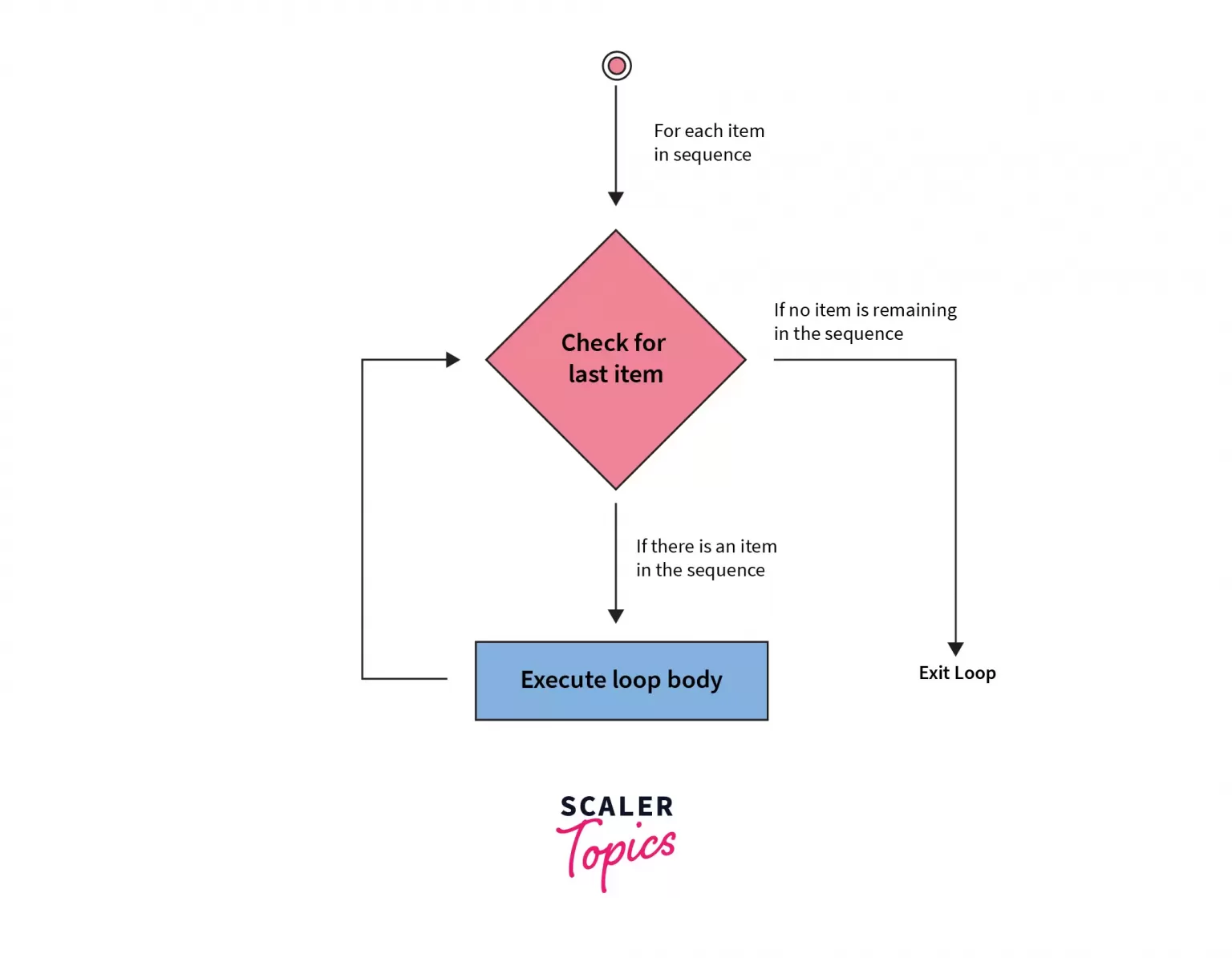
Now, let's see how this is implemented in Python. We'll watch a video that visually explains the syntax and mechanics.
Python Loops (Visually Explained) | For, While, Break, Continue, Else
The video 'Python Loops (Visually Explained)' by Data with Baraa provides an excellent, beginner-friendly introduction to the for loop. It visually sketches out how Python processes the loop, which aligns with your theory-first preference.
Watch from the beginning (00:00) to 11:10. Focus on: The basic syntax: for item in sequence:. How the loop variable (item) takes on the value of each element in the sequence, one by one. The different types of sequences you can loop over (lists, strings).
Generating Sequences with range()
Often, you don't have a pre-made list but simply want to run a loop a specific number of times. Manually creating a list like [1, 2, 3, ..., 100] would be tedious. Python's built-in range() function is the standard solution for this.
range() generates a sequence of numbers, making it perfect for use in for loops. It can be used in a few ways:
range(stop): Generates numbers from0up to (but not including)stop. For example,range(5)gives you0, 1, 2, 3, 4.range(start, stop): Generates numbers fromstartup tostop. For example,range(1, 6)gives you1, 2, 3, 4, 5.range(start, stop, step): Generates numbers fromstarttostop, incrementing bystep. For example,range(0, 10, 2)gives you0, 2, 4, 6, 8.
Let's continue with the video to see range() in action.
Python Loops (Visually Explained) | For, While, Break, Continue, Else
This segment explains how to use the range() function to control for loops, a fundamental pattern in Python.
Watch from 11:10 to 16:06. Pay attention to the start, stop, and step arguments and how they control the sequence of numbers generated.
The while Loop: Iterating While a Condition is True
The second type of loop is the while loop. Unlike a for loop, which runs for a pre-defined number of items, a while loop runs as long as a specified condition remains True. You use a while loop when you don't know how many iterations you'll need, but you know the condition that should stop the loop.

The structure of a while loop involves three key parts:
- Initialization: A variable is set up before the loop begins.
- Condition: The
whilestatement checks this variable in a condition. - Update: Inside the loop, the variable is modified to ensure the condition will eventually become
False, preventing an infinite loop.
Let's see how this works.
Python Loops (Visually Explained) | For, While, Break, Continue, Else
This part of the video first contrasts for and while loops, then demonstrates the classic condition-based while loop, emphasizing the three essential components: initialization, condition, and update.
Watch from 1:16:33 to 1:27:49. Focus on: The core difference between iterating over a sequence (for) vs. iterating based on a condition (while). The example of building a counter, and why the update step (i = i + 1) is critical to avoid an infinite loop.
Controlling Loop Execution: break and continue
Sometimes you need more granular control over a loop's execution. Python provides two statements for this:
break: Immediately terminates the loop, and the program continues execution at the first statement after the loop.continue: Immediately terminates the current iteration and proceeds to the next one.
These are typically used inside an if statement to handle special cases. For example, you might break out of a loop once you find the item you're searching for, or you might continue to skip over invalid data points.
Python Loops (Visually Explained) | For, While, Break, Continue, Else
This segment provides a detailed visual explanation of how break and continue alter the flow of a loop.
Watch from 23:21 to 33:55. This covers both break and continue. Observe how break provides an 'emergency exit' from the entire loop, while continue just skips the current cycle and jumps back to the top.
Your Turn: Automating System Checks
Now it's time to apply what you've learned. The following exercises will challenge you to use both for and while loops, along with control statements, in a scenario inspired by your "Tony Stark" goal of building intelligent systems.
Exercise 1: for loop for diagnostics (10 minutes)
You are programming a drone that needs to run a pre-flight check on its four propellers.
- Write a
forloop that iterates four times using therange()function. - Inside the loop, print a message for each propeller, like:
Running diagnostics on propeller #1...,Running diagnostics on propeller #2..., and so on.
Example Code Structure:
# The range should produce numbers 1, 2, 3, 4
for propeller_id in range(1, 5):
    print(f"Running diagnostics on propeller #{propeller_id}...")
Exercise 2: while loop for system pressurization (15 minutes)
You need to write code that monitors a system's pressure as it builds up.
- Create a variable
pressure_psiand initialize it to0. - Write a
whileloop that continues as long aspressure_psiis less than50. - Inside the loop:
- Increment
pressure_psiby10at the start of each iteration. - Check the pressure:
- If
pressure_psiis exactly30, printPressure at 30 PSI. Venting minor excess.and usecontinueto skip to the next iteration without printing the regular status. - If
pressure_psiexceeds40, printCRITICAL: Pressure over 40 PSI. Aborting.and usebreakto exit the loop immediately.
- If
- If neither of the special conditions is met, print the current pressure:
System pressure: <pressure_psi> PSI.
- Increment
- After the loop finishes (either by reaching the condition or by breaking), print a final message:
Pressurization sequence ended.
Example Output:
System pressure: 10 PSI
System pressure: 20 PSI
Pressure at 30 PSI. Venting minor excess.
System pressure: 40 PSI
CRITICAL: Pressure over 40 PSI. Aborting.
Pressurization sequence ended.
Take your time to work through these exercises. They are designed to directly test your understanding of for, while, range, break, and continue.
Conclusion
You have now added another essential tool to your programming arsenal: iteration. You can write code that performs tasks repeatedly, which is fundamental to automating processes and working with data at scale. You've distinguished between iterating over known sequences with for loops and iterating based on a condition with while loops.
Key Takeaways:
forloops are used to iterate over a finite sequence of items. They are ideal when you know how many times you need to loop.whileloops are used to iterate as long as a certain condition is true. They are used when the number of iterations is not known beforehand.- The
range()function is a powerful tool for generating number sequences forforloops. breakprovides an exit from a loop, whilecontinueskips the current iteration.- Care must be taken with
whileloops to avoid infinite loops by ensuring the loop's condition will eventually become false.
Preview of the Next Lesson:
In this lesson, we often looped over simple sequences like ranges of numbers or hard-coded lists. The true power of loops is unlocked when you combine them with dynamic data structures. In our next lesson, you will learn to create and manipulate lists. Lists are one of the most versatile and commonly used data types in Python, and understanding them is the next critical step toward building complex applications.