Introduction
Welcome to the second module of your journey, "Data Handling and Visualization in Python." In the first module, you built a solid foundation by learning to write your own Python code from the ground up—from variables and functions to complex data structures and even saving your work to files. This was essential for understanding the core mechanics of programming.
However, a key aspect of building large, complex systems—like the AI you aspire to create—is not reinventing the wheel. Powerful programmers leverage existing, well-tested code to work more efficiently and reliably.
In this lesson, you will learn to do just that. Your learning outcome is to import and use functions from Python standard library modules. Think of this as opening a vast, pre-stocked workshop. Instead of forging every tool yourself, you'll learn how to find and use the professional-grade instruments that Python provides right out of the box. This skill is the first step towards using the powerful ecosystem of libraries that makes Python the top choice for AI and data science.
What are Modules and the Standard Library?
In programming, a module is simply a Python file (.py) containing functions, variables, and classes that are all related to a specific task. You can "import" a module into your own script to gain access to all the tools it contains.
The Python Standard Library is a massive collection of these modules that is included with every Python installation. It provides solutions for a huge variety of common problems, from mathematical calculations to interacting with the operating system and handling dates and times.
Think of it like a LEGO set. In the first module, you learned to work with the basic bricks. Now, with the import statement, you're gaining access to thousands of specialized pieces—wheels, engines, and transparent canopies—that let you build much more complex and powerful creations without starting from scratch.
To get a better sense of what the standard library offers, let's watch a brief introduction.
Python Tutorial for Beginners 9: Import Modules and Exploring The Standard Library
Corey Schafer, in his excellent Python series, explains the value of the standard library.
Watch the segment from 13:42 to 14:31. Notice the emphasis on how the standard library contains functionality written by expert programmers and optimized for performance.
The import Statement: Accessing the Toolkit
To use a module, you must first bring it into your program's scope using the import statement. There are a few common ways to do this, each with its own use case.
Python Tutorial for Beginners 9: Import Modules and Exploring The Standard Library
Let's return to Corey Schafer's video for a detailed breakdown of the different ways to import modules and their specific syntax.
Watch from 01:58 to 06:20. Pay close attention to the following four methods and understand the differences: import my_module: How to call functions using my_module.function(). import my_module as mm: Using an alias to shorten the module name. from my_module import find_index: Importing a specific function to use it directly. from my_module import *: The 'star import' and why it's generally a bad practice.
Let's summarize the key import styles:
-
import module_name- This is the most common and recommended method. It imports the entire module.
- To use a function or variable from the module, you must prefix it with the module name and a dot:
module_name.function_name(). - Example:
import math area = math.pi * (5 ** 2) print(area) - Benefit: This is very explicit and makes your code easy to read. It's always clear where a function like
piis coming from, which prevents confusion.
-
import module_name as alias- This is used to give a module a shorter, more convenient name.
- It's particularly common for modules with long names or for community-wide conventions (e.g.,
import numpy as np, which you'll see in future lessons). - Example:
import statistics as stats

data = [1, 2, 2, 3, 5, 8]
mean_value = stats.mean(data)
print(mean_value)
-
from module_name import item_name- This imports a specific function or variable directly into your program's namespace.
- You can then use the item directly without the module prefix.
- Example:
from math import sqrt, pi hypotenuse = sqrt(3**2 + 4**2) print(hypotenuse) # Prints 5.0 - Caution: Use this sparingly. If you import a function that has the same name as a function you've defined, it can lead to name clashes and unexpected behavior.
A Word of Warning: Avoid import *
The from module_name import * syntax imports all functions and variables from a module into your current namespace. While it might seem convenient, it is strongly discouraged in production code.
Why? It makes your code very difficult to read because you can't tell where a function originated. More dangerously, it can silently overwrite existing functions if the imported module has items with the same name, leading to bugs that are incredibly hard to track down.
Complete Guide to Imports in Python
This article provides a very clear example of how import * can cause unexpected problems.
Read the section titled 'Importing *'. Pay close attention to the example using the time and asyncio modules, which both have a function named sleep. This demonstrates how using import * can lead to the wrong function being called without any error message.
A Tour of Useful Standard Library Modules
Now that you know how to import, let's explore some of the most useful modules in the standard library.
Python Tutorial for Beginners 9: Import Modules and Exploring The Standard Library
Let's watch a final clip from Corey Schafer's tutorial, where he demonstrates several key modules.
Watch from 14:31 to 17:48. This will give you a practical look at: random: For generating random numbers and making random choices. math: For common mathematical operations. datetime and calendar: For working with dates and times. os: For interacting with the operating system (like finding the current directory).
Here is a summary of a few modules you'll find indispensable.
The math Module
Provides access to mathematical functions and constants beyond basic arithmetic. Given your BTech background, you'll recognize many of these.

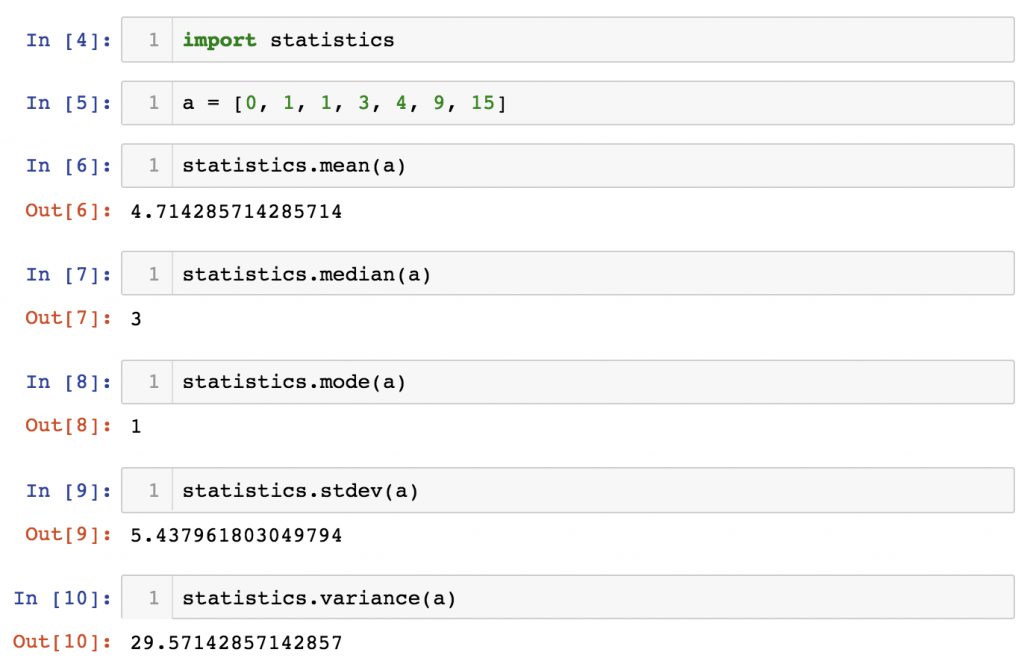
The statistics Module
Essential for any data-related work, this module provides functions for calculating mathematical statistics of numeric data.
The random Module
Crucial for simulations, games, cryptography, and many AI algorithms that require an element of stochasticity.
random.random(): Returns a random float between 0.0 and 1.0.random.randint(a, b): Returns a random integer betweenaandb(inclusive).random.choice(sequence): Returns a random element from a sequence (like a list).
The datetime Module
Provides classes for working with dates and times. Invaluable for logging, scheduling tasks, or analyzing time-series data.
datetime.datetime.now(): Returns adatetimeobject representing the current local date and time.
Your Turn: System Diagnostics Report
Time to put this theory into practice. Your task is to build a simple "System Diagnostics" script that generates a status report. This will require you to import and use tools from several different modules.
Instructions (15 minutes):
- Create a new Python file (e.g.,
diagnostics.py). - Import the following three modules:
datetime,random, andmath. - Log the Timestamp:
- Use the
datetimemodule to get the current time and store it in a variable. - Print a header for your report, like
--- System Diagnostics Report ---, followed by the timestamp.
- Use the
- Simulate a Sensor Reading:
- Generate a random float between 0.0 and 1.0 using
random.random()to represent a "signal strength" reading. Store it in a variable. - Print this signal strength.
- Generate a random float between 0.0 and 1.0 using
- Calculate Signal in Decibels (dB):
- The formula to convert a power ratio (your signal strength) to decibels is .
- Use the
math.log10()function to perform this calculation. - Print the result in a user-friendly format, e.g., "Signal (dB): -3.45".
- Determine System Status:
- Create a list of possible system states:
statuses = ['Nominal', 'Warning', 'Critical', 'Offline']. - Use
random.choice()to select one of these states at random. - Print the final system status.
- Create a list of possible system states:
Example Output (will vary due to randomness):
--- System Diagnostics Report ---
Timestamp: 2023-10-27 15:02:35.123456
Raw signal strength: 0.4519
Signal (dB): -3.449
System Status: Nominal
--- End of Report ---
Click to see a possible solution
# 1. Import the necessary modules
import datetime
import random
import math


# 2. Log the Timestamp
current_time = datetime.datetime.now()
print("--- System Diagnostics Report ---")
print(f"Timestamp: {current_time}")


# 3. Simulate a Sensor Reading
signal_strength = random.random()
print(f"Raw signal strength: {signal_strength:.4f}") # Format to 4 decimal places


# 4. Calculate Signal in Decibels (dB)
# Add a small value to avoid math.log10(0) which is undefined
if signal_strength > 0:
    signal_db = 10 * math.log10(signal_strength)
    print(f"Signal (dB): {signal_db:.3f}")
else:
    print("Signal (dB): -inf (No signal)")


# 5. Determine System Status
statuses = ['Nominal', 'Warning', 'Critical', 'Offline']
system_status = random.choice(statuses)
print(f"System Status: {system_status}")

print("--- End of Report ---")
Conclusion
You have successfully learned how to expand your programming toolkit by using Python's standard library. This is a fundamental shift from writing everything yourself to leveraging the work of others—a hallmark of an efficient and effective developer.
Key Takeaways:
- Modules are files of reusable Python code. The Standard Library is a vast collection of modules included with Python.
- The
importstatement is your key to accessing this functionality. import moduleandimport module as aliasare the preferred methods for clarity and avoiding name conflicts.from module import itemis useful but should be used with caution.from module import *should be avoided as it makes code unreadable and can cause hard-to-find bugs.- Modules like
math,random,statistics, anddatetimegive you powerful, pre-built tools for a wide range of tasks.
Preview of the Next Lesson:
The standard library is powerful, but the true strength of the Python ecosystem lies in its massive collection of third-party libraries. These are specialized toolkits created by the global community for tasks like numerical computing, data analysis, and building neural networks. In the next lesson, you will learn how to install and import third-party libraries using pip, the Python package installer. This will unlock the tools that form the very bedrock of modern AI development.