Hello! Welcome to the final lesson in our first module on foundations.
In our last session, you mastered the sliding window technique, a powerful pattern for optimizing problems on contiguous data. You learned to distinguish between fixed and variable-sized windows and how to apply them to achieve linear time complexity.
Today, we'll shift our focus from implementing complex algorithmic patterns to mastering the essential tools provided by the Java standard library. In any technical interview or competitive programming challenge, knowing your tools is as critical as knowing your algorithms. This lesson will cover how to use Java's built-in sorting methods, Arrays.sort() and Collections.sort(), and most importantly, when to use each for optimal performance.
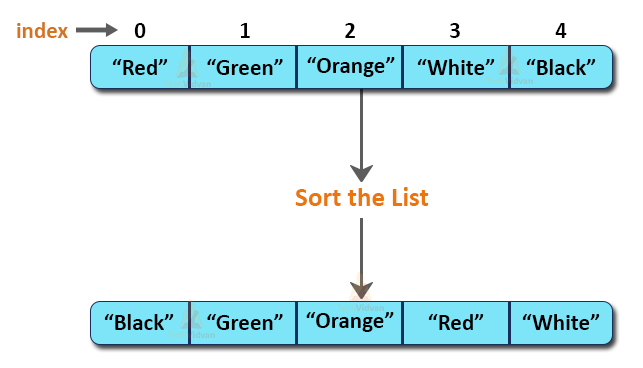
1. Sorting Collections with Collections.sort()
When working with Java's Collections Framework, your go-to data structure for a dynamic array of objects is often an ArrayList or LinkedList, both of which implement the List interface. The Collections utility class provides a simple and powerful method for sorting these lists: Collections.sort().
Sorting with Natural Order
For data types that have an inherent or "natural" order, like numbers, strings, or dates, sorting is straightforward. The Collections.sort() method can sort them without any extra configuration.
Let's start with a basic example of sorting a list of strings. The article 'How To Sort Java Collections' from Spring Framework Guru provides a clear demonstration.
Read the sections 'Understanding the java.util.Collections.sort() Method' and 'Complete Example of Collections.sort()'. Focus on the simplicity of calling Collections.sort(myList) to sort a list of strings alphabetically.
As you saw, a single line of code is all it takes to sort the list in place. The method uses an efficient sorting algorithm, which we'll discuss later, to achieve this.
You can also easily sort in reverse order using a built-in Comparator.
The same article also shows how to perform a reverse sort.
Quickly review the section 'Reverse Sort with Collections.sort()'. The key takeaway is the use of Collections.reverseOrder() as the second argument to the sort method.
Sorting Custom Objects
What if you want to sort a list of your own custom objects, like a List<Student> or List<Product>? Java doesn't know whether to sort by ID, name, or some other property. You need to provide the sorting logic.
As we covered in an earlier lesson, you have two primary ways to do this:
Comparable: Implement this interface within your custom class to define its natural order.Comparator: Create a separate class or use a lambda expression to define a custom order. This is useful when you want to sort in multiple different ways (e.g., by name, then by age).
Let's watch a video that provides an excellent practical review of both approaches.
#95 Comparator vs Comparable in Java
The video '#95 Comparator vs Comparable in Java' by Telusko demonstrates how to sort custom objects, reinforcing the concepts we covered in lesson 1.2.
Please watch from 07:42 to 15:31. Pay attention to: Using a Comparator (07:42 - 11:19): How a Comparator is passed to Collections.sort to sort Student objects by age. Using Comparable (11:19 - 14:00): How implementing Comparable in the Student class allows Collections.sort to work without an external comparator. Lambda Expressions (14:00 - 15:31): See how the verbose anonymous class for the Comparator can be simplified into a single, clean line of code with a lambda. This is modern Java best practice.
Using lambda expressions for Comparators is highly encouraged in modern Java development and is expected in technical interviews. It makes your code much more concise and readable.
For example, to sort a list of Person objects by last name, you can write:Collections.sort(list, (p1, p2) -> p1.getLastName().compareTo(p2.getLastName()));
2. Sorting Arrays with Arrays.sort()
When your data is in a plain array (int[], String[], etc.) instead of a List, you'll use the Arrays.sort() method from the java.util.Arrays utility class.

Arrays.sort() is versatile and has different implementations under the hood depending on the array type.
Collection.sort() vs Arrays.sort() in Java
The article 'Collection.sort() vs Arrays.sort() in Java' by Reetesh Kumar provides great detail on how Arrays.sort() works.
Read the sections 'Arrays.sort()' and 'Variants Of Arrays.sort()'. Note these key points: The different underlying algorithms used: dual-pivot quicksort for primitive types and Timsort for objects. The variants available, such as sorting a specific range of an array and the introduction of Arrays.parallelSort() in Java 8 for potential performance gains on large arrays.
For object arrays, Arrays.sort() behaves just like Collections.sort(), requiring the objects to be Comparable or be supplied with a Comparator. For primitive arrays, it's highly optimized for performance.
3. When to Use Which? Arrays.sort() vs. Collections.sort()
This is the central question for this lesson. While both methods appear similar, understanding their differences is crucial for writing efficient code, especially in competitive programming where performance matters.
Here's a summary of the key differences:
| Feature | Arrays.sort() |
Collections.sort() |
|---|---|---|
| Data Structure | Works on arrays (int[], String[], Object[], etc.). |
Works on objects that implement the List interface (ArrayList, LinkedList). |
| Primitive Performance | Highly optimized. Uses dual-pivot quicksort and operates directly on memory. | Requires primitives to be boxed (e.g., int to Integer), adding overhead. |
| Object Performance | Uses Timsort. Very efficient. | Uses Timsort. Very efficient. |
| Algorithm (Primitives) | Dual-pivot Quicksort (O(n log n) average, O(n²) worst-case, but rare). | Not applicable (must use wrapper classes). |
| Algorithm (Objects) | Timsort (a stable, O(n log n) hybrid of Merge Sort and Insertion Sort). | Timsort (a stable, O(n log n) hybrid of Merge Sort and Insertion Sort). |
The most significant performance difference arises when sorting large arrays of primitive types. Arrays.sort() avoids the overhead of creating Integer, Double, etc., wrapper objects, which can make a substantial difference.
Let's see a practical demonstration of this performance gap.
The 'How To Sort Java Collections' article has a great section that benchmarks the two methods.
Read the sections 'Arrays.sort() vs Collections.sort()' and 'Performance of Arrays.sort() vs Collections.sort()'. Pay close attention to the code and the final benchmark numbers. This clearly illustrates why Arrays.sort() is preferred for primitive arrays.
The result is clear: for 10 million integers, Arrays.sort() was about 3 times faster than Collections.sort() on an ArrayList<Integer>. This is a crucial piece of knowledge for performance-critical applications.
Test your understanding!
You are in a competitive programming contest and need to read N integers and sort them as quickly as possible. You have two options:
- Read them into an
ArrayList<Integer>and useCollections.sort(). - Read them into a primitive
int[]array and useArrays.sort().
Which approach should you choose and why?
Show answer
You should choose Option 2: use a primitive int[] array and Arrays.sort().
The primary reason is performance. Arrays.sort() on a primitive array is significantly faster because it avoids the overhead of "boxing" each int into an Integer object and the associated memory allocations and dereferencing required by the ArrayList. In a time-sensitive environment like competitive programming, this performance gain can be the difference between a solution passing or timing out.
Conclusion
You now have a solid understanding of Java's built-in sorting utilities. While you will learn to implement various sorting algorithms from scratch, knowing how to leverage the highly optimized, production-grade tools in the standard library is a fundamental skill for any effective programmer.
Key Takeaways:
Collections.sort()is used forListimplementations. It sorts in-place using an efficient, stable algorithm called Timsort (O(n log n)).Arrays.sort()is used for arrays. It's especially powerful for primitive arrays where it uses a tuned dual-pivot quicksort and avoids object-boxing overhead, making it the most performant choice.- To sort custom objects with either method, your class must either implement
Comparable(for natural order) or you must provide aComparator(for custom order), often as a concise lambda expression. - The Rule of Thumb: Use
Arrays.sort()for arrays (especially primitives). UseCollections.sort()for lists.
Preview of the next lesson:
This lesson concludes our foundational module. You've covered Java collections, complexity analysis, and key algorithmic patterns. In our next module, we will dive deep into Arrays, Searching, and Basic Sorting. Now that you know how to sort data efficiently, our very next lesson will focus on how to search that sorted data efficiently by implementing linear and binary search.