Hello! Welcome to the first lesson of our second module.
In our previous lesson, we wrapped up our foundations module by mastering Java's built-in sorting methods, Arrays.sort() and Collections.sort(). You learned that sorting data is a fundamental prerequisite for many efficient algorithms. Today, we'll see the first major payoff of having sorted data as we dive into two fundamental search algorithms: linear search and binary search.
This lesson is crucial for your goals. A deep understanding of these search algorithms, their implementations, and their performance trade-offs is a non-negotiable topic in technical interviews and a foundational concept in competitive programming. We will implement both from scratch in Java.
The Search Problem: Finding a Needle in a Haystack
The goal of a search algorithm is simple: given a collection of items (like an array), find the position of a specific target element. The efficiency with which we can do this depends heavily on the algorithm we choose and whether the data is sorted.
Let's start with a visual comparison.
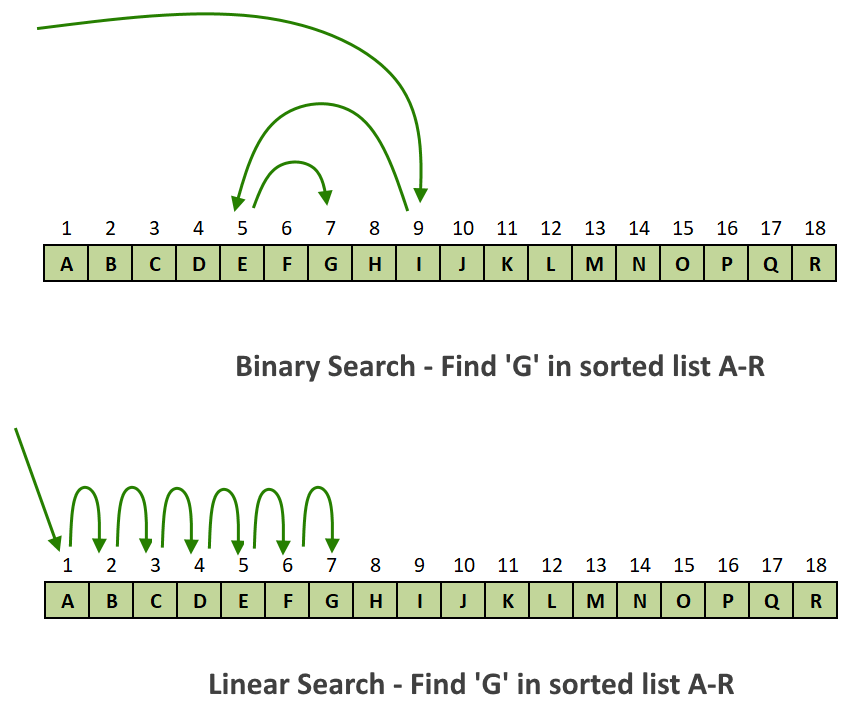
As you can see, the strategies are vastly different. Let's explore each one.
1. Linear Search: The Straightforward Scan
Linear search, also known as sequential search, is the most intuitive approach. It iterates through each element of the array one by one, from the beginning, until it either finds the target or reaches the end.
Diving into Search Algorithms: Linear vs. Binary Search
For a clear definition and step-by-step breakdown of how linear search works, let's consult the article 'Diving into Search Algorithms' from Algocademy.
Please read the section titled 'Linear Search: The Straightforward Approach'. Focus on its simple step-by-step logic, its advantages (works on unsorted arrays), and its major disadvantage (O(n) time complexity).
Java Implementation
The implementation in Java is a direct translation of the logic: a simple for loop that checks each element. Let's watch it being coded and explained.
Linear & Binary Search Code | Big O Notation
This video from the Telusko channel provides a practical, hands-on implementation of linear search in Java.
Watch the section from 03:00 to 07:24. The instructor implements a linearSearch method that takes an array and a target, iterates through it, and returns the index if found, or -1 otherwise.
Here's the essence of the code:
public static int linearSearch(int[] arr, int target) {
    for (int i = 0; i < arr.length; i++) {
        if (arr[i] == target) {
            return i; // Target found, return its index
        }
    }
    return -1; // Target not found in the entire array
}
The key takeaway for linear search is its simplicity and the fact that it works on unsorted arrays. However, its time complexity is O(n), meaning the time it takes to run grows linearly with the size of the array. For the million-element arrays common in competitive programming, this is often too slow.
2. Binary Search: Divide and Conquer
This is where the power of having a sorted array comes into play. Binary search uses a "divide and conquer" strategy to find an element with incredible efficiency.
Instead of starting from the beginning, it starts at the middle of the sorted array.
- If the middle element is the target, the search is over.
- If the target is less than the middle element, we know it must be in the left half. We can completely discard the right half.
- If the target is greater than the middle element, we know it must be in the right half. We discard the left half.
We repeat this process on the remaining (and much smaller) segment until the element is found or the segment is empty.
Binary Search in Java - Full Simple Coding Tutorial
This video from 'Coding with John' provides an excellent conceptual walk-through of how binary search works, illustrating the 'divide and conquer' process.
Watch from 02:15 to 06:41. Pay close attention to how the search space is halved in each step, and how the algorithm concludes when an element is not found.
Java Implementation (Iterative)
The most common and memory-efficient way to implement binary search is with a while loop.
Linear & Binary Search Code | Big O Notation
Let's return to the Telusko video to see a live-coded implementation of iterative binary search. This will build on the same project setup from the linear search example.
Watch from 07:24 to 11:54. The instructor implements binary search using left, right, and mid pointers to manage the search space within a while loop.
A crucial detail for interviews and robust code is how you calculate the middle index. A naive (left + right) / 2 can cause an integer overflow if left and right are very large positive numbers. The correct, safe way is:
int mid = left + (right - left) / 2;
This mathematical rearrangement prevents overflow and is a detail that interviewers often look for.
Here is a clean, robust implementation incorporating this best practice:
public static int binarySearch(int[] arr, int target) {
    int left = 0;
    int right = arr.length - 1;

    while (left <= right) {
        int mid = left + (right - left) / 2; // Prevents overflow

        if (arr[mid] == target) {
            return mid; // Target found
        } else if (arr[mid] < target) {
            left = mid + 1; // Search in the right half
        } else {
            right = mid - 1; // Search in the left half
        }
    }
    return -1; // Target not found
}
Test your understanding!
You are given a sorted array with 1,024 elements. In the worst-case scenario (the element is not present or is the last one checked), what is the maximum number of comparisons binary search will perform to find an element?
Show answer
The maximum number of comparisons is 10.
Binary search halves the search space with each comparison. The number of comparisons is related to how many times you can divide 1,024 by 2 until you get to 1. This is the definition of a logarithm base 2.
log₂(1024) = 10. So, in the worst case, it will take just 10 comparisons to search through 1,024 elements. A linear search could take up to 1,024 comparisons.
3. Performance Showdown: O(n) vs. O(log n)
The time complexity of binary search is O(log n). This logarithmic growth is incredibly slow, making it exceptionally efficient for large datasets.
- For 1,000 elements, it takes at most 10 comparisons.
- For 1,000,000 elements, it takes at most 20 comparisons.
- For 1,000,000,000 elements, it takes at most 30 comparisons.
Let's see this difference in action.
Linear & Binary Search Code | Big O Notation
The Telusko video provides a fantastic practical demonstration by adding a step counter to both search algorithms.
Watch from 11:54 to 15:54. Observe how the number of steps for linear search grows directly with the array size, while the number of steps for binary search barely increases. This is the power of O(log n).
4. Recursive Implementation and Built-in Methods
While the iterative approach is most common due to its O(1) space complexity, it's also valuable to understand the recursive implementation. It can be more elegant but uses O(log n) space on the call stack.
Additionally, just like with sorting, Java provides a built-in method for convenience.
Binary Search in Java: Algorithm, Code & Implementation ...
This article from index.dev provides clean code examples for both the recursive approach and Java's built-in Arrays.binarySearch() method. It also highlights common mistakes to avoid.
Skim through these three sections: Recursive Binary Search Implementation: Note how the function calls itself with updated left and right boundaries. This is a classic recursive pattern. Java Binary Search Using Arrays.binarySearch(): See how you can perform a binary search in one line. Note the special negative return value when an element is not found. Common Mistakes in Java Binary Search: This is a very important section for you. Pay close attention to the fixes for Integer Overflow, Off-by-One Errors, and handling Unsorted Arrays.
Conclusion
You have now implemented two of the most fundamental algorithms in computer science. Understanding their mechanics and, more importantly, their performance characteristics is essential for building efficient software and succeeding in technical interviews.
Key Takeaways:
- Linear Search:
- Simple to implement.
- Works on both sorted and unsorted arrays.
- Time Complexity: O(n). Inefficient for large datasets.
- Binary Search:
- Highly efficient "divide and conquer" algorithm.
- Strict Requirement: The array must be sorted.
- Time Complexity: O(log n). The gold standard for searching in sorted arrays.
- The iterative version is generally preferred due to O(1) space complexity.
- Always calculate the middle index as
mid = left + (right - left) / 2to prevent integer overflow.
Preview of the next lesson:
You've mastered how to use binary search to find an element in a sorted array. In our next lesson, we'll take this concept to a more abstract and powerful level. We will learn how to apply binary search not on data, but on a range of potential answers to solve complex optimization problems. This technique, often called "Binary Search on the Answer Space," is a common and powerful pattern in competitive programming.