Hello, and welcome back. In our last lesson, you learned how to use the Print() function to make your program communicate its results and status to you. This is like having a conversation where your program does all the talking. Today, we're going to explore how you can leave notes for yourself—and other programmers—directly within your code.
This lesson is all about comments. While Print() lets the program talk to you, comments let you talk to your future self. You'll learn how to write notes, explanations, and reminders that are ignored by the computer but are invaluable for making your code understandable. For someone eager to build complex bots quickly, mastering comments isn't a delay; it's a critical tool for speed, as it saves you from having to re-decipher your own logic weeks or months later.
By the end of this lesson, you will be able to write both single-line and multi-line comments to effectively document your MQL5 code.
Leaving Notes in Your Code
Imagine you've written a few hundred lines of code for a trading strategy. If you come back to it a month later, will you remember why you chose a specific number, or what a particular block of code is supposed to achieve? Probably not. Comments solve this problem. They are explanatory notes embedded within the source code that are completely ignored by the compiler when it builds your program. Their only purpose is to be read by humans.
There are two main ways to write comments in MQL5. Let's dive into them.
Single-Line Comments: The // Syntax
The most common type of comment is a single-line comment. You create one by typing two forward slashes //. Everything from the // to the end of that line is treated as a comment.
This is perfect for short, quick notes next to a line of code. For example:
double accountBalance = 10000.0; // Starting balance for the simulation
double riskPercentage = 0.02;     // Risk 2% of the balance per trade
Here, the comments clarify the purpose of each variable without cluttering the code.
The article "Introduction to MQL5" provides a clear definition and examples of how comments are used.
A Beginner's Guide into Algorithmic Trading - MQL5 Articles
This article provides a concise introduction to the fundamental syntax of MQL5, including comments. It will reinforce what we've just discussed.
Navigate to section 4.1.2. Comments. Read the short paragraphs on single-line comments and multi-line comments. Pay attention to the simple examples provided for each.
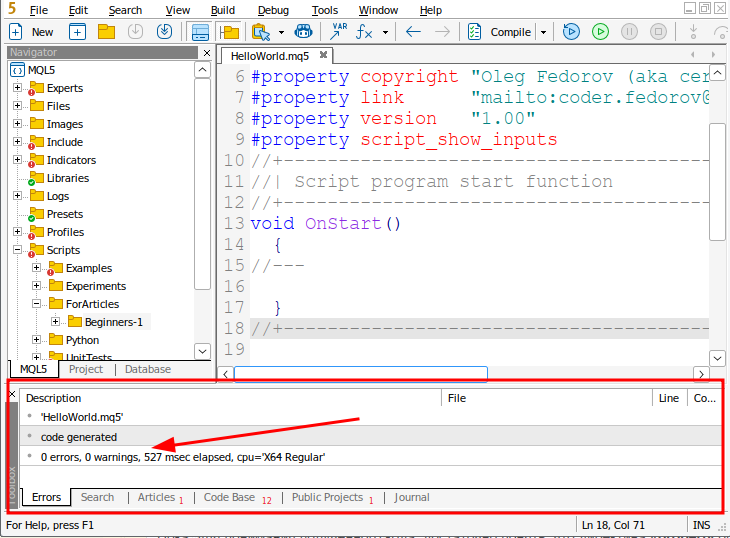
As you can see, single-line comments are straightforward. The image below shows them used in a standard "Hello World" script, both to create a decorative separator and to explain the purpose of the OnStart function.
Multi-Line Comments: The /* ... */ Syntax
Sometimes, a single line isn't enough. You might need to write a longer explanation, provide a header for your file with copyright information, or temporarily disable a whole section of code. For this, you use multi-line comments.
A multi-line comment starts with /* and ends with */. Everything in between, including multiple lines of text, is ignored by the compiler.
Here is an example of using it for a longer description:
/*
  Strategy: Mean Reversion on EURUSD H1
  Author: Your Name
  Date: 2023-10-27

  This Expert Advisor will monitor the 20-period moving average.
  It enters a trade when the price deviates significantly from the average
  and exits when it returns to the mean.
*/
void OnTick()
{
  // Trading logic goes here...
}
The article "Master MQL5 from beginner to pro" offers a great explanation of both comment types and includes some very useful, practical tips for working in MetaEditor.
Master MQL5 from beginner to pro (Part I): Getting started ...
This resource explains comments in detail and provides professional context for their use. It also contains a fantastic productivity tip you'll want to remember.
Read the section on comments, which begins right after "Example 1". Pay attention to the distinction between single-line comments and multi-line comments. Most importantly, take note of the keyboard shortcuts mentioned for quickly commenting and uncommenting lines of code. This will save you a lot of time.
Comments in Action
Let's look at a practical example. The code snippet below shows how comments can be used to explain the purpose of different input variables for an Expert Advisor. Without the comments on the right, it would be much harder to understand what MaximumRisk or MovingPeriod are supposed to do just by their names.

The Art of Commenting: Why, Not What
Now that you know how to write comments, it's important to learn when to write them. A common beginner mistake is to over-comment by stating the obvious.
-
Bad comment (states the 'what'):
lotSize = lotSize + 0.1; // Add 0.1 to lotSizeThis is not helpful because the code itself is perfectly clear.
-
Good comment (states the 'why'):
lotSize = lotSize + 0.1; // Increase lot size for martingale strategyThis comment is extremely useful. It explains the reasoning behind the action, providing context that is impossible to get from the code alone. Always strive to comment on the "why," not the "what."
Another powerful use for comments, especially the multi-line /* ... */ style, is to temporarily disable blocks of code. If a part of your bot isn't working correctly and you want to test the rest of it, you can simply wrap the problematic section in a comment block. This prevents it from running without you having to delete it.
void OnStart()
{
  Print("This part will run.");

  /*
  // This entire block is now disabled for testing.
  double complexCalculation = GetComplexValue();
  if (complexCalculation > 1.0)
  {
    PlaceTrade();
  }
  */

  Print("This part will also run.");
}
Conclusion
You now have a complete set of basic tools for writing and understanding a program. You can declare variables to store data, use operators to perform calculations, use Print() to see the results, and now, use comments to document your logic. This foundation is essential as we move into more complex topics.
Key Takeaways:
- Comments are notes for human readers that are ignored by the MQL5 compiler.
- Use
//for single-line comments, which are great for short notes next to your code. - Use
/* ... */for multi-line comments, ideal for longer explanations or temporarily disabling blocks of code. - Good comments explain the "why" (the intent or logic) behind your code, not the "what" (which the code already says).
- Use the MetaEditor shortcuts (
Ctrl+'andCtrl+;) to comment and uncomment code quickly.
So far, our programs have run in a straight line from top to bottom. In our next lesson, we will give our code the ability to make decisions. You'll learn how to use if-else statements to make your program execute different actions based on different conditions. This is the first major step toward building a bot that can react to changing market data.