Welcome to our next lesson. In our last session, you learned how to use arithmetic operators to perform calculations and update variables. This gave your program the ability to "think" by manipulating data. However, a program that only thinks internally isn't very useful; you need a way to see the results of its calculations and check its logic.
This lesson focuses on making your program "talk." We will cover the Print() function, one of the most essential tools in any programmer's toolkit. You will learn how to send messages, display variable values, and get crucial feedback from your MQL5 scripts. Mastering this skill is a fundamental step toward debugging your code and understanding exactly what your future trading bots are doing at any given moment.
Your First Conversation with MetaTrader
When you're learning to code, or even when you're an expert, you constantly need to ask your program questions: "Did this part of the code run?", "What is the value of my price variable right now?", "Is my calculation correct?". The Print() function is how you get the answers. It allows you to output text and data to a log file within the MetaTrader 5 terminal.
The simplest way to start is by printing a fixed piece of text, known in programming as a "string literal." The traditional first program for any new developer is one that prints "Hello, World!". Let's see how to do that in MQL5.
Our very first MQL5 Program "Hello World!!!" #coding #programming #helloworld
This short video provides a perfect, step-by-step visual guide on writing your very first MQL5 script to print "Hello World". It shows you everything from typing the code to seeing the result.
Watch the segment from the demonstration. Observe how the Print() command is written, how the script is compiled, and where the "Hello World" message appears in the MT5 terminal.
As you saw in the video, the basic syntax is straightforward:
void OnStart()
{
  // The text to be printed is placed inside parentheses and double quotes.
  Print("Hello World");
}
When this script runs, it sends the string "Hello World" to a specific log.
Finding Your Program's Output: The Experts Journal
So where does this printed message actually go? You don't see it on the chart or in a pop-up window. The Print() function sends all output to the Experts tab located in the Toolbox panel at the bottom of your MetaTrader 5 window.
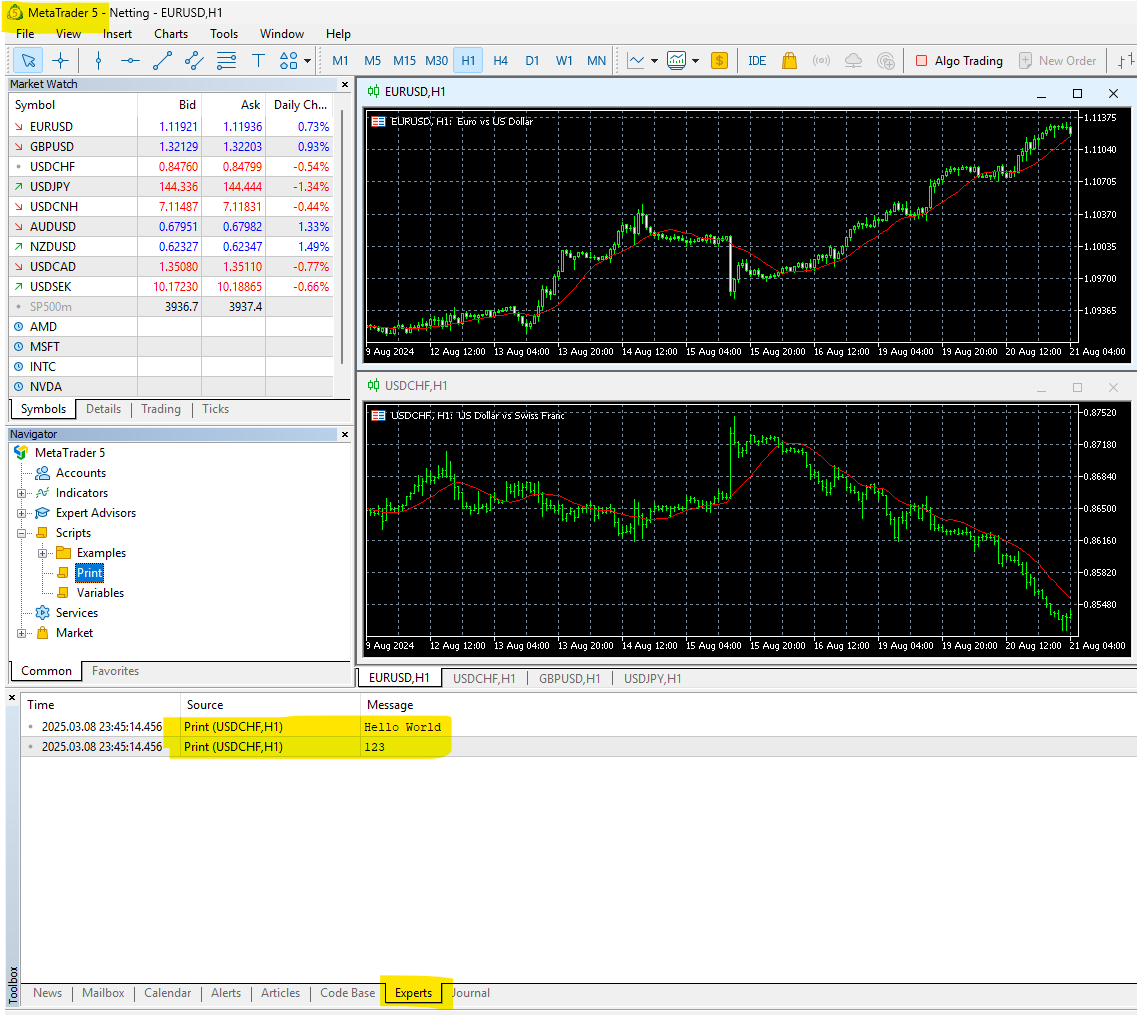
This journal is your main window into your program's activity. It logs every message from your scripts, indicators, and Expert Advisors, making it the central place for debugging and monitoring.
Printing the Contents of Variables
Printing static text is a start, but the real power of Print() comes from seeing the values of your variables. This is how you verify calculations and check the state of your program.
To print a variable, you simply place its name inside the parentheses, without any quotes.
The image below shows a simple script that declares an integer variable i and then prints both a "Hello World" string and the value of i.

Notice the two Print() calls:
Print("Hello World");prints the literal text.Print(i);looks up the value stored in the variablei(which is123) and prints that number to the log.
Combining Text and Variables for Readable Output
If you run the code from the image above, the Experts journal would show "Hello World" on one line and "123" on the next. While correct, "123" by itself lacks context. Is it the number of trades, a price, or an error code?
To make your output meaningful, you should combine descriptive text with your variable values. The Print() function allows you to include multiple items by separating them with commas.
There's a crucial detail here: Print() concatenates (joins) all arguments together without adding any spaces. It's up to you to add them for readability.
Logging messages - Common APIs - MQL5 Programming for Traders
This official MQL5 documentation explains how Print() handles multiple arguments. It contains a key example showing how to properly format the output.
Focus on the paragraph that starts with this explanation of how arguments are combined. Pay close attention to the code example that explicitly adds a comma and space ", " as a string literal between variables.
Based on what you just read, let's improve our previous example. Instead of just printing the number, we can describe what it is.
void OnStart()
{
  int numberOfTrades = 10;

  // Bad: This will print "10", which is unhelpful.
  // Print(numberOfTrades);

  // Good: This prints a descriptive message.
  Print("Current number of trades: ", numberOfTrades);
}
The output in the Experts journal for the "Good" example would be: Current number of trades: 10. The text in quotes provides context, and the space after the colon makes it easy to read. This practice is essential for effective debugging.
Let's look at another practical example from the MQL5 Cookbook.
MQL5 Cookbook: Using Different Print Modes - MQL5 Articles
This article demonstrates printing various pieces of information. It includes a clear example of combining a string literal with a variable to produce a useful log entry.
In the section "Writing a Code", find the code block under the if-else if structure. Look at the line that begins with Print("Symbol Name: "...);. Notice how it combines the text "Symbol Name: " with the built-in variable _Symbol to print the current chart's symbol. Then, examine "Fig. 4. Toolbox - Experts tab" to see the resulting output in the journal. You only need to focus on the Print part of the code for now.
From Calculation to Verification
Let's tie this back to our last lesson on arithmetic. You can now use Print() to verify the results of your calculations. This creates a complete cycle: you declare variables, perform an operation, and then print the result to confirm it's what you expected.
Consider this simple script:
void OnStart()
{
  // 1. Define inputs for a calculation
  double entryPrice = 1.0750;
  double exitPrice = 1.0800;

  // 2. Perform the calculation
  double profitInPrice = exitPrice - entryPrice;

  // 3. Print the results to verify everything
  Print("Trade Entry: ", entryPrice);
  Print("Trade Exit: ", exitPrice);
  Print("Calculated Profit: ", profitInPrice);
}
Running this script would produce three clear, readable lines in your Experts journal, allowing you to instantly check if your subtraction was correct and if the variables held the right values. This simple feedback loop is the foundation of building and testing any complex trading logic.
Conclusion
You have now learned how to make your MQL5 programs communicate with you. The Print() function is not just a command; it's your primary tool for observation and debugging. As you move toward building real trading bots, you will rely on it constantly to monitor decisions, check indicator values, and trace the execution of your logic.
Key Takeaways:
- The
Print()function is used to output information to the Experts tab in the MetaTrader Toolbox. - To print literal text (a string), enclose it in double quotes:
Print("My message");. - To print a variable's value, use its name without quotes:
Print(myVariable);. - You can combine text and variables by separating them with commas:
Print("Value: ", myVariable);. - Always add descriptive text and spacing to your
Print()statements to make the output clear and understandable.
Now that your code can "talk" to you, the next step is to learn how you can leave notes for yourself and other programmers directly inside the code. In our next lesson, we will cover comments, which are essential for documenting your logic and making your code readable long after you've written it.