Welcome back! In our previous lessons, all the code you've written has executed in a straight line, one command after the other, from top to bottom. This is useful, but it's not enough to build a smart trading bot. A bot needs to be able to react to the market, and that means it needs to make decisions.
This lesson introduces one of the most fundamental concepts in all of programming: control flow. You will learn how to use if-else statements to give your code the ability to choose a path based on a condition. This is the first major step from simply writing instructions to creating intelligent logic. For your goal of building trading bots, this is the building block for all trading rules, such as "if the price crosses above a moving average, then buy."
By the end of this lesson, you will be able to construct a complete if-else statement to execute different code blocks based on whether a condition is true or false.
A Fork in the Road: The if Statement
Imagine your program is walking down a path and comes to a fork in the road. It needs to decide whether to go left or right. An if statement is how you tell your program what question to ask at that fork to make its decision.
The question, or condition, must have a simple "yes" or "no" answer, which in programming is represented by true or false.
- If the condition is
true, the code inside theifblock is executed. - If the condition is
false, the code inside theifblock is skipped.
The basic structure looks like this:
if (condition)
{
  // Code to execute if the condition is true
}
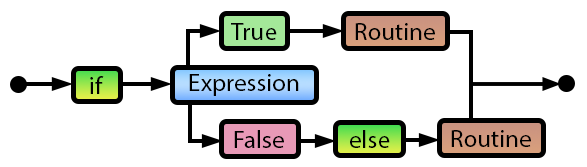
The flowchart below provides a great visual for this decision-making process. The program evaluates an "Expression" (our condition). If it's True, it follows one path; if it's False, it follows another.
Crafting the Condition: Asking the Right Questions
The condition inside the parentheses () is a logical expression. For it to be useful, we need operators that can compare values. The video "MQL5 Programming Tutorial 1.05" gives an excellent overview of these operators.
MQL5 Programming Tutorial 1.05 - Logic If/Else Operators and Expressions
This part of the video clearly explains the essential comparison operators you'll use in every if statement you write. Pay close attention to the warning about using a single = versus a double ==. This is a very common mistake for new programmers.
Watch the segment from this timestamp. It covers the following operators: == (is equal to) != (is not equal to) > (is greater than) < (is less than) >= (is greater than or equal to) <= (is less than or equal to)
Here's a summary of those key comparison operators:
| Operator | Meaning | Example | Result |
|---|---|---|---|
== |
Equal to | 5 == 5 |
true |
!= |
Not equal to | 5 != 3 |
true |
> |
Greater than | 5 > 3 |
true |
< |
Less than | 3 < 5 |
true |
>= |
Greater than or equal to | 5 >= 5 |
true |
<= |
Less than or equal to | 3 <= 5 |
true |
The most critical point to remember is the difference between = and ==:
x = 5;is an assignment. It means "set the value of variablexto 5."x == 5;is a comparison. It means "is the value ofxequal to 5?" and evaluates to eithertrueorfalse.
Using a single = inside an if condition is a frequent source of bugs that can be very hard to find.
What If It's False? The else Statement
The if statement tells the program what to do if a condition is true. But what if it's false? You can provide an alternative path using the else statement. The code inside the else block only runs if the if condition is false.
if (price > movingAverage)
{
  // Condition is true: price is above the average
  // Place a BUY order
}
else
{
  // Condition is false: price is not above the average
  // Do nothing, or check for a SELL condition
}
The video you just watched also provides a perfect, trading-focused example of this structure.
MQL5 Programming Tutorial 1.05 - Logic If/Else Operators and Expressions
This section explains the full if-else structure using a clear trading example.
Watch the segment from this clip. It demonstrates how to check if the price is greater than a simple moving average and execute different code in the if and else blocks.
An important rule, especially for beginners, is to always use curly braces {} to enclose the code for your if and else blocks, even if there's only one line of code. This prevents ambiguity and makes your code much easier to read and debug. This short video explains why it's so important.
LEARN MQL5 TUTORIAL BASICS - 6 SIMPLE IF CONDITION
This video demonstrates a common error that occurs when you omit curly braces for a block of code with more than one line.
Watch the segment from this part of the video to see why the braces are necessary.
Practical Exercise: Building a Spread Checker
Now, let's put this into practice. We'll build a simple Expert Advisor that checks the current spread of a symbol and displays a different message on the chart depending on whether the spread is acceptable. This is a practical tool, as high spreads can make a strategy unprofitable.
This exercise follows the step-by-step demonstration in the "MQL5 Programming Tutorial 1.05" video. You can code along with the instructor.
MQL5 Programming Tutorial 1.05 - Logic If/Else Operators and Expressions
This is a complete, hands-on demonstration. It will guide you from creating an input variable for the maximum allowed spread to writing the if-else logic and seeing it work live on a chart. This is a perfect example of how to apply what you've learned today.
Follow along with the video from this timestamp. Here's a summary of the steps you'll be taking: Create a new input double variable called MaxSpread to define your tolerance. In the OnTick() function, get the current spread. Write an if-else statement: if the currentSpread is greater than MaxSpread, set a warning message. else, set a normal status message. Use the Comment() function to display the message on the chart. Compile the EA, attach it to a chart, and test it by changing the MaxSpread input value.
This exercise demonstrates the full cycle: you have a condition (currentSpread > MaxSpread), and your program takes one of two different actions based on the outcome. You have just given your code the power to make a decision.
Conclusion
Today you've made a huge leap forward. Your programs are no longer limited to running in a straight line; they can now analyze conditions and change their behavior accordingly. This is the core of any automated strategy.
Key Takeaways:
- The
if-elsestatement allows your code to execute different blocks of code based on a condition. - The
conditionmust be an expression that evaluates totrueorfalse. - You use comparison operators (
==,!=,>,<, etc.) to build these conditions. Be careful to use==for comparison, not=. - The
ifblock runs if the condition istrue; theelseblock runs if it isfalse. - Always wrap your
ifandelsecode blocks in curly braces{}for clarity and to avoid errors.
So far, we've only checked one simple condition at a time. But what if a trading decision depends on multiple factors? For example: "Is the price above the moving average AND is the RSI indicator below 30?" In our next lesson, we will explore how to combine multiple conditions using logical operators like && (AND) and || (OR) to build more sophisticated decision-making logic for your bots.