Hello! Welcome to the next lesson in our NumPy module.
In our previous lesson, we dove into the essential techniques of indexing, slicing, and boolean masking, which allow you to select and modify specific data within NumPy arrays.
Today, we'll shift our focus from selecting existing data to creating it from scratch. This lesson covers how to use NumPy's powerful random module to generate arrays of random data. This skill is fundamental in machine learning for tasks like initializing model parameters, creating synthetic datasets for testing, performing statistical simulations, and shuffling your data before training.
By the end of this lesson, you will be able to use the numpy.random module to generate random integers, floating-point numbers from different distributions, and make random selections from existing data.
1. The Modern Approach: np.random.Generator
Before we start generating numbers, it's important to know that NumPy has updated its random number generation infrastructure. You will often find older code using functions directly from np.random, like np.random.randint(). The modern, recommended approach is to first create a Generator object and then call methods on it.
This new approach offers better performance and more flexibility. We will be using this modern API throughout the lesson.
To start, you first create an instance of a random number generator:
import numpy as np

# Create a default random number generator object
rng = np.random.default_rng()
Now, you can use this rng object to access all the random data generation functions.
For a brief official overview of this new approach, take a look at the NumPy documentation.
Random sampling (numpy.random)
This is the official quick-start guide from the NumPy documentation. It introduces the recommended way to generate random numbers.
Read the 'Quick start' section. Pay attention to how the rng object is created with np.random.default_rng() and then used to call methods like random(), standard_normal(), and integers().
2. Generating Random Numbers
With our rng object, we can now generate various types of random numbers.
Random Integers
To generate random integers, we use the rng.integers() method. You can specify a range and the desired size of the output array.
# Generate one random integer between 0 (inclusive) and 10 (exclusive)
random_int = rng.integers(low=0, high=10)
print(f"A single random integer: {random_int}")

# Generate a 1D array of 5 random integers between 50 and 100
random_int_array = rng.integers(low=50, high=100, size=5)
print(f"A 1D array of random integers: {random_int_array}")

# Generate a 3x4 array of random integers
random_int_matrix = rng.integers(low=0, high=10, size=(3, 4))
print(f"A 2D array of random integers:\n{random_int_matrix}")
Random Floats: Uniform Distribution
A uniform distribution means that every value within a given range has an equal probability of being chosen. Think of it as picking a number from a hat where every number has the same chance of being picked.
rng.random(size): Generates floats in the half-open interval[0.0, 1.0).rng.uniform(low, high, size): Generates floats in a custom range[low, high).
# Generate a 2x3 array of random floats between 0 and 1
random_float_array = rng.random(size=(2, 3))
print(f"Random floats between 0 and 1:\n{random_float_array}\n")

# Generate a 1D array of 4 floats between -5 and 5
uniform_array = rng.uniform(low=-5, high=5, size=4)
print(f"Uniformly distributed floats between -5 and 5:\n{uniform_array}")
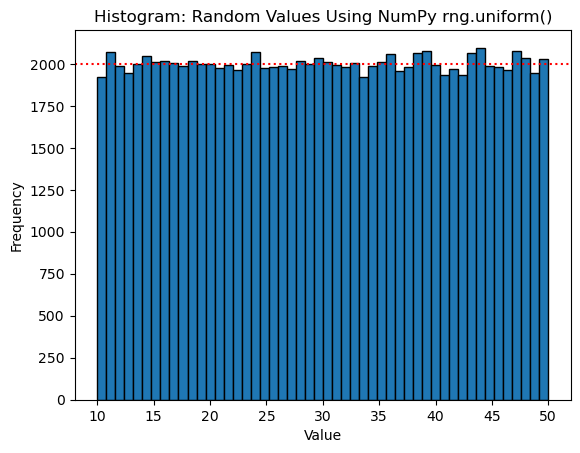
The image below shows a histogram of 100,000 numbers generated with rng.uniform(10, 50). Notice how all the bars are roughly the same height, visually confirming the "uniform" nature of the distribution.
Random Floats: Normal Distribution
The normal distribution (or "bell curve") is one of the most important distributions in statistics. In a normal distribution, most values cluster around the central mean, and values further from the mean are less likely to occur.
rng.standard_normal(size): Generates floats from a standard normal distribution (mean=0, standard deviation=1).rng.normal(loc, scale, size): Generates floats from a normal distribution with a specified mean (loc) and standard deviation (scale).
# Generate a 3x3 array from a standard normal distribution
std_normal_array = rng.standard_normal(size=(3, 3))
print(f"Standard Normal distribution (mean=0, std=1):\n{std_normal_array}\n")

# Generate 5 numbers from a normal distribution with mean=50 and std=5
normal_array = rng.normal(loc=50, scale=5, size=5)
print(f"Normal distribution with mean=50, std=5:\n{normal_array}")
Test your understanding!
Your task is to generate a dataset for a simple experiment. Create a 5x2 NumPy array representing 5 data points, each with 2 features. The values for both features should be random floating-point numbers drawn from a uniform distribution between -1 and 1.
Show answer
import numpy as np

# Create a generator object
rng = np.random.default_rng()

# Generate the 5x2 array
dataset = rng.uniform(low=-1, high=1, size=(5, 2))

print(dataset)
Your output will vary, but it should be a 5x2 array with values between -1.0 and 1.0.
3. Reproducibility and Seeding
An essential concept in scientific computing and machine learning is reproducibility. If you are running an experiment, you need to be able to get the exact same results again. But how is this possible if we are using random numbers?
The answer is that computers generate pseudo-random numbers. They are created by a deterministic algorithm that starts with an initial number called a seed. If you use the same seed, you will get the exact same sequence of "random" numbers every time.
To make your random numbers reproducible, you pass an integer as the seed when creating your generator:
# Create a generator with a specific seed
rng_seeded = np.random.default_rng(seed=42)

# These numbers will be the same every time this code is run
print(rng_seeded.random(5))

# Create another generator with the same seed
rng_also_seeded = np.random.default_rng(seed=42)

# It will produce the exact same sequence of numbers
print(rng_also_seeded.random(5))

# A generator with no seed (or a different seed) will produce different numbers
rng_unseeded = np.random.default_rng()
print(rng_unseeded.random(5))
The following video provides an excellent practical explanation of why seeding is so important.
Random Seed Method in Python [NumPy + Random module]
This video from Koolac explains the concept of a random seed in a very intuitive way. It uses the analogy of a teacher assigning homework to students and needing to verify their results.
Watch the video from 0:08 to 3:38 and from 5:32 to 7:04. Please note that the video uses the older NumPy syntax (np.random.seed() and np.random.randint()). The concept is identical, but the modern way to do this is by passing the seed directly to np.random.default_rng(seed=...), as shown above.
4. Shuffling and Making Choices
Besides generating new random data, you often need to randomize existing data.
Shuffling Arrays
rng.shuffle() shuffles the contents of an array along its first axis. This is often used to randomize the order of a dataset before splitting it into training and testing sets. Note that this operation happens in-place, meaning it modifies the original array directly.
# Create an ordered array
data_order = np.arange(10)
print(f"Original array: {data_order}")

# Shuffle the array in-place
rng.shuffle(data_order)
print(f"Shuffled array: {data_order}")
Making Random Choices
rng.choice() lets you randomly select items from an array. This is useful for techniques like bootstrapping or simply sampling your data.
# Create an array of options
fruits = np.array(["apple", "banana", "cherry", "date"])

# Select one random fruit
random_fruit = rng.choice(fruits)
print(f"Random fruit: {random_fruit}")

# Select 3 random fruits, with replacement (can pick the same one multiple times)
three_fruits = rng.choice(fruits, size=3, replace=True)
print(f"Three random fruits (with replacement): {three_fruits}")

# Select 3 unique fruits, without replacement
# Note: size cannot be larger than the number of items in the array if replace=False
unique_fruits = rng.choice(fruits, size=3, replace=False)
print(f"Three unique fruits (without replacement): {unique_fruits}")

# You can also provide probabilities for each item
# p must sum to 1.0
fruit_probabilities = [0.1, 0.1, 0.7, 0.1] # 'cherry' is most likely
weighted_choice = rng.choice(fruits, p=fruit_probabilities)
print(f"Weighted choice: {weighted_choice}")
This video gives a quick and fun demonstration of these concepts.
This final clip from the 'Learn NumPy in 1 hour!' video by Bro Code demonstrates how to shuffle an array and make random choices, including with multi-dimensional arrays and even emojis.
Watch from 57:15 to 59:57 to see shuffling and random choices in action.
Conclusion
You now have the tools to generate a wide variety of random data with NumPy, a skill that you will use constantly in your machine learning journey.
Key Takeaways:
- The modern, recommended way to generate random numbers is to create a generator object with
rng = np.random.default_rng(). - You can generate random numbers from different distributions, including
integers,uniform, andnormal. - Setting a seed (
np.random.default_rng(seed=...)) is crucial for creating reproducible experiments and debugging your code. - You can randomly reorder arrays in-place with
rng.shuffle()and select random samples from an array withrng.choice().
Preview of the Next Lesson:
In the next lesson, we will explore vectorized operations. We've been using them all along, but we'll now take a deeper look at why they are the cornerstone of NumPy's performance and how using them effectively can make your code dramatically faster and cleaner than writing traditional Python loops.