Hello! Welcome to the third lesson in our Advanced Python Fundamentals module.
In our last session, we mastered *args and **kwargs, learning how to create functions that accept a variable number of arguments. As I hinted then, this skill is a direct prerequisite for today's topic.
Today's lesson will address the learning outcome: Implement decorators to modify function behavior. Decorators are a powerful concept in Python that allow you to extend or modify the functionality of functions or methods without changing their source code. This is a common pattern in Python, especially in web frameworks and, as we'll see, it has very useful applications in machine learning for tasks like logging, timing, and data validation.
The "Why": Separating Concerns
Imagine you have several functions in your code, and for each one, you want to log when it's called and how long it takes to run. The naive approach would be to add logging and timing code to the beginning and end of every single function.
import time

def function_one():
    start_time = time.time()
    print("Starting function_one...")
    # Original logic of function_one
    time.sleep(1)
    end_time = time.time()
    print(f"function_one finished in {end_time - start_time:.2f} seconds.")

def function_two():
    start_time = time.time()
    print("Starting function_two...")
    # Original logic of function_two
    time.sleep(0.5)
    end_time = time.time()
    print(f"function_two finished in {end_time - start_time:.2f} seconds.")
This approach has two major problems:
- Code Duplication: The timing and logging logic is repeated everywhere. If you need to change it, you have to find and edit every instance.
- Violates Single Responsibility Principle: Each function is now doing two things: its primary task and also timing/logging. This makes the code harder to read and maintain.
Decorators provide an elegant solution to this by separating these "cross-cutting concerns" (like logging, timing, or authentication) from the core business logic of the function.
Part 1: The Foundation of Decorators
To understand decorators, we first need to embrace a core Python feature: functions are first-class objects. This means you can treat a function just like any other variable—you can pass it as an argument to another function, and you can have a function return another function.
This is the foundation of how decorators work. A decorator is essentially a function that takes another function as input, adds some functionality to it (by "wrapping" it in another function), and returns the new, enhanced function.
To see this foundational concept in action, the following video provides a clear, visual explanation.
Python Decorators - Visually Explained
Watch this segment from 'Python Decorators - Visually Explained' to understand the problem decorators solve and to see a step-by-step guide on creating a basic timer decorator.
Watch from 00:56 to 04:22. Focus on how the decorator is a function that defines and returns an 'enhanced' inner function.
As the video explains, the core structure is a nested function. The outer function is the decorator, and the inner function is the "wrapper" that contains the added logic and a call to the original function.
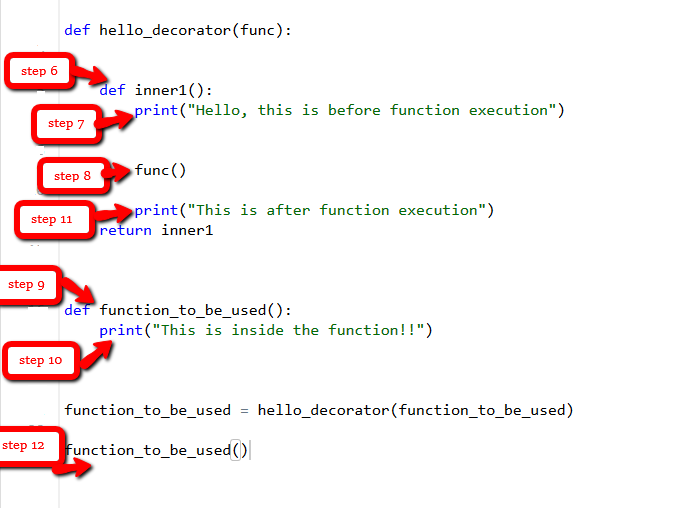
Here's that manual process in code:
def my_decorator(func):
    def wrapper():
        print("Something is happening before the function is called.")
        func()  # This is where the original function runs
        print("Something is happening after the function is called.")
    return wrapper

def say_whee():
    print("Whee!")

# Now, let's manually "decorate" our function
say_whee = my_decorator(say_whee)

# When we call say_whee now, we're actually calling the wrapper
say_whee()
Part 2: Syntactic Sugar and Real-World Flexibility
That manual reassignment (say_whee = my_decorator(say_whee)) works, but it's a bit clunky. Python provides a much cleaner syntax for this, the @ symbol, which is just "syntactic sugar" for the same process.
@my_decorator
def say_whee():
    print("Whee!")

say_whee() # This does the exact same thing as the manual example above
This is much more readable and explicitly states that say_whee is being decorated.
Connecting to the Previous Lesson
Our simple decorator has a major flaw: it only works for functions that take zero arguments. What happens if we try to decorate a function like greet(name)?
# @my_decorator  <-- If you uncomment this, it will raise a TypeError!
def greet(name):
    print(f"Hello, {name}!")

# greet("Alice")
The wrapper function was defined with no parameters (def wrapper():), so it can't accept the "Alice" argument.
This is where your knowledge of *args and **kwargs from the last lesson becomes essential. To make our decorator general-purpose, we can define the wrapper to accept any combination of positional and keyword arguments and then pass them along to the original function.
Let's revise our decorator:
def general_purpose_decorator(func):
    def wrapper(*args, **kwargs): # Accept any arguments
        print("Something is happening before the function is called.")
        result = func(*args, **kwargs) # Pass them to the original function
        print("Something is happening after the function is called.")
        return result # Return the result of the original function
    return wrapper

@general_purpose_decorator
def greet(name):
    print(f"Hello, {name}!")

@general_purpose_decorator
def add(a, b):
    return a + b

greet("Alice")
sum_result = add(5, 3)
print(f"The sum is: {sum_result}")
Now our decorator is flexible and can be applied to a wide range of functions!
The following video provides an excellent visual walkthrough of this exact process, showing why *args and **kwargs are needed and how to handle return values correctly.
Python Decorators - Visually Explained
This segment clearly demonstrates how to make a decorator flexible enough to handle functions with any number of arguments using *args and **kwargs.
Watch from 07:18 to 15:24. Pay close attention to how *args and **kwargs are used in the wrapper's definition and then unpacked in the call to the base function. Also, note how the wrapper must capture and return the base function's return value.
Part 3: A Crucial Refinement: Preserving Metadata
Decorators have one subtle "gotcha". When you decorate a function, you are technically replacing it with the wrapper function. This means the original function's metadata, like its name (__name__) and its docstring (__doc__), is lost.
@general_purpose_decorator
def say_hello():
    """A simple function that says hello."""
    print("Hello!")

print(say_hello.__name__)
# Expected: 'say_hello'
# Actual: 'wrapper'

print(say_hello.__doc__)
# Expected: 'A simple function that says hello.'
# Actual: None
This can be problematic for debugging and introspection tools. Fortunately, Python's standard library has a fix: another decorator called @functools.wraps. You use it to decorate your wrapper function inside your decorator. It copies the metadata from the original function to the wrapper.
To see how to apply this, let's watch a quick clip.
Python Decorators: The Complete Guide
This video from ArjanCodes quickly explains the metadata problem and demonstrates the solution using @functools.wraps.
Watch from 17:16 to 18:35.
Here is our "best practice" decorator template, which you should use as a starting point for your own decorators:
import functools

def decorator_template(func):
    @functools.wraps(func) # Use this to preserve metadata
    def wrapper(*args, **kwargs):
        # --- Code to run BEFORE the original function ---
        result = func(*args, **kwargs)
        # --- Code to run AFTER the original function ---
        return result
    return wrapper
Test your understanding!
Write a decorator called log_function_call that prints the name of the function being called and its arguments before execution. Make sure it can handle any function and preserves the function's metadata.
Example usage:
@log_function_call
def multiply(x, y, z=1):
    """Returns the product of three numbers."""
    return x * y * z

multiply(2, 3)
# Should print: "Calling function 'multiply' with args=(2, 3), kwargs={}"

multiply(2, 3, z=5)
# Should print: "Calling function 'multiply' with args=(2, 3), kwargs={'z': 5}"
Show answer
import functools

def log_function_call(func):
    @functools.wraps(func)
    def wrapper(*args, **kwargs):
        print(f"Calling function '{func.__name__}' with args={args}, kwargs={kwargs}")
        return func(*args, **kwargs)
    return wrapper

@log_function_call
def multiply(x, y, z=1):
    """Returns the product of three numbers."""
    return x * y * z

product1 = multiply(2, 3)
product2 = multiply(2, 3, z=5)

print(f"Result 1: {product1}")
print(f"Result 2: {product2}")

# Verify metadata
print(multiply.__name__) # Should be 'multiply'
print(multiply.__doc__)  # Should be 'Returns the product of three numbers.'
Part 4: Practical Use Cases
Decorators are not just a theoretical exercise. They are used extensively in real-world code.
Use Case 1: Logging
The example in the exercise is a common one. Here is a complete, visual example of a logging decorator.

Use Case 2: Caching / Memoization
For functions that are computationally expensive, you can use a decorator to cache their results. The first time the function is called with specific arguments, it computes the result and stores it. On subsequent calls with the same arguments, it returns the stored result instantly. Python has a built-in decorator for this!
A Gentle Introduction to Decorators in Python
This article, 'A Gentle Introduction to Decorators in Python', provides an excellent explanation and example of memoization, a powerful technique for optimizing performance.
Read the subsection titled 'Memoization'. Pay attention to how the decorator avoids re-running expensive calculations. Also, note the mention of the built-in @functools.lru_cache, which you should prefer in your own code.
Here's an example using the built-in decorator:
import functools
import time

@functools.lru_cache(maxsize=None) # 'lru' stands for 'Least Recently Used'
def slow_fibonacci(n):
    """Calculates the n-th Fibonacci number recursively (slowly)."""
    if n < 2:
        return n
    return slow_fibonacci(n - 1) + slow_fibonacci(n - 2)

# First call is slow, as it computes and caches all values up to 35
start = time.time()
result = slow_fibonacci(35)
end = time.time()
print(f"Result: {result}. First call took {end - start:.4f} seconds.")

# Second call is instantaneous because the result for 35 is already cached
start = time.time()
result = slow_fibonacci(35)
end = time.time()
print(f"Result: {result}. Second call took {end - start:.4f} seconds.")
This technique can be a lifesaver when working with complex calculations in data analysis or machine learning.
Conclusion
Congratulations! You've just learned one of Python's most powerful and elegant features. You can now modify and extend functions in a clean, reusable, and maintainable way.
Key Takeaways:
- Decorators are functions that wrap other functions to add new behavior without altering the source code of the wrapped function.
- They rely on functions being "first-class citizens" in Python.
- The
@decoratorsyntax is syntactic sugar for the manual assignmentmy_func = decorator(my_func). - To create a general-purpose decorator, its inner
wrapperfunction must accept*argsand**kwargsand pass them to the original function. - Always use
@functools.wrapson your inner wrapper function to preserve the original function's metadata for easier debugging.
Preview of the Next Lesson:
In our next lesson, we will cover exception handling with try-except blocks. You'll learn how to gracefully manage errors in your code. As you might guess, decorators can also be used to create standardized error-handling logic for a group of functions, which is another powerful application of what you've learned today.