Hello! Welcome to the fourth lesson in our Advanced Python Fundamentals module.
In our last lesson, we explored decorators, a powerful way to add functionality to existing functions without changing their code. We even previewed how decorators could be used for error handling. Today, we'll dive deep into Python's primary mechanism for dealing with errors as they happen.
This lesson addresses the learning outcome: Handle exceptions effectively using try-except blocks. When you write code for real-world applications, especially in machine learning where you might be processing unpredictable data from various files or APIs, things will inevitably go wrong. A file might be missing, data might be in the wrong format, or a network connection might fail. A robust program doesn't crash; it anticipates these problems and handles them gracefully. Today, you'll learn how.
The "Why": Asking for Forgiveness, Not Permission
In many programming languages, a common pattern is to check for potential problems before you act. This is called "Look Before You Leap" (LBYL). For example:
import os

# "Look Before You Leap" (LBYL)
if os.path.exists("my_file.txt"):
    f = open("my_file.txt")
    # ... do something with the file
    f.close()
else:
    print("File does not exist.")
Python, however, often encourages a different style: "Easier to Ask for Forgiveness than Permission" (EAFP). The idea is to assume your code will work and handle the consequences if it doesn't. This is where try-except comes in.
# "Easier to Ask for Forgiveness than Permission" (EAFP)
try:
    f = open("my_file.txt")
    # ... do something with the file
    f.close()
except FileNotFoundError:
    print("File does not exist.")
The EAFP approach is often considered more "Pythonic" because it's cleaner and avoids a potential issue called a race condition (e.g., what if the file is deleted between the os.path.exists check and the open call?).
Part 1: The Core - try and except
When Python encounters an error during execution, it "raises" an exception. If this exception isn't "caught," your program stops and prints an error message (a traceback). The try-except block is how you catch these exceptions.
- The
tryblock contains the code that might fail. - The
exceptblock contains the code that runs if an exception occurs in thetryblock.
To see this fundamental concept in action, let's watch the beginning of a helpful video from Corey Schafer.
Python Tutorial: Using Try/Except Blocks for Error Handling
This first segment will introduce the basic try-except structure and explain why it's necessary for handling runtime errors like a missing file.
Watch from the beginning to 02:07. Focus on how the try block attempts to run risky code and how the except block provides a custom response when an error occurs.
Being Specific Is Key
As the video hints, just using a generic except: is a bad habit. It catches every possible exception, including ones you didn't expect, like a typo in your code (NameError). This can hide bugs and make your program difficult to debug.
The best practice is to catch only the specific exceptions you anticipate. You can have multiple except blocks to handle different types of errors differently.
Watch the next part of the video to see why this is so important and how to implement it.
Python Tutorial: Using Try/Except Blocks for Error Handling
This segment demonstrates the importance of catching specific exceptions and shows how to handle multiple, different errors that might arise from your try block.
Continue watching from 02:07 to 05:39. Pay close attention to the difference between catching a specific FileNotFoundError versus a general Exception. Also, note how you can access the exception object itself using the as e syntax.
Here's an example combining these ideas:
def calculate_ratio(x, y):
    try:
        # Convert inputs to numbers
        num_x = float(x)
        num_y = float(y)

        # Perform calculation
        result = num_x / num_y
        print(f"The ratio is: {result}")

    except ValueError:
        # This runs if float() fails
        print("Error: Both inputs must be numbers.")
    except ZeroDivisionError:
        # This runs if division by zero occurs
        print("Error: The second input cannot be zero.")
    except Exception as e:
        # A catch-all for any other unexpected errors
        print(f"An unexpected error occurred: {e}")

# Let's test it
calculate_ratio(10, 2)    # Works fine
calculate_ratio(10, "a")  # Triggers ValueError
calculate_ratio(10, 0)    # Triggers ZeroDivisionError
Test your understanding!
Write a function get_list_element(data, index) that attempts to access an element from a list. It should gracefully handle two potential errors:
- If the
indexis not an integer, it should print "Error: Index must be an integer." (This would raise aTypeError). - If the
indexis out of bounds, it should print "Error: Index is out of range." (This would raise anIndexError).
my_list = ['a', 'b', 'c']
get_list_element(my_list, 1)      # Should print: 'b'
get_list_element(my_list, '1')    # Should print: "Error: Index must be an integer."
get_list_element(my_list, 5)      # Should print: "Error: Index is out of range."
Show answer
def get_list_element(data, index):
    try:
        element = data[index]
        print(element)
    except TypeError:
        print("Error: Index must be an integer.")
    except IndexError:
        print("Error: Index is out of range.")

my_list = ['a', 'b', 'c']
get_list_element(my_list, 1)
get_list_element(my_list, '1')
get_list_element(my_list, 5)
Part 2: The Full Structure: else and finally
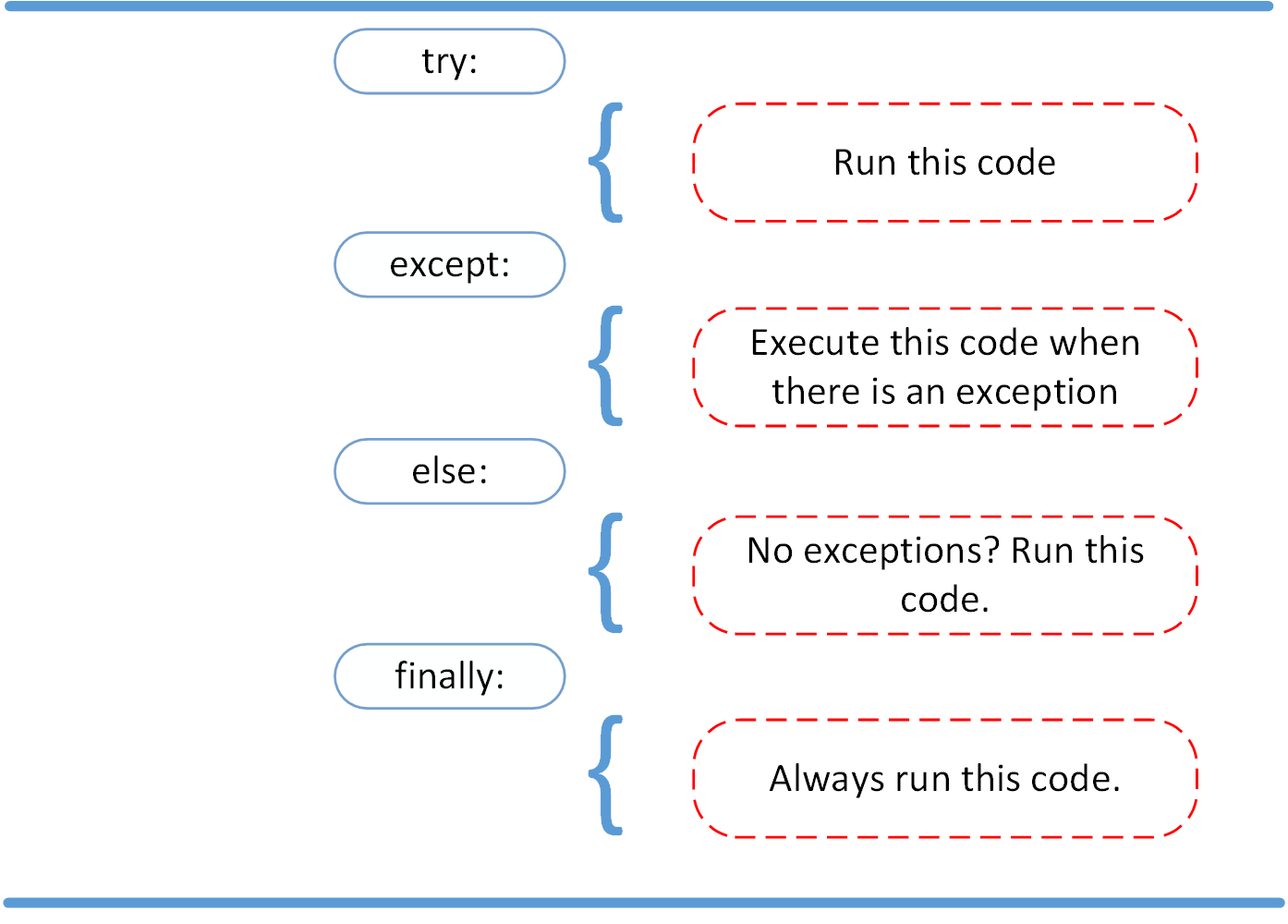
The try-except block can be extended with two more optional clauses: else and finally. This gives you very fine-grained control over your program's flow.
- The
elseblock runs only if no exceptions were raised in thetryblock. This is useful for separating your "success" code from the code you are monitoring for errors. - The
finallyblock runs no matter what. It executes whether an exception occurred or not. This is essential for cleanup actions, like closing a file or a network connection, to ensure resources are released properly.
This diagram perfectly illustrates the complete execution flow.
Let's return to Corey Schafer's video to see how these two clauses work in practice.
Python Tutorial: Using Try/Except Blocks for Error Handling
This final segment from the video explains the purpose of the else and finally clauses, completing our understanding of the full error-handling structure.
Watch from 05:39 to 08:35. Note when the else block is executed versus when the finally block is. Think about why you'd want to put code in else instead of at the end of the try block.
The key reason to use an else block is to minimize the amount of code in the try block. The try block should only contain the absolute minimum code that could raise an exception you want to handle. Any subsequent code that should only run on success is better placed in the else block.
Part 3: Advanced Usage and Best Practices
Now that you understand the mechanics, let's focus on how to use exception handling effectively, like a professional developer.
Python Try-Except Tutorial: Best Practices and Real-World Use Cases
The following article from DataCamp summarizes the best practices and shows real-world use cases. It's a great way to solidify your understanding.
Read the sections titled 'Python try-except Best Practices and Common Pitfalls' and 'Real-World Examples and Use Cases'. Focus on the advice to keep try blocks tight and to avoid silencing errors with a bare except: pass.
Raising Your Own Exceptions
Sometimes, an error isn't something Python would automatically detect, but rather a violation of your program's logic. For example, you might write a function that requires a positive number as input. You can use the raise keyword to create and throw an exception yourself.
Python Tutorial: Using Try/Except Blocks for Error Handling
Let's see a quick example of how and why you would manually raise an exception in your code.
Watch from 08:35 to 10:04.
Here's another practical example:
def set_age(age):
    if age < 0:
        # This is a logical error for our application
        raise ValueError("Age cannot be negative.")
    print(f"Age set to {age}")

try:
    set_age(25)
    set_age(-5)
except ValueError as e:
    print(f"Error setting age: {e}")
Re-raising Exceptions
There are times when you want to catch an exception, do something with it (like log it to a file), but then let the exception continue to propagate up to let a higher-level part of the program handle it. You can do this by using raise by itself inside an except block.
Python Try-Except Tutorial: Best Practices and Real-World ...
The following article explains how to properly re-raise an exception after you've logged it, and introduces the concept of exception chaining.
Read the section 'Logging, Re-Raising, and Exception Chaining'. Pay attention to the use of a bare raise to re-throw the original exception.
Example of logging and re-raising:
import logging

logging.basicConfig(level=logging.INFO, filename='app.log', filemode='w',
                    format='%(asctime)s - %(levelname)s - %(message)s')

def process_data(data):
    try:
        # Risky operation
        important_value = data['key']
        print(f"Processing value: {important_value}")
    except KeyError as e:
        logging.error(f"Missing essential key in data: {e}")
        raise # Re-raise the exception after logging it

try:
    my_data = {'wrong_key': 'some_value'}
    process_data(my_data)
except KeyError:
    print("Execution failed. Check app.log for details.")
If you check the app.log file after running this, you'll see the error message you logged.
Conclusion
You have now learned a fundamental skill for writing robust and professional Python code. By anticipating and handling errors, you can build applications that are more reliable and easier to debug.
Key Takeaways:
- Exception handling allows your program to react to runtime errors without crashing.
- The
try-exceptblock is Python's primary tool for this, aligning with the EAFP ("Easier to Ask Forgiveness than Permission") philosophy. - Always be specific with the exceptions you catch. Avoid bare
except:blocks. - Use the full
try-except-else-finallystructure for fine-grained control:try: Code that might fail.except: Code to run if an error occurs.else: Code to run only iftrysucceeds.finally: Cleanup code that always runs.
- You can use
raiseto trigger exceptions based on your program's logic.
Preview of the Next Lesson:
The cleanup pattern we saw with the finally block (like ensuring a file is always closed) is extremely common. In our next lesson, Apply context managers for resource handling using the 'with' statement, we will learn about a more elegant and "Pythonic" syntax for managing resources that automatically handles this cleanup for you. You'll see how the with statement simplifies the code you'd normally write in a try...finally block.