Hello! Welcome to the fifth lesson in our Advanced Python Fundamentals module.
In our last lesson, we mastered try-except-else-finally for robust error handling. We saw how the finally block is essential for "cleanup" actions, like closing a file, ensuring that critical code runs no matter what. Today, we'll learn a more elegant and powerful way to handle this exact pattern.
This lesson addresses the learning outcome: Apply context managers for resource handling using the 'with' statement. This is a cornerstone of idiomatic Python code. It ensures that resources are set up and torn down correctly, making your programs safer, cleaner, and more readable—a vital skill when building data processing pipelines in machine learning.
From try...finally to with
Remember this pattern from our last lesson for safely working with a file?
# The verbose try...finally way
f = open('my_file.txt', 'w')
try:
    f.write('Hello, world!')
finally:
    f.close() # This is guaranteed to run
This works, but it's a bit clunky. The setup (open) and teardown (close) are separated, and we have to write this boilerplate code every time. Python provides a much cleaner solution: the with statement.
# The elegant 'with' statement way
with open('my_file.txt', 'w') as f:
    f.write('Hello, world!')

# The file is automatically closed here!
The with statement encapsulates the try...finally logic, automatically handling the cleanup for you. An object that can be used in a with statement is called a context manager.
Let's watch a short video that introduces this concept and highlights why it's so useful.
Python Tutorial: Context Managers - Efficiently Managing Resources
Corey Schafer from the 'Python Tutorial: Context Managers' video will explain what context managers are and why they are the preferred way to manage resources like files.
Watch from the beginning until 01:25. Pay attention to how the with statement simplifies the code and guarantees that the resource (the file) is closed properly, even if errors occur.
As the video mentions, this isn't just for files. It's for any resource that needs explicit setup and teardown, like database connections, network sockets, or managing temporary changes to system state.
How Context Managers Work: The __enter__ and __exit__ Methods
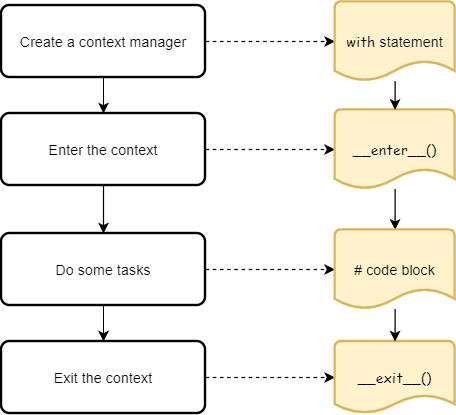
So, how does an object gain this superpower of working with the with statement? It follows Python's "context management protocol" by implementing two special "dunder" (double underscore) methods:
__enter__(self): This method is executed at the start of thewithblock. Its return value is what gets assigned to the variable after theaskeyword. This is the "setup" phase.__exit__(self, exc_type, exc_value, traceback): This method is executed at the end of thewithblock, right before exiting. It always runs, whether the block finished successfully or an exception was raised. This is the "teardown" phase.
The parameters exc_type, exc_value, and traceback are populated with details about an exception if one occurred inside the with block; otherwise, they are all None.
This flowchart provides a great visual summary of the execution flow.
Building a Class-Based Context Manager
To truly understand this, let's build our own context manager from scratch. We'll create one that replicates the behavior of open().
The next segment of Corey Schafer's video provides an excellent walkthrough of creating a context manager using a class.
Python Tutorial: Context Managers - Efficiently Managing Resources
This section demonstrates how to create your own context manager by defining a class with __init__, __enter__, and __exit__ methods. It's a great way to see what happens 'under the hood'.
Watch from 01:25 to 08:20. Follow along as he builds the OpenFile class. Notice how the __enter__ method opens and returns the file object, and the __exit__ method simply closes it.
Here is a summary of the class from the video:
class OpenFile:
    def __init__(self, filename, mode):
        self.filename = filename
        self.mode = mode

    def __enter__(self):
        # Setup: open the file and return the file object
        self.file = open(self.filename, self.mode)
        return self.file

    def __exit__(self, exc_type, exc_value, traceback):
        # Teardown: close the file
        self.file.close()

# Now we can use our custom context manager
with OpenFile('sample.txt', 'w') as f:
    f.write('Testing our custom context manager!')

print(f.closed) # This will print True
Test your understanding!
Imagine you want to create a context manager called Timer that measures the time it takes to execute a block of code. Which method, __enter__ or __exit__, would you use to record the start time, and which would you use to calculate and print the elapsed time?
Show answer
You would record the start time in __enter__. Then, in __exit__, you would record the end time, calculate the difference (end_time - start_time), and print the result. This ensures the timer stops and reports the duration even if an error occurs inside the with block.
A Simpler Way: The @contextmanager Decorator
Creating a full class just for a simple setup/teardown task can feel like a lot of code. For these cases, Python's contextlib module provides a handy decorator: @contextmanager.
This decorator lets you create a context manager from a simple generator function. Here’s how it works:
- The code before the
yieldstatement acts as the__enter__method (setup). - The
yieldstatement passes control back to thewithblock. The value it yields is what gets assigned to theasvariable. - The code after the
yieldstatement acts as the__exit__method (teardown). It's best practice to wrap the teardown code in afinallyblock to guarantee it runs.
Let's see this in action.
Python Tutorial: Context Managers - Efficiently Managing Resources
This clip shows how to achieve the same result as the class-based approach but with less code, using a generator function and the @contextmanager decorator.
Watch from 08:20 to 13:04. Notice how the yield statement separates the setup logic from the teardown logic. This is a very common and Pythonic pattern.
Here's the equivalent OpenFile context manager using the decorator:
from contextlib import contextmanager

@contextmanager
def open_file_gen(filename, mode):
    f = None # Good practice to define f before the try block
    try:
        # --- SETUP ---
        print("Entering context...")
        f = open(filename, mode)
        yield f # This is where the 'with' block's code runs
    finally:
        # --- TEARDOWN ---
        print("Exiting context...")
        if f:
            f.close()

# Using the generator-based context manager
with open_file_gen('sample_gen.txt', 'w') as f:
    f.write('Testing the generator version!')

print(f.closed) # This will also print True
This approach is often preferred for its conciseness when the setup and teardown logic is straightforward.
A Practical Example: Managing Directories
Replicating open() is a great learning exercise, but the real power comes from creating context managers for your own custom tasks.
Imagine you have a script that needs to temporarily change the current working directory, perform some actions, and then reliably change back, even if an error occurs. Doing this manually is risky—if an error happens, your script could end in the wrong directory, affecting subsequent operations.
This is a perfect use case for a context manager. The final part of the video walks through building a practical change_dir context manager.
Python Tutorial: Context Managers - Efficiently Managing Resources
Now let's see a real-world example that you can't find in the standard library. This will solidify your understanding of when and why you should create your own context managers.
Watch from 13:04 to 19:40. Observe how the context manager neatly bundles the logic of saving the original directory, changing to a new one, and then always returning to the original.
This pattern is incredibly useful for automating tasks, managing configurations, or any situation where you need to temporarily change a state and then restore it.
Conclusion
You've now added another powerful tool to your Python arsenal. By understanding and using context managers, you can write code that is not only more readable but also significantly more robust and safe.
Key Takeaways:
- The
withstatement automates resource management, replacing verbosetry...finallyblocks. - Any object that implements the context management protocol (
__enter__and__exit__methods) can be used as a context manager. __enter__handles resource setup and returns the object to be used inside thewithblock.__exit__handles resource teardown and is always called, guaranteeing cleanup.- You can create context managers in two ways:
- Class-based: By defining
__enter__and__exit__methods. - Function-based: By using the
@contextmanagerdecorator on a generator function.
- Class-based: By defining
Preview of the Next Lesson:
We have spent the last few lessons diving into advanced Python syntax for writing clean, robust functions and managing resources. In our next lesson, Organize code into modules and packages with proper import structures, we will zoom out from individual functions to look at the bigger picture. You'll learn how to structure larger projects by organizing your code into separate files (modules) and directories (packages), a fundamental skill for building the scalable and maintainable machine learning applications you'll be working on.