Hello! Welcome to the second module of our course, "Object-Oriented Programming in Python."
In the last module, we focused on how to organize your code into separate files and directories using modules and packages. That was about structuring your project on a large scale. Now, we're going to zoom in and learn how to structure the code inside those files by bundling data and functionality together. This paradigm is called Object-Oriented Programming (OOP), and it's the foundation for building complex, maintainable software—including the machine learning libraries you'll soon master.
This lesson addresses the learning outcome: Design classes with appropriate attributes and methods. We'll explore how to create your own custom data types that model real-world or abstract concepts, making your code more intuitive and powerful.
What is a Class? The Blueprint for Objects
At its core, a class is a blueprint. It defines a new type of object by specifying two things:
- Attributes: The data or properties that objects of this type will have. Think of these as variables that belong to the object.
- Methods: The functions that objects of this type can perform. These functions typically operate on the object's attributes.
An object (also called an instance) is a concrete item created from that blueprint. For example, you could have a Dog class (the blueprint). fido and buddy would be two separate objects, or instances, of the Dog class. Each would have its own attributes (like name, age) but share the same methods (like bark(), roll_over()).
To get a clear introduction to this core idea, let's watch the first part of a classic tutorial on Python OOP.
Python OOP Tutorial 1: Classes and Instances
This video by Corey Schafer clearly explains why we use classes and the fundamental difference between a class (the blueprint) and an instance (the object).
Watch from the beginning (00:29) to 03:08. Pay attention to the terms 'attributes' for data and 'methods' for functions associated with a class.
For a supplementary text-based explanation, the following article reinforces these concepts with a helpful Circle analogy.
Python Classes: The Power of Object-Oriented Programming
This article from Real Python, 'Python Classes: The Power of Object-Oriented Programming', provides excellent definitions and analogies for classes, objects, attributes, and methods.
Read the sections 'Getting Started With Python Classes' and 'Defining a Class in Python'. This will solidify the concepts from the video and show you the basic syntax.
Building Your First Class: The __init__ Method
Now, let's get practical. To define a class, you use the class keyword. But how do we ensure that every time we create an object, it's set up with the correct attributes from the start?
We use a special method called __init__ (short for "initialize"). This method is often called a constructor. It runs automatically whenever you create a new instance of a class. Its job is to set up the initial state of the object by assigning values to its attributes.
The first argument to __init__ (and any other instance method) is always, by convention, named self. self is a reference to the specific instance of the class that is being created or worked on. Python passes this argument automatically.
The following video segment demonstrates this perfectly. It first shows the clumsy, manual way of adding attributes and then introduces __init__ as the clean, standard solution.
Python OOP Tutorial 1: Classes and Instances
Continuing with Corey Schafer's tutorial, this part shows how to use the __init__ method to create instances with their own unique data.
Watch from 03:08 to 08:54. Notice how using __init__ makes the code for creating new employees much cleaner and less error-prone. Pay close attention to how self is used to attach data to the instance (e.g., self.first = first).
Here is a summary of the code you just saw, defining a simple Employee class:
class Employee:
    # The __init__ method is the constructor.
    # 'self' refers to the instance being created (e.g., emp_1).
    def __init__(self, first, last, pay):
        # These are instance attributes. Each employee will have their own.
        self.first = first
        self.last = last
        self.pay = pay
        self.email = f"{first}.{last}@company.com"

# Creating instances (objects) of the Employee class.
# The arguments 'Corey', 'Schafer', 50000 are passed to __init__.
emp_1 = Employee('Corey', 'Schafer', 50000)
emp_2 = Employee('Test', 'User', 60000)

print(emp_1.email)  # Output: Corey.Schafer@company.com
print(emp_2.email)  # Output: Test.User@company.com
Adding Behavior with Methods
Now that our objects have data (attributes), let's give them behavior (methods). A method is simply a function defined inside a class that can operate on the instance's data via the self parameter.
Let's add a method to our Employee class to get the full name.
Python OOP Tutorial 1: Classes and Instances
This final clip demonstrates how to add a custom method to your class and further clarifies the role of self.
Watch from 08:54 to the end (14:07). The explanation of how emp_1.fullname() is secretly Employee.fullname(emp_1) is a crucial insight into how methods work in Python.
After watching, you should understand how to add this method to our class:
class Employee:
    def __init__(self, first, last, pay):
        self.first = first
        self.last = last
        self.pay = pay
        self.email = f"{first}.{last}@company.com"

    # This is an instance method.
    def fullname(self):
        # It uses the instance's own attributes via `self`.
        return f"{self.first} {self.last}"

emp_1 = Employee('Corey', 'Schafer', 50000)
print(emp_1.fullname()) # Note the parentheses to call the method.
# Output: Corey Schafer
Test your understanding!
Add a method to the Employee class called apply_raise. It should take a raise_percentage (e.g., 0.05 for 5%) as an argument and update the employee's self.pay attribute accordingly.
class Employee:
    def __init__(self, first, last, pay):
        self.first = first
        self.last = last
        self.pay = pay
        self.email = f"{first}.{last}@company.com"

    def fullname(self):
        return f"{self.first} {self.last}"

    # Your code here
    # def apply_raise(self, raise_percentage):
    #     ...

emp_1 = Employee('Test', 'User', 50000)
emp_1.apply_raise(0.05)
print(emp_1.pay) # Should print 52500.0
Show answer
Here's how you could implement the method:
class Employee:
    def __init__(self, first, last, pay):
        self.first = first
        self.last = last
        self.pay = pay
        self.email = f"{first}.{last}@company.com"

    def fullname(self):
        return f"{self.first} {self.last}"

    def apply_raise(self, raise_percentage):
        self.pay = self.pay * (1 + raise_percentage)

emp_1 = Employee('Test', 'User', 50000)
emp_1.apply_raise(0.05)
print(emp_1.pay) # Output: 52500.0
Designing Attributes: Instance vs. Class Variables
So far, all our attributes (first, last, pay) have been instance variables. Their values are unique to each object.
But what if you have data that should be shared by all instances of a class? For this, we use class variables. A class variable is defined directly inside the class, but outside of any method.
For example, the standard raise amount might be the same for all employees. We can make this a class variable.
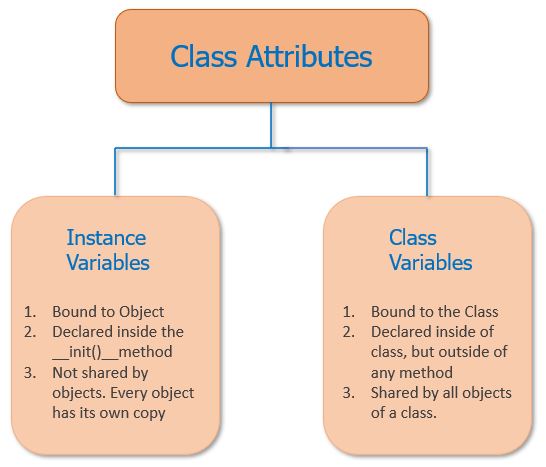
Let's modify our Employee class to include a class variable. We'll also update apply_raise to use it.
class Employee:
    # This is a class variable. It is shared among all instances.
    raise_amount = 1.04  # 4% raise

    def __init__(self, first, last, pay):
        self.first = first
        self.last = last
        self.pay = pay
        self.email = f"{first}.{last}@company.com"

    def fullname(self):
        return f"{self.first} {self.last}"

    def apply_raise(self):
        # We access the class variable via `self` or the class name `Employee`
        self.pay = self.pay * self.raise_amount

emp_1 = Employee('Corey', 'Schafer', 50000)
emp_2 = Employee('Test', 'User', 60000)

print(emp_1.pay)  # 50000
emp_1.apply_raise()
print(emp_1.pay)  # 52000.0

print(Employee.raise_amount) # 1.04
print(emp_1.raise_amount)    # 1.04
print(emp_2.raise_amount)    # 1.04
You can access class variables through either the class itself (Employee.raise_amount) or an instance (emp_1.raise_amount).
A Word of Caution
A common design mistake is to use a mutable object, like a list or dictionary, as a class variable. Since it's shared, a change made through one instance will affect all other instances, which is usually not what you want.
The official Python documentation has a perfect example of this pitfall and its correct solution.
9. Classes — Python 3 documentation
The official Python documentation provides a concise and critical example of why using a list as a class variable can lead to unexpected behavior.
Read section '9.3.5. Class and Instance Variables'. Focus on the Dog class example. Understand why the tricks list behaves unexpectedly when defined as a class variable and why the corrected version, which defines it as an instance variable in __init__, works as intended.
This highlights a key aspect of designing classes: choosing whether an attribute should hold state for the whole class or for individual instances.
Conclusion
In this lesson, you've taken your first steps into Object-Oriented Programming. You now have the tools to design and build your own basic data types in Python. This is a massive leap forward from simple procedural scripting and is essential for building the modular, reusable components needed in machine learning.
Key Takeaways:
- A class is a blueprint for creating objects, defining their attributes (data) and methods (behavior).
- An instance is a specific object created from a class.
- The
__init__method acts as a constructor, setting up the initial state of an instance. - The
selfparameter is a reference to the instance itself, allowing methods to access and modify the instance's attributes. - Instance attributes (usually defined in
__init__) store data unique to each object. - Class attributes store data shared by all instances of a class.
Preview of the Next Lesson:
We've learned how to create a single, self-contained class. But the real power of OOP comes from the relationships between classes. In our next lesson, Implement inheritance and method overriding, we will explore how to create new classes that "inherit" attributes and methods from a parent class. This allows you to build specialized versions of existing classes, promoting code reuse and creating elegant class hierarchies.