Hello! Welcome back to our module on Object-Oriented Programming (OOP) in Python.
In our last lesson, we learned how to design a basic class, like our Employee example, bundling its own data (attributes) and behaviors (methods) into a single, neat blueprint. This is the first pillar of OOP.
Today, we build on that foundation to explore one of the most powerful features of OOP: inheritance. This lesson directly addresses the learning outcome: Implement inheritance and method overriding. We'll learn how to create specialized "child" classes that reuse and customize the functionality of a "parent" class. This is key to building logical, scalable, and maintainable code—a skill you'll use constantly in libraries like scikit-learn.
What is Inheritance?
Inheritance is a mechanism that allows us to create a new class—called a subclass or child class—that is based on an existing class, known as a superclass or parent class.
The child class "inherits" all the attributes and methods of the parent class. This creates an "is-a" relationship. For example, a Developer is an Employee. A Manager is an Employee.
Why is this useful?
- Code Reusability: Instead of copying and pasting code from the
Employeeclass to createDeveloperandManagerclasses, we can simply inherit it. This follows the "Don't Repeat Yourself" (DRY) principle. - Logical Structure: It helps create a clear and logical hierarchy among your classes that often mirrors real-world relationships.
Let's see this in action using our Employee class from the last lesson.
# The parent class
class Employee:
    raise_amount = 1.04

    def __init__(self, first, last, pay):
        self.first = first
        self.last = last
        self.pay = pay
        self.email = f"{first}.{last}@company.com"

    def fullname(self):
        return f"{self.first} {self.last}"

    def apply_raise(self):
        self.pay = self.pay * self.raise_amount

# The child class
# We specify the parent class in parentheses
class Developer(Employee):
    pass # For now, the class is empty

dev_1 = Developer('Test', 'Developer', 70000)

print(dev_1.email)
print(dev_1.fullname())
Output:
Test.Developer@company.com
Test Developer
Even though the Developer class is empty, we can create an instance and access the .email attribute and the .fullname() method. How? Because it inherited them from Employee.
When you try to access an attribute or method on dev_1, Python first looks in the Developer class. If it doesn't find it there, it walks up the chain of inheritance to the Employee class. This chain is called the Method Resolution Order (MRO).
The following video, a direct continuation of the one from our last lesson, explains this beautifully.
Python OOP Tutorial 4: Inheritance - Creating Subclasses
Corey Schafer's tutorial clearly demonstrates how a subclass inherits functionality and introduces the Method Resolution Order (MRO).
Watch from the beginning to 04:25. Pay close attention to how the Developer class works without any code inside it, and notice the help() function, which is a useful tool for inspecting the MRO.
Customizing Subclasses
Inheriting is great, but the real power comes from customizing the subclass. You can do this in three main ways:
- Override parent attributes.
- Add new attributes and methods.
- Override parent methods.
1. Overriding Parent Attributes
Let's say we want developers to get a higher standard raise than other employees. We can "override" the raise_amount class variable by simply redefining it in the Developer subclass.
Python OOP Tutorial 4: Inheritance - Creating Subclasses
This next segment shows how easy it is to change an attribute in the subclass without affecting the parent class.
Watch from 04:25 to 06:06. See how changing raise_amount in Developer gives a different result for dev_1 but wouldn't affect a regular Employee instance.
Here's the code reflecting the change:
class Developer(Employee):
    raise_amount = 1.10 # 10% raise for developers

dev_1 = Developer('Test', 'Developer', 70000)
print(f"Original Pay: {dev_1.pay}")
dev_1.apply_raise()
print(f"Pay after 10% raise: {dev_1.pay}") # Uses the Developer's raise_amount

emp_1 = Employee('Regular', 'Employee', 70000)
print(f"\nOriginal Pay: {emp_1.pay}")
emp_1.apply_raise()
print(f"Pay after 4% raise: {emp_1.pay}") # Uses the Employee's raise_amount
Python finds raise_amount in the Developer class first and uses it. For emp_1, it doesn't find it in Employee and uses the parent's value.
2. Adding New Attributes with super()
What if we want our Developer instances to have attributes that Employee instances don't, like a main programming language? To do this, we need to give Developer its own __init__ method.
A common mistake is to copy-paste the __init__ from Employee. A much better way is to tell Python: "run the parent class's __init__ method first to handle the first, last, and pay attributes, and then I'll add my new stuff."
We do this using the built-in super() function. super().__init__(...) calls the __init__ method of the parent class.
Python OOP Tutorial 4: Inheritance - Creating Subclasses
This is a critical concept. This part of the video explains how to properly initialize a subclass by calling the parent's __init__ method using super().
Watch from 06:06 to 10:05. Focus on why super() is used and how it helps avoid repeating code.
Our Developer class now looks like this:
class Developer(Employee):
    raise_amount = 1.10

    # Add 'prog_lang' to the signature
    def __init__(self, first, last, pay, prog_lang):
        # Let the parent class handle the common attributes
        super().__init__(first, last, pay)
        # Add the new, specific attribute
        self.prog_lang = prog_lang

dev_1 = Developer('Test', 'Developer', 70000, 'Python')

print(dev_1.email)        # Inherited from Employee's __init__
print(dev_1.prog_lang)    # Defined in Developer's __init__
3. Method Overriding
Just as we overrode the raise_amount attribute, we can also override methods. This means providing a different implementation of a method that is already defined in the parent class.
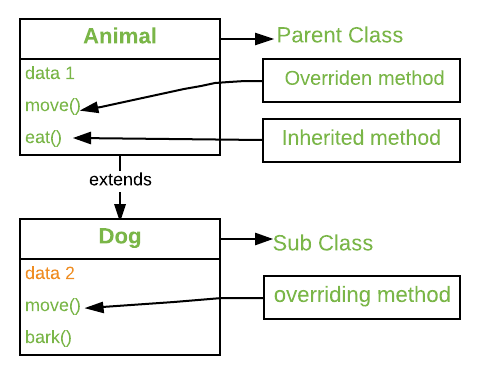
When you override a method, you can either completely replace the parent's behavior or extend it.
To extend it, you can use super() to call the parent's version of the method and then add more functionality.
Let's see this with a simple example.
Method Overriding In Python | A Comprehensive Guide ...
This article from 'unstop.com' provides a clear explanation of method overriding. We'll focus on the example that uses super() to extend a parent method.
Read the section 'What Is Method Overriding In Python?'. Pay special attention to the Animal/Dog code example, where the Dog class's speak() method both calls the parent's speak() method and adds its own print statement.
Here's a similar example with our Robot classes from python-course.eu:
class Robot:
    def __init__(self, name):
        self.name = name

    def say_hi(self):
        print(f"Hi, I am {self.name}")

class PhysicianRobot(Robot):
    # This method overrides the parent's say_hi method
    def say_hi(self):
        # We first call the parent's version
        super().say_hi()
        # Then we add our own specific behavior
        print("and I am a physician!")

doc = PhysicianRobot("Dr. James")
doc.say_hi()
Output:
Hi, I am Dr. James
and I am a physician!
This pattern of using super() to extend parent methods is extremely common and powerful.
Test your understanding!
Let's create a Manager class that inherits from Employee.
- Its
__init__method should accept a list of employees they supervise, in addition to the standardfirst,last, andpay. Store this list as an instance attribute calledemployees. Remember to usesuper()! - Override the
apply_raisemethod. For managers, we want to increase theirraise_amountby an additional 2% (* 1.02) before applying the raise. Hint: you can access the parent'sraise_amountviaEmployee.raise_amount. - Add a new method called
print_employeesthat prints the full name of each employee in the manager's supervision list.
# Here are some employee instances to use
emp_1 = Employee('Corey', 'Schafer', 50000)
dev_1 = Developer('Test', 'Developer', 70000, 'Python')

# Your Manager class definition here
# class Manager(Employee):
#    ...

# mgr_1 = Manager('Sue', 'Smith', 90000, [emp_1, dev_1])
# mgr_1.print_employees()
# mgr_1.apply_raise()
# print(mgr_1.pay) # Should be 90000 * 1.04 * 1.02 = 95659.2
Show answer
class Manager(Employee):
    def __init__(self, first, last, pay, employees=None):
        super().__init__(first, last, pay)
        if employees is None:
            self.employees = []
        else:
            self.employees = employees

    def apply_raise(self):
        # Custom raise logic for managers
        self.raise_amount = Employee.raise_amount * 1.02
        super().apply_raise() # Use the parent method with the new raise_amount

    def print_employees(self):
        print(f"Employees supervised by {self.fullname()}:")
        for emp in self.employees:
            print(f"--> {emp.fullname()}")

# Create a manager instance
mgr_1 = Manager('Sue', 'Smith', 90000, [emp_1, dev_1])

mgr_1.print_employees()
print(f"\nManager's pay before raise: {mgr_1.pay}")
mgr_1.apply_raise()
print(f"Manager's pay after raise: {mgr_1.pay}")
Output:
Employees supervised by Sue Smith:
--> Corey Schafer
--> Test Developer

Manager's pay before raise: 90000
Manager's pay after raise: 95659.2
Conclusion
You've now mastered inheritance, a cornerstone of object-oriented programming. You've seen how to build on existing code to create specialized classes, making your programs more organized and efficient.
Key Takeaways:
- Inheritance creates an "is-a" relationship between a parent class (superclass) and a child class (subclass).
- Subclasses inherit all attributes and methods from their parent.
- Method Overriding allows a subclass to provide its own specific implementation of a method that already exists in its parent.
- The
super()function is the standard way to call a method from the parent class. It's essential for extending, rather than completely replacing, parent behavior, especially in the__init__method.
Preview of the Next Lesson:
So far, the methods and attributes we've used are tied to specific instances (emp_1, dev_1). But what if you need methods that are tied to the class itself? Or methods that don't depend on the class or instance at all? In our next lesson, "Use class methods, static methods, and properties," we will explore these different types of methods and learn how to create "getter" and "setter" attributes with properties, giving you even finer control over your class designs.