Recommended resources
The freely available resources this lesson will direct you to.
Hello! We’ll start with the story your workshop needs to tell before showing any GitHub Actions YAML: how a small application change gets from source control to a running production website.
This first module builds the vocabulary for that story. In this lesson, you’ll distinguish continuous integration, continuous delivery, and continuous deployment by following one change through a pipeline. Allow about 35 minutes to study and rehearse it. In the eventual 20-minute workshop, this material should take only the opening 2–3 minutes.
Why a successful commit is not yet a release
Imagine you change the greeting on a simple web application from “Hello” to “Welcome.” You save the change in Git and send it to the shared GitHub repository. Has the website changed for its users? Not necessarily. The repository holds source code; the running website needs a working application deployed to its production environment. Between those states, the team must find out whether the new code builds, whether tests pass, and whether the resulting application is safe to release.
Watch KodeKloud’s short introduction for a first picture of that journey. It uses several developers contributing to one repository to explain why automated verification matters.
DevOps: CI/CD Introduction (Continuous Integration, Continuous Delivery, Continuous Deployment)
Watch “DevOps: CI/CD Introduction (Continuous Integration, Continuous Delivery, Continuous Deployment)” from KodeKloud for a compact visual introduction to the three terms.
Watch integration and tests as the presenters describe developers contributing to a shared repository. Then watch the two CDs for its contrast between preparing software for release and automatically deploying it. Treat the video's packaged-software example as an illustration; we will use the broader criterion that continuous delivery keeps software releasable to production.
The word integration matters. Running tests on your private branch is valuable, but it does not, by itself, show that your change works alongside everyone else’s changes. Continuous integration, or CI, is the practice of integrating changes into a shared mainline frequently and verifying those integrations with an automated build and tests. Teams commonly run checks on a pull request before merging as well, then verify the integrated result. A green check on an unmerged branch is useful early feedback; it is not a substitute for checking the shared codebase.
CI also does not mean “the code is bug-free.” Tests can miss defects. Its immediate promise is more precise: small changes are combined regularly, and the team gets fast, repeatable evidence when the combined code fails to build or violates a tested expectation. If a check fails, the team fixes or reverts the change rather than treating the broken build as a deployable release.
Martin Fowler’s feature walkthrough puts the automated check in the context of a developer’s ordinary work. Notice that the developer runs tests locally and waits for the CI service’s result after pushing.
Read the feature walkthrough in Martin Fowler’s “Continuous Integration” to see what frequent integration looks like before we follow the change toward production.
In “Building a Feature with Continuous Integration,” begin where the developer takes a copy of the latest sources onto a local machine. Read the walkthrough through the CI service's notification, stopping before “Practices of Continuous Integration.” Focus on why passing tests locally is not the last verification step.
Trace one change from GitHub to a running application
Let’s give our greeting change a concrete route. For this course, the destination will eventually be Azure App Service, a service that can host the web application. For now, you only need to distinguish where code is stored from where the website runs.
Microsoft’s five-stage description is a useful checklist for the whole journey. In particular, it continues after deployment: a successful transfer of files is not conclusive evidence that the website works.
CI/CD Pipeline Guide for Developers
Read Microsoft's five-stage pipeline overview to connect source control, a deployable build, production deployment, and observation of the running application.
Under “How CI/CD pipelines work: five core stages,” start with the explanation beneath “Source/commit.” Read all five stages through the explanation beneath “Monitor.” Track what is being checked at each stage and when there is finally a running application to observe.
Here is a slide-ready ASCII map of our example. The numbers show the order; they do not imply that every stage must run automatically.
+---------------------------------------------------------------+
| 1  SOURCE       Greeting change reaches the shared codebase  |
| 2  CI           Build and automated tests verify the change  |
| 3  PACKAGE      Produce deployable application output        |
| 4  VALIDATE     Check it in a pre-production environment     |
| 5  PRODUCTION   Release the validated output when allowed    |
| 6  OBSERVE      Check the live site and watch for problems    |
+---------------------------------------------------------------+
At source, Git records which change is under consideration. At CI, an automated system builds the integrated code and runs tests. If either fails, the journey should stop until the failure is resolved. The package stage produces deployable output—such as the published files for our web app—so that deployment does not depend on someone reconstructing the application by hand on a laptop.
A team may deploy that output to a pre-production environment and run further checks there. Those checks can catch problems that a build alone cannot, such as a page failing to start in its target environment. At production, the application becomes available on the live site. A post-deployment smoke check might load the homepage; monitoring then helps reveal errors that earlier checks missed. Smoke checks and monitoring do not turn a failed release into a success, but they give the team evidence for responding.
Two boundaries are worth keeping distinct when presenting this map:
- Passing CI says that specified checks passed on the code. It does not say that users can see the new greeting.
- Deploying to production says that the application was placed in the live environment. It does not, on its own, prove that it started correctly or behaves as intended.
Where “delivery” ends and “deployment” begins
The final production decision is what separates the two meanings of CD. Fowler describes continuous delivery in terms of an application being consistently ready for a production release. Read his distinction before looking at the flowchart: it keeps us from defining delivery too narrowly as merely creating a package or using a staging environment.
Return to Fowler’s “Continuous Integration” for the release-readiness criterion and the difference between a possible production release and an automatic one.
In “What is the difference between Continuous Integration and Continuous Delivery?”, begin with the discussion of the journey beyond mainline integration. Read the delivery discussion, ending where Fowler describes the pipeline heading toward production. Then, in “How does Continuous Deployment fit in with all this?”, read the deployment distinction through the condition for an automatic production release.
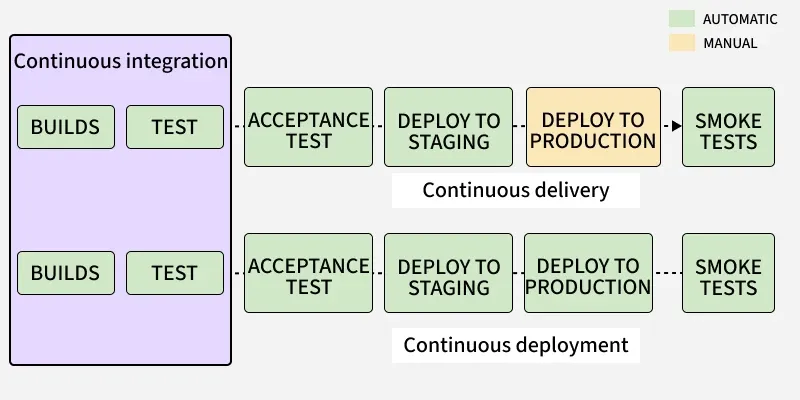
Use this comparison when someone asks what a green build permits:
| Practice | What happens to a change that passes its checks? | Production release |
|---|---|---|
| Continuous integration | Its integration with the shared codebase has been automatically built and tested. | Not implied. |
| Continuous delivery | The team keeps the application releasable; it can choose when to release. | May wait for a person’s release decision or approval. |
| Continuous deployment | A passing change proceeds to production without a per-release manual decision. | Automatic, provided the required checks pass. |
Delivery is about readiness, not an obligation to deploy immediately. Automated staging deployment is one useful way to establish that readiness, as the flowchart shows, but staging alone is not the definition. A team might deliberately wait for a business decision even though its tested application is ready to release. The subsequent deployment mechanics can still be automated: a person authorizes the release rather than manually copying files.
Deployment removes that final per-release decision from the normal path. If all required checks pass, the pipeline releases to production automatically. This does not eliminate tests, safeguards, or responsibility for monitoring. It changes when and how the production release is initiated.
For our greeting change, suppose the build and tests pass and the updated site works in pre-production. If a release owner must approve publication on Friday, the team can be practicing continuous delivery. If the passing change is released to the live site automatically under the team’s release rules, that is continuous deployment. In either case, the change first needed reliable integration and verification.
Turn the lifecycle into your workshop opening
For the eventual 20-minute workshop, resist spending five minutes defining acronyms. An audience can understand the distinction faster if you point to a single change and ask, “At what moment can a user see it?”
Suggested opening slide — 2–3 minutes
- On-slide talking point: “A GitHub commit changes the repository, not necessarily the live website.” Show the six numbered stages from the ASCII map.
- Speaker notes: “CI frequently combines changes and checks the shared codebase. Continuous delivery keeps a checked application ready for release, with a person able to choose the production moment. Continuous deployment makes that production step automatic after required checks pass.”
- Demo instruction for later in the workshop: When the live deployment runs, identify the commit being built, the result of its checks, and the point at which the Azure App Service website actually displays the changed greeting. Do not describe a green build log as proof of a working site; load the site to validate that claim.
- Key takeaway: CI checks the integrated change; delivery makes it releasable; deployment automatically releases passing changes.
That wording leaves room for the technical sections that follow. GitHub Actions will be the mechanism that runs the checks and deployment, but its vocabulary belongs in the next lesson.
Conclusion
A change travels through distinct states: recorded in source control, verified as part of the shared codebase, prepared and validated for release, deployed to production, and observed while running. Continuous integration addresses frequent shared-code integration and fast automated feedback. Continuous delivery maintains release readiness while allowing a deliberate production decision. Continuous deployment releases automatically when the required checks succeed.
Next, we’ll open the GitHub Actions execution model and see how workflows, jobs, steps, and actions can express portions of that journey.