Recommended resources
The freely available resources this lesson will direct you to.
Hello! This module moves from thinking about language models in terms of prompts and tokens to working with the numerical objects used to build them. Today’s goal is practical: create PyTorch tensors, change their shapes and data types, and keep track of where they live—on the CPU or an accelerator. Those habits will make the model code in later lessons much easier to read and debug.
Allow about 40 minutes: roughly 16 minutes of video, 5 minutes of reading, and the remainder for the explanations and runnable code.
A tensor has values and metadata
A PyTorch tensor is a multidimensional array of values. Its printed numbers are only part of its identity. For every tensor, get used to asking three questions:
- Shape: How many axes does it have, and how long is each one?
- Dtype: What kind of numbers does it store?
- Device: Where is it stored for computation?
For example, a batch of two token sequences, each containing three token IDs, has shape (2, 3). We will call those axes batch and sequence. The IDs are integers, while the numerical representations produced from them in the next lesson will be floating-point values.
Start with the PyTorch team’s demonstrations of tensor creation and data types. Watch the selected portions rather than the intervening arithmetic section.
Introduction to PyTorch Tensors
“Introduction to PyTorch Tensors,” from PyTorch, shows the basic creation methods and how to inspect or choose a dtype.
Watch the introduction for the role of tensors, tensor creation for factories, Python data, and random seeds, then data types for dtype selection and conversion. Notice that empty allocates storage without supplying meaningful initial values.
Here is a small starting point you can run in a Python session with PyTorch installed:
import torch

ids = torch.tensor([[10, 20, 30],
                    [40, 50, 60]], dtype=torch.int64)
zeros = torch.zeros((2, 3), dtype=torch.float32)
noise = torch.rand((2, 3), dtype=torch.float32)

print(ids.shape, ids.dtype, ids.device)
print(zeros.shape, zeros.dtype, zeros.device)
print(ids.numel())
ids has shape (2, 3), dtype torch.int64, and—unless a device was specified—device cpu. It contains six elements, reported by numel(). zeros and noise have the same shape but floating-point dtype. torch.tensor(...) uses supplied values; zeros, ones, and rand create values for a requested shape. Avoid treating torch.empty(...) as a tensor of zeros: its contents are uninitialized.
Specifying the dtype removes ambiguity. Integer token IDs commonly use torch.int64; ordinary numerical model inputs and parameters commonly use torch.float32. You can convert a tensor with .to(dtype=...):
float_ids = ids.to(dtype=torch.float32)
print(float_ids.shape, float_ids.dtype, float_ids.device)
The conversion changes the dtype, not the shape or device. It does not change ids itself. Converting floating-point values to an integer dtype can lose fractional information, so a dtype change is not merely cosmetic.
Devices: keep computations together
Your RTX 3080 Ti uses PyTorch’s cuda device when a CUDA-enabled installation is available. On an Apple Silicon Mac, PyTorch may expose the GPU through mps. CPU remains a useful fallback for everything in this lesson.
The next two video segments show device movement followed by shape changes. We will unpack both ideas below.
Introduction to PyTorch Tensors
Return to PyTorch’s “Introduction to PyTorch Tensors” to see accelerator placement and the three most useful introductory shape methods.
Watch device movement, focusing on creation on a device and .to(...). Then watch shape changes, noting what each of unsqueeze, squeeze, and reshape preserves.
This device-selection pattern runs on any of your machines without assuming that GPU support is installed:
if torch.cuda.is_available():
    device = torch.device("cuda")
elif torch.backends.mps.is_available():
    device = torch.device("mps")
else:
    device = torch.device("cpu")

ids_on_device = ids.to(device=device)
print(device, ids_on_device.device)
The assignment matters: .to(...) returns a tensor on the requested device; it does not relocate the original variable in place. You can also create a tensor there directly:
offset = torch.ones((2, 3), dtype=torch.int64, device=device)
result = ids_on_device + offset
print(result.shape, result.dtype, result.device)
Both operands are on device, so the addition can run there. If ids remained on the CPU while offset was on an accelerator, adding them would fail. Before combining tensors, check both their device and their intended dtype, not just their shapes. If you need a GPU result in CPU-only code, move it back with .cpu().
Shape is a description of meaning
Axes are numbered from zero. The image below shows a tensor containing one group of three rows, each with three values. Its shape is (1, 3, 3): axis 0 has length 1, axis 1 has length 3, and axis 2 has length 3.
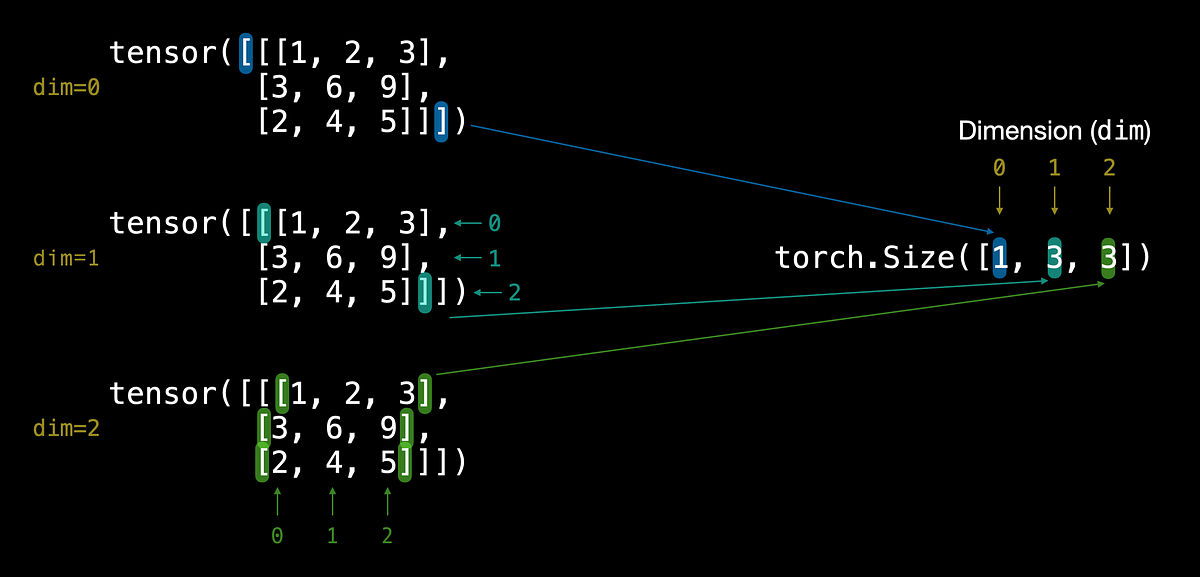
For language-model inputs, a shape such as (2, 3) usually means two sequences of three tokens. Merely knowing the numbers is not enough: (3, 2) would arrange the data into three sequences of two tokens, a different interpretation.
Indexing and slicing select portions of a tensor. Shape methods reorganize how its elements are presented:
first_sequence = ids[0]             # shape (3,)
single_batch = first_sequence.unsqueeze(0)  # shape (1, 3)
sequence_again = single_batch.squeeze(0)    # shape (3,)

flat = ids.reshape(-1)              # shape (6,)
rearranged = ids.reshape(3, 2)      # shape (3, 2)

print(first_sequence.shape, single_batch.shape)
print(flat.shape, rearranged.shape)
unsqueeze(0) adds a length-one batch axis; squeeze(0) removes that axis if its length is one. Naming the axis is safer than calling squeeze() without an axis when a batch size of one has meaning.
reshape must preserve the total number of elements. In reshape(-1), PyTorch infers the only unspecified length. Reshaping the six values into (3, 2) changes their grouping; it does not swap axes. A true axis swap, such as ids.transpose(0, 1), has shape (3, 2) but generally puts values in different positions. Finally, do not rely on reshape always making a separate copy: it may share underlying storage with its input.
Selecting and combining data without losing track
Read the PyTorch examples in Dive into Deep Learning for indexing and broadcasting. The page includes tabs for other libraries; use the PyTorch examples here.
“2.1. Data Manipulation,” from Dive into Deep Learning, supplies compact examples of selecting tensor entries and combining different but compatible shapes.
In Section 2.1.2, “Indexing and Slicing,” read indexing basics, from the opening explanation through the example of selecting rows. Continue to slice assignment; focus on what : selects along each axis. Then go to Section 2.1.4, “Broadcasting,” and read the broadcasting example. Follow the PyTorch tab’s (3, 1) and (1, 2) tensors and predict the result shape before looking at their sum.
Indexing can remove an axis; slicing usually retains it:
print(ids[0].shape)       # (3,): one sequence
print(ids[0:1].shape)     # (1, 3): a batch containing one sequence
print(ids[:, 1].shape)    # (2,): second token from each sequence
This distinction matters when a model expects a batch, even if you are sending only one sequence.
Broadcasting lets compatible shapes participate in an elementwise operation. Compare dimensions from the right: lengths must match, or one of them must be 1. A missing leading axis behaves like a length-one axis. For example:
scores = torch.tensor([[1.0, 2.0, 3.0],
                       [4.0, 5.0, 6.0]])
bias = torch.tensor([0.1, 0.2, 0.3])

adjusted = scores + bias
print(adjusted.shape, adjusted.dtype, adjusted.device)  # (2, 3), float32, cpu
The (3,) bias is applied to each row of the (2, 3) tensor. The result has shape (2, 3); you did not need to construct two stored copies of bias. A (2,) vector, by contrast, cannot be added this way: its rightmost length 2 conflicts with the tensor’s rightmost length 3.
Concatenation does something different—it extends an existing axis rather than applying an operation across compatible axes:
more_ids = torch.cat((ids, ids), dim=0)
print(more_ids.shape)  # (4, 3)
Joining along axis 0 doubles the number of sequences while leaving each sequence’s length unchanged.
A compact end-to-end trace
Run this as one script. Each printed line is a checkpoint for the shape–dtype–device habit:
import torch

device = (
    torch.device("cuda") if torch.cuda.is_available()
    else torch.device("mps") if torch.backends.mps.is_available()
    else torch.device("cpu")
)

def describe(name, tensor):
    print(name, tuple(tensor.shape), tensor.dtype, tensor.device)

ids = torch.tensor([[10, 20, 30],
                    [40, 50, 60]], dtype=torch.int64)
describe("token IDs", ids)               # (2, 3), int64, cpu

one_sequence = ids[0]
one_batch = one_sequence.unsqueeze(0)
describe("one batch", one_batch)          # (1, 3), int64, cpu

values = ids.to(device=device, dtype=torch.float32)
bias = torch.tensor([0.1, 0.2, 0.3],
                    dtype=torch.float32, device=device)
adjusted = values + bias
describe("adjusted", adjusted)            # (2, 3), float32, selected device

flat = adjusted.reshape(-1)
describe("flat", flat)                    # (6,), float32, selected device

assert adjusted.numel() == flat.numel() == 6
assert adjusted.device == bias.device
The script begins with integer IDs on the CPU, selects one sequence, adds a batch axis, then converts the full set of IDs to floating-point values on the selected device. Broadcasting adds a length-three bias without changing the result’s shape. Flattening changes the shape but preserves all six elements, the dtype, and the device. That trace is more informative than inspecting the printed values alone.
Takeaways
A tensor operation is easiest to reason about when you track shape, dtype, and device together. Indexing may remove an axis; unsqueeze and squeeze add or remove length-one axes; reshape regroups the same number of elements; broadcasting combines compatible shapes; and .to(...) handles dtype or device conversion. Tensors taking part in the same GPU computation must reside on the same device.
In the next lesson, integer token IDs become floating-point representations through an embedding layer, then pass through a linear layer to produce vocabulary scores. The shape and dtype checks you used here will let you follow that path precisely.