Recommended resources
The freely available resources this lesson will direct you to.
Welcome to your first lesson. We're kicking off your journey to becoming an AI Engineer by focusing on a foundational skill: how to communicate with Large Language Models (LLMs) effectively. As a software engineer, you're used to giving precise instructions to a computer and getting deterministic results. LLMs, however, operate on probabilities and patterns, which requires a different approach to achieve reliability.
Your experience so far has been with "zero-shot" prompting—giving a direct command and hoping for the best. Today, you'll learn to move beyond that. We'll explore two powerful techniques, Few-Shot Prompting and Chain-of-Thought (CoT) Prompting, that allow you to guide an LLM's reasoning process. Mastering these is the first step toward building the robust, production-grade AI systems you're aiming for.
From Direct Instructions to Guided Reasoning
When you write a function, you have a clear contract: specific inputs produce a specific output. If it fails, you can debug it line by line. With an LLM, your prompt is the "source code," but the execution is fuzzy. When an LLM gives a wrong answer to a complex question, it often fails because it tries to compute the result in a single, intuitive leap, much like a person trying to do complex multiplication in their head.
The techniques in this lesson are about making the model's process more explicit and structured, moving it closer to the reliability you expect from traditional software.
Few-Shot Prompting: Guiding by Example
The simplest way to improve an LLM's performance is to show it what you want. This is the core idea of few-shot prompting. Instead of only telling the model the task, you provide a few examples ("shots") of inputs and their corresponding desired outputs. The model then uses these examples as a pattern to follow for your actual input.
This is analogous to writing a good docstring for a function. You don't just describe what it does; you include examples of its usage. These examples clarify ambiguity and demonstrate the expected format and logic.
For a hands-on look at how this works, the following article from Real Python walks through a practical software engineering task: sanitizing chat logs.
Prompt Engineering: A Practical Example
This article provides a clear, step-by-step example of using few-shot prompting to solve a data sanitization problem, a common task in software development.
Start by reading the section Use Few-Shot Prompting. Notice how providing a single example dramatically improves the output compared to a zero-shot prompt. Then, continue reading to see how adding a second, more comprehensive example further refines the model's behavior to handle cases it missed initially. You can skip the intermediate settings.toml code blocks and focus on the prompts and the model's outputs.
The key takeaway is that the quality and relevance of your examples are critical. They must accurately represent the task you want the model to perform. If your examples don't cover a specific edge case, the model will likely fail on that edge case.

Chain-of-Thought (CoT): Making the Model "Show its Work"
Few-shot prompting is great for teaching format and style, but for tasks that require logic, math, or multiple reasoning steps, models can still fail. They often guess the answer instead of deriving it. Chain-of-Thought (CoT) prompting solves this by instructing the model to generate the intermediate reasoning steps that lead to the final conclusion.
This is like asking a developer to not just submit a pull request, but to also explain their thought process in the description. The reasoning itself becomes part of the context, making the final output more reliable.
Let's look at a classic visual example of how CoT improves performance on a simple reasoning problem.
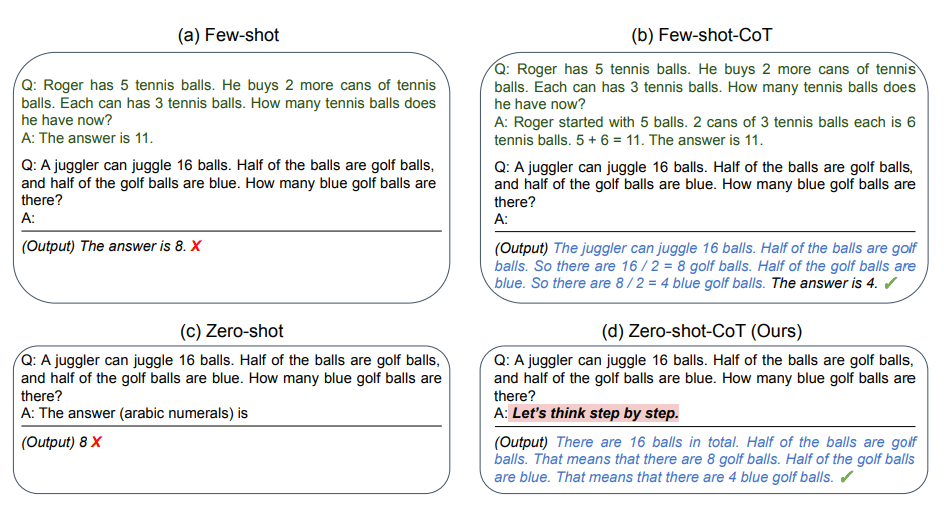
There are two main ways to elicit a chain of thought.
1. Zero-Shot CoT: The "Magic Phrase"
The simplest form of CoT doesn't require any examples. You can often trigger step-by-step reasoning just by adding a simple phrase like "Let's think step by step" to the end of your prompt. This simple instruction encourages the model to break down the problem before giving the final answer. It's surprisingly effective for its simplicity.
2. Few-Shot CoT: Demonstrating the Reasoning Pattern
For more complex or domain-specific tasks, you can combine few-shot and CoT. In this approach, your examples include not just the question and final answer, but also the detailed reasoning steps. This teaches the model the specific pattern of reasoning you want it to emulate.
The following article is an excellent deep-dive into Chain-of-Thought prompting. It covers the core concepts, shows clear before-and-after examples, and even provides Python code for implementation.
Chain of Thought Prompting: Complete Tutorial with Examples | PE ...
This guide offers a comprehensive overview of CoT, its variants, and its practical applications.
Please read the following sections: Start with the introduction to understand the core mechanism. Read the section on Zero-Shot CoT to see how a simple instruction can trigger reasoning. Read the section on Few-Shot CoT to understand how to provide examples with reasoning. Finally, review the tables under When to Use Chain of Thought for clear guidelines on where CoT is most (and least) effective.
Implementing CoT in Code
As an engineer, you need to see how this translates to code. The goal is to structure your API call to request the reasoning and then programmatically parse the final answer from the model's verbose output. A common pattern is to instruct the model (often in the system prompt) to put its reasoning in one section and the final answer in another.
Here is a practical Python example adapted from the "Chain-of-Thought Prompting Guide." It uses the OpenAI API, which you're already familiar with.
from openai import OpenAI


# Assumes you have your OPENAI_API_KEY set as an environment variable
client = OpenAI()

def solve_with_cot(problem: str) -> dict:
    """Solves a problem using a basic Chain-of-Thought prompt."""


    # The system prompt guides the model's entire behavior.
    # Here, we instruct it to reason first, then provide a clearly marked answer.
    system_prompt = """
    You are a precise analytical assistant.
    For every question, reason through the problem step by step in a section called "REASONING".
    After your reasoning, provide your final answer in a section called "ANSWER".
    For example:
    REASONING:
    - Step 1: ...
    - Step 2: ...
    ANSWER:
    [Your final answer]
    """

    response = client.chat.completions.create(
        model="gpt-4o", # Or any other capable model
        temperature=0.0, # Set to 0 for deterministic, reasoning-based tasks
        messages=[
            {"role": "system", "content": system_prompt},
            {"role": "user", "content": problem}
        ]
    )

    text = response.choices[0].message.content


    # Parse the output to separate reasoning from the final answer
    try:
        reasoning_part, answer_part = text.split("ANSWER:")
        reasoning = reasoning_part.replace("REASONING:", "").strip()
        answer = answer_part.strip()
    except ValueError:


        # If the model doesn't follow the format, handle it gracefully
        reasoning = "Could not parse reasoning."
        answer = text.strip()

    return {
        "reasoning": reasoning,
        "answer": answer
    }


# --- Example Usage ---
# A classic multi-step problem that LLMs often get wrong without CoT.
problem_statement = (
    "A grocery store has 50 apples. They sell 15 in the morning and then "
    "receive a new shipment of 2 cartons, each containing 24 apples. "
    "They then sell 30 more apples. How many apples are left?"
)

result = solve_with_cot(problem_statement)

print("--- REASONING ---")
print(result["reasoning"])
print("\n--- FINAL ANSWER ---")
print(result["answer"])
Notice how the system_prompt sets up the structure, and the Python code parses the REASONING and ANSWER sections. This pattern is crucial for production systems. You can log the reasoning for debugging and evaluation while only showing the clean, final answer to the user.
Hands-on Exercise
Now it's your turn to apply these techniques.
Scenario: You're building a tool to help your support team quickly triage bug reports from a legacy system. The reports are unstructured text. You need to create a prompt that extracts key information and classifies the report.
Your Task:
Write a prompt that takes a bug report as input and produces a JSON object with the following fields:
component: The name of the affected system component (e.g., "Auth Service", "Payment Gateway", "UI Dashboard").priority: A priority level ("P0", "P1", "P2"). The logic should be: if the report mentions "crash", "outage", or "data loss", it's a P0. If it mentions "slow", "error", or "fails", it's a P1. Otherwise, it's a P2.summary: A one-sentence summary of the issue.
Sample Bug Report:
"The payment gateway is throwing a 500 error every time a user tries to process a transaction with a Visa card. It's not a full outage, but it's blocking all Visa payments. This started after the last deployment. Users are complaining non-stop."
Instructions:
- Attempt 1 (Zero-Shot): First, write a simple, direct prompt asking the model to do the task. Observe its output. Does it follow the JSON format? Is the priority classification correct?
- Attempt 2 (Few-Shot CoT): Now, write a new prompt using the principles you've learned.
- Use the few-shot technique by providing at least one complete example of a bug report, the reasoning for classifying it, and the final JSON output.
- Use the Chain-of-Thought technique by explicitly asking the model to "think step by step" to determine the priority before constructing the final JSON.
- Combine these into a single, robust prompt.
Share both of your prompts and the model's outputs. This exercise will simulate the iterative process of prompt engineering and solidify your understanding of how to guide a model toward a reliable, structured output.
Conclusion
In this lesson, you've taken a significant step beyond basic prompting. You've learned how to actively guide an LLM's behavior to improve its reliability and accuracy—a critical skill for any AI Engineer.
Here are the key takeaways:
- Zero-Shot Prompting is a baseline, but often insufficient for complex or high-stakes tasks.
- Few-Shot Prompting steers the model by providing examples, teaching it the desired format, style, and logic through pattern recognition.
- Chain-of-Thought (CoT) Prompting forces the model to "show its work," breaking down complex problems into manageable steps and dramatically improving performance on reasoning tasks.
- These techniques can be combined and implemented programmatically to build robust, parsable outputs for production applications.
Now that you can better control the model's reasoning, you'll soon face another challenge: what happens when the conversation gets too long? LLMs have a finite memory, or context window. In our next lesson, we will explore how to manage this limitation by calculating token counts and implementing context-trimming strategies to keep your applications running smoothly.