Recommended resources
The freely available resources this lesson will direct you to.
- Most devs don't understand how LLM tokens workwww.youtube.com
- Most devs don’t understand how context windows workwww.youtube.com
- Chapter 5 — Counting tokens|Getting Started with Tokens — The Unit Behind Every LLMzenn.dev
- Token Optimization: Reducing LLM Input Size Without Losing Quality | CallSphere Blogcallsphere.tech
In our last lesson, we focused on refining the quality of your instructions to an LLM using Few-Shot and Chain-of-Thought prompting. You learned to guide the model's reasoning, moving from simple commands to a more structured dialogue. Now, we'll address a critical constraint you'll face when building any real-world AI application: the model's finite memory, known as the context window.
As a conversation with an LLM or an agent's task progresses, the amount of information it needs to track—past messages, tool outputs, system instructions—grows. This information must fit within the context window. Exceeding this limit leads to errors, lost information, and spiraling costs. This lesson will equip you with the fundamental engineering skills to manage this constraint effectively. You will learn how to precisely measure the size of your context using tokens and implement essential strategies to trim it, ensuring your applications are scalable, efficient, and reliable.
What Fills the Context Window?
First, let's clarify what the "context window" actually contains. It's not just your most recent message. It is the entirety of the information the model sees in a single API call. This includes:
- System Prompt: The core instructions defining the model's persona and task.
- Conversation History: All previous user messages and assistant replies.
- File Contents: Any documents or code provided as context.
- Tool Definitions & Results: Schemas for available functions and the data they return.
- Reserved Output Space: The space you anticipate the model's next response will occupy.
This diagram gives a great system-level view of how these components stack up.
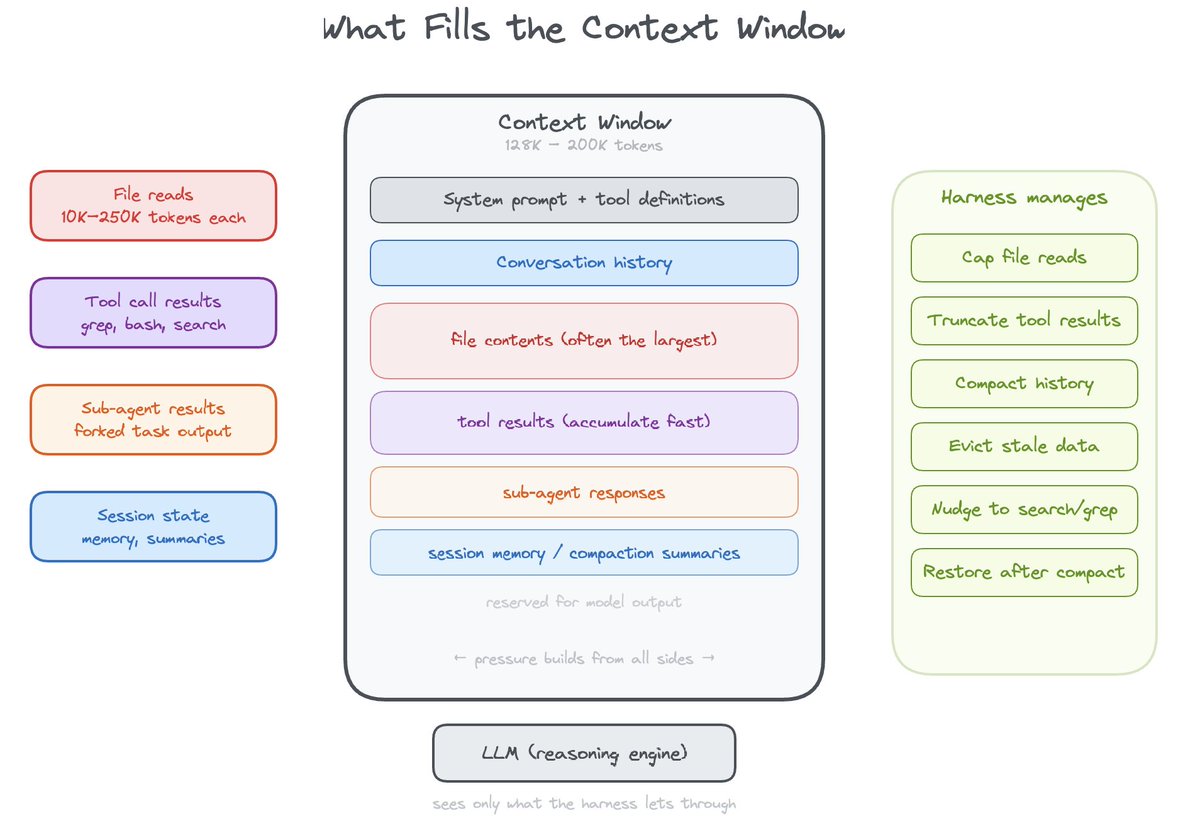
Every model has a hard-coded context window limit. For example, OpenAI's gpt-4o has a 128k token limit, while Anthropic's claude-3-5-sonnet has a 200k limit. Sending an input that exceeds this limit will result in an API error. The following video from Matt Pocock, a developer-focused educator, provides an excellent explanation of what a context window is and why these limits exist.
Most devs don’t understand how context windows work
This video provides a clear, developer-centric breakdown of the context window concept.
Watch these three segments: What makes up the context window, which defines the components. The hard-coded limits, explaining why they exist due to architectural and performance constraints. Performance degradation, where he introduces the critical "needle in a haystack" problem.
The "Lost in the Middle" Problem
As the video touches on, a larger context window isn't always better. Models exhibit a behavior known as the "Lost in the Middle" problem: they pay more attention to information at the very beginning (primacy bias) and very end (recency bias) of a long context, often struggling to recall details from the middle.
This isn't an intentional design choice; it's an emergent property of the Transformer architecture's attention mechanism. For you as an engineer, this means that simply stuffing more data into the prompt can actually degrade performance. Effective context management isn't just about avoiding errors—it's about maximizing the model's ability to use the information you provide.
Let's continue with the same video to see a visual explanation of this phenomenon.
Most devs don’t understand how context windows work
This segment explains one of the most important and non-obvious aspects of managing large contexts.
Watch the section from the middle of the conversation. Pay close attention to the "U-shaped" graph he draws. Understanding this concept is key to designing prompts that are not just long, but effective.
Measuring Your Context: The Art of Counting Tokens
To manage the context window, you first need to be able to measure it. The unit of measurement for LLMs is the token. A token can be a word, part of a word, a punctuation mark, or even a space. Everything—cost, latency, and context limits—is denominated in tokens.
The popular rule of thumb "1 token ≈ 4 characters" is dangerously misleading. It only holds for simple English prose. For source code (like Go or JavaScript), JSON, or non-Latin text, the character-to-token ratio is much denser. For a concise introduction to what tokens are and how they're used, the following video is an excellent resource.
Most devs don't understand how LLM tokens work
This video provides a great foundation on the "currency" of LLMs.
Watch the introduction from Tokens are the currency to understand their role in cost calculation. Then, watch the segment on what tokens actually are, where he explains how text is encoded into numbers. Finally, watch the brief section on how a tokenizer behaves to understand why different types of text (including code) have different token costs.
For production systems, rules of thumb are insufficient. You need to count tokens programmatically. The following guide provides a fantastic, practical overview of how to do this.
Chapter 5 — Counting tokens|Getting Started with Tokens — The Unit Behind Every LLM
This chapter from "Getting Started with Tokens" is a must-read for any AI engineer. It moves from theory to practice, giving you a clear framework for token management.
Please read the following sections: Start with the three modes of measurement. This provides a mental model for when to use different counting methods. Next, read the section Mode 1: Exact (in code) to see how to use libraries like tiktoken in Python and their equivalents in JavaScript. Since you work with both languages, this is directly applicable. Then, read Counting conversations. This is a critical point: you must account for the overhead of chat templates and tool definitions, not just the raw text content. Finally, study the Budgeting workflow. This formalizes context management into a simple, robust algorithm that you can implement in your applications.
As the guide explains, the most reliable way to count tokens for OpenAI models is with the tiktoken library. Here's a quick Python example demonstrating its use:
import tiktoken

def count_tokens_for_messages(messages: list[dict], model: str = "gpt-4o") -> int:
    """
    Calculates the token count for a list of messages for a given OpenAI model.
    Note: This is a simplified implementation. For perfect accuracy, you'd need to
    account for the specific tokens used to delimit roles and messages, which
    vary slightly between models. Tiktoken provides a close approximation.
    """
    try:
        encoding = tiktoken.encoding_for_model(model)
    except KeyError:
        print(f"Warning: Model {model} not found. Using cl100k_base encoding.")
        encoding = tiktoken.get_encoding("cl100k_base")

    total_tokens = 0
    for message in messages:


        # Each message object has role, content, and sometimes name.
        # Add a small overhead for each message structure.
        total_tokens += 4  # A rough estimate for role/name tokens
        for key, value in message.items():
            if value: # Ensure value is not None
                total_tokens += len(encoding.encode(str(value)))

    total_tokens += 2 # Every reply is primed with <|im_start|>assistant

    return total_tokens


# --- Example Usage ---
conversation = [
    {"role": "system", "content": "You are a helpful assistant."},
    {"role": "user", "content": "What is the context window?"},
    {"role": "assistant", "content": "The context window is the total number of tokens a model can process at once."},
]

token_count = count_tokens_for_messages(conversation)
print(f"Estimated token count for the conversation: {token_count}")
Implementing Context Trimming Strategies
Once you can measure your context and know your budget, the next step is to decide what to do when you're about to exceed it. This is where context trimming (also called pruning or compaction) comes in. There are several strategies, from simple to complex. This diagram shows how different real-world systems approach the problem.
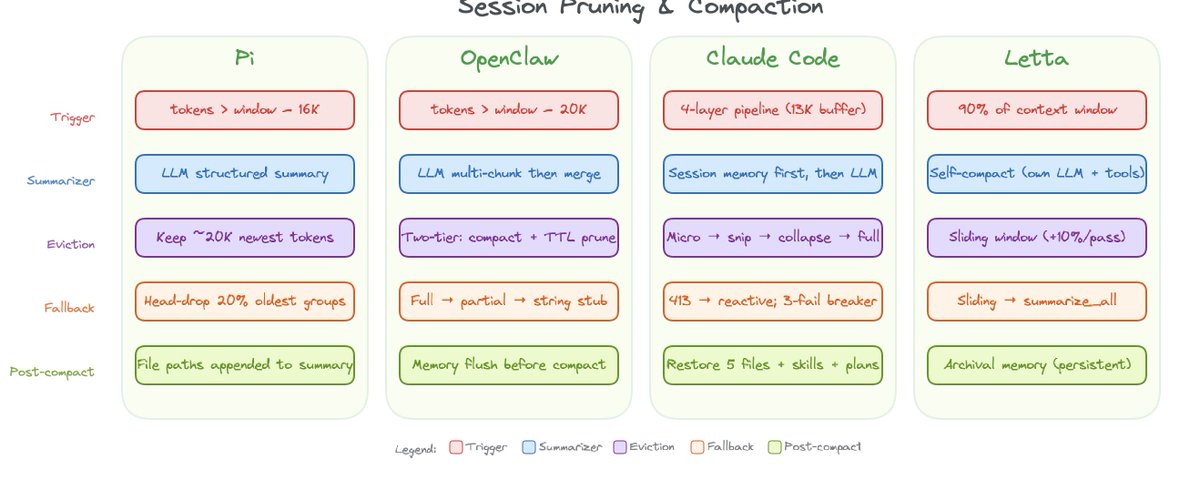
Let's explore the most common and practical strategies.
1. Simple Sliding Window (Pruning)
This is the most straightforward method. You always keep the system prompt and the N most recent messages, dropping the oldest conversational turns from the middle. It's fast and easy to implement but can lose important information established early in the conversation.
2. Conversation Summarization
A more sophisticated approach is to replace a chunk of older messages with a concise summary. You can use a cheaper, faster LLM (like gpt-4o-mini) to generate this summary. This preserves the "gist" of the early conversation in far fewer tokens. You can apply this in a "sliding window" fashion: once the conversation reaches a certain length, you summarize the oldest portion and prepend it to the remaining history.
3. Truncating Tool Outputs
Tool calls, especially those returning API responses or database records, are often a primary source of token bloat. A simple and highly effective strategy is to truncate these outputs. For example, if a tool returns a long list of JSON objects, you might only keep the first 5 and add a note like "... (25 more items truncated)".
The following article provides excellent code examples for these techniques.
Token Optimization: Reducing LLM Input Size Without Losing Quality | CallSphere Blog
This blog post provides clear Python code for several key context management strategies.
Focus on these three sections: Read Context Pruning for a code example of a simple sliding window strategy. Next, read Conversation Summarization. The SlidingWindowManager class is a great, practical implementation of this pattern. Finally, review Truncating Tool Outputs for a utility function that handles both JSON and plain text truncation.
Hands-on Exercise
It's time to put this into practice. You'll build a Python class to manage a conversation's context, incorporating both token counting and trimming.
Scenario: You are building a stateful AI assistant that maintains a conversation history. You need to ensure the list of messages sent to the API never exceeds a specific token budget.
Your Task:
Create a ContextManager class in Python with the following specifications:
-
__init__(self, model: str, max_input_tokens: int):- The constructor should take a model name (e.g.,
"gpt-4o") and the maximum input token budget. - It should initialize an empty list to store the conversation messages.
- It should get the correct
tiktokenencoding for the specified model.
- The constructor should take a model name (e.g.,
-
add_message(self, role: str, content: str):- This method appends a new message dictionary (
{"role": ..., "content": ...}) to its internal list.
- This method appends a new message dictionary (
-
get_trimmed_messages(self) -> list[dict]:- This is the core of the exercise. This method should implement a trimming strategy to ensure the returned list of messages is within the
max_input_tokensbudget. - Strategy:
- The first message (which you can assume is the
systemprompt) must always be kept. - The three most recent messages must always be kept.
- If the total token count still exceeds the budget, remove the oldest conversational messages (i.e., those at index 1, 2, 3...) until the context fits.
- The first message (which you can assume is the
- Use a token counting function similar to the one shown earlier in the lesson to calculate the size.
- This is the core of the exercise. This method should implement a trimming strategy to ensure the returned list of messages is within the
Starter Code:
import tiktoken

class ContextManager:
    def __init__(self, model: str = "gpt-4o", max_input_tokens: int = 4096):
        self.model = model
        self.max_input_tokens = max_input_tokens
        self.messages = []
        try:
            self.encoding = tiktoken.encoding_for_model(self.model)
        except KeyError:
            self.encoding = tiktoken.get_encoding("cl100k_base")

    def _count_tokens(self, messages: list[dict]) -> int:


        # Implement your token counting logic here.
        # You can adapt the function provided earlier in the lesson.
        num_tokens = 0
        for message in messages:
            num_tokens += 4  # Every message follows <|start|>role/name\n{content}<|end|>\n
            for key, value in message.items():
                if value:
                    num_tokens += len(self.encoding.encode(str(value)))
        num_tokens += 2  # Every reply is primed with <|start|>assistant
        return num_tokens

    def add_message(self, role: str, content: str):
        self.messages.append({"role": role, "content": content})

    def get_trimmed_messages(self) -> list[dict]:


        # --- YOUR IMPLEMENTATION GOES HERE ---
        # 1. Handle the base case: if the conversation is short, return it as is.
        # 2. If it's too long, apply the trimming logic:
        #    - Keep the system prompt (self.messages[0]).
        #    - Keep the last 3 messages.
        #    - Iteratively remove messages from the middle until the token count is under the budget.


        # Placeholder
        return self.messages


# --- Test your implementation ---
# Create a very long conversation
long_conversation_history = [
    {"role": "system", "content": "You are a travel agent."},
    {"role": "user", "content": "I want to go to Japan."},
    {"role": "assistant", "content": "Great! When are you thinking of going?"},


    # ... Add many more turns to exceed the token limit ...
    {"role": "user", "content": "How about food recommendations for Kyoto?"},
    {"role": "assistant", "content": "Kyoto is famous for its Kaiseki dining..."},
    {"role": "user", "content": "What about Tokyo?"},
]


# Simulate a low token budget to force trimming
manager = ContextManager(max_input_tokens=100) # A very small budget for testing
for msg in long_conversation_history:
    manager.add_message(msg['role'], msg['content'])

original_tokens = manager._count_tokens(manager.messages)
trimmed_messages = manager.get_trimmed_messages()
trimmed_tokens = manager._count_tokens(trimmed_messages)

print(f"Original messages: {len(manager.messages)}, Tokens: {original_tokens}")
print(f"Trimmed messages: {len(trimmed_messages)}, Tokens: {trimmed_tokens}")
print("--- Trimmed Conversation ---")
for msg in trimmed_messages:
    print(f"- {msg['role']}: {msg['content'][:30]}...")
Complete the get_trimmed_messages method. Your goal is to see the token count drop below the max_input_tokens limit while preserving the system prompt and the most recent turn.
Conclusion
You've now tackled one of the most fundamental engineering challenges in building LLM applications. Effective context management is the bedrock of creating applications that are not only functional but also scalable, cost-effective, and performant.
Key takeaways from this lesson:
- The Context Window is a Shared Resource: It's filled with system prompts, conversation history, and tool data, all competing for a finite space.
- Measure, Don't Guess: Use token counting libraries like
tiktokento get an accurate measure of your context size. Rules of thumb are unreliable for production code. - Beware the "Lost in the Middle" Effect: Performance can degrade with very large contexts. A leaner, more relevant context is often better than a bloated one.
- Implement Trimming Strategies: Simple pruning (sliding window) is a good starting point, while summarization offers a way to retain information more gracefully in long-running conversations.
You can now guide a model's reasoning and ensure the conversation stays within its memory limits. But what if you need the model's output to conform to a rigid structure, like a valid JSON object, every single time? In our next lesson, we will explore JSON mode and schema enforcement, giving you the tools to make LLM outputs reliably machine-readable.