Recommended resources
The freely available resources this lesson will direct you to.
Welcome to the next stage of your journey! In our previous lessons, we focused on organizing and managing your code using Git and GitHub. You learned how to track changes, collaborate on features, and keep your project repository clean with .gitignore. Your code is now perfectly structured on your local machine and backed up in the cloud. But there's a crucial question left: how do you turn your project from a folder on your computer into a live app that anyone can visit?
This lesson answers that question by introducing the concept of deployment. We will demystify what it means to "go live" by exploring the transition from a private, local project to a public application accessible on the internet. By the end of this lesson, you'll understand exactly what's happening when your LLM assistant guides you to "deploy" your app.
From Your Laptop to the World
Right now, when you run a web project, you likely open it in your browser at an address like localhost:3000. The word localhost is a special name that always means "this computer." It's your private workshop, visible only to you.
To make your app accessible to everyone else, you need to move it from your private workshop to a public showroom. This showroom is a specialized computer called a server. A server is designed to be on 24/7, connected to the internet with a high-speed link, and configured to "serve" your application's files to anyone who requests them.
The process of taking your code and putting it on one of these public servers is called deployment.
The following article from MindStudio provides a clear explanation of this core concept.
How to Deploy a Web App: A Beginner's Guide to Going Live | MindStudio
This guide introduces the fundamental challenge of deployment and defines what the process actually means.
Start by reading the introduction, "Getting Your App Off Your Machine and Into the World." Then, read the next section, "What ‘Deploying a Web App’ Actually Means," which directly contrasts your local setup with a remote server and a public URL. This is the central idea of deployment.
Hosting: Renting Your Space on the Internet
So where do these servers come from? You don't have to buy one and set it up in your closet. Instead, you use a web hosting service. A hosting company owns and maintains massive data centers full of servers, and you can rent a small slice of one to run your app.
Think of it like this:
- Your domain name (e.g.,
mycoolapp.com) is the street address of your business. - Your web hosting is the physical building or retail space you rent at that address.
You need both to have a functioning public presence. A domain name without hosting is just an empty lot.
This short video explains the concept of web hosting using a great analogy.
What is Web Hosting and How Does It Work? (For Complete Beginners)
This video from Create a Pro Website breaks down the idea of web hosting for beginners.
Watch from the beginning to see the explanation. It uses the analogy of a physical shop to differentiate between a domain name (the address) and hosting (the actual space), clarifying why you need servers to store your website's files and make them live.
The Journey to "Production"
In a professional workflow, code goes through several stages before it reaches users. You've already been working in the first one: the development environment. This is your local machine, where you write and test code freely.
Once a feature is ready, it's often moved to a staging or testing environment. This is a private copy of the live app, running on a server that mirrors the real thing. It's used for final checks and to make sure nothing breaks.
The final destination is the production environment. This is the live server that real users interact with. When something is "in production," it means it's live and public. The act of moving your app to this environment is deployment.
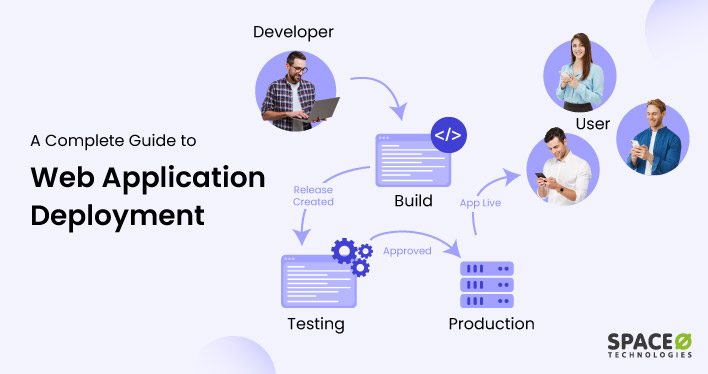
The diagram below shows a simplified version of this flow. A developer creates a release, which is built and tested. Once approved, it's moved to "Production," and the app becomes "Live" for users.
To help make this distinction clearer, let's use another analogy—this time involving a band preparing for a show.
What is a Production Environment? | PagerDuty
This PagerDuty article explains the different environments in software development with a simple, effective analogy.
First, read the main definition under the heading "What is a Production Environment?". Then, read the section "What is the difference between a production environment and development and stage environments?" to understand the band analogy, which compares development to band practice, staging to a dress rehearsal, and production to the live performance.
Seeing Deployment in Action
The concept can still feel a bit abstract, so let's watch a quick demonstration. In modern web development, platforms like Vercel and Netlify (which we'll cover soon) have made deployment incredibly simple. Often, it's as easy as dragging your project folder into a web browser.
This video shows exactly that. The creator takes a project running on their localhost and deploys it to get a public, shareable URL.
How To Deploy a Website (to the internet)
This video by Smoljames provides a direct, visual demonstration of deploying a simple website.
First, watch the introduction to see the "before" state—a project running locally (local project). Then, watch the core deployment step where the folder is dragged onto a hosting platform, instantly creating a live site (the deployment). This visually captures the essence of moving from local to public.
This simple drag-and-drop action is doing exactly what we've discussed: it's uploading the code from a local folder to a server managed by the hosting company (in this case, Netlify) and making it available at a public URL.
Conclusion
You've now demystified one of the most critical steps in building an app. Deployment is not magic; it's the logical process of moving your finished work from your private computer to a public server so the world can see it.
Key Takeaways:
- Deployment is the process of moving your application from your local machine to a public server.
- Code on your computer runs at
localhostand is only visible to you. Deployed code runs on a server and is accessible to anyone via a public URL. - Web hosting is the service of renting space on these public servers.
- The production environment is the live server where your public-facing application runs for your users.
In the past few modules, you've learned how to manage your code with Git and GitHub. Now you understand the goal: getting that code onto a production server.
In our next lesson, we will look at a specific and very popular tool for this: Vercel. You'll learn what Vercel is, why it's so tightly integrated with modern frameworks like Next.js, and why your LLM assistant will almost certainly recommend it when you want to deploy a web app.