Recommended resources
The freely available resources this lesson will direct you to.
- The Brand Audit Framework That Actually Workswww.youtube.com
- SaaS Website Positioning and Messaging - Reforge Website Audit Example [Startup Week 2022]www.youtube.com
- How to Audit Your B2B SaaS Brand Before a Rebrandwww.madmagnet.com
- Brand optimization: What it is and why your AI visibility depends on itblog.hubspot.com
Hello! In the previous lesson, we looked at why a B2B software purchase can feel risky to several people at once. A brand helps when its claims and evidence make that decision easier to judge. This lesson turns that idea into a touchpoint audit: a way to inspect what buyers actually encounter, rather than what the company intends to communicate.
We’ll continue with the fictional invoice-exception software company. The aim is not to invent a new position or redesign its identity yet. It is to find out whether its website, sales conversations, product, and supporting materials tell a clear, compatible, believable story.
Follow the buyer, not the asset folder
A touchpoint is an occasion on which someone encounters the company or its product. The diagram below shows how broad that category can be. For a B2B software audit, you do not need to inventory every possible channel. Start with the encounters that matter to a prospective customer’s decision and early experience.
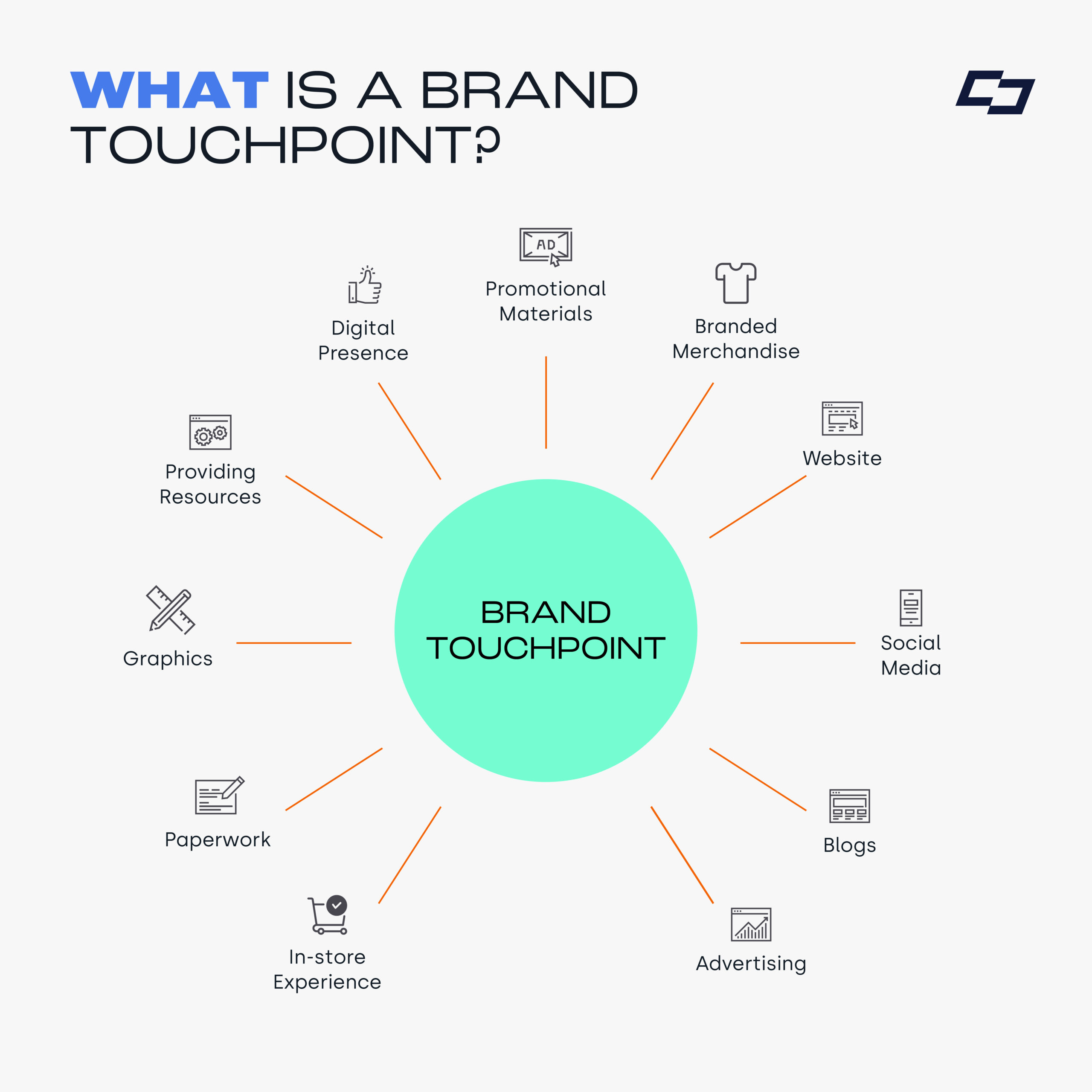
Imagine a finance leader finds the invoice-software company through a post, visits its homepage, receives a sales deck, and attends a demo. An IT colleague later opens its security information; a potential user tries the workflow. Each encounter supplies clues about what the product does, who it serves, and whether the provider can be trusted. The audit asks whether those clues add up.
For an early-stage software company, a manageable first inventory might include its homepage and key product page, social profile, sales deck, demo or trial, follow-up email, security or implementation information, and onboarding or support materials. Select the ones a buyer is most likely to see. Include the product experience where possible: a claim about an easy workflow must survive contact with that workflow.
Capture the current version of each touchpoint, with a date and a note about who would encounter it. Record the actual headline, screenshot, spoken explanation, or product behavior—not a paraphrase of what the team meant. If a document is unavailable, mark it not found rather than assuming it does not exist.
Learn to read the signals
A close reading of one page is a useful starting point. In Headway’s SaaS Website Positioning and Messaging – Reforge Website Audit Example, the presenters examine how a homepage can leave visitors unsure who an offering is for and what they would receive. Their example is an education offering, not the invoice software, but the method of noticing buyer uncertainty transfers.
SaaS Website Positioning and Messaging - Reforge Website Audit Example [Startup Week 2022]
Watch Headway's homepage audit to see how its presenters turn specific words and page elements into a diagnosis, rather than immediately proposing new copy.
Watch the homepage audit. Notice their questions about the intended audience and the tension between descriptions of cohorts and membership near the start. Later, from the discussion of scoring page elements to the registration workflow, watch how information found deeper in the experience changes their interpretation of the homepage.
The important habit is to separate observation from inference. “The page says ‘membership’ here and ‘cohort’ there” is an observation. “A visitor may not know whether this is ongoing access or a fixed-length program” is an inference worth checking. “Buyers are abandoning the page because of it” is a stronger claim that requires evidence you do not yet have.
Apply that discipline through three lenses:
- Clarity: Can the intended buyer tell what the software does, for whom, and in which situation? Does a term such as “automated approvals” name a specific capability, or leave the reader to guess how much human work remains?
- Consistency: Do touchpoints make compatible claims about the same product? They need not use identical wording. A homepage can give the short version while a demo supplies detail. The problem is an unexplained change in meaning.
- Credibility: Can the company support its meaningful claims with what buyers can inspect—such as a realistic demo, accurate documentation, or appropriately scoped customer evidence? An unsupported claim is not necessarily false, but the buyer has little basis for relying on it.
These lenses overlap without being interchangeable. A sentence can be perfectly clear and still promise something the product cannot do. A polished visual system can make materials recognizably related without resolving a contradiction between the sales deck and the demo.
Build an evidence-led audit
Mad Magnet’s How to Audit Your B2B SaaS Brand Before a Rebrand supplies a practical inventory of internal descriptions, messaging, visual execution, and social proof. Its priority categories are useful when deciding what to address first. Treat its tests as diagnostic prompts, not universal thresholds: a quick homepage impression, for example, cannot establish by itself why a deal did or did not progress.
How to Audit Your B2B SaaS Brand Before a Rebrand
Read Mad Magnet's audit framework for concrete ways to collect and compare brand signals, then its guidance on distinguishing consequential gaps from cosmetic ones.
Under "The 6-Area Brand Audit Framework for B2B SaaS," read Areas 1 through 4, starting with internal to external checks. Stop before "Area 5: Competitive Brand Comparison." Focus on what each check would reveal, rather than treating its enterprise examples as requirements for every small company. Then find "How to Prioritize Audit Findings by Commercial Impact" and read the priority categories, stopping after the cosmetic-and-low-impact category.
The internal check matters even though a buyer never sees it directly. If a founder says the invoice product “automates approvals,” while the person giving demos says it “makes exceptions easier to assign and review,” external inconsistency may reflect a disagreement about the product itself. Changing a headline alone would conceal that disagreement.
To make findings comparable, use a small audit record for each touchpoint:
| Record | What to capture |
|---|---|
| Encounter | Touchpoint, date, likely audience, and point in their evaluation or use |
| Signal | The exact claim, visual cue, evidence offered, or behavior observed |
| Clarity | What a buyer can understand—and what they must guess |
| Consistency | The specific other touchpoint that supports or conflicts with it |
| Credibility | What substantiates the claim; what remains unverified |
| Consequence | The question or concern this could create for a buyer |
You can mark each of the three lenses clear/supported, uncertain, or problematic, provided you add an observation explaining the mark. Do not average them into a single “brand score.” A serious unsupported promise should not disappear because the logo and colors are consistent.
Here is a fictional excerpt from the invoice-software audit. Assume the demo shows a person assigning an exception and viewing its approval history; it does not show approvals happening without human action.
| Touchpoint and observed signal | Audit finding |
|---|---|
| Homepage: “Automate every invoice approval.” | Clarity: “Every” implies a broader scope than the demo explains. Consistency: Conflicts with a workflow requiring human approval. Credibility: The observed demo does not support the claim. |
| Sales deck: “Assign invoice exceptions and keep approval history in one place.” | Clarity: Names a task and capability. Consistency: Fits the observed demo, but not the homepage’s broader promise. Credibility: The demo offers a way to inspect it. |
| Security page: “Enterprise-grade security,” with no relevant details visible | Clarity: Does not say which safeguards are in place. Credibility: A reader cannot verify the claim from this page. This finding does not establish that the product is insecure. |
Notice that consistency is relational. The sales deck is not defective simply because it uses different words from the homepage; the two imply different degrees of automation. Before recommending a correction, the auditor should confirm the product’s actual capabilities with the people responsible for it.
Check where one buyer hands the story to another
A touchpoint audit becomes more revealing when you trace a short buyer path, rather than viewing assets as isolated designs. In our example, the finance leader may share the homepage with a colleague, summarize the sales deck to a budget holder, and invite a user and IT colleague to the demo. Later, implementation or support materials may set expectations about the experience after purchase.
At each transition, ask whether someone who missed the earlier conversation can still understand the core promise. The security page need not repeat the homepage hero. It should, however, describe the same product and provide information appropriate to the technical evaluator’s question. Likewise, a sales deck may emphasize business outcomes while a user demo emphasizes daily tasks—provided both remain faithful to what the software currently does.
Look especially for three types of gap:
- A contradiction: Marketing promises fully automatic approvals; the demo requires manual decisions.
- A missing bridge: The deck promises an easier rollout, but no one can explain what setup or training involves.
- An evidence mismatch: A broad outcome claim rests only on a demonstration of a narrow feature.
A different tone or level of detail is not automatically a gap. Different people need different evidence. The audit should identify where adaptation helps a buyer and where it makes the shared proposition harder to evaluate.
Prioritize the findings without prescribing a rebrand
The useful output is a short list of findings tied to buyer consequences, not a catalogue of everything that looks imperfect. For each finding, note how often a relevant buyer is likely to encounter it, what decision it could affect, and how confident you are in the evidence.
For the fictional company, the homepage’s “every approval” claim deserves attention before a slightly different blue in an old slide. It is prominent, concerns a central capability, and could make a later demo feel like a retreat from the original promise. The security-page gap may also matter substantially if technical review is part of the purchase. Its next step is to establish what accurate, shareable information exists—not to invent reassuring language.
That yields a disciplined sequence of recommendations: verify the product truth behind a claim; resolve any internal disagreement; then correct the affected customer-facing materials. Some findings will call for clearer copy, others for accessible evidence or a better handoff. A visual adjustment might help recognition, but an audit does not automatically imply a new identity or a full rebrand.
Keep uncertainty visible. Without buyer feedback, you can say, “This discrepancy could create doubt at the demo,” not “This discrepancy is losing deals.” The audit identifies what to investigate and where to act first; later customer conversations can test whether your interpretation matches buyers’ experience.
Conclusion
A touchpoint audit examines the signals buyers actually receive across marketing, sales, product, and supporting experiences. Collect the current evidence, test it for clarity, consistency, and credibility, and trace what happens when the story passes between stakeholders. Prioritize contradictions and unsupported claims that bear on a real purchase decision over low-impact cosmetic differences.
The next module moves closer to the customer. You’ll examine an early-customer conversation for pains, desired outcomes, buying triggers, objections, and the language buyers use themselves—evidence that can sharpen or challenge the interpretations made in this audit.