Recommended resources
The freely available resources this lesson will direct you to.
Hello! In our last lesson, we successfully accelerated a single training step by moving our model and data to a GPU. This was a huge leap in performance, but our training code still has a major limitation: it only works on a single, manually created batch of data.
To train a real model, we need to process an entire dataset, which can contain thousands or even millions of samples. How do we do this efficiently? How do we shuffle the data at the beginning of each training run to prevent the model from learning the order of the data? How do we split it into batches?
This lesson addresses these crucial questions. Our learning outcome is to use PyTorch's Dataset and DataLoader classes to wrap, batch, and shuffle training data. These two primitives are the standard PyTorch way to build robust and efficient data pipelines for your models.
Why Not Just Loop Through a Big Tensor?
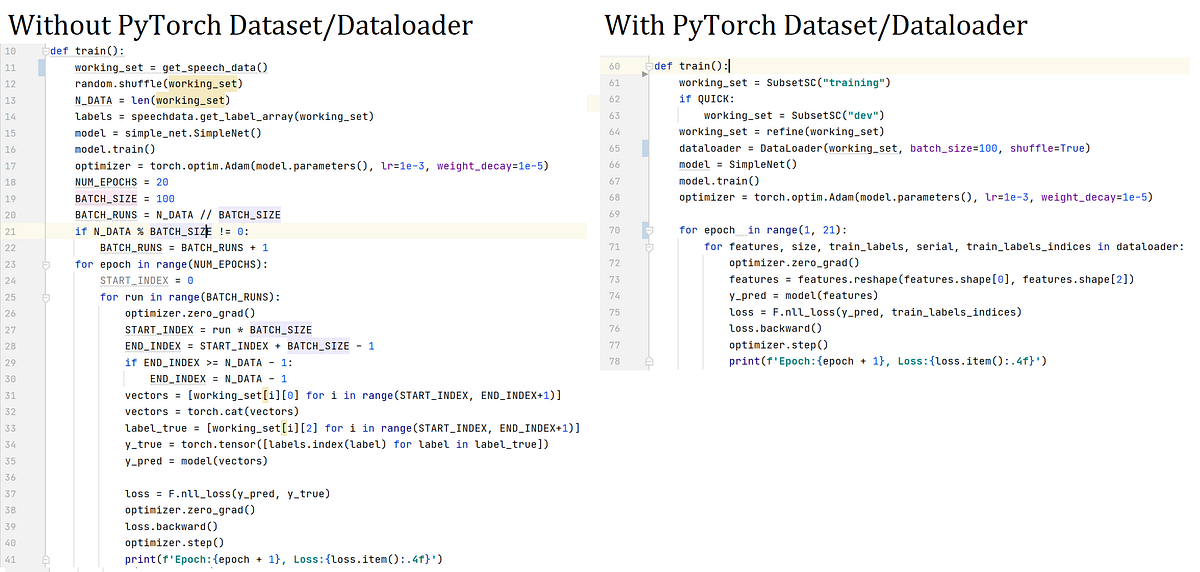
In previous lessons, we trained on a small, hand-made batch. For a real dataset, you might be tempted to load all the data into one giant tensor and then manually slice it into batches within your training loop. While this works for very small datasets, it quickly becomes inefficient and unmanageable.
PyTorch's Dataset and DataLoader classes provide a clean, powerful abstraction that separates your data-handling logic from your model-training logic.
To get started, let's clarify some key terminology used in training.
PyTorch Tutorial 09 - Dataset and DataLoader - Batch Training
The video 'PyTorch Tutorial 09 - Dataset and DataLoader' by Patrick Loeber starts by defining the core concepts of epochs, batch size, and iterations. Understanding these terms is essential before we dive into the code.
Watch the first two minutes of the video (0:00 - 2:02). Focus on the definitions of: Epoch: One full pass through the entire training dataset. Batch Size: The number of samples processed before the model's weights are updated. Iterations: The number of batches needed to complete one epoch (Total Samples / Batch Size).
The Data Pipeline: Dataset and DataLoader
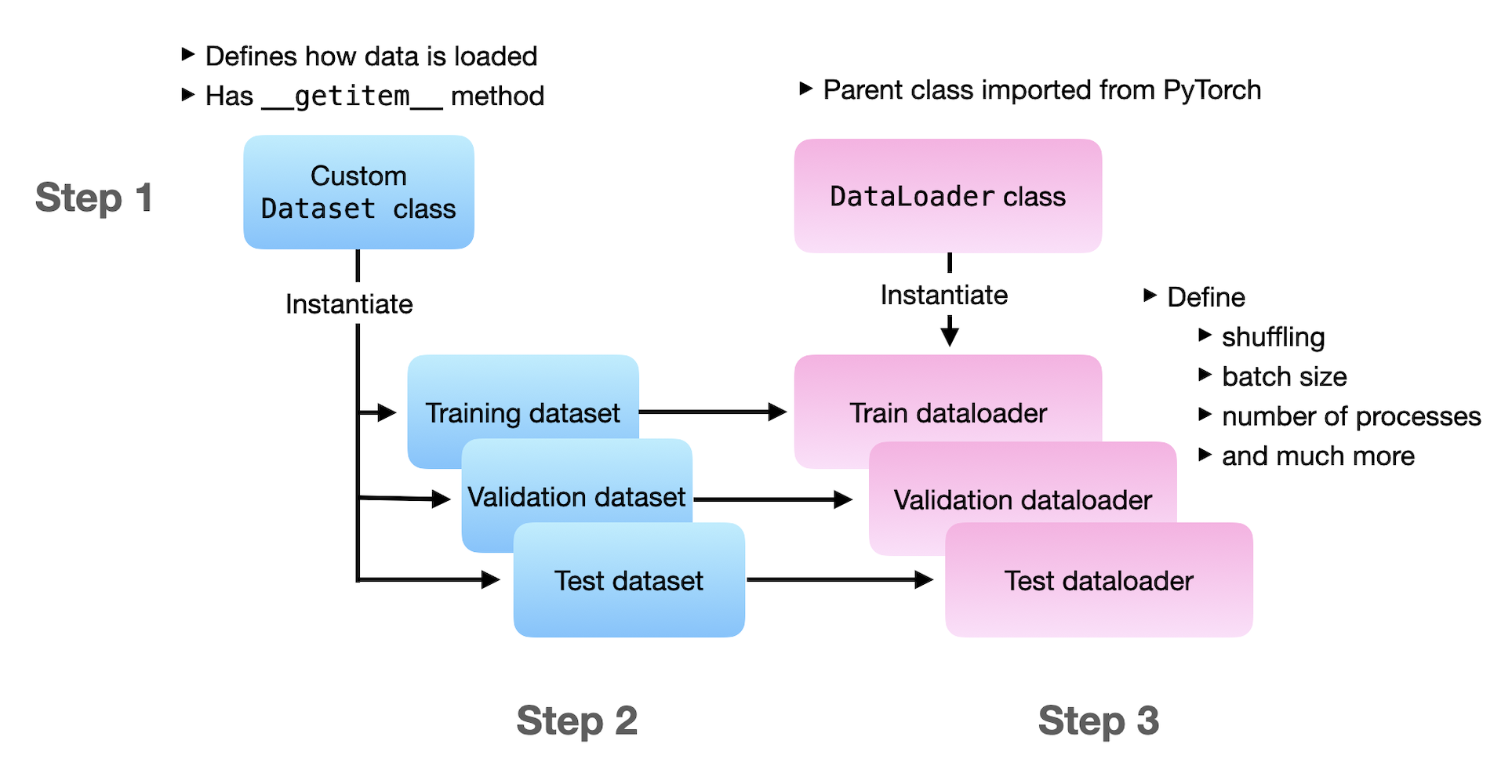
The PyTorch data loading pipeline consists of two main components that work together:
torch.utils.data.Dataset: This class stores the samples and their corresponding labels. It's an object that knows the total number of samples and how to fetch a single sample by its index.torch.utils.data.DataLoader: This class wraps an iterable around theDataset. It's responsible for pulling samples from theDatasetand organizing them into batches, shuffling them, and even loading them in parallel using multiple processes.
Creating a Dataset
A PyTorch Dataset can be created in two main ways: by using a pre-existing dataset from a library like torchvision, or by creating your own custom class. For real-world projects, creating a custom Dataset is a fundamental skill.
A custom Dataset class must inherit from torch.utils.data.Dataset and implement three special methods:
__init__(self, ...): This is the constructor, run once when you instantiate theDataset. Here, you typically load your data into memory or, more commonly, prepare the file paths and labels.__len__(self): This method must return the total number of samples in the dataset.DataLoaderuses this to know how many iterations make up an epoch.__getitem__(self, idx): This method loads and returns a single sample from the dataset at the given indexidx.DataLoadercalls this method repeatedly to construct a batch.
The following video provides an excellent, practical walkthrough of creating a custom Dataset for a tabular (CSV) dataset. Given your background in data science, this example should be very intuitive.
PyTorch Tutorial 09 - Dataset and DataLoader - Batch Training
Let's continue with the Patrick Loeber video. He now demonstrates how to create a WineDataset class from scratch to load data from a CSV file.
Watch the segment from 2:02 to 8:08. Pay close attention to how the three required methods (__init__, __len__, __getitem__) are implemented. Notice how NumPy is used to load the data, which is then converted to PyTorch tensors.
While the video showed a custom Dataset for a CSV file, the same principle applies to any data type. For instance, __getitem__ could load an image from a file path, read a line from a text file, or extract a segment from an audio file. The official PyTorch documentation provides another great example for image data.
To reinforce the concept, you can review the official PyTorch tutorial 'Datasets & DataLoaders'. It provides a clear, textual explanation and code for creating a custom Dataset for image files.
Please read the section 'Creating a Custom Dataset for your files'. This will show you the exact same structure (__init__, __len__, __getitem__) but applied to a different data type, helping you see the general pattern.
Preparing Data with DataLoader
Once you have a Dataset object, you can pass it to a DataLoader to handle the complexity of batching and shuffling. The DataLoader is an iterable, which means you can use it in a for loop to get one batch of data at a time.
Key parameters for DataLoader:
dataset: TheDatasetobject you created.batch_size: The number of samples per batch.shuffle: IfTrue, the data is reshuffled at every epoch. This is crucial for training to prevent the model from learning the order of the data and to improve generalization. It is typically set toFalsefor validation and testing.num_workers: The number of subprocesses to use for data loading. Setting this to a value greater than 0 can significantly speed up data loading by fetching batches in the background while the GPU is busy with computations.
Let's see how to instantiate and use the DataLoader.
PyTorch Tutorial 09 - Dataset and DataLoader - Batch Training
The next part of the video shows how to wrap the WineDataset in a DataLoader and then demonstrates how to use this DataLoader inside a mock training loop.
Watch the remainder of the video (from 8:08 to the end). Instantiating DataLoader (8:08 - 10:26): Observe how the DataLoader is created with the custom dataset, a batch_size, shuffle=True, and num_workers. Using DataLoader in a Loop (10:26 - 14:28): This is the most important part. Notice the clean for i, (inputs, labels) in enumerate(data_loader): syntax. This is the standard pattern you will use in all your future PyTorch training loops.
The Complete Training Loop Structure
Now we can combine what we've learned in the last few lessons into a complete skeleton for a training loop.
import torch
import torch.nn as nn
from torch.utils.data import Dataset, DataLoader


# Assume YourCustomDataset is defined as shown in the resources
# class YourCustomDataset(Dataset):
#     ...


# --- 1. SETUP ---
# Device
device = torch.device("cuda" if torch.cuda.is_available() else "cpu")
print(f"Using device: {device}")


# Hyperparameters
num_epochs = 10
batch_size = 4
learning_rate = 0.001


# --- 2. DATA LOADING ---
# Instantiate Dataset
# (Using a dummy dataset for this example)
class DummyDataset(Dataset):
    def __init__(self, num_samples=100, features=10):
        self.num_samples = num_samples
        self.features = features
        self.data = torch.randn(num_samples, features)
        self.labels = torch.randint(0, 2, (num_samples,))

    def __len__(self):
        return self.num_samples

    def __getitem__(self, idx):
        return self.data[idx], self.labels[idx]

dataset = DummyDataset()


# Instantiate DataLoader
train_loader = DataLoader(dataset=dataset, batch_size=batch_size, shuffle=True, num_workers=0)


# --- 3. MODEL, LOSS, and OPTIMIZER ---
# (Using a dummy model for this example)
model = nn.Linear(10, 2).to(device) # Move model to device
criterion = nn.CrossEntropyLoss()
optimizer = torch.optim.Adam(model.parameters(), lr=learning_rate)


# --- 4. TRAINING LOOP ---
for epoch in range(num_epochs):


    # The 'for' loop over the DataLoader is the key!
    for i, (inputs, labels) in enumerate(train_loader):


        # Move data for this batch to the device
        inputs = inputs.to(device)
        labels = labels.to(device)


        # Forward pass
        outputs = model(inputs)
        loss = criterion(outputs, labels)


        # Backward and optimize
        optimizer.zero_grad()
        loss.backward()
        optimizer.step()

        if (i+1) % 20 == 0:
            print(f'Epoch [{epoch+1}/{num_epochs}], Step [{i+1}/{len(train_loader)}], Loss: {loss.item():.4f}')

print("Training finished.")
This code structure is the blueprint for almost any supervised learning task in PyTorch.
Conclusion
In this lesson, you've mastered the standard PyTorch workflow for preparing data for training. By separating data-handling logic (Dataset) from batching and iteration logic (DataLoader), you can write cleaner, more efficient, and more readable code.
Key Takeaways:
Datasetis an abstract class that provides a common interface for accessing data. You must implement__init__,__len__, and__getitem__.DataLoaderis an iterable that wraps aDatasetand automatically handles batching, shuffling, and parallel data loading.- The training loop iterates over the
DataLoaderto get batches of data:for inputs, labels in train_loader:. - This pipeline is flexible and can be adapted to almost any type of data, from CSV files and images to text and audio.
You now have all the core components needed to train a neural network in PyTorch: defining a model, using a loss function and optimizer, running the training step on a GPU, and now, efficiently loading and batching data.
In our next lesson, we will put all these pieces together to train and evaluate a complete multi-class classifier on a benchmark dataset using PyTorch.