Recommended resources
The freely available resources this lesson will direct you to.
Hello! Welcome to the final lesson in our "Introduction to PyTorch" module.
In our previous lessons, we've assembled all the individual components of a PyTorch project: we've defined models with nn.Module, calculated gradients with autograd, updated weights with optimizers, accelerated training on a GPU, and, most recently, built efficient data pipelines with Dataset and DataLoader.
Today, we'll bring all these pieces together. Our goal is to train and evaluate a multi-class classifier on a benchmark dataset using PyTorch. This is a milestone lesson where you'll see the complete end-to-end workflow of a real deep learning project.
We will follow these five essential steps:
- Load and prepare the training and test datasets.
- Define our neural network model.
- Define the loss function and the optimizer.
- Implement a training loop to train the model over multiple epochs.
- Implement an evaluation loop to measure the model's performance on unseen data.
By the end of this lesson, you will have a complete, working blueprint for training and evaluating supervised learning models in PyTorch.
1. Preparing the Data and Model
For this lesson, we'll use the classic MNIST dataset, which consists of 28x28 grayscale images of handwritten digits (0-9). torchvision makes it incredibly easy to download and prepare this dataset.
The following video provides an excellent walkthrough of setting up the entire project. We'll watch it in segments, focusing on each part of the process.
Pytorch Neural Network example
Let's begin with the video 'Pytorch Neural Network example' from the Aladdin Persson channel. This first segment covers loading the MNIST dataset and defining our neural network.
Watch the video from 8:05 to 9:58 and from 3:05 to 5:45. You can watch them in that order. Focus on: Data Loading (8:05 - 9:58): How torchvision.datasets.MNIST is used to get the data and how DataLoader wraps it for batching and shuffling. This directly applies what we learned in the last lesson. Model Definition (3:05 - 5:45): How a simple fully-connected neural network is defined using nn.Module. Notice the input size is 784 (28 * 28 pixels) and the output size is 10 (for 10 classes/digits).
As you saw in the video, the setup is straightforward. We use torchvision.datasets.MNIST to handle the download and basic transformation (converting images to tensors). Then, we wrap the training and test sets in DataLoader instances to create our batch iterators.
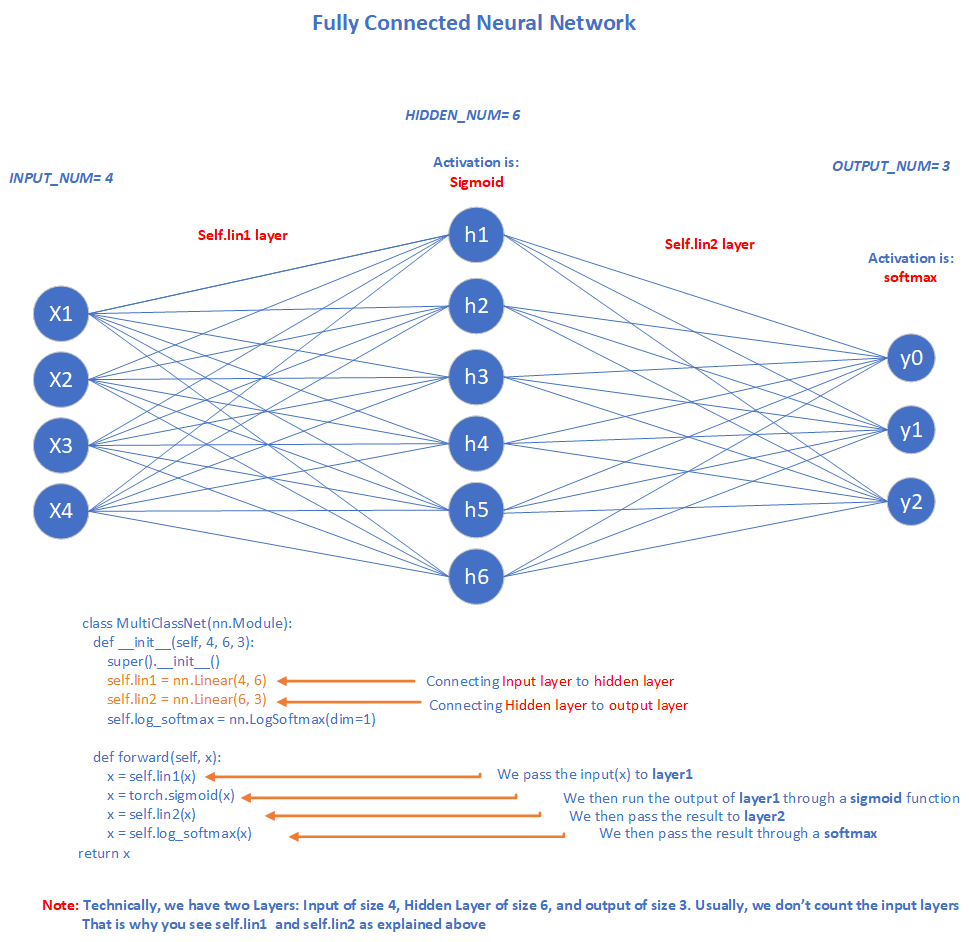
The model is a simple two-layer Multi-Layer Perceptron (MLP). It takes a flattened image vector and passes it through one hidden layer with a ReLU activation, followed by an output layer that produces scores (logits) for each of the 10 classes.
2. Defining the Loss Function and Optimizer
For a multi-class classification problem like MNIST, the standard choice for a loss function is Cross-Entropy Loss. In PyTorch, nn.CrossEntropyLoss is particularly convenient because it combines two operations:
- A
LogSoftmaxfunction, which converts the model's raw output scores (logits) into log probabilities. - The Negative Log-Likelihood Loss (
NLLLoss), which calculates the loss based on these probabilities.
This means you do not need to add a Softmax layer at the end of your network. The loss function handles it for you.
For the optimizer, we'll use Adam, a popular and effective choice that often requires less manual tuning of the learning rate.
Pytorch Neural Network example
Let's continue with the video to see how the device, hyperparameters, loss function, and optimizer are initialized.
Watch the segments from 6:59 to 8:05 and from 9:58 to 11:23. Observe the instantiation of nn.CrossEntropyLoss and optim.Adam, passing the model's parameters and the learning rate to the optimizer.
3. The Training Loop
Now we arrive at the heart of the process: the training loop. This is where the model actually learns. The structure consists of an outer loop for epochs and an inner loop for batches provided by our DataLoader.
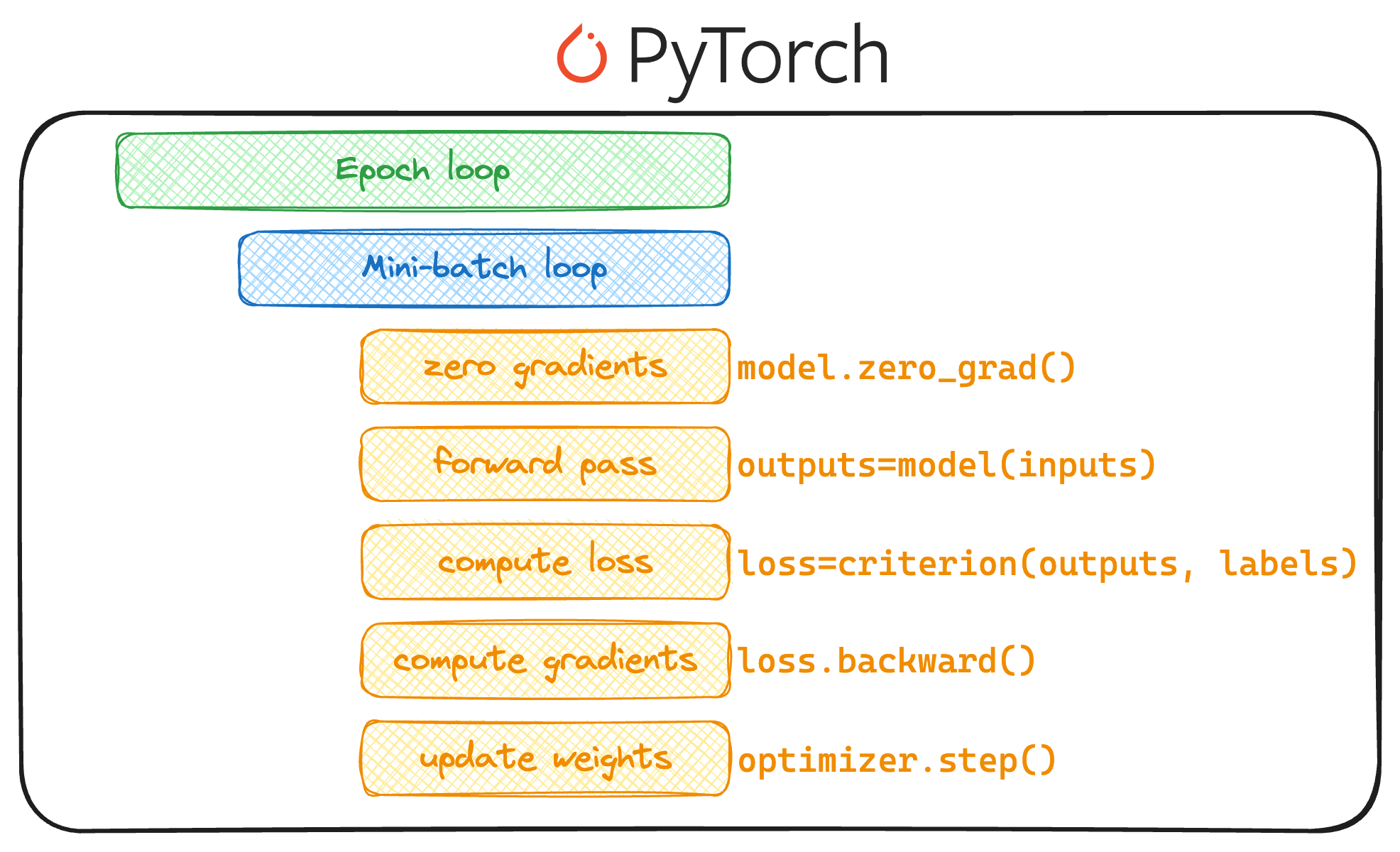
Within the inner loop, for each batch, we perform the five critical steps we've discussed before:
- Zero gradients:
optimizer.zero_grad() - Forward pass:
outputs = model(inputs) - Compute loss:
loss = criterion(outputs, labels) - Backward pass:
loss.backward() - Update weights:
optimizer.step()
Let's watch how this is implemented.
Pytorch Neural Network example
The next segment of the video details the complete training loop.
Watch from 11:23 to 16:33. Pay close attention to how the code iterates through the train_loader, moves data to the correct device, reshapes the input images into flat vectors, and executes the five steps of a training iteration.
4. Evaluating the Model
Training a model is only half the battle. We need to evaluate its performance on data it has never seen before—the test set. This tells us how well our model generalizes.
When evaluating, we follow two important best practices:
model.eval(): We switch the model to evaluation mode. This is crucial for certain layers like Dropout and Batch Normalization, which behave differently during training and testing. While our current model is simple, this is a vital habit to build.with torch.no_grad():: We wrap our evaluation code in this context manager. It tells PyTorch not to calculate gradients, which saves memory and speeds up computation, as we don't need to backpropagate during evaluation.
To calculate accuracy, we take the model's output scores for a batch, find the index of the highest score for each sample (this is our prediction), and compare it to the true labels.
Pytorch Neural Network example
The final segment of the video shows how to create a helper function to check the model's accuracy on both the training and test datasets.
Watch from 16:33 to the end. Notice the use of model.eval() and torch.no_grad(). Focus on the logic to get the predictions using scores.max(1) and how the number of correct predictions is tallied.
5. Bringing It All Together: A Complete Example
We've now seen all the individual parts. Let's combine them into a single, complete script that not only trains and evaluates but also tracks performance over time and visualizes the results—a standard practice in any data science project.
The article "Building a Multiclass Classification Model in PyTorch" provides an excellent, robust template for a training script, which we can adapt for our MNIST task. It demonstrates how to track training and validation accuracy/loss at each epoch and then plot them.
Building a Multiclass Classification Model in PyTorch
This article from Machine Learning Mastery provides a very professional and complete training script structure. While it uses the Iris dataset, the principles are universal.
Please read the section 'Benchmark the Model', focusing on the final, more advanced training loop. Pay attention to how it switches between model.train() and model.eval(), and how it appends loss and accuracy metrics to lists (train_loss_hist, test_acc_hist, etc.) for later plotting.
Here is a complete, runnable script for our MNIST classifier that integrates these best practices. You can run this code in your own environment to train your first full PyTorch model.
import torch
import torch.nn as nn
import torch.optim as optim
import torchvision
import torchvision.transforms as transforms
from torch.utils.data import DataLoader
import matplotlib.pyplot as plt


# --- 1. SETUP ---
# Device
device = torch.device("cuda" if torch.cuda.is_available() else "cpu")
print(f"Using device: {device}")


# Hyperparameters
input_size = 784  # 28x28
hidden_size = 50
num_classes = 10
num_epochs = 5
batch_size = 64
learning_rate = 0.001


# --- 2. DATA LOADING ---
# MNIST dataset
train_dataset = torchvision.datasets.MNIST(root='./data', train=True, transform=transforms.ToTensor(), download=True)
test_dataset = torchvision.datasets.MNIST(root='./data', train=False, transform=transforms.ToTensor())

train_loader = DataLoader(dataset=train_dataset, batch_size=batch_size, shuffle=True)
test_loader = DataLoader(dataset=test_dataset, batch_size=batch_size, shuffle=False)


# --- 3. MODEL DEFINITION ---
class NeuralNet(nn.Module):
    def __init__(self, input_size, hidden_size, num_classes):
        super(NeuralNet, self).__init__()
        self.fc1 = nn.Linear(input_size, hidden_size)
        self.relu = nn.ReLU()
        self.fc2 = nn.Linear(hidden_size, num_classes)

    def forward(self, x):
        out = self.fc1(x)
        out = self.relu(out)
        out = self.fc2(out)
        return out

model = NeuralNet(input_size, hidden_size, num_classes).to(device)


# --- 4. LOSS AND OPTIMIZER ---
criterion = nn.CrossEntropyLoss()
optimizer = optim.Adam(model.parameters(), lr=learning_rate)


# --- 5. TRAINING AND EVALUATION LOOP ---
train_losses = []
test_accuracies = []

for epoch in range(num_epochs):


    # --- TRAINING ---
    model.train() # Set model to training mode
    running_loss = 0.0
    for i, (images, labels) in enumerate(train_loader):


        # Reshape images to (batch_size, input_size) and move to device
        images = images.reshape(-1, 28 * 28).to(device)
        labels = labels.to(device)


        # Forward pass
        outputs = model(images)
        loss = criterion(outputs, labels)


        # Backward and optimize
        optimizer.zero_grad()
        loss.backward()
        optimizer.step()

        running_loss += loss.item()

    epoch_loss = running_loss / len(train_loader)
    train_losses.append(epoch_loss)


    # --- EVALUATION ---
    model.eval() # Set model to evaluation mode
    correct = 0
    total = 0
    with torch.no_grad():
        for images, labels in test_loader:
            images = images.reshape(-1, 28 * 28).to(device)
            labels = labels.to(device)
            outputs = model(images)
            _, predicted = torch.max(outputs.data, 1)
            total += labels.size(0)
            correct += (predicted == labels).sum().item()

    accuracy = 100 * correct / total
    test_accuracies.append(accuracy)

    print(f'Epoch [{epoch+1}/{num_epochs}], Loss: {epoch_loss:.4f}, Accuracy: {accuracy:.2f}%')

print('Finished Training')


# --- 6. PLOTTING RESULTS ---
plt.figure(figsize=(10, 5))
plt.subplot(1, 2, 1)
plt.plot(train_losses, label='Training Loss')
plt.xlabel('Epoch')
plt.ylabel('Loss')
plt.title('Training Loss Over Time')
plt.legend()

plt.subplot(1, 2, 2)
plt.plot(test_accuracies, label='Test Accuracy')
plt.xlabel('Epoch')
plt.ylabel('Accuracy (%)')
plt.title('Test Accuracy Over Time')
plt.legend()

plt.show()
Conclusion
Congratulations! You have now walked through the entire process of training and evaluating a neural network in PyTorch. You've brought together all the concepts from this module into a single, functional project.
Key Takeaways:
- The standard workflow involves setting up (device, hyperparameters), loading data, defining the model, loss, and optimizer, running the training loop, and evaluating on a test set.
nn.CrossEntropyLossis the go-to for multi-class classification and simplifies the model by not requiring a final Softmax layer.- It's crucial to use
model.train()andmodel.eval()to switch between modes. - Evaluation should always be done with
torch.no_grad()for efficiency. - Tracking and plotting metrics like loss and accuracy over epochs is essential for understanding how your model is learning.
This end-to-end structure will serve as the foundation for all the more complex models you'll build in the upcoming modules.
In the next lesson, we will begin a new module, "Techniques for Training Deep Neural Networks," where we'll dive deeper into improving the training process itself. We'll start by exploring and comparing different optimizers like SGD, Momentum, RMSProp, and Adam to understand their impact on model convergence and performance.