Hello! Welcome back to our module on Visual Storytelling with AI.
In the previous lesson, we established the theoretical foundation of effective cover design. We learned that a cover is your book's #1 marketing asset and that success hinges on understanding the core principles: adhering to genre conventions, and strategically combining imagery, typography, and color to send the right signals to your target audience.
Today, we move from theory to practice. You will learn how to generate compelling cover art concepts tailored to specific book genres using AI. We will take the design principles you've learned and translate them into powerful text-to-image prompts that can bring your vision to life. This is where you become the creative director, guiding the AI to produce the core artwork for your book covers.
1. The Anatomy of a Genre-Specific Prompt
A great AI-generated image is rarely an accident. It's the result of a well-crafted prompt. Instead of giving the AI a vague idea like "fantasy book cover," you need to provide a detailed set of instructions. Think of yourself as commissioning an artist; the more specific you are, the closer you'll get to your vision.
The following article explains how to build a "master prompt" by breaking down your idea into distinct components the AI can understand.
AI Book Cover Design That Actually Sells Books
The article 'AI Book Cover Design That Actually Sells Books' from BeYourCover offers an excellent framework for prompt construction. It teaches you to think like a director guiding the AI.
Please read the section titled 'Building Your Master Prompt from Scratch'. Focus on the core elements it identifies: Subject, Style, Mood, Lighting, and Composition. These components are how you translate the design principles from our last lesson into actionable instructions.
To summarize, a strong prompt typically includes:
- Subject: What is the main focus? (e.g., a lone astronaut, a couple embracing, an abstract geometric pattern).
- Style: What should it look like? (e.g., photorealistic, digital painting, minimalist vector art, children's book illustration).
- Mood & Atmosphere: What feeling should it evoke? (e.g., mysterious and suspenseful, warm and romantic, energetic and optimistic).
- Lighting & Color: How is the scene lit? What is the color palette? (e.g., dramatic rim lighting, soft morning light, a palette of blues and cold grays).
- Composition: How is the scene framed? (e.g., close-up portrait, wide-angle landscape, symmetrical).
2. Prompting for Your Specific Genres
Now, let's apply this framework to the different genres you're interested in. The key is to lean into the genre conventions we discussed in the last lesson. Readers have visual expectations, and meeting them is the first step to getting them to click "buy."
The article you just read provides a fantastic table with prompt components for several popular fiction genres.
AI Book Cover Design That Actually Sells Books
Let's return to the 'AI Book Cover Design...' article. The next section provides a cheat sheet for building genre-specific prompts.
Read the section 'Using Genre Conventions to Your Advantage' and carefully study the 'Genre-Specific AI Prompt Components' table. Notice how specific keywords for subject, style, and lighting are tied directly to each genre.
Since your interests also include non-fiction like business and mentoring, we need to add those conventions to our toolkit.
The Complete Guide to AI-Generated Book Covers in 2025
The article 'The Complete Guide to AI-Generated Book Covers' from KDPEasy has a great section on non-fiction covers.
Please read the section titled 'Genre-Specific Considerations'. Pay special attention to the 'Non-Fiction/Business' part. It correctly points out that these covers are often clean, professional, and typography-focused, where the AI might be used to create an abstract background.
Let's put this together with a few examples relevant to your goals:
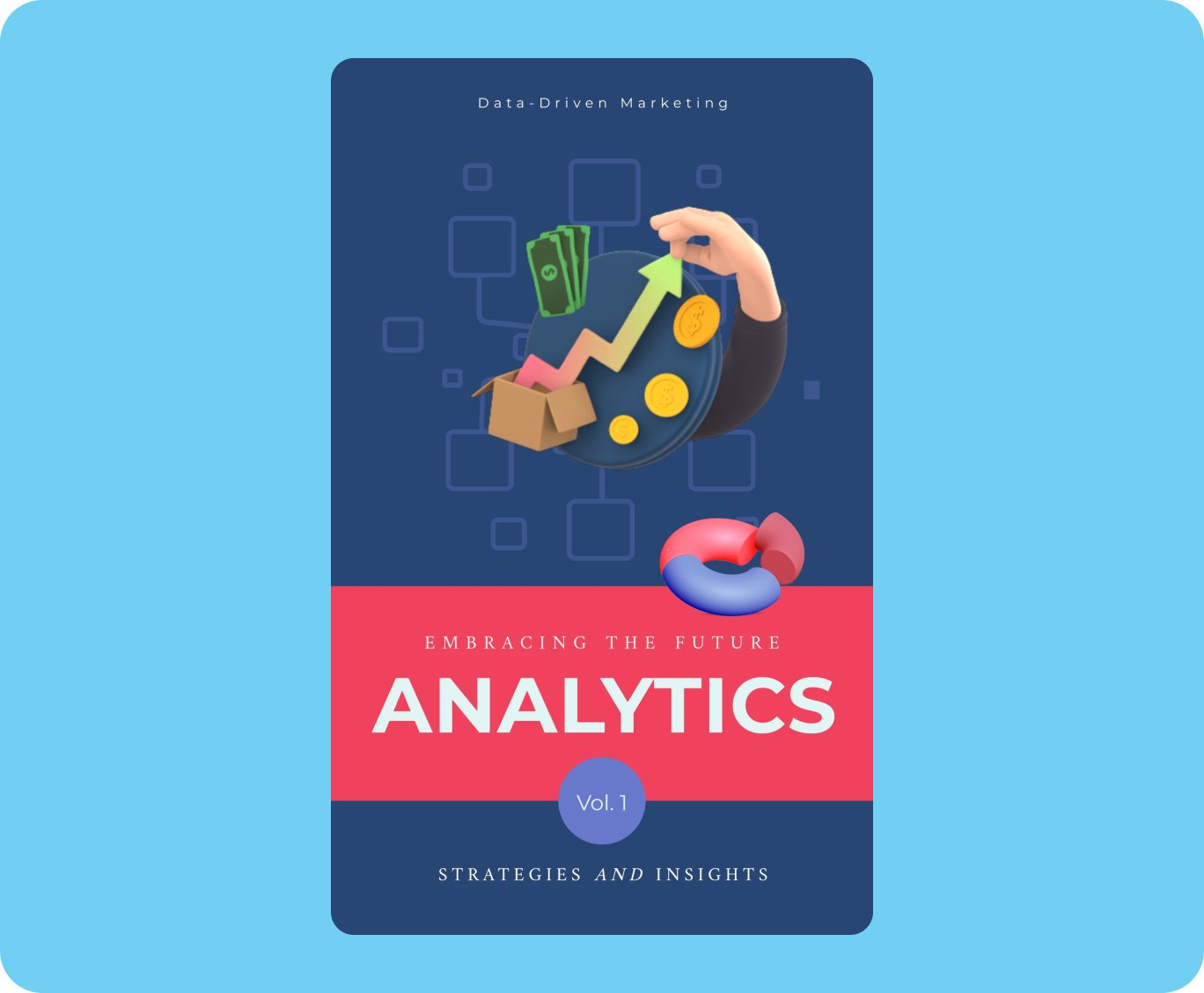
Example 1: Tech Mentoring Book (Non-Fiction)
Drawing on your IT background, you might write a book called "The Startup Architect."
- Subject: Abstract representation of data, growth, or networks.
- Style: Clean 3D render, minimalist graphic design.
- Mood: Professional, modern, innovative.
- Lighting/Color: Corporate blues and grays, with a bright accent color like green or orange for energy.
- Prompt Idea: "A minimalist 3D graphic of an abstract, glowing neural network structure on a dark blue background, professional, clean, corporate aesthetic, book cover art."
This approach leads to professional-looking covers like this one:
Example 2: Children's Picture Book
For a story about a curious fox, the prompt would be completely different.
- Subject: A friendly, cartoon fox exploring a magical forest.
- Style: Whimsical children's book illustration, gentle watercolor style.
- Mood: Cheerful, adventurous, warm.
- Lighting/Color: Bright, sunny day with a vibrant, primary color palette.
- Prompt Idea: "A cute, friendly cartoon fox with a backpack looking up at a giant, magical tree. Whimsical children's book illustration, vibrant colors, sunny day, simple background."
The goal is to generate distinct concepts that immediately signal the book's content and tone.

Test your understanding!
Let's say you're planning a book on psychology titled "The Resilient Mind." Using the prompt components we've discussed, write a full prompt to generate cover art for it. Think about what visual metaphors would represent resilience and the mind.
Show answer
Here is one possible prompt, but many creative approaches could work:
"A minimalist and symbolic book cover design. A human head silhouette made of cracked gold, with a single, vibrant green plant growing from a crack at the top. The background is a clean, dark charcoal gray. The style is a sophisticated, modern graphic. The mood is hopeful, thoughtful, and professional. Kintsugi art style."
- Subject: Human head silhouette, cracked gold (Kintsugi), and a growing plant (symbolizing resilience and growth from damage).
- Style: Minimalist, modern graphic, Kintsugi (the Japanese art of repairing broken pottery with gold).
- Mood: Hopeful, thoughtful, professional.
- Color/Lighting: High contrast with dark gray, gold, and a vibrant green accent.
- Composition: Central, symbolic image.
3. Generating Your First Concepts with Free Tools
Now for the hands-on part. There are several excellent free AI art generators you can use. Since you prefer to avoid paid software, we'll focus on these. The following video demonstrates three popular and capable options: Leonardo.ai, Ideogram, and Microsoft Bing Image Creator (DALL-E 3).
Create UNLIMITED AI Book Cover Design For Amazon KDP | Book Cover Generator
The video 'Create UNLIMITED AI Book Cover Design...' provides a great walkthrough of three excellent free tools. Let's see how they work.
Watch the following segments to see the generation process in action: Leonardo.ai: From 00:51 to 03:32. Ideogram: From 03:32 to 05:13. Microsoft Bing Creator: From 05:13 to 06:37. Notice how the same prompt can yield different results in each tool due to their unique models. For now, ignore the parts where the AI tries to write the title directly on the image; we'll handle typography separately in the next lesson for better control.
Pro-Tip: Don't get discouraged if your first few generations aren't perfect. Iteration is a key part of the process. Try tweaking your prompt—change the style, adjust the color palette, or rephrase the subject—and generate again.
4. Refining Your Art: The AI-Powered Editing Workflow
You've generated an image that's about 80% of what you envisioned. It has great composition and mood, but there's a weird artifact in the corner, or you wish the character's expression was slightly different. You don't need Photoshop to fix this! Modern AI tools have built-in features for refinement that are perfect for your workflow.
AI Book Cover Design That Actually Sells Books
Let's go back to the 'AI Book Cover Design That Actually Sells Books' article one last time. It details a powerful, iterative workflow for polishing your images without needing traditional software.
Please read the subsections 'Find a Good Base, Then Use Variations', 'In-painting and Out-painting: Your Secret Weapons', and 'Upscaling for That Print-Ready Polish'. These techniques are the core of professional AI art refinement.
Here is a summary of that workflow:
- Generate & Find a Base: Run your prompt until you get an image that is a strong foundation.
- Use Variations: Instead of starting over, use the "variations" feature (available in many tools) to generate similar images. This allows you to explore subtle changes in composition or detail while maintaining the core concept.
- Use In-painting (Generative Fill): This is your secret weapon. If there's a small area you want to fix—like a distorted hand or an unwanted object—you can select that area and give the AI a new, simple prompt to regenerate only that part. It's like surgical correction for your art.
- Upscale for Quality: AI tools often generate images at a lower resolution to be fast. Upscaling uses AI to increase the image size and resolution to the 300 DPI (dots per inch) standard required for professional printing, ensuring your cover looks crisp, not blurry.
A Quick Note on Commercial Use
Since your goal is to sell these books, it's critical to ensure you have the right to use the generated images commercially. This directly addresses your concern about IP rights.
Most reputable AI art generators have clear terms of service. Generally:
- Free Tiers may have restrictions on commercial use.
- Paid Tiers (even the lowest-cost ones) often grant you full commercial rights to the images you create.
Always read the terms of service for the specific tool you are using. For example, Microsoft's terms for Bing Image Creator state that you can use the creations for any legal personal, non-commercial purpose. For commercial use, you would need to explore paid tools like a ChatGPT Plus subscription (which includes commercial rights for DALL-E 3) or other services that explicitly grant a commercial license. This is a small but crucial step to protect your business.
Conclusion
You now have a practical workflow for translating design theory into compelling, genre-specific cover art concepts. You've learned how to deconstruct your vision into a detailed prompt, leverage genre conventions, and use free AI tools and their built-in features to generate and refine your artwork.
Key Takeaways:
- A great AI cover starts with a master prompt that details the subject, style, mood, lighting, and composition.
- Tailor your prompts by using the established visual language of your book's genre to meet reader expectations.
- The process is iterative. Generate multiple concepts, find a strong base, and then use features like variations and in-painting to refine it.
- For print books, upscaling your final image to 300 DPI is a non-negotiable step for professional quality.
- Always verify the commercial use rights in the terms of service of your chosen AI tool.
Preview of the Next Lesson:
Now that we have compelling cover art, our next step is to turn it into a complete, market-ready cover. In the next lesson, we will assemble a complete book cover by combining AI-generated imagery with text using a free tool like Canva. We'll focus on typography, layout, and creating a file that's ready for Amazon KDP.