Recommended resources
The freely available resources this lesson will direct you to.
Welcome to our next lesson on 3D Gaussian Splatting. In our previous session, we established the fundamental building block of a 3DGS scene: the explicit, anisotropic 3D Gaussian primitive. You learned that each Gaussian is defined by its position, covariance (shape), opacity, and color (represented by Spherical Harmonics). We ended by posing a critical question: how do we transform this 3D collection of ellipsoids into a 2D image?
Today, we will answer that question by diving into the mathematics of the rendering process. Our focus will be on a single primitive. We will derive the complete analytical process for projecting a 3D Gaussian from world space onto a 2D image plane. This procedure is the very origin of the term "splatting" and is central to the efficiency and differentiability of the entire system.
The Core Idea: Analytical Projection
In traditional graphics, we project 3D triangles onto the screen. In 3DGS, we project 3D Gaussians. The key insight that makes this efficient is that the projection of a 3D Gaussian (an ellipsoid) onto a 2D plane is a 2D Gaussian (an ellipse), and this transformation can be calculated analytically. There's a direct mathematical formula to get from the 3D parameters to the 2D parameters.
To build intuition, let's start with a high-level analogy.
Part III: 3D Gaussian Splatting (3DGS)
This video from the Kotak IISc AI-ML Centre provides an excellent "snowball" analogy for the splatting process.
Watch the segment from "using something known as splatting". Focus on the idea that we are "throwing" the 3D ellipsoids at the 2D image plane and that the resulting 2D ellipse can be calculated with a precise equation.
This "splatting" process is visualized perfectly in the original paper. The image below shows 3D Gaussians in world space being projected onto an image plane, where they form 2D ellipses. The final image on the right is formed by blending all these ellipses together.
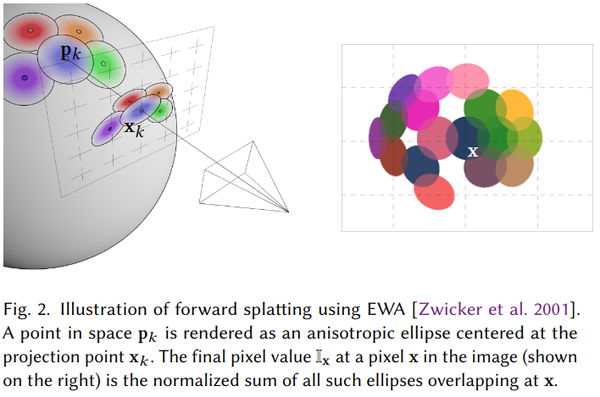
Our goal is to derive the mathematics that govern this projection. We need to find the center, shape, and orientation of the 2D ellipse that results from projecting a given 3D Gaussian.
Step 1: Projecting the Center (Mean)
Let's start with the easy part: the center of the Gaussian. A 3D Gaussian is defined by its mean (a 3D position vector) and its 3x3 covariance matrix .
Projecting the mean is identical to the standard vertex transformation pipeline you've studied in computer graphics. The 3D world-space coordinate is transformed into a 2D screen-space coordinate using a series of matrix multiplications, typically involving a world-to-camera (view) matrix and a camera-to-screen (projection) matrix.
3D Gaussian Splatting | 3DGS Implementation from Scratch in PyTorch-Only
The "Papers in 100 Lines of Code" channel shows a from-scratch implementation. This short clip implements exactly this projection of the Gaussian means.
Watch from "project each gaussian". Notice how it's a standard perspective projection, transforming the 3D means into the camera coordinate system and then applying the perspective divide.
So, transforming the center is straightforward. The real challenge lies in transforming the shape of the Gaussian, which is defined by the covariance matrix .
Step 2: Projecting the Covariance
Here is where the process departs from simple vertex transformation. An affine transformation (like rotation or translation) applied to a Gaussian results in another Gaussian whose covariance transforms according to the rule , where is the transformation matrix. Our world-to-camera transformation, let's call it , is affine. So, the covariance in camera space is simply .
However, the next step, perspective projection, is not an affine transformation. It involves dividing by the depth coordinate , which makes it non-linear.
Question: Given that perspective projection is non-linear, how can we find the covariance of the transformed Gaussian? We need a way to apply a transformation rule that is only defined for linear (affine) maps. What tool from calculus allows us to find the best local linear approximation of a non-linear function around a specific point?
The answer is the Jacobian matrix. We can approximate the non-linear perspective projection as a linear transformation that is valid in the immediate vicinity of the Gaussian's center. The Jacobian of the projection function, evaluated at the Gaussian's mean in camera space, gives us the matrix for this local linear map.
The following reading provides a great refresher on this concept and sets up the derivation.
3D Gaussian Splatting - Paper Explained, Training NeRFStudio
This article from LearnOpenCV clearly explains the problem of the non-linear projection and the solution using a Jacobian.
Please read two sections: Start at "3D to 2D Projection". This part introduces the non-linear transformation and the need for an approximation. Continue to the next section, "Taylor Expansion Explained". Focus on how the Jacobian provides a local linear approximation for the non-linear projection function.
Now we have all the pieces. To project the 3D covariance into a 2D covariance , we follow a two-step affine approximation:
- World to Camera Space: First, apply the affine world-to-camera view transformation . The covariance in camera space is .
- Camera to Image Space: Next, apply the local linear approximation of the perspective projection using its Jacobian, .
Combining these, the projected covariance matrix is given by:
The resulting is a 3x3 matrix. Since we only care about the 2D projection on the image plane (x and y axes), we simply take the upper-left 2x2 submatrix to get our final 2D covariance, .
Let's look at a resource that lays out these formulas explicitly.
Rendering in 3D Gaussian Splatting - Scthe's blog
This technical blog post by Scthe provides a clear, step-by-step mathematical breakdown of the projection.
First, briefly review the 3D Covariance section to remind yourself of the \Sigma = RS S^T R^T construction. Then, carefully study the section "Covariance 2D". Pay close attention to the formula for the Jacobian J and the final equation for \Sigma'. Note how it confirms we extract the 2x2 matrix cov2d from the result.
For someone with your interest in systems, it's also worth noting that this exact equation is what gets implemented in code. The implementation often includes a small fudge factor added to the diagonal of the final 2D covariance matrix to ensure it remains positive semi-definite and invertible, preventing numerical issues during rendering.
3D Gaussian Splatting | 3DGS Implementation from Scratch in PyTorch-Only
This video again shows the direct implementation of the math we just derived.
Watch from the covariance projection to see the code for \Sigma' = J W \Sigma W^T J^T. Then, continue watching from the stability section to see the practical considerations for numerical stability.
Step 3: From 2D Covariance to Ellipse Geometry
We have successfully projected our 3D Gaussian and now have its 2D representation: a projected mean and a 2x2 covariance matrix .
What does this geometrically represent? This brings us back to our module on linear algebra. The eigendecomposition of this 2x2 matrix gives us everything we need to draw the ellipse on the screen.
- The two eigenvectors of are orthogonal and point along the major and minor axes of the ellipse, giving us its orientation.
- The corresponding eigenvalues () are proportional to the squared radii along these axes, giving us the ellipse's size. The radius along an axis is typically taken as to capture a reasonable extent of the Gaussian function.
This final step connects the abstract covariance matrix directly to the visual geometry of the splat.
Rendering in 3D Gaussian Splatting - Scthe's blog
The same blog post continues from where we left off, showing how to extract the geometry from the 2D covariance matrix.
Read the sections "Calculating eigenvalues" and "Vertex shader - eigenvectors". These sections provide the final, concrete formulas for calculating the eigenvalues and eigenvectors from the elements of the 2D covariance matrix, completing the projection process.
Conclusion
In this lesson, you have dissected the core mathematical process that underpins 3D Gaussian Splatting. You now understand how a 3D Gaussian primitive is analytically projected onto a 2D image plane to form a "splat."
Key Takeaways:
- Projection Goal: The objective is to find the parameters (center, shape, orientation) of the 2D ellipse that results from projecting a 3D Gaussian.
- Mean Projection: The 3D Gaussian's center (mean) is projected using standard graphics transformations (view and projection matrices).
- Covariance Projection: Because perspective projection is non-linear, we must use its Jacobian matrix to form a local linear approximation.
- The Full Formula: The 2D covariance is found by computing and taking the upper-left 2x2 submatrix, where is the view matrix.
- Geometric Interpretation: The eigendecomposition of the resulting provides the final geometric properties of the 2D ellipse: the eigenvectors define its orientation, and the eigenvalues define its size.
Preview of the Next Lesson:
We now know how to project a single Gaussian. But a real scene consists of millions of them. How does the renderer handle this massive number of primitives to produce a final image in real time? In our next lesson, we will explore the differentiable rasterization pipeline. We'll cover how these 2D splats are sorted by depth and efficiently blended together on a per-pixel basis to form the final, photorealistic image. This highly optimized pipeline is the final piece of the puzzle to understanding the performance of 3DGS.