Recommended resources
The freely available resources this lesson will direct you to.
- Master the core principles of prompt engineering with GitHub Copilotwww.youtube.com
- Prompt engineering essentials: Getting better results from LLMs | Tutorialwww.youtube.com
- The Prompt Engineering Playbook for Programmersaddyo.substack.com
- How to Build a Free Trading Bot with ChatGPT and Alpacaalpaca.markets
Welcome to the final lesson in our module on AI-assisted project planning. So far, you've learned to decompose a project, design a blueprint, write detailed prompts using the RACE framework, and, most recently, enforce strict quality standards using constraints. You now know how to write a single, high-quality prompt for a well-defined function.
However, what happens when the function itself is highly complex? Attempting to generate a sophisticated piece of logic in one go, even with a perfect prompt, can often lead to confusing or incomplete results. This lesson introduces a more robust, conversational technique: incremental prompting. You will learn how to build complex code step-by-step, guiding the AI through a series of smaller, manageable requests. This is the final core prompting skill you'll need before we begin the hands-on construction of your trading bot.
The Problem with "Doing It All at Once"
In the last lesson, we crafted a very detailed, constrained prompt for our calculate_moving_averages function. For a task of that size, a single prompt works well. But as complexity grows, this approach starts to break down. Asking an AI to perform too many distinct tasks in a single request is a common mistake known as the "Overloaded Prompt."

An overloaded prompt might ask the AI to "Fix five bugs, add three new features, and optimize the code for speed." This creates ambiguity and forces the AI to make too many assumptions. Which task is the priority? What does "optimize" mean in this context? This confusion often results in jumbled, incomplete, or incorrect code.
This issue isn't just about clarity; it's also a technical limitation. AI models have a finite context window, measured in "tokens." A very long prompt combined with a request for a very long output can exceed this limit, causing the model to generate partial responses or simply fail.
Prompt engineering essentials: Getting better results from LLMs | Tutorial
This tutorial from GitHub on prompt engineering essentials directly addresses this problem. It explains why breaking down complex requests is critical for getting the results you want.
Please watch these two key segments: From this section, listen for the explanation of "Prompt confusion" and the solution: breaking down a multi-part request into separate, iterative steps. Next, watch the segment on token limits from this part. The key question posed is, "Instead of asking for it to generate an entire application, could you ask it to make each component step by step?"
The core takeaway is clear: for complex tasks, a single, monolithic request is brittle. A sequence of smaller, focused prompts is more resilient and effective.
The Incremental Strategy: From Monologue to Dialogue
Incremental prompting transforms your interaction with the AI from a one-shot command into an interactive conversation. You start with a high-level goal and progressively drill down, building the solution piece by piece. This mirrors how a human developer works: you don't write an entire application in one sitting; you build it feature by feature, function by function.
A great mental model for this is the "3S Principle": Simple, Specific, Short. The "Simple" principle is key here: break down your problem into the simplest possible steps and tackle them one at a time.
The Prompt Engineering Playbook for Programmers
This guide offers excellent, practical advice on prompting for programmers. It provides a clear methodology for implementing new features using an incremental approach.
Please read the following sections to understand the strategy: Start with the section on breaking down complex tasks. Read the first bullet point that advises to split the work into smaller chunks. Next, in the section "Prompt patterns for implementing new features," read the strategy to start high-level and drill down. This outlines the two-stage process of getting a plan and then executing each step. Finally, review the Feature implementation example to see this in action. The author starts with an initial, broad request. After getting the first version of the code, they use a series of shorter, follow-up prompts to refactor the fetching logic and add new functionality.
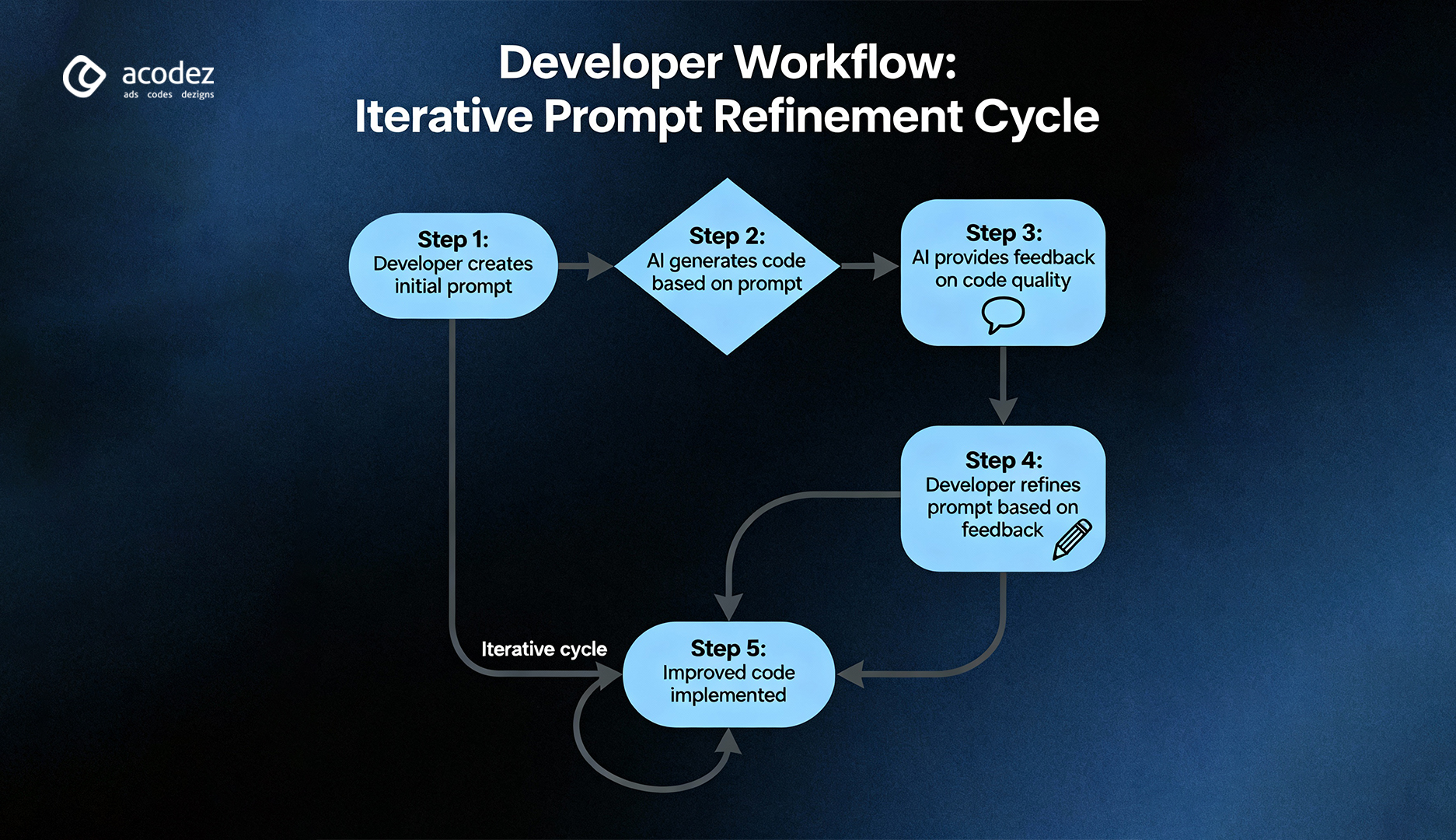
This iterative cycle of prompting, reviewing, and refining is far more powerful than trying to craft one "perfect" prompt. It allows for mid-course corrections and ensures each piece of the code is correct before moving on to the next.
Building a Complex Trading Function, Step-by-Step
Let's apply this to our trading bot. Imagine we need a function more complex than just calculating moving averages. Let's say we want a function that:
- Calculates both RSI (Relative Strength Index) and MACD (Moving Average Convergence Divergence).
- Generates a trading signal based on specific conditions for both indicators.
- Includes error handling and logging.
Trying to prompt for this all at once is a classic "overloaded prompt." Instead, let's build it incrementally.
Step 1: Outline the Plan (Generate Pseudocode)
Before writing any code, we can ask the AI to map out the logic. This ensures we agree on the plan before implementation begins.
- Prompt:
You are an expert algorithmic trading developer. Write clear, commented pseudocode for a Python function named "generate_signals". It should take a pandas DataFrame with a 'close' price column as input. The plan should include: calculating a 14-period RSI, calculating a standard MACD (12, 26, 9), and defining the logic for a 'buy' signal.
This first step is low-effort and gives us a blueprint for the subsequent prompts. This approach is demonstrated in the Alpaca Markets guide on building a trading bot.
How to Build a Free Trading Bot with ChatGPT and Alpaca
This article shows a practical workflow for building a trading bot, starting with strategy definition and pseudocode before moving to implementation.
First, look at Step 5: Write Pseudocode. Notice how the author uses a detailed prompt to generate a logical outline first. Then, skim the list of follow-up tasks under Step 6. After generating an initial block of code, the developer must perform several small, incremental tasks like removing extra logic and adding new features, and implementing logging. This demonstrates that even with a large initial prompt, the process is inherently iterative.
Step 2: Implement the Core Calculations
With the pseudocode as our guide, we ask for the first piece of functional code.
- Prompt:
Based on our pseudocode, write the Python function "generate_signals". It should take a pandas DataFrame and use the 'pandas-ta' library to calculate and append the 14-period RSI and the standard MACD (12, 26, 9) columns. Include type hints and a basic docstring.
Step 3: Add the Signal Generation Logic
Now that we have the indicators, we build on the existing function by adding the next piece of logic.
- Prompt:
Great. Now, modify the function to add a 'signal' column. A 'buy' signal occurs only if RSI is below 30 AND the MACD line has just crossed above the MACD signal line. Otherwise, the signal should be 'hold'.
Step 4: Add Error Handling and Logging
Finally, we make the function production-ready.
- Prompt:
Excellent. Lastly, add a check at the beginning of the function to ensure the input DataFrame contains a 'close' column, raising a ValueError if it doesn't. Also, use Python's 'logging' module to log an info message every time a 'buy' signal is generated.
By breaking the problem down, each prompt was simple, specific, and built upon the last. The result is a complex, robust function that we guided the AI to build, verifying each step along the way.
Conclusion
In this lesson, you've learned the vital technique of incremental prompting, completing your foundational toolkit for AI-assisted development.
Key Takeaways:
- Avoid Overloaded Prompts: Don't ask the AI to do too many things at once. It leads to confusion and poor-quality code.
- Think Incrementally: Break complex problems into a series of simple, logical steps. Use the AI to generate a plan (like pseudocode) first if needed.
- Build in a Dialogue: Treat prompting as a conversation. Start with a core piece of functionality, then use follow-up prompts to refine, extend, and add features like error handling.
- Iterate Towards Quality: The goal is not a perfect first prompt, but a process of iterative refinement that leads to a correct and robust final product.
You are now equipped with the essential prompting strategies: decomposing a project, writing detailed and constrained prompts, and building complex logic incrementally. It's time to put these skills into practice.
In the next lesson, we will begin Module 2 and start the hands-on construction of our trading bot. Your first task will be to use your AI assistant to research and select a suitable Forex data API, then generate the code to connect to it.