Recommended resources
The freely available resources this lesson will direct you to.
Hello! Last time, you distinguished a single task from the broader business process it serves, and saw that a workflow can remain partly manual even when some handoffs are automated. Now we’ll look inside a manual workflow before choosing any software.
The aim is to describe one piece of work in five parts: what starts it, what information it needs, what rules guide decisions, what people do, and what results they leave behind. We’ll use the customer-request example from the previous lesson. By the end, you should be able to describe its routing work precisely without claiming that routing a request also resolves it.
Set the boundary before listing steps
Consider a team that receives customer requests through a shared intake form. A staff member reads each request, checks whether it contains enough information, and assigns it to a team. Where does the piece of work we want to describe begin and end?
For this lesson, it begins when a new request is submitted and ends when the request has either been assigned to a team or marked for follow-up. Investigating the problem and replying with a solution belong to a larger customer-support process, but they are outside this routing workflow. That boundary keeps us from mixing the output of triage—a recorded assignment or follow-up status—with the later outcome of resolution.
The following video offers a practical way to identify a beginning, an end, and the main activities between them. Its example is a written procedure for handling feedback; concentrate on the method rather than adopting that procedure for our request workflow.
7 Steps to Write Standard Operating Procedures that ACTUALLY Work
Watch “7 Steps to Write Standard Operating Procedures that ACTUALLY Work” from Layla at ProcessDriven for its approach to defining a manageable piece of work.
In the segment on documenting a workflow, watch start to finish. Notice how the speaker names the endpoint before filling in the main steps, and describes steps by the results they produce. Then watch prerequisites and deliverables for the distinction between what is needed to do the work and what shows it has been completed.
A useful boundary test is: Can someone tell, from the resulting record, whether this piece of work ended? “Handle the customer” is too broad for our example. “Record an assignment or a follow-up status for each submitted request” gives us an observable end.
Take the workflow apart into five parts
Once the boundary is clear, we can describe the work without drawing a chart. Keep events, information, decisions, work, and results distinct:
| Part | Question to ask | In the request-routing workflow |
|---|---|---|
| Trigger | What event starts a new instance of the work? | A customer submits the intake form. |
| Inputs | What information is available or needed? | The submitted request, including its reply address and description; the form also records a request ID and submission time. |
| Rules | Under which conditions should different things happen? | A request missing essential information needs follow-up; a sufficiently clear request is assigned according to its topic and language. |
| Actions | What does a person actually do? | Read the request, check fields, determine its topic and language, record an assignment or follow-up status. |
| Outputs | What observable result does this work produce? | A request record showing its assigned team or its need for follow-up. |
These parts are related, but they are not interchangeable. Submission is the trigger even though it also supplies input data. “The request is in French” is not a new trigger; it is a fact the staff member considers when applying a routing rule. “Assign it to the French technical-support queue” is an action. The saved assignment is an output that a later support workflow can use as its input.
Read the selected passages below to see how process discovery distinguishes information, rules, people, and results. The guide discusses automation, but the questions are useful before deciding what, if anything, to automate.
Business Process Workflow Automation Guide for Teams
FlowWright’s “Business Process Workflow Automation Guide for Teams” provides a vocabulary for examining a process from its inputs to its outputs. Read the specified passages for a discovery method, not for a software design.
Start in “From an input to a valuable output” and read the components. Note the separate entries for inputs, people, rules, and outputs. In “How Do You Discover a Process Before Automating It?”, find the numbered list. Read steps 3 through 7, beginning with step 3’s description of forms and records and ending with step 7’s recovery paths: inputs to exceptions. Focus on the questions you would ask the people who currently perform the work. Finally, under “How Should You Design Integrations for End-to-End Execution?”, find the subsection “Define the trigger and data contract.” Read trigger and data. For now, take “data contract” to mean a clear statement of the information the workflow expects; you do not need to design an integration.
Notice that the five-part description does not try to replace people or systems with categories. When recording an action, it is often useful to add who performs it and where the resulting information is recorded. For example, “intake staff record the assigned queue in the request log” is more informative than “route request.”
Make the inputs and rules specific enough to inspect
Suppose the form supplies a request ID, submission time, reply address, and free-text description. The ID helps staff refer to the right record; the reply address makes follow-up possible; the description is what they read to understand the issue. Topic and language are not necessarily fields the customer supplied. In this manual workflow, a staff member determines them from the description and records their judgment.
That distinction matters when documenting an existing process. A description such as “input: category” quietly assumes that a reliable category already exists. If staff must infer it, the work includes an additional action: read the description and identify the category. You have not yet shown that software can make the same judgment reliably.
A rule should say what condition is checked and what happens when it holds. “Route appropriately” conceals the decision. The following is a more inspectable account of the current manual practice:
- If the reply address or description is missing, mark the request needs follow-up and assign it to an intake reviewer. If an address is available, the reviewer can ask for the missing detail.
- Otherwise, if the description concerns billing, assign the request to the billing team.
- Otherwise, if it concerns a technical issue written in French, assign it to the French technical-support queue.
- Otherwise, if it concerns a technical issue, assign it to the general technical-support queue. If the topic is unclear, assign it to an intake reviewer.
Order matters here. The missing-information check comes first so that staff do not treat an incomplete request as ready for routine routing. The French technical check precedes the general technical check so that a request meeting both descriptions reaches the intended queue. These are proposed descriptions of how the manual work is done, not claims that every real support team uses these rules. Before implementation, you would confirm the rules with the people responsible for the work—especially what counts as “technical,” “billing,” or “unclear.”
The rules also reveal a limit. If a description says only “I cannot access my bill,” reasonable staff might disagree about whether it is a billing problem or a technical access problem. Decomposing the process does not make ambiguity disappear. It makes the point of judgment visible so that it can be clarified or sent for review.
Follow two requests and inspect the outputs
Imagine a submitted request has a reply address and a description, in French, explaining that an application will not open. The form submission starts the workflow and supplies its initial inputs. A staff member checks that the essential fields are present, reads the description, identifies a technical issue written in French, and records an assignment to the French technical-support queue. The output is the request record with that assignment and a status such as assigned. The customer’s application has not yet been fixed.
Now imagine a submission with a reply address but no description. The same kind of submission starts a new instance of the workflow, but a different rule applies. Staff mark the record needs follow-up, assign it to an intake reviewer, and may request a description. That is still a concrete output of the routing work; it is not a successfully routed support request. Recording the exception prevents the item from silently disappearing or being counted as ready for investigation.
An output can become an input to the next piece of work. The assigned queue tells the support team what it has received; a needs follow-up status tells the reviewer what remains to be obtained. This is why naming the recorded result is stronger than ending the description with “staff handle it.”
The supplied product-delivery diagram shows a more complex example of the same distinctions. Read it as an illustration of what a process description needs to account for, not as a chart you need to reproduce yet.
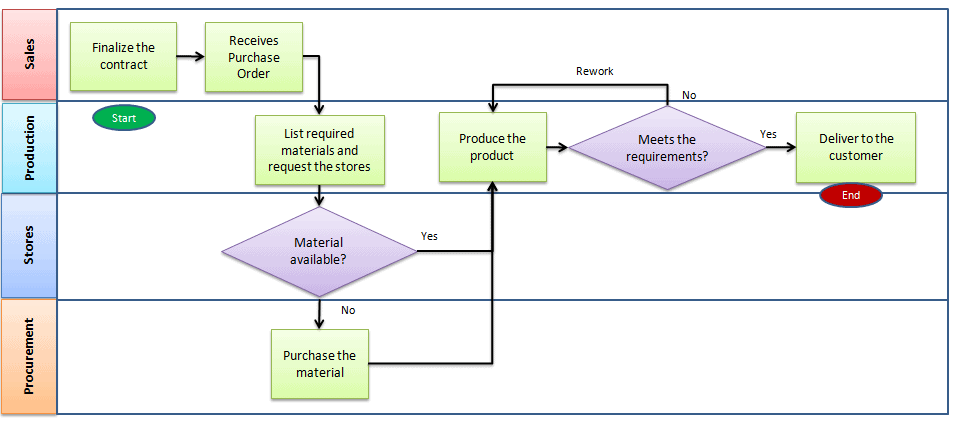
In that diagram, “Material available?” identifies a decision, but a useful written rule would still need to say which material, in what quantity, and what counts as available. “Meets the requirements?” likewise needs a stated basis for checking the product. The diagram makes work and handoffs visible; the five-part description helps supply the information that a short label cannot hold. We will return to visual representation in the next lesson.
Keep the description faithful to the manual work
When documenting a manual process, describe what actually happens, then note what is uncertain. Do not improve the account silently. If staff sometimes assign unclear requests directly and sometimes ask a reviewer, record that variation rather than inventing a single consistent rule. The gap may be the very reason the workflow is difficult to operate or automate.
For a small process, a useful working description contains the five parts plus the people and records involved:
Boundary: From submission of one intake form to a recorded assignment or follow-up status. Trigger: A new form submission. Inputs: Request ID, submission time, reply address, and description. Rules: Check required information first; use topic and language for routing when the request is clear; send unclear or incomplete requests for review. Actions: Intake staff check, interpret, and record the decision. Outputs: An assigned request or a request visibly awaiting follow-up, with its status in the request log.
This description is intentionally narrower than “automate customer support.” It tells you which facts enter the work, where judgment occurs, and what the work leaves for the next person. It also gives you a way to ask precise questions about the current practice without committing to a tool.
Key takeaways
To decompose a manual workflow, first choose its start and end. Then distinguish the trigger that starts each instance, the inputs needed to work on it, the rules that govern choices, the actions people perform, and the outputs that show what happened. Include an output for an incomplete or unclear case rather than describing only the straightforward path. Keep the result within the boundary you chose: an assigned request is not a resolved customer issue.
Next, you’ll turn a written account like this into a flowchart that shows its steps and decision points.