Recommended resources
The freely available resources this lesson will direct you to.
Hello! Last lesson, you set a test for the request-routing pilot: reduce average human handling time without increasing wrong routes or losing track of submissions. A design choice now sits behind all three measures: which decisions should the workflow make on its own, and where should a person remain responsible?
This final lesson in the module uses the request-routing workflow to answer that question. You’ll distinguish review from approval, place human checkpoints before or after the actions they are meant to control, and design a way for exceptions to reach a person rather than disappear.
Start with the consequence, not the technology
An automated workflow can collect a request, check whether fields are present, suggest a destination, and record what happened. Those steps do not all carry the same risk. A mistaken suggestion that a reviewer can correct before anything is sent is different from an automatic rejection that affects someone’s access to a service.
The useful question at each decision point is: What happens if this step is wrong, and can someone catch or reverse the error in time? Three situations commonly justify human involvement:
- Judgment is needed: the information is incomplete, contradictory, or outside the agreed rules.
- The action has substantial consequences: it commits money, denies a request, changes an important record, or sends a consequential message.
- The workflow cannot establish that it is operating safely: a required check fails, an unexpected case appears, or the system cannot confirm what happened.
Not every case needs the same intervention. In What is Human In The Loop with AI? How HITL Shapes AI Systems, IBM Technology contrasts a workflow that stops for authorization with one that runs while a person monitors and can intervene. Although the video discusses AI, this distinction also helps when designing simpler rule-based workflows.
What is Human In The Loop with AI? How HITL Shapes AI Systems
Watch IBM Technology’s What is Human In The Loop with AI? How HITL Shapes AI Systems for a vocabulary of human involvement and examples of live-workflow checkpoints.
Watch oversight levels for the difference between stopping for permission and monitoring an operating system. Then watch runtime checkpoints for uncertain cases, approval gates, and escalation queues. Focus on what the person can actually do at each checkpoint, rather than assuming that any human involvement provides the same protection.
Monitoring is appropriate only when a person can detect a problem and intervene before the relevant harm occurs. If a workflow sends an incorrect external response instantly, noticing it in a weekly report is useful for learning but cannot prevent that send. For that action, a pre-send approval may be necessary.
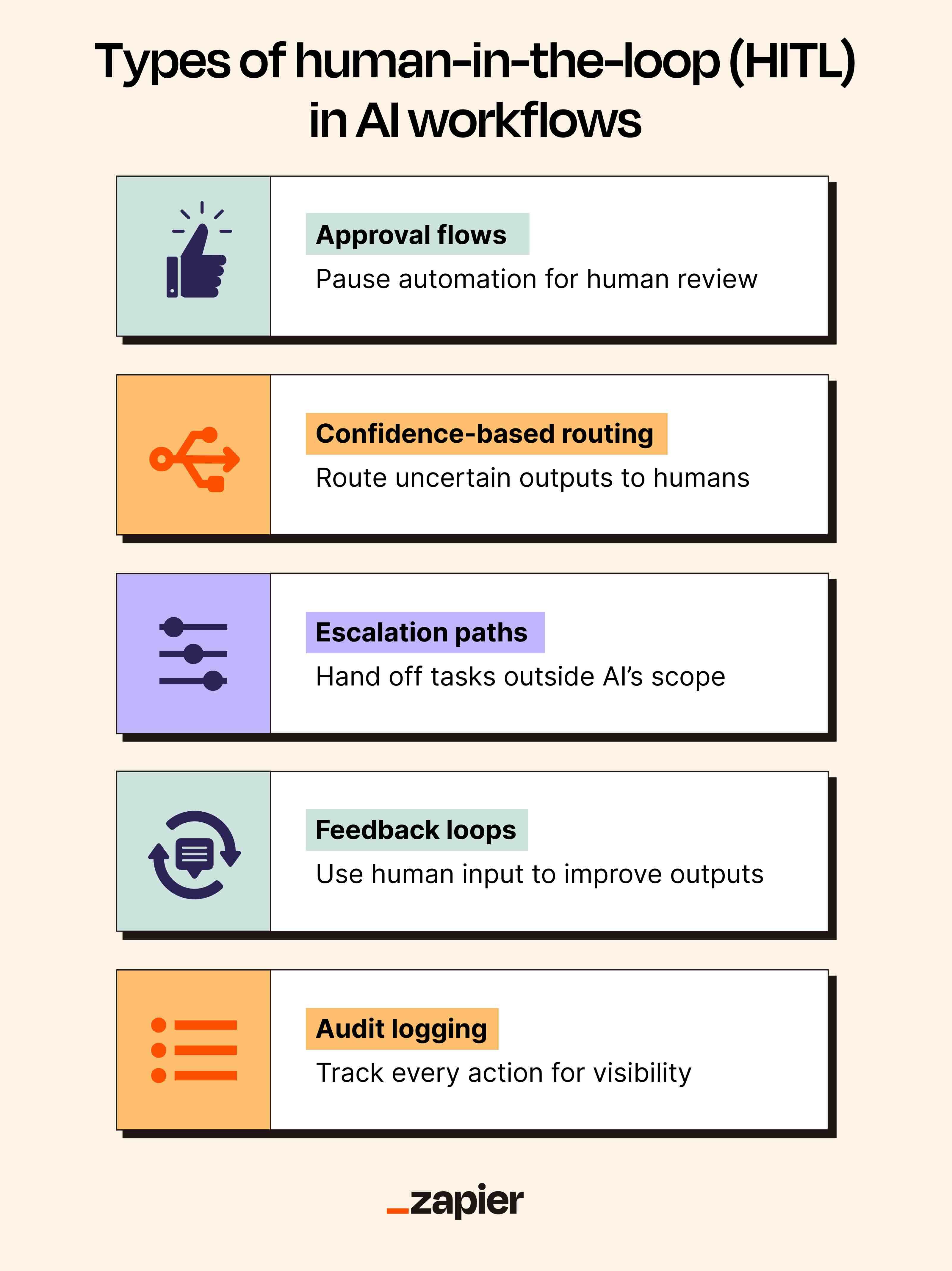
The image groups several useful patterns under “human-in-the-loop,” but they serve different purposes. Approval is a gate. Escalation is a handoff. Feedback and logs help people learn what happened. When placing a checkpoint, be precise about which of those jobs it must perform.
Place review where uncertainty enters the request-routing workflow
Consider the pilot from the previous lesson. A submitted request has a topic and the information needed for routing. The workflow may suggest an internal destination, but its next step should depend on what it finds.
| What the workflow finds | Appropriate handling | Human involvement |
|---|---|---|
| Required details are present and one agreed routine rule clearly applies | Record the suggested destination; use the pilot’s checking procedure | Review the initial assignment during the supervised pilot |
| A required detail is missing | Record “awaiting information” and initiate the agreed follow-up | A person handles the case if the missing detail cannot be obtained through a standard request |
| The topic fits multiple destinations or no rule | Hold the case in an intake-review queue | A reviewer chooses the destination or obtains more context |
| The case requires a consequential decision, such as approving an expense | Prepare the information, but do not execute the decision | An authorized person approves or rejects before the consequential action |
The first two rows reveal a useful distinction. Missing information does not automatically require a person to make the final decision; the workflow might safely request a standard missing field. But it must not quietly treat the case as eligible, invent the value, or drop the submission. The third row requires judgment because the existing rules do not settle the route. The fourth requires authorization even if the information is complete and the proposed action appears obvious.
For the supervised routing pilot, reviewing every eligible initial assignment supports the wrong-route measure defined last lesson. If an incorrect internal suggestion could cause harm before the check, hold it for review before assignment. If the destination is only a reversible internal staging queue, a process owner may permit the suggestion to be recorded first and reviewed promptly afterward. That is a process decision based on consequences, not a feature of the software.
Microsoft Learn’s introduction to approvals offers familiar examples—vacation requests, documents requiring sign-off, and expense reports. Notice that software can handle notifications and recordkeeping without taking over the authority to grant approval.
Get started with Power Automate approvals
Read the introduction to Microsoft Learn’s Get started with approvals for concrete examples of decisions that remain with an approver even when the surrounding workflow is automated.
Under “Get started with approvals,” begin with the approval examples. Stop immediately before “Approvals actions.” Focus on the division of work: the flow presents a request and notifies people; the approver reviews and acts on it.
Make “review” and “approval” operationally different
A review asks a person to examine information and resolve uncertainty. In request routing, a reviewer might correct a suggested destination, ask for missing details, or mark a request as outside the workflow’s scope. An approval asks someone with the necessary authority to permit or refuse a specified action. Reviewing an expense for completeness is not the same as authorizing payment.
In a flowchart, put the human checkpoint at the point where it can do its job. For an unclear request, place a review branch after the completeness and routing-rule checks. For an expense payment or a consequential external message, place the approval decision before payment or sending. Writing “human reviews later” beside an already completed action does not make that action subject to approval.
A usable checkpoint specifies more than “send to a human”:
- Who receives it? Assign a role or queue with a responsible owner, not an unattended inbox.
- What can they see? Include the original request, relevant fields, proposed route or action, and the rule or reason for escalation.
- What can they decide? Define options such as approve, reject, correct the route, or request information.
- What happens while it waits? Keep the case pending; do not interpret silence or a timeout as approval.
- How is the decision recorded? Store the case ID, decision, reviewer, time, and a reason when a correction or rejection needs explanation.
These details protect both quality and the earlier completeness condition: every submission should have a recorded status, including one that is waiting for a person. They also make handling time visible. If the three-minute pilot target proves incompatible with necessary review, the responsible response is to revisit the forecast or redesign the work—not silently remove an essential checkpoint.
A person must be able to make a real decision
Adding an “Approve” button does not guarantee meaningful oversight. A reviewer who sees only a proposed answer, lacks the original request, or is expected to accept every recommendation cannot reliably detect a mistake. The person needs enough context, time, and authority to disagree.
The UK Information Commissioner’s Office discusses this particularly in the context of AI-supported decisions with significant effects on individuals. Its legal discussion is jurisdiction-specific; the broader design lesson is that a nominal human click is not a substitute for independent judgment.
How do we ensure individual rights in our AI systems? | ICO
Read the ICO’s How do we ensure individual rights in our AI systems? to see why human review must be more than routine sign-off. The legal example is specific to UK data-protection guidance; use its account of meaningful review to sharpen your workflow design.
In “What is the role of human oversight?”, begin at the paragraph starting human oversight. Continue through “What is the difference between solely automated and partly automated decision-making?” and its list beginning “The key considerations are.” Stop after the last point in that list, before “Further reading outside this guidance.” Pay particular attention to a reviewer’s ability to examine the underlying information and go against a recommendation.
This matters even without AI. Suppose a rule proposes routing a request to the billing team because it contains the word “invoice.” A reviewer may see in the full message that the sender is reporting a security concern about a fraudulent invoice. If the interface shows only the keyword and proposed team, the reviewer cannot make the correction the checkpoint was intended to enable.
For an AI-generated recommendation later in the course, the same principle becomes more important: a confident-sounding output is still a proposal, not evidence that the reviewer can skip the source material. When risk is high, review the underlying information and the proposed action before permitting it.
Decide what stays automated—and check the design against the pilot
Human involvement has a cost, so place it where it changes an outcome. For the routing pilot, a defensible initial design is to automate intake, completeness checks, routine route suggestions, notifications to reviewers, and status recording. Keep people responsible for ambiguous cases, disputed rules, and any consequential approval. During the pilot, inspect every eligible initial assignment to measure errors; only after examining the results should the process owner consider lighter checking for low-risk routine cases.
This design preserves a difference between handling an exception and authorizing an action. An ambiguous request needs someone to determine where it belongs. A clear request that would trigger an important external commitment may still need approval. Conversely, a routine internal filing step may need neither case-by-case review nor approval if errors are easy to detect and correct; a recorded outcome and periodic checks may suffice.
Finally, test the checkpoint itself against the success criterion. A good design should let you answer: Were any submissions left without an outcome? Which suggested routes were changed, and why? How long did review take? Did any consequential action happen before its required approval? Those answers show whether human oversight is working, rather than merely appearing on a flowchart.
Key takeaways
Keep a person in the workflow where rules cannot resolve a case or where an action’s consequences require human authority. Put review where the person can resolve uncertainty; put approval before the action it controls. Give reviewers the underlying context, a real choice, and a recorded path for corrections. Logs and later feedback help improve a workflow, but they do not replace a needed pre-action gate.
This completes the module on finding valuable automation opportunities. Next, you’ll move to spreadsheet and data foundations—starting with a structured table that can hold the clear fields, statuses, and case IDs a reliable workflow needs.