Recommended resources
The freely available resources this lesson will direct you to.
Hello! You’ve practiced the pieces this project needs: functions for calculations, dictionaries for unit data, input normalization, and tracebacks for debugging. This lesson brings them together in your Week 1 portfolio project: a command-line engineering unit converter.
Allow about 45–55 minutes to read, build, and check the program. It will convert length and pressure, reject incompatible units, and keep its calculations separate from its command-line interface. That separation lets you test the mathematics without repeatedly typing commands.
What makes this a command-line tool?
Instead of prompting after the program starts, this converter will accept a command such as:
python3 converter.py 2.5 m cm
Here, 2.5 is the value, m is its current unit, and cm is the requested unit. Python supplies these pieces to the script as strings in a list called sys.argv. Read the short “Displaying Arguments” subsection of Real Python’s Python Command-Line Arguments before building the tool.
Python Command-Line Arguments – Real Python
Real Python’s example makes the relationship between a terminal command and sys.argv concrete.
In “The sys.argv Array,” go to the “Displaying Arguments” subsection. Read the script example, starting with the example that prints its arguments and ending with the summary immediately before “Reversing the First Argument.” Focus on why element zero identifies the script and why the remaining elements are still strings.
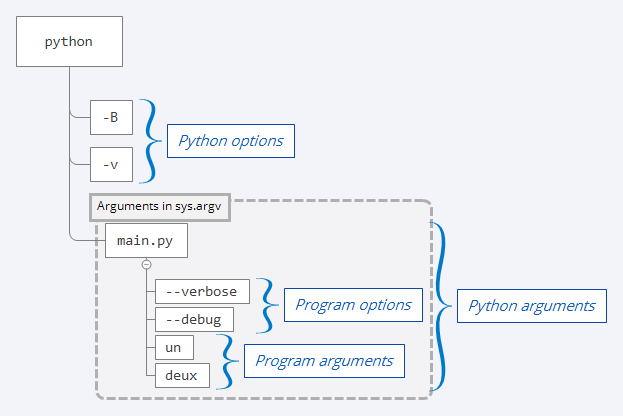
For our example command, sys.argv[0] identifies converter.py, while sys.argv[1], sys.argv[2], and sys.argv[3] hold "2.5", "m", and "cm". The quotes here indicate strings in Python; you do not type them in the terminal command.
The first safeguard is therefore to check the list’s length before accessing those positions. Otherwise, a missing value would cause the kind of IndexError you learned to diagnose last lesson.
Keep the conversion rule independent of the terminal
For a given category, store each unit’s factor to a base unit. For length, the base is metres: one centimetre is metres. For pressure, the base is pascals: one kilopascal is pascals. Converting first to the base unit and then to the destination gives one reusable rule:
For example, metres becomes centimetres. Storing length and pressure factors in separate dictionaries matters just as much as getting the arithmetic right: metres cannot meaningfully be converted to kilopascals.
In VS Code, create converter.py in your Week 1 project folder. Enter the following complete version. Its convert() function takes ordinary Python values and returns a number—or None when the units are unknown or belong to different categories.
import sys


FACTORS = {
    "length": {"m": 1.0, "cm": 0.01, "mm": 0.001},
    "pressure": {"pa": 1.0, "kpa": 1_000.0, "mpa": 1_000_000.0},
}

LABELS = {
    "m": "m",
    "cm": "cm",
    "mm": "mm",
    "pa": "Pa",
    "kpa": "kPa",
    "mpa": "MPa",
}


def convert(value, source, target):
    source = source.strip().lower()
    target = target.strip().lower()

    for factors in FACTORS.values():
        if source in factors and target in factors:
            base_value = value * factors[source]
            return base_value / factors[target]

    return None


def main():
    if len(sys.argv) != 4:
        print("Usage: python3 converter.py <value> <from_unit> <to_unit>")
        print("Units: m, cm, mm; Pa, kPa, MPa")
        return

    try:
        value = float(sys.argv[1])
    except ValueError:
        print("Value must be a number, for example 2.5.")
        return

    source = sys.argv[2].strip().lower()
    target = sys.argv[3].strip().lower()
    result = convert(value, source, target)

    if result is None:
        print("Unknown unit or incompatible categories.")
        print("Units: m, cm, mm; Pa, kPa, MPa")
        return

    print(f"{value:g} {LABELS[source]} = {result:g} {LABELS[target]}")


if __name__ == "__main__":
    main()
Notice the division of work. convert() knows the conversion factors but nothing about sys.argv or printing. main() deals with terminal arguments, converts the numeric string with float(), and decides what message to display. The final two lines run main() when you execute converter.py directly, but not when another file imports its convert() function for testing.
The short try/except addresses one predictable problem: float("hello") raises ValueError. Watch the beginning of Fabio Musanni’s How to Validate User Inputs in Python for a demonstration of that specific idea. The video uses prompted input rather than command-line arguments, but both arrive as text. You’ll study exception handling more fully in Week 2.
How to Validate User Inputs in Python | Input Validation in Python
Watch How to Validate User Inputs in Python by Fabio Musanni to see why numeric-looking input is text and how a ValueError check prevents a failed numeric conversion from crashing a program.
Watch numeric input. Stop after the demonstration of the invalid-input message; the later repeated-prompt loop is not needed for this one-command tool. Compare the video’s integer conversion with our use of float() for measurements.
The LABELS dictionary handles presentation: accepting kpa or KPA is convenient, while displaying the conventional symbol kPa makes the result easier to read. The :g formatting keeps ordinary outputs compact; it is display formatting, not a change to the conversion factors.
Test the functions, then test the command
A calculation can be wrong without producing a traceback. Give it known inputs and compare the results with values worked out independently. Create a second file, test_converter.py, beside converter.py:
from converter import convert


def test_conversions():
    assert convert(2.5, "m", "cm") == 250.0
    assert convert(1000, "mm", "m") == 1.0
    assert convert(1, "MPa", "kPa") == 1000.0
    assert convert(1, "Pa", "kPa") == 0.001
    assert convert(5, "cm", "cm") == 5.0

    assert convert(1, "m", "kPa") is None
    assert convert(1, "yard", "m") is None

    assert abs(convert(0.1, "m", "cm") - 10.0) < 1e-9


test_conversions()
print("All 8 checks passed.")
The first checks cover both engineering categories and a conversion back to a larger unit. The next two ensure that incompatible or unsupported units are rejected, rather than producing a plausible-looking number. The final check allows a tiny tolerance because decimal arithmetic with floating-point numbers can introduce rounding differences.
Open the VS Code integrated terminal, make sure you are in the folder containing both files, and run:
python3 test_converter.py
You should see All 8 checks passed. If an assertion fails, use the traceback to find the failing check, then inspect the relevant factor or calculation. Do not change the expected answer merely to make a test pass; first verify it using the conversion rule.
Now try the interface itself from the same terminal:
python3 converter.py 2.5 m cm
python3 converter.py 150 kPa Pa
python3 converter.py 1 m kPa
python3 converter.py hello m cm
python3 converter.py 2 m
The first two should print 2.5 m = 250 cm and 150 kPa = 150000 Pa. The remaining commands should print a helpful message instead of a traceback. Run these from the terminal rather than relying on Run Python File, because you need to supply the words following the filename.
A useful final check is to change one conversion factor temporarily, run test_converter.py, and observe a failing assertion. Restore the correct factor and rerun it. That confirms your checks can actually detect a broken calculation.
What you have built
You now have a small CLI project with a tested calculation function, a separate command-line interface, two engineering measurement categories, and clear behavior for missing, non-numeric, unknown, and incompatible inputs. Its deliberate limit is scope: factor-based conversion works for these units, but not every kind of measurement follows this rule.
Next week, you’ll strengthen projects like this with file and JSON handling, more systematic exception handling, reusable modules, and an automated testing tool called pytest.