Recommended resources
The freely available resources this lesson will direct you to.
Hello! Last lesson, your converter could handle one choice and one measurement, then it stopped. A loop lets it perform another conversion without restarting the file. You’ll first use a for loop when the items or number of repetitions are known, then a while loop when repetition depends on a condition—such as whether you want to quit.
Allow about 40–45 minutes to watch, read, and run the examples. In your existing VS Code project, create loops_basics.py. Save with Command–S and use Run Python File in the terminal, as you did last lesson.
Repeat an operation with for
A for loop takes one item at a time from a sequence and runs its indented block for each item. Watch the short demonstrations of iterating over values and using range() to control the number of repetitions.
Python Tutorial for Beginners 7: Loops and Iterations - For/While Loops
In “Python Tutorial for Beginners 7: Loops and Iterations,” Corey Schafer demonstrates the two forms of for loop you need here.
Watch each item to see the loop variable receive successive values. Then watch counted repetition, paying attention to why the stopping number in range() is not printed.
Try this in loops_basics.py:
for unit in ["mm", "cm"]:
    print("Supported unit:", unit)

print("Finished listing units.")
The square brackets hold two items; you’ll work more extensively with lists later this week. On the first pass, unit is "mm"; on the second, it is "cm". The indented print() runs twice. The unindented message runs once, after the loop finishes. A for loop can also visit each character of a string, but here each whole unit name needs to be an item, so a list is more useful.
When you want to repeat an operation a known number of times rather than use existing items, use range():
for attempt in range(3):
    print("Measurement", attempt)
This prints measurement numbers 0, 1, and 2: three passes altogether. range(3) starts at zero and excludes three. You can specify a start and a stopping point, or add a step:
for number in range(1, 4):
    print(number)  # 1, 2, 3

for number in range(0, 7, 2):
    print(number)  # 0, 2, 4, 6
The comments describe what each loop prints, on separate lines. The stopping point remains excluded in both forms. If a range contains no values—for example, range(0)—its loop body does not run at all.
A loop becomes especially useful when each pass contributes to a result. Replace the file contents with this example:
total_mm = 0

for distance_m in [1.2, 0.5, 2]:
    converted_mm = distance_m * 1000
    print("Converted distance:", converted_mm, "mm")
    total_mm += converted_mm

print("Total distance:", total_mm, "mm")
Here total_mm is a running total. It starts before the loop so earlier measurements are not forgotten. The statement total_mm += converted_mm adds this pass’s result to the total; it is shorthand for total_mm = total_mm + converted_mm. After all three passes, the total is 3700.0 mm. If you placed total_mm = 0 inside the loop, each pass would erase the previous total—a common mistake when processing repeated measurements.
Repeat while a condition holds
A fixed set of values is not always available. When someone uses a command-line converter, you do not know in advance how many conversions they want. A while loop checks a Boolean condition before every pass and repeats its body while that condition is True.
Python Tutorial for Beginners 7: Loops and Iterations - For/While Loops
Corey Schafer’s while-loop demonstration shows how a changing counter eventually makes the loop stop.
Watch the condition. Notice the check happens again after each pass, including once more when the counter has reached its stopping value.
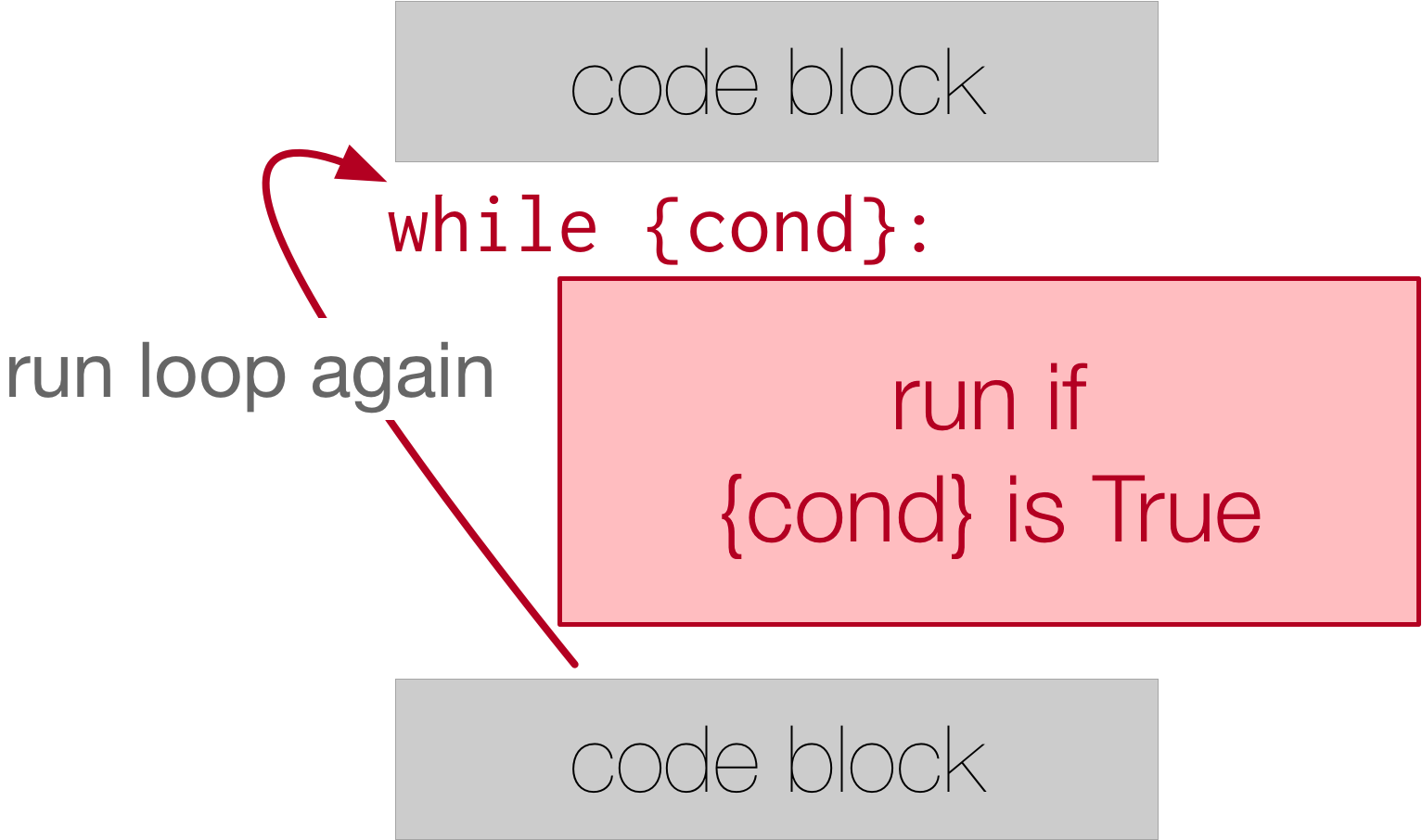
Replace loops_basics.py with:
reading_number = 1

while reading_number <= 3:
    print("Process reading", reading_number)
    reading_number += 1

print("All readings processed.")
The loop prints readings 1, 2, and 3. After the third pass, reading_number becomes 4. Python checks 4 <= 3, gets False, and runs the final unindented line. If reading_number began at 4, the body would run zero times.
For a counter-controlled while loop, check three things: its initial value, its repeating condition, and the change that will eventually make the condition false. Removing reading_number += 1 would leave the condition true indefinitely. That is an infinite loop. If you accidentally start one in VS Code’s terminal, click in the terminal and press Control–C to interrupt it.
Read the focused explanation in Runestone Academy’s “The while Statement” to sharpen the distinction between choosing for and while.
In Section 11.2, “The while Statement,” find the paragraph after the numbered flow-of-execution description. Read the termination warning. Then, in “Note 11.2.2,” read the loop comparison, stopping before “Checkpoint 11.2.3.” Focus on why a known number of passes generally favors for, even though a while loop could perform them.
Stop early or skip one pass
Sometimes a loop should end before its normal stopping condition. break exits the loop immediately. By contrast, continue skips the rest of the current pass and moves to the next one.
Python Tutorial for Beginners 7: Loops and Iterations - For/While Loops
Return to Corey Schafer’s loops tutorial for the two ways to change a loop’s normal flow.
Watch break and continue in a for loop. Then watch stopping a while to see why a loop with while True needs a reachable break.
For example, this loop ignores an unsupported unit but continues processing the later item:
for unit in ["mm", "miles", "cm"]:
    if unit == "miles":
        continue
    print("Supported unit:", unit)
It prints mm and cm, not miles. The continue skips the print() for that pass; it does not end the loop. Be more careful with continue in a counter-controlled while loop: if it skips the counter update, the loop may never end.
For your converter, you need a different behavior. The person using it can choose q to leave altogether, so break is appropriate. A while True loop is safe only if its exit is reachable; here the program asks for a fresh choice at the start of every pass and checks it immediately.
Let the converter handle multiple measurements
Create converter_loop.py and enter this version of last lesson’s program:
while True:
    unit = input("Convert to mm or cm (q to quit): ").strip().lower()

    if unit == "q":
        print("Goodbye.")
        break

    if unit != "mm" and unit != "cm":
        print("Choose mm or cm.")
    else:
        distance_text = input("Distance in metres (0 to 3): ").strip()

        if distance_text == "":
            print("Enter a distance.")
        else:
            distance_m = float(distance_text)

            if distance_m < 0 or distance_m > 3:
                print("Distance must be between 0 and 3 m.")
            elif unit == "mm":
                print("Converted distance:", distance_m * 1000, "mm")
            else:
                print("Converted distance:", distance_m * 100, "cm")
Most of the decision-making is familiar. The important change is its position inside the loop: after a conversion or an error message, execution reaches the end of the indented body and returns to the choice prompt. Entering q instead runs break, so Python continues after the loop—and, because there are no further statements, the program finishes.
Run it and try MM with 2.5, then cm with 1.5, and finally q. Also try miles: it should show the supported-unit message and ask for a unit again, without asking for a distance first. Every non-quit path must leave the program able to reach the prompt on the next pass.
The numeric-input limitation from last lesson still applies: entering three as a distance raises a ValueError. The loop repeats valid interactions; it does not make float() accept invalid text. You’ll handle failed conversions properly when you learn exceptions.
Key takeaways
Use for to process each item in a sequence or to repeat a known number of times with range(). Use while when repetition depends on a condition that must be checked again after each pass. Keep running totals outside loops, make sure a while loop has a way to stop, and use break to exit early or continue to skip only the current pass.
Your converter can now serve multiple requests in one run. Next, you’ll put its conversion logic into functions, so each calculation has a clear input, result, and reusable name.