Recommended resources
The freely available resources this lesson will direct you to.
Hello! Your converter can now handle several measurements in one run. Its calculations, however, still sit inside the input loop. A function gives a calculation a name and lets the rest of the program supply inputs and use the result.
In about 40–45 minutes, you’ll define and call functions, distinguish parameters from arguments, and use return to make conversion results available to the caller. You’ll finish by moving one calculation out of last lesson’s converter and into a reusable function.
Give a calculation a name
You have already called functions: input() obtains text, float() converts text to a number, and print() displays a value. You can also define one yourself. Watch how a function definition differs from a call.
Functions in Python are easy 📞
Watch “Functions in Python are easy” by Bro Code for a visual introduction to defining functions and supplying inputs.
Watch define and call for the def syntax and the point at which a function's body runs. Then watch passing inputs, focusing on why the number and order of values in a call matter. The examples use greetings and an invoice; we’ll apply the same mechanics to measurements.
Create functions_basics.py in your existing VS Code project:
def metres_to_mm(distance_m):
    converted_mm = distance_m * 1000
    return converted_mm


result = metres_to_mm(1.2)
print("Converted distance:", result, "mm")
Save the file with Command–S and run it using Run Python File in the terminal. It prints Converted distance: 1200.0 mm.
The def line defines metres_to_mm; its indented lines form the function body. Defining it does not perform a conversion. Python performs one when it reaches metres_to_mm(1.2) later in the file. It then resumes at the calling line with the value the function returned. For now, put definitions above the code that calls them.
Notice what belongs on each side of that call. distance_m is a parameter: a variable named in the definition. 1.2 is an argument: the value supplied at this particular call. A later call can supply a different value without changing the function:
print(metres_to_mm(0.5))  # 500.0
print(metres_to_mm(2))    # 2000
The image below marks the same distinction in a function with two inputs.
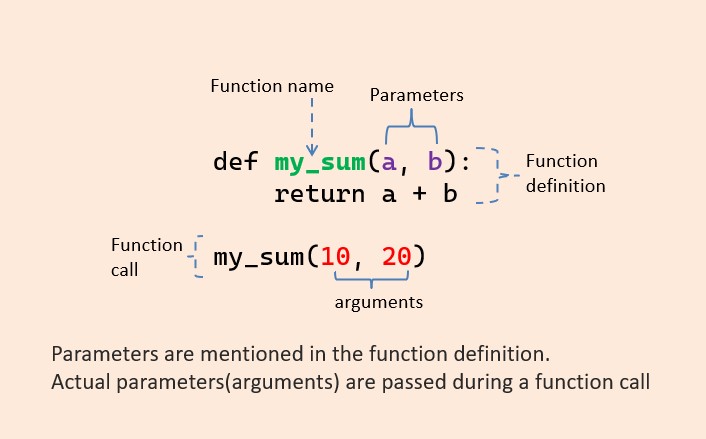
For two parameters, arguments normally match them by position. Add this definition above your calls:
def scale_distance(distance_m, factor):
    return distance_m * factor


print(scale_distance(1.2, 1000))  # 1200.0 mm
print(scale_distance(1.2, 100))   # 120.0 cm
In scale_distance(1.2, 1000), distance_m receives 1.2 and factor receives 1000. Swapping the arguments would change what each parameter receives, even if multiplication happened to produce the same number. In functions where order affects the calculation, that mistake can change the result too. The call must also supply both required arguments; scale_distance(1.2) is missing one.
Return a result rather than just displaying it
A conversion function is most useful when it gives its answer back to the code that called it. Watch the return-value portion of the first video, then a short comparison of return and print().
Functions in Python are easy 📞
Continue “Functions in Python are easy” to see how a returned value can be assigned to a variable and used after a function call.
Watch return values. Focus on the arithmetic functions: each sends a computed value back rather than merely displaying it.
print() vs. return in Python Functions
“print() vs. return in Python Functions” by Coding with Estefania isolates a distinction that often causes bugs in first programs.
Watch returning a value, then printing instead. Notice what gets stored by the caller when a function prints a result but has no return statement.
In scale_distance, return distance_m * factor does two things: it ends that function call and supplies the computed value to the caller. The caller can store it, print it, or use it in another expression:
first_mm = scale_distance(1.2, 1000)
second_mm = scale_distance(0.5, 1000)

total_mm = first_mm + second_mm
print("Total:", total_mm, "mm")  # Total: 1700.0 mm
Compare that with a function that only prints:
def show_double(number):
    print(number * 2)


result = show_double(3)
print("Stored result:", result)
The first line displayed is 6, produced by print() inside show_double. The second is Stored result: None. Because show_double has no return statement, its call returns None—Python’s value for “no result.” Printing and returning therefore serve different purposes: print to show a value; return to let other code use it.
Parameters and variables created inside a function are local to that call. In the earlier metres_to_mm example, converted_mm is available while the function runs, but code after the call cannot use that variable directly. The caller uses the returned value stored in result instead. This is one reason to pass a function what it needs and return what it computes, rather than relying on variables elsewhere in the file.
A return also ends the call immediately. For example:
def distance_label(distance_m):
    if distance_m < 0:
        return "negative distance"
    return "zero or positive distance"


print(distance_label(-1))   # negative distance
print(distance_label(1.2))  # zero or positive distance
For -1, execution stops at the first return; it never reaches the final line of the function. For 1.2, the condition is false, so the final return runs.
Put a function into your converter
You can now keep the command-line interaction in the loop while moving the arithmetic into a function. Create converter_functions.py with this version of your converter:
def scale_distance(distance_m, factor):
    return distance_m * factor


while True:
    unit = input("Convert to mm or cm (q to quit): ").strip().lower()

    if unit == "q":
        print("Goodbye.")
        break

    if unit != "mm" and unit != "cm":
        print("Choose mm or cm.")
    else:
        distance_text = input("Distance in metres (0 to 3): ").strip()

        if distance_text == "":
            print("Enter a distance.")
        else:
            distance_m = float(distance_text)

            if distance_m < 0 or distance_m > 3:
                print("Distance must be between 0 and 3 m.")
            else:
                if unit == "mm":
                    factor = 1000
                else:
                    factor = 100

                result = scale_distance(distance_m, factor)
                print("Converted distance:", result, unit)
The loop still decides when to ask for another measurement. The conditionals still decide which unit is requested and whether the distance is in range. The function has a smaller job: given a distance and a factor, compute and return the scaled distance. The print() stays with the command-line code, where the display format belongs.
Run the file with mm and 1.2, then cm and 1.2, then q. You should see 1200.0 mm, 120.0 cm, and finally Goodbye. The function does not need to know how those inputs were typed or how its answer will be displayed. That separation will help when you later test calculations without repeatedly entering console input.
This version retains the earlier limitation: entering a word such as three where a number is expected still makes float() fail. Defining a function does not automatically handle invalid input; you’ll address failed operations in a later lesson.
Key takeaways
A function definition names an indented block of code; a call runs it. Parameters are the input names in the definition, while arguments are the values supplied by a call. Use return when the caller needs a result; print() only displays one. Keep each function’s job clear: here, the loop handles interaction and scale_distance handles arithmetic.
Next, you’ll use lists and dictionaries to store and transform groups of values, giving your programs better ways to manage data than separate variables for every item.